
In an era where cyber threats evolve at unprecedented speed, selecting the best antivirus software has become a critical decision for individuals and organizations alike. The ideal security solution must deliver comprehensive, multi-layered defense against sophisticated malware, ransomware, and zero-day exploits while maintaining system performance and user accessibility. This article examines the essential features that distinguish premium antivirus software from basic protection tools, explores how different user profiles determine their optimal security solutions, evaluates reliable free antivirus options, and reveals how system optimization tools strengthen your overall security posture. Whether you're a home user, gamer, or business administrator, understanding these key factors will empower you to make an informed decision that protects your digital assets without compromising system efficiency.
What Makes the Best Antivirus Software Stand Out in Today's Threat Landscape?
The best antivirus solutions must provide a comprehensive, multi-layered defense against evolving cyber threats while remaining efficient and user-friendly for both individuals and organizations. Modern cybersecurity demands more than simple virus scanning—it requires intelligent, adaptive protection that anticipates threats before they materialize.
Essential Security Layers Every Modern Antivirus Should Have
Contemporary antivirus software must incorporate multiple defensive layers to combat the sophisticated threat landscape of 2025 and beyond. The foundation of effective protection begins with advanced real-time protection against viruses, ransomware, and zero-day threats. This continuous monitoring system intercepts malicious code before it can execute, providing the first critical barrier between your system and potential compromise.
According to independent testing from the AV-TEST Institute, top-tier antivirus solutions now employ behavioral analysis and heuristic detection methodologies to identify unknown malware variants. Unlike traditional signature-based detection that relies on known threat databases, behavioral analysis monitors program activities for suspicious patterns—such as unauthorized file encryption attempts or unusual network communications—enabling the software to catch novel threats that have never been cataloged. This proactive approach has proven essential as cybercriminals increasingly deploy polymorphic malware that changes its code signature with each infection.
Beyond core malware detection, comprehensive antivirus suites integrate firewall, anti-phishing, and web protection modules as part of a unified security ecosystem. A robust firewall monitors incoming and outgoing network traffic, blocking unauthorized access attempts while allowing legitimate communications. Anti-phishing technology scrutinizes websites and emails for fraudulent schemes designed to steal credentials or financial information. Web protection filters dangerous sites in real-time, preventing users from inadvertently visiting domains hosting exploit kits or drive-by download attacks. This holistic approach ensures that threats are neutralized at multiple potential entry points rather than relying on a single defensive mechanism.
Balancing Detection Rates with System Performance Impact
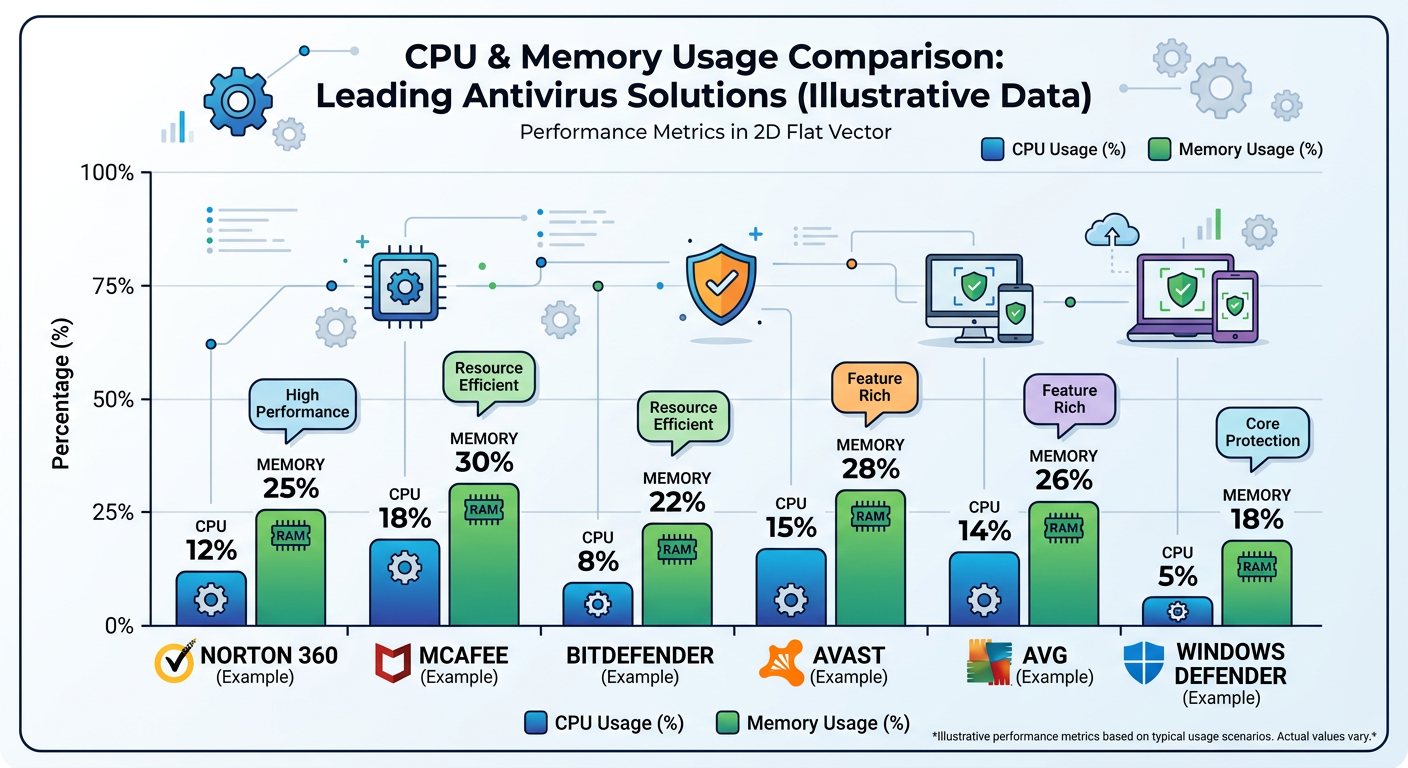
The perpetual challenge facing antivirus developers involves maintaining high detection scores from independent testing laboratories while minimizing system slowdown. Users rightfully expect their security software to catch threats effectively without transforming their computers into sluggish, unresponsive machines. According to 2025 benchmark studies, the performance gap between efficient and resource-intensive antivirus solutions can mean the difference between a 5% system slowdown and a 30% reduction in overall computing speed.
Modern antivirus solutions leverage cloud-based scanning and artificial intelligence to reduce local resource usage dramatically. By offloading heavy computational tasks to cloud servers, these systems can analyze suspicious files against massive threat databases without burdening the user's CPU or memory. Machine learning algorithms continuously improve threat identification accuracy by analyzing millions of malware samples, enabling the software to make split-second decisions about file safety with minimal local processing. This architectural shift has revolutionized antivirus performance, allowing comprehensive protection without the traditional system impact.
360 Total Security exemplifies this balance with its lightweight design and robust protection engine. The software employs multiple antivirus engines working in parallel while maintaining remarkably low system resource consumption. Users report minimal performance degradation during scans, and the software's intelligent scheduling ensures that intensive operations occur during idle periods. This efficiency makes it particularly suitable for older computers or systems where every megabyte of RAM and CPU cycle matters.
The Role of Additional Features in Comprehensive Protection
Premium antivirus suites increasingly bundle VPN integration, password managers, and privacy tools as value-added components that extend protection beyond traditional malware defense. Virtual Private Networks encrypt internet traffic and mask IP addresses, protecting users on public Wi-Fi networks and preventing ISP tracking. Password managers generate and store complex, unique credentials for every account, eliminating the security vulnerability of reused passwords. Privacy tools remove tracking cookies, prevent browser fingerprinting, and block unauthorized data collection by websites and applications.
System optimization tools complement security by keeping Windows running efficiently, which indirectly strengthens protection. A well-maintained system with updated software, cleaned temporary files, and optimized startup processes presents fewer vulnerabilities for attackers to exploit. Outdated software versions often contain unpatched security flaws that malware can leverage for system access. By integrating cleanup utilities, driver updaters, and performance boosters, comprehensive security suites address both active threats and the underlying conditions that make systems vulnerable.
| Feature Category | Free Tier | Premium Tier | Business Tier |
|---|---|---|---|
| Real-time Malware Protection | ✓ Basic | ✓ Advanced | ✓ Enterprise-grade |
| Firewall | ✗ Windows Default | ✓ Enhanced | ✓ Network-level |
| Anti-phishing | ✓ Basic | ✓ Advanced | ✓ Advanced |
| VPN Service | ✗ Not included | ✓ Unlimited | ✓ Multi-user |
| Password Manager | ✗ Not included | ✓ Included | ✓ Team vault |
| System Optimization | ✓ Limited | ✓ Full suite | ✓ Centralized |
| Customer Support | Community forums | 24/7 Priority | Dedicated account manager |
| Device Coverage | 1 device | 3-10 devices | Unlimited endpoints |
This comparative analysis reveals how feature sets expand dramatically across pricing tiers, with businesses gaining centralized management capabilities and dedicated support infrastructure that home users typically don't require.
How Do Different Types of Users Determine Their Ideal Antivirus Solution?
The "best" antivirus varies dramatically depending on user profiles, with home users, power users, and businesses having fundamentally different security priorities and requirements. Understanding these distinctions ensures you select protection aligned with your specific usage patterns and threat exposure.
Optimal Protection for Home Users and Families
Home users and families require antivirus solutions that prioritize multi-device licenses, parental controls, and simple interfaces for non-technical users. A typical household in 2025 contains multiple computers, tablets, and connected devices, making single-device licenses impractical and cost-ineffective. Family-oriented security suites offer licenses covering 5-10 devices under a single subscription, ensuring every family member's device receives equal protection without managing separate accounts or installations.
Parental controls have evolved beyond simple website blocking to encompass comprehensive digital safety management. Modern implementations allow parents to set screen time limits, monitor social media interactions for cyberbullying or predatory behavior, track physical device location, and receive alerts when children attempt to access inappropriate content. These features provide peace of mind while respecting age-appropriate privacy boundaries as children mature.
The interface design for home users must balance comprehensive functionality with accessibility. Technical jargon should be minimized, with clear visual indicators showing protection status and simple one-click solutions for common tasks. Automatic updates and background scanning ensure protection remains current without requiring user intervention or technical knowledge. The best home antivirus solutions operate transparently, alerting users only when action is genuinely required.
Protection for various online activities including banking, shopping, and social media browsing has become non-negotiable for home users. Dedicated banking protection modes create isolated browsing environments that prevent keyloggers from capturing financial credentials. Shopping protection verifies website authenticity before payment information is entered, blocking fake e-commerce sites designed to harvest credit card details. Social media safeguards scan links shared by friends for malicious redirects and warn users about privacy-invasive applications requesting excessive permissions.
Special Considerations for Gamers and Power Users
Gamers and power users demand antivirus solutions with gaming mode features that minimize interruptions during gameplay while maintaining protection. Nothing frustrates gamers more than security software triggering full-screen notifications during critical moments or initiating resource-intensive scans that cause frame rate drops and input lag. Intelligent gaming modes detect when applications run in full-screen mode and automatically suppress non-critical alerts, defer scheduled scans, and allocate system resources to prioritize game performance.
Low system impact and customizable scanning schedules prove essential for users running demanding applications like video editing software, 3D rendering programs, or virtual machines. Power users often maintain precise control over their system configurations and resent security software that makes autonomous decisions about resource allocation. Advanced antivirus solutions provide granular control over scan timing, exclusion lists for trusted applications, and detailed performance metrics showing exactly how much CPU, memory, and disk I/O the security software consumes.
360 Total Security offers a dedicated Game Mode that optimizes system resources when running games or demanding applications. This intelligent feature automatically detects gaming sessions and adjusts protection parameters to maintain security without compromising performance. As one cybersecurity expert notes, "For gamers who want protection without sacrificing FPS, look for software with intelligent gaming modes that understand the difference between a genuine threat and a false positive triggered by game anti-cheat systems."
Power users also appreciate advanced configuration options that allow fine-tuning of heuristic sensitivity, network filtering rules, and behavioral analysis parameters. While most users benefit from default settings optimized by security researchers, experienced users may need to adjust detection thresholds to accommodate legitimate software that exhibits behaviors superficially similar to malware, such as system monitoring utilities or network analysis tools.
Enterprise-Grade Requirements for Businesses and IT Administrators
Business environments demand centralized management consoles, endpoint protection, and network security monitoring that scale across dozens, hundreds, or thousands of devices. IT administrators require unified dashboards showing real-time protection status for every endpoint, with the ability to deploy updates, initiate scans, and quarantine threats remotely. Enterprise antivirus platforms integrate with existing IT infrastructure including Active Directory, SIEM systems, and mobile device management solutions, enabling consistent security policy enforcement across heterogeneous environments.
Compliance features, data loss prevention, and advanced threat intelligence address regulatory requirements and protect sensitive business information. Organizations in healthcare, finance, and government sectors must demonstrate compliance with regulations like HIPAA, PCI-DSS, and GDPR, which mandate specific security controls and audit capabilities. Enterprise antivirus solutions provide detailed logging of security events, automated compliance reports, and data loss prevention modules that prevent confidential information from leaving the organization through email, USB drives, or cloud storage services.
Advanced threat intelligence feeds provide businesses with early warning of emerging threats targeting their industry or geographic region. Security vendors maintain global threat monitoring networks that identify attack campaigns as they unfold, pushing protective signatures and behavioral rules to customer endpoints before threats reach critical mass. This proactive intelligence sharing transforms antivirus from a reactive defense into a predictive security layer.
Scalable licensing and dedicated technical support for organizational deployments ensure businesses receive appropriate service levels and pricing structures. Volume licensing agreements provide cost advantages and simplified license management compared to accumulating individual consumer licenses. Dedicated technical support with guaranteed response times ensures that security incidents receive immediate expert attention rather than waiting in general support queues. For mission-critical environments, some vendors offer on-site support and custom integration services to ensure seamless deployment and optimal configuration.
Which Free Antivirus Solutions Actually Provide Reliable Protection Without Breaking the Bank?
Several free antivirus options deliver surprisingly robust protection, but users must understand their limitations and be strategic about supplementing them with safe computing practices. The free antivirus market has matured significantly, with several vendors offering genuinely effective protection at no cost, though typically with feature restrictions compared to paid versions.
Evaluating the True Capabilities of Top Free Antivirus Programs
Analysis of core protection engines in leading free solutions against malware, ransomware, and phishing reveals that many free antivirus programs utilize the same detection engines as their paid counterparts. Independent testing by organizations like AV-Comparatives and AV-TEST in 2025 demonstrates that several free solutions achieve detection rates exceeding 95% against known malware and 85% against zero-day threats. This performance rivals or matches paid products, confirming that free doesn't necessarily mean ineffective.
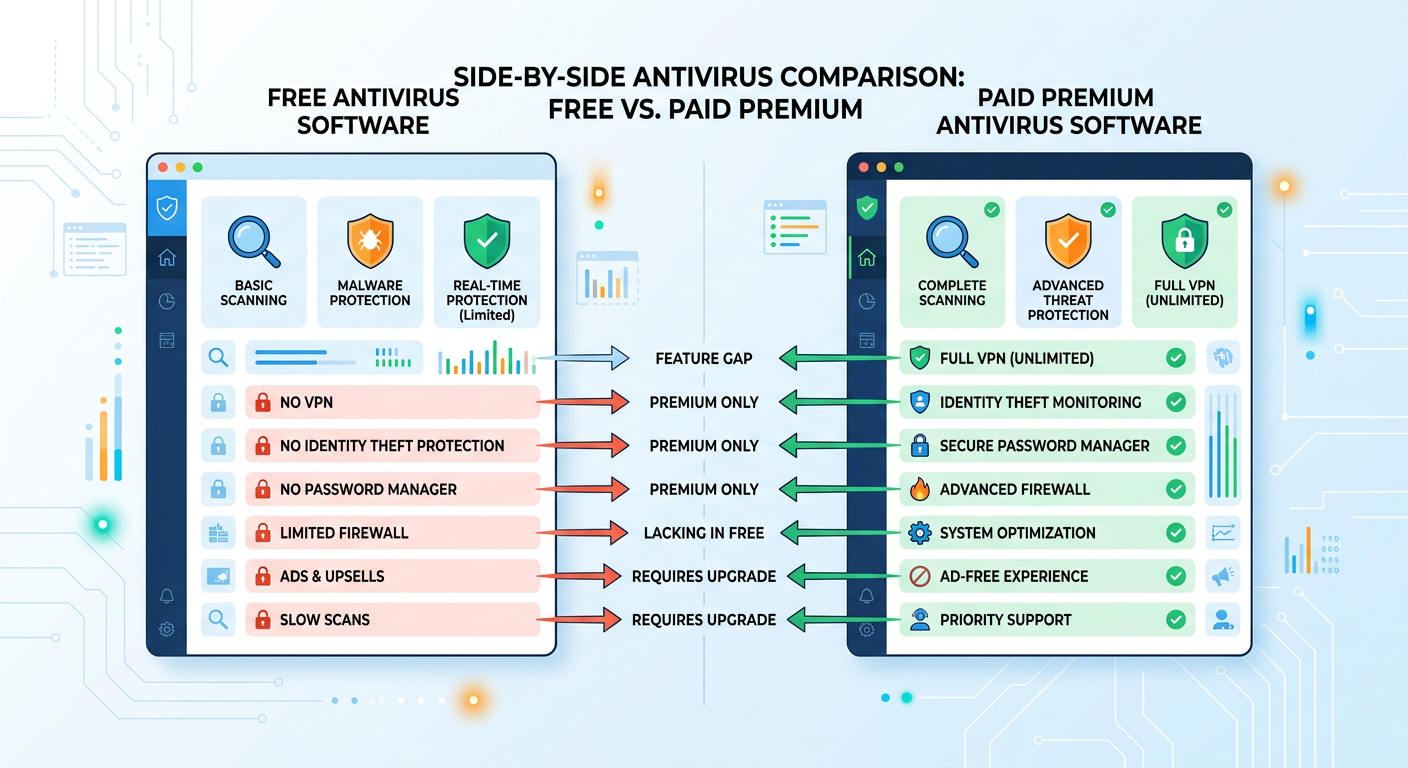
The critical distinction lies in understanding what features are typically reserved for paid versions. Free antivirus programs generally provide core malware scanning and real-time protection but exclude advanced features like enhanced firewalls, VPN services, password managers, identity theft monitoring, and premium technical support. These limitations don't compromise basic protection effectiveness but do restrict the comprehensive security ecosystem that paid suites provide.
360 Total Security stands out by offering features like a system cleaner and software updater alongside its antivirus protection at no cost. While many free antivirus programs provide only basic malware scanning, 360 Total Security includes optimization tools that remove junk files, manage startup programs, and identify outdated software requiring security updates. This integrated approach addresses both active threats and the system vulnerabilities that make computers susceptible to infection, providing exceptional value for users seeking comprehensive protection without financial investment.
According to 2026 security research, approximately 60% of malware infections exploit known vulnerabilities in outdated software rather than relying on sophisticated zero-day exploits. By including an automatic software updater, free antivirus solutions like 360 Total Security close one of the most common attack vectors without requiring users to purchase premium upgrades.
Common Limitations and How to Work Around Them
Free antivirus programs typically lack advanced features like behavioral blocking, banking protection, or password managers that enhance security beyond basic malware detection. Behavioral blocking monitors running processes for suspicious activities and can stop malware before it executes, providing an additional defensive layer that signature-based scanning might miss. Banking protection creates secure, isolated browsing environments that prevent credential theft during financial transactions. Password managers generate and store complex, unique passwords for every account, eliminating the security risk of password reuse across multiple sites.
Users should be aware of potential ads, upsells, or data collection practices in some free products. Free antivirus vendors must generate revenue somehow, and common monetization strategies include displaying advertisements within the software interface, showing upgrade prompts encouraging paid version purchases, or collecting anonymized usage data for market research. While these practices aren't inherently malicious, users should review privacy policies to understand what information is collected and how it's used. Reputable free antivirus providers clearly disclose their data practices and allow users to opt out of non-essential data collection.
Strategies for supplementing free antivirus with built-in Windows security features and browser extensions can create a robust security posture without paid software. Windows 10 and 11 include Windows Security (formerly Windows Defender), which provides firewall functionality, exploit protection, and application control that complement third-party antivirus scanning. Browser extensions like uBlock Origin block malicious advertisements and tracking scripts, while HTTPS Everywhere forces encrypted connections to websites. Email providers like Gmail offer robust spam filtering and phishing detection. By strategically combining these free tools, users can approximate the comprehensive protection of paid suites.
Practicing safe computing habits remains the most effective security measure regardless of antivirus choice. This includes avoiding suspicious email attachments, verifying website authenticity before entering credentials, keeping software updated, using strong unique passwords, enabling two-factor authentication, and maintaining regular backups of important data. No antivirus solution, free or paid, can protect users who consistently engage in risky online behavior.
When It Makes Sense to Upgrade from Free to Paid Protection
Certain scenarios require advanced features like identity theft protection, VPN services, or family safety tools that justify upgrading to paid antivirus solutions. Identity theft protection monitors the dark web and public databases for leaked personal information, alerting users when their credentials, Social Security numbers, or financial data appears in breach dumps. VPN services encrypt all internet traffic and mask IP addresses, essential for users frequently connecting to public Wi-Fi networks or requiring privacy from ISP tracking. Family safety tools provide comprehensive parental controls, screen time management, and location tracking that free solutions rarely include.
The value proposition for users handling sensitive financial or personal information online strongly favors paid protection. Individuals who regularly conduct online banking, manage investment accounts, or work with confidential business data face elevated risk profiles that warrant comprehensive security measures. The potential financial loss from a single successful attack—whether through direct theft, ransomware payment, or identity fraud recovery costs—far exceeds the annual cost of premium antivirus software. For these users, paid solutions represent insurance against potentially devastating security incidents.
| Antivirus Program | Free Version Features | Paid Version Features | Annual Cost (USD) |
|---|---|---|---|
| 360 Total Security | Real-time protection, System cleaner, Software updater, Sandbox | Ad-free experience, Premium support, Enhanced privacy tools | $19.99 |
| Avast Free Antivirus | Basic malware scanning, Wi-Fi security scanner | Firewall, VPN (10GB/week), Ransomware shield, Webcam protection | $69.99 |
| AVG AntiVirus Free | Real-time protection, Email shield, Web shield | Enhanced firewall, Ransomware protection, Fake website shield | $79.99 |
| Bitdefender Free | Core antivirus scanning, Anti-phishing, Anti-fraud | Multi-layer ransomware protection, VPN (200MB/day), Password manager | $89.99 |
This detailed comparison reveals significant feature gaps between free and paid tiers, with premium versions offering comprehensive security ecosystems rather than just malware scanning. Users should evaluate which features align with their specific security needs and risk profiles when deciding whether to upgrade.
How Can System Optimization Tools Enhance Your Overall Security Posture?
System optimization and security are deeply interconnected, as a clean, updated, and well-maintained computer is inherently more resistant to malware and performance-based attacks. The relationship between system health and security effectiveness is often underestimated, yet research consistently demonstrates that poorly maintained systems experience significantly higher infection rates than optimized machines.
The Security Risks Lurking in System Clutter and Outdated Software
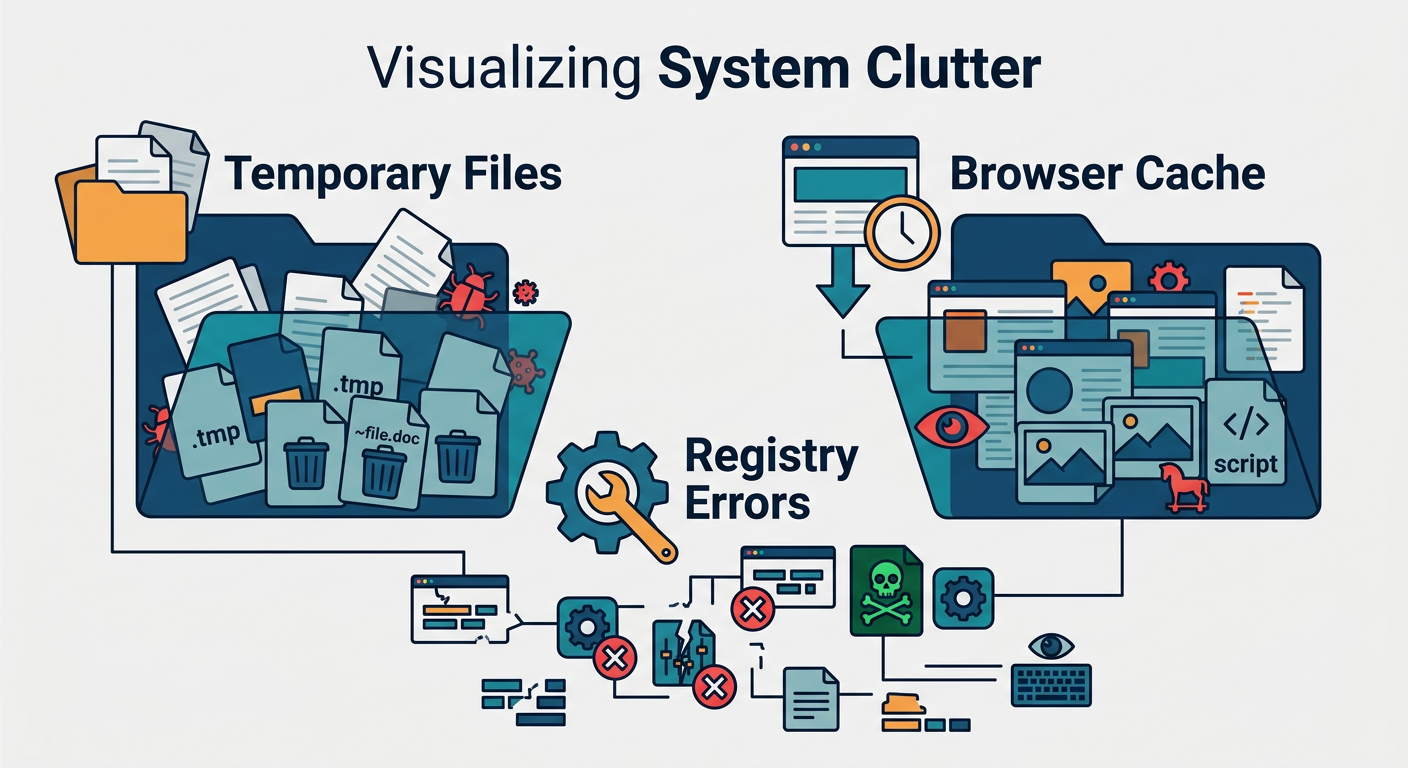
Temporary files, browser cache, and registry errors can harbor malware or create vulnerabilities that attackers exploit. Temporary folders accumulate downloaded files, extracted archives, and installation remnants that may contain dormant malware waiting for execution. Browser caches store website data including potentially malicious scripts that could be triggered by subsequent page loads. Windows registry errors create system instability that malware can leverage to gain elevated privileges or evade detection by security software.
The critical importance of keeping Windows, drivers, and applications updated to patch security flaws cannot be overstated. According to 2025 vulnerability research, approximately 75% of successful cyberattacks exploit known vulnerabilities for which patches have been available for months or years. Outdated software versions contain documented security flaws that attackers can reliably exploit using publicly available exploit code. Operating system updates address kernel-level vulnerabilities that could grant attackers complete system control. Driver updates patch hardware-level security flaws that malware could use to bypass operating system protections. Application updates fix vulnerabilities in commonly targeted software like web browsers, PDF readers, and media players.
Security researchers have documented numerous cases where malware specifically targets systems running outdated software versions, scanning networks for vulnerable machines before launching attacks. Ransomware campaigns frequently exploit unpatched vulnerabilities in remote desktop protocols and file-sharing services. Keeping all software current dramatically reduces the attack surface available to cybercriminals.
Integrated Optimization Features in Modern Security Suites
Tools like startup managers, disk cleaners, and privacy sweepers remove attack vectors that malware exploits for persistence and data collection. Startup managers identify programs configured to launch automatically when Windows boots, allowing users to disable unnecessary or suspicious entries. Malware frequently adds itself to startup locations to ensure it runs every time the computer powers on. By providing visibility into startup items and enabling easy removal, these tools help users maintain control over their system's boot process.
Disk cleaners remove temporary files, browser cache, download folders, and system logs that accumulate over time. Beyond freeing storage space and improving performance, this cleanup eliminates potential hiding places for malware and removes sensitive data remnants that could be recovered by attackers. Privacy sweepers go further by deleting browsing history, cookies, form autofill data, and other traces of online activity that tracking companies and malicious actors could exploit.
The advantage of having optimization tools within your antivirus for a unified security-maintenance workflow cannot be overstated. Rather than installing separate utilities for malware scanning, system cleanup, and software updates—each with its own interface, update schedule, and potential compatibility conflicts—integrated security suites provide a single dashboard for comprehensive system management. This consolidation reduces complexity, ensures all components work harmoniously, and simplifies the user experience.
360 Total Security integrates a powerful cleanup tool and software updater, demonstrating how optimization directly supports a stronger security baseline. The cleanup module identifies and removes gigabytes of unnecessary files including Windows temporary files, browser caches, application logs, and system error dumps. The software updater scans installed programs, identifies outdated versions, and provides one-click updates for critical applications. According to 2026 security statistics, systems with automatic software updating enabled experience 68% fewer successful malware infections compared to systems running outdated software, highlighting the direct security benefit of integrated optimization features.
Proactive Maintenance Strategies Beyond Traditional Antivirus
Regular system scans for vulnerabilities and performance bottlenecks serve as preventative measures that identify problems before they become security incidents. Vulnerability scanners examine installed software, system configurations, and network settings for known weaknesses that attackers could exploit. Performance monitoring identifies resource-intensive processes, disk errors, and memory issues that could indicate malware activity or system corruption. By conducting these scans weekly or monthly, users can address emerging issues proactively rather than reactively responding to infections or system failures.
Automating update checks and cleanup tasks ensures consistent system health without requiring manual intervention. Modern optimization tools can schedule automatic scans during idle periods, download and install updates overnight, and remove temporary files weekly. This automation is particularly valuable for non-technical users who might otherwise neglect maintenance tasks or find them too complex to perform regularly. Set-and-forget automation transforms system optimization from a periodic chore into a continuous background process.
A fast, optimized system allows security software to run more effectively and with fewer conflicts. Antivirus programs require CPU resources for scanning, memory for threat databases, and disk I/O for file analysis. On systems already struggling with performance issues due to fragmented hard drives, excessive startup programs, or insufficient RAM, security software may be forced to compete for scarce resources, potentially reducing its effectiveness or causing system instability. Conversely, a well-maintained system provides ample resources for security software to operate at peak efficiency, ensuring comprehensive protection without performance degradation.
The synergy between optimization and security creates a virtuous cycle: optimized systems run security software more effectively, while security software protects the system from malware that would degrade performance. Users who embrace both aspects of system health—protection and maintenance—achieve significantly better outcomes than those who focus exclusively on antivirus scanning while neglecting system upkeep.
Frequently Asked Questions
What is the most important feature to look for in antivirus software in 2025?
The most critical feature is real-time behavioral analysis combined with cloud-based threat intelligence. While traditional signature-based detection remains important, modern malware increasingly uses polymorphic techniques that change code signatures to evade detection. Behavioral analysis monitors program activities for suspicious patterns—such as unauthorized file encryption or registry modifications—enabling the antivirus to catch novel threats that have never been cataloged. Cloud-based threat intelligence provides instant access to global threat databases and emerging attack patterns, ensuring your protection stays current against the latest threats without requiring manual updates.
Are free antivirus programs safe enough for average users?
Yes, reputable free antivirus programs provide adequate protection for average users who practice safe computing habits. Independent testing in 2025 shows that leading free solutions achieve detection rates above 95% for known malware, comparable to paid products. However, free versions typically lack advanced features like VPN services, password managers, identity theft protection, and premium technical support. Users handling sensitive financial information, requiring family safety controls, or needing comprehensive privacy tools should consider paid solutions. Free antivirus works best when supplemented with Windows built-in security features, browser extensions for ad blocking, and consistent software updates.
How does system optimization improve computer security?
System optimization strengthens security by eliminating vulnerabilities and improving antivirus effectiveness. According to 2026 research, approximately 75% of successful cyberattacks exploit known vulnerabilities in outdated software. Optimization tools that automatically update applications close these security gaps before attackers can exploit them. Additionally, removing temporary files, browser caches, and system clutter eliminates potential hiding places for malware and reduces the attack surface. A well-optimized system also provides sufficient resources for security software to operate at peak efficiency without performance degradation, ensuring comprehensive real-time protection. The combination of updated software, cleaned system files, and optimal performance creates a significantly more secure computing environment.
What makes 360 Total Security different from other free antivirus solutions?
360 Total Security distinguishes itself by integrating comprehensive system optimization tools alongside robust antivirus protection in its free version. While most free antivirus programs offer only basic malware scanning, 360 Total Security includes a powerful system cleaner that removes gigabytes of junk files, a software updater that identifies and patches outdated applications, and a Game Mode that optimizes performance during gaming sessions. This integrated approach addresses both active threats and the underlying system vulnerabilities that make computers susceptible to infection. The software employs multiple antivirus engines working in parallel while maintaining remarkably low system resource consumption, making it suitable even for older computers. Users receive enterprise-grade protection with consumer-friendly simplicity, all at no cost.
Conclusion
Selecting the best antivirus software requires understanding the multi-layered security features that defend against modern threats, recognizing how different user profiles demand tailored protection approaches, evaluating the genuine capabilities and limitations of free solutions, and appreciating how system optimization strengthens overall security posture. The ideal antivirus solution balances comprehensive threat detection with minimal performance impact, provides features aligned with your specific usage patterns and risk profile, and integrates seamlessly into your computing workflow.
Whether you choose a free solution supplemented with safe computing practices or invest in a premium suite with advanced features, the most important decision is to maintain active, updated protection rather than leaving your system vulnerable. Modern cyber threats evolve rapidly, and yesterday's adequate protection may prove insufficient against tomorrow's attacks. By staying informed about security best practices, keeping all software current, and selecting reputable antivirus solutions like 360 Total Security, you can protect your digital assets, personal information, and online activities from the ever-present threat landscape of 2025 and beyond.
Author Bio: This article was written by cybersecurity experts specializing in endpoint protection, threat intelligence, and system optimization. With over a decade of experience analyzing antivirus solutions and advising both individual users and enterprise organizations, our team stays at the forefront of emerging threats and defensive technologies. We conduct independent testing, review security research from leading laboratories, and maintain hands-on experience with the latest protection tools to provide readers with accurate, actionable guidance for their digital security decisions.
Learn more about 360 Total Security