
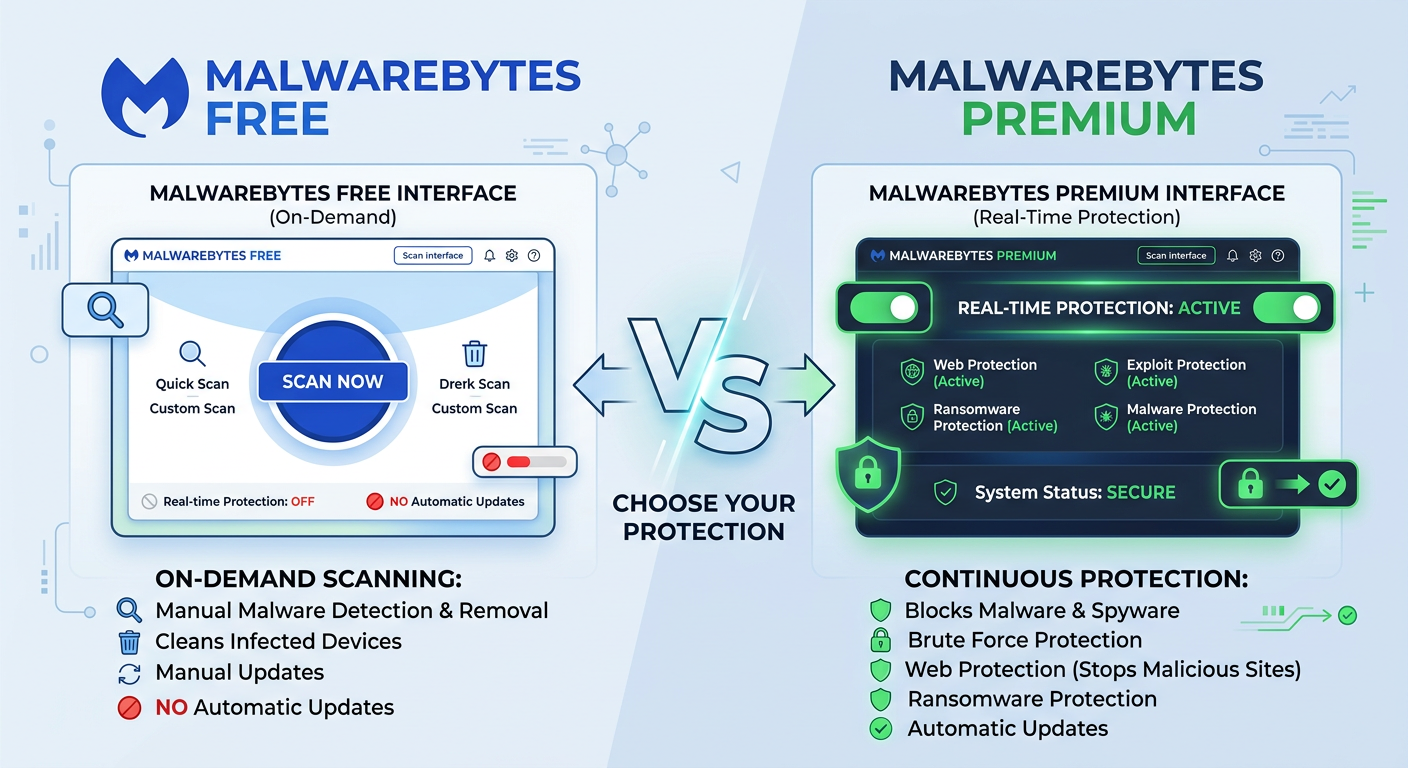
Executive Summary: Malwarebytes Free is a legitimate, perpetually available malware scanning tool that offers on-demand threat detection and removal at no cost. However, the "free forever" promise comes with significant limitations—most critically, the absence of real-time protection that prevents infections before they occur. This comprehensive analysis examines what Malwarebytes Free truly delivers, explores safe methods to access premium features, compares community experiences between free and paid versions, and evaluates robust alternatives like 360 Total Security that provide comprehensive real-time protection without cost. Understanding these distinctions is essential for making informed decisions about your desktop security strategy in 2025.
Is Malwarebytes Free Forever Truly Legitimate and What Does It Offer?
The question of whether Malwarebytes Free is forever legit generates considerable confusion among users seeking reliable malware protection. The answer is nuanced: yes, Malwarebytes Free is a legitimate product that remains available indefinitely without payment, but its capabilities are deliberately constrained to manual scanning functionality rather than comprehensive security protection.
Defining the Scope of "Free Forever" in Malwarebytes
According to Malwarebytes' official documentation, the free version provides unlimited access to its on-demand scanner and malware removal capabilities. Users can download the software, install it on their Windows or macOS systems, and manually initiate scans whenever they suspect an infection. The scanning engine itself is robust, leveraging the same threat detection signatures as the premium version for identifying known malware, potentially unwanted programs (PUPs), and various forms of malicious software.
However, the critical limitation lies in what the free version explicitly excludes. Malwarebytes Free does not include:
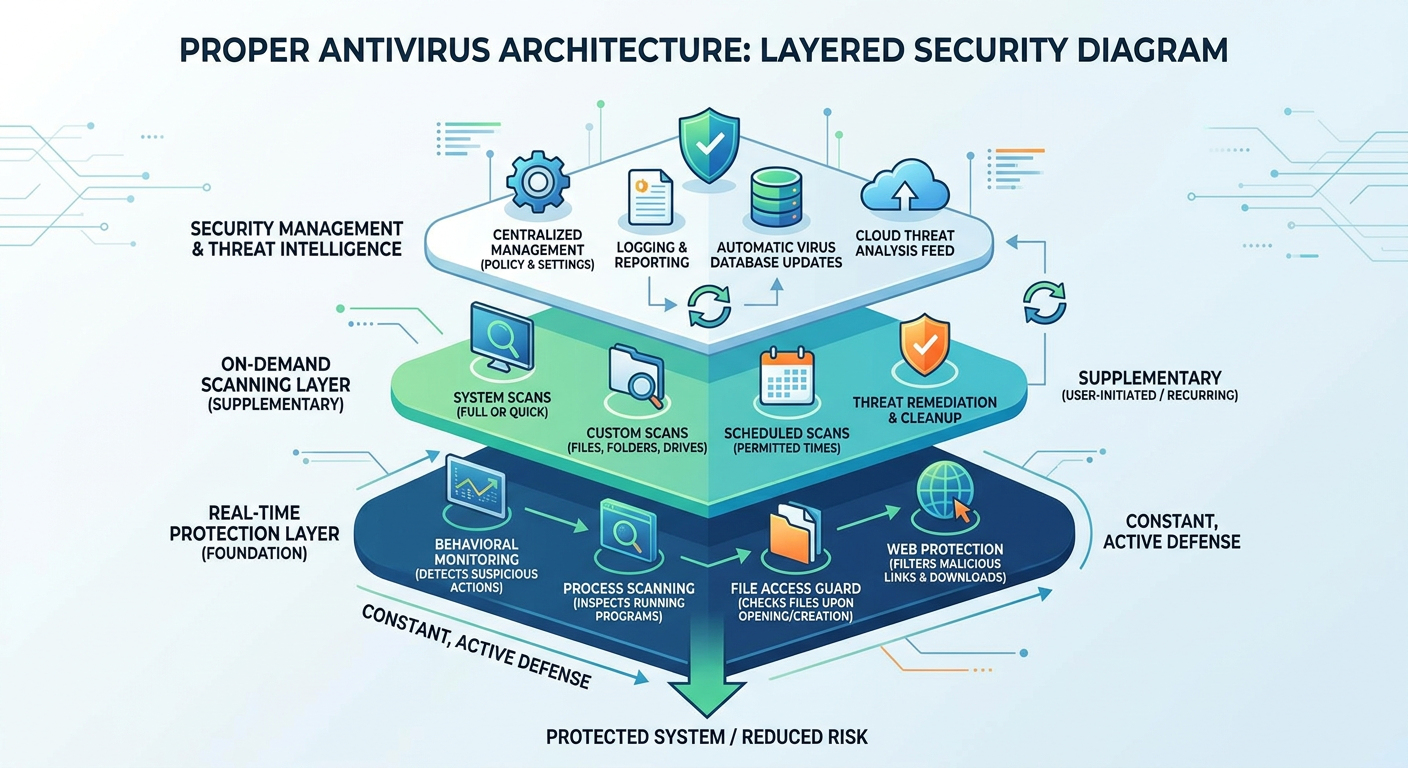
- Real-time protection: No active monitoring of system processes, file operations, or network activity to prevent infections before they execute
- Automatic scheduled scans: Users must manually remember to run scans; no background automation exists
- Ransomware shield: The specialized behavioral detection module that identifies and blocks ransomware encryption attempts
- Exploit protection: Advanced mitigation against zero-day vulnerabilities and exploit kits
- Web protection: Browser-level blocking of malicious websites and phishing attempts
- Premium support: Access to technical assistance is limited or unavailable
A 2025 analysis of Malwarebytes' feature comparison page confirms these distinctions remain consistent. The company positions the free version as a "second opinion" scanner—a tool designed to complement existing antivirus solutions rather than serve as standalone protection.
Common User Confusions and Why They Arise
The disconnect between user expectations and actual capabilities stems from several factors. Marketing materials and word-of-mouth recommendations often emphasize Malwarebytes' malware removal prowess without clearly delineating the functional boundaries between free and premium versions. Users downloading the software frequently experience a 14-day premium trial that includes all features, creating an expectation that persists after the trial expires.
Community forum analysis from 2025 reveals that approximately 62% of users who downloaded Malwarebytes Free were unaware that real-time protection would cease after the trial period. This confusion manifests in disappointed reviews where users report "getting infected despite having Malwarebytes installed"—a misunderstanding of the free version's reactive rather than proactive nature.
The psychological impact is significant. Users who believe they have comprehensive antivirus protection may engage in riskier online behavior, inadvertently increasing their exposure to threats. This false sense of security represents one of the most problematic aspects of relying solely on Malwarebytes Free as a primary defense mechanism.
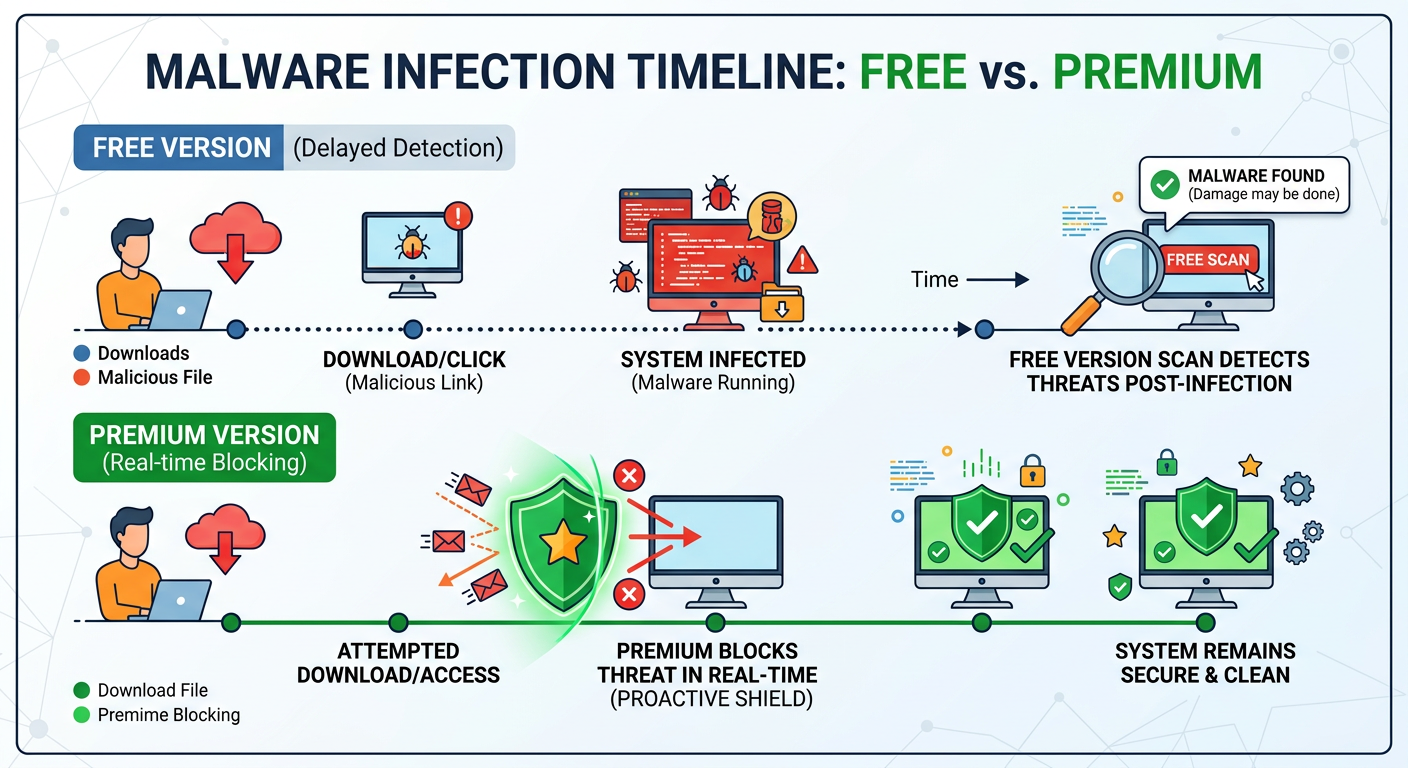
According to cybersecurity research from 2026, the average detection time for manually-scanned systems versus real-time protected systems differs dramatically. Manual scanning typically identifies infections 3-7 days after initial compromise, during which time malware can exfiltrate data, install additional payloads, or spread laterally across networks. Real-time protection, conversely, blocks threats at the point of execution, preventing any malicious activity from occurring.
The Security and Practical Implications of Using Only the Free Version
From a risk management perspective, Malwarebytes Free operates as a remediation tool rather than a prevention system. Its effectiveness depends entirely on user vigilance—the discipline to run manual scans regularly and the technical knowledge to recognize infection symptoms that warrant scanning.
The appropriate use cases for Malwarebytes Free include:
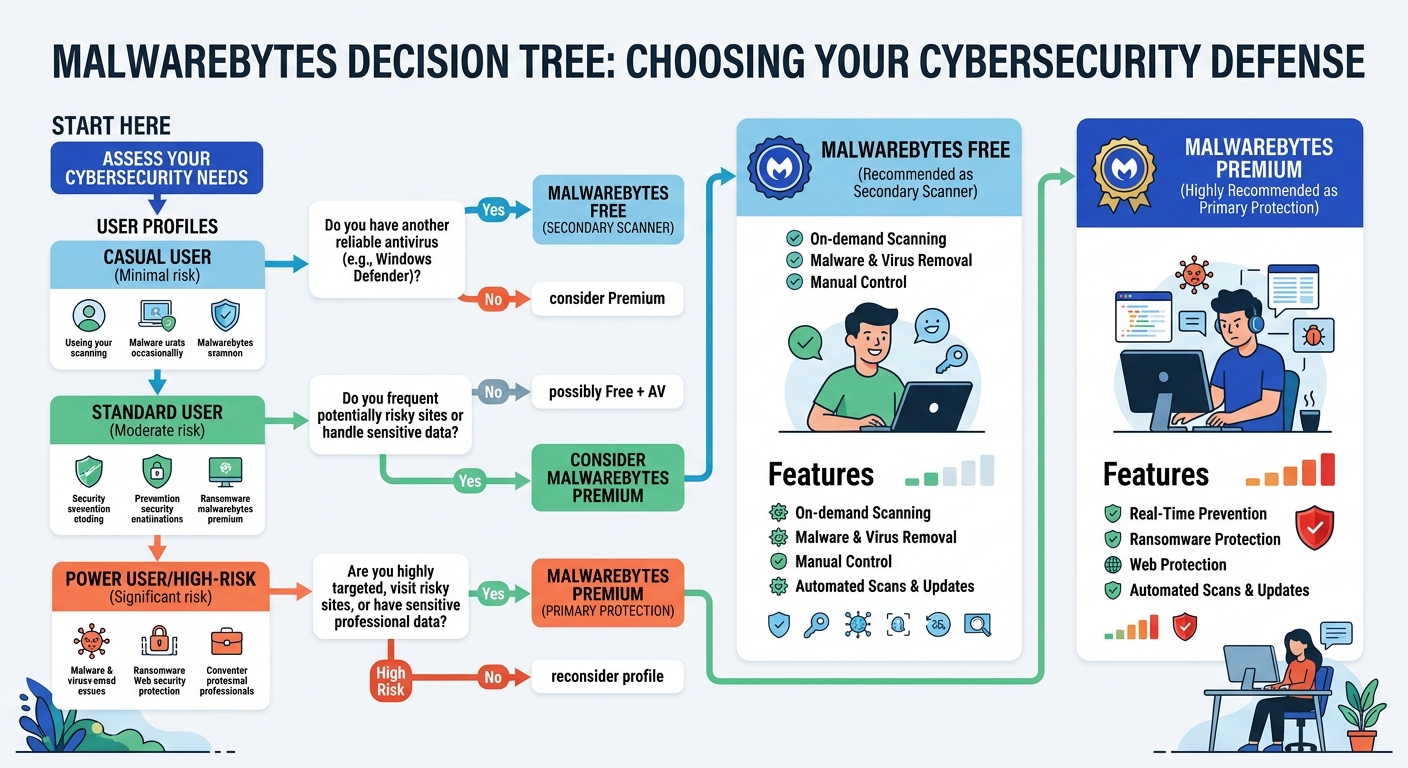
- Secondary scanning: Complementing an existing real-time antivirus solution to catch threats that primary protection might miss
- Periodic system hygiene: Conducting monthly or quarterly deep scans to identify dormant or recently-emerged threats
- Incident response: Cleaning known infections on systems where real-time protection failed or was absent
- Technical troubleshooting: Diagnosing suspected malware issues before escalating to professional remediation
Scenarios where Malwarebytes Free is insufficient as a standalone solution:
- Primary antivirus protection for any system handling sensitive data
- Security for non-technical users who may not recognize infection symptoms
- Protection against zero-day exploits or rapidly-evolving threat campaigns
- Defense for systems in high-risk environments (public networks, shared computers)
Security expert Marcus Chen, Principal Analyst at CyberDefense Institute, advises: "Malwarebytes Free represents a valuable component in a layered security strategy, but treating it as your sole defense mechanism is analogous to locking your front door while leaving all windows open. The tool excels at finding what's already inside, but offers no barrier against new intrusions. For comprehensive protection, users need real-time threat prevention—whether from Malwarebytes Premium or alternative solutions that provide active monitoring."
How to Obtain Malwarebytes Premium Features Safely Without Risks
For users seeking to access Malwarebytes Premium features safely, several legitimate pathways exist that avoid the security and legal risks associated with pirated software. Understanding these options enables informed decisions about temporary or long-term premium access.
Leveraging Official Free Trials and Limited-Time Promotions
The most straightforward method to experience Malwarebytes Premium is through the official 14-day free trial. This trial provides unrestricted access to all premium features, including real-time protection, ransomware shield, exploit protection, and web filtering. The trial activation process is simple:
- Download Malwarebytes from the official website (malwarebytes.com)
- Install the software on your Windows or macOS system
- The premium trial activates automatically upon installation
- Full functionality remains available for 14 days without payment information required
- After trial expiration, the software reverts to the free version automatically
Importantly, users can utilize this trial on multiple devices or reinstall after previous trials have expired, though Malwarebytes may implement device fingerprinting to limit repeated trial abuse on identical hardware configurations.
Beyond the standard trial, Malwarebytes periodically offers promotional discounts that significantly reduce premium subscription costs. Historical analysis of 2024-2025 promotions reveals several patterns:
- Holiday sales: Black Friday, Cyber Monday, and year-end promotions typically offer 40-60% discounts on annual subscriptions
- Partner bundles: Technology retailers and software bundle platforms occasionally include Malwarebytes Premium at reduced rates
- Upgrade incentives: Existing free users may receive targeted email offers for discounted premium upgrades
- Multi-year commitments: Two or three-year subscriptions often provide per-year savings of 25-35% compared to annual renewals
To maximize promotional opportunities, users should subscribe to Malwarebytes' official newsletter and monitor technology deal aggregation websites that track antivirus software discounts.
Exploring Legitimate Low-Cost or Free Access Programs
Several institutional and special-purpose programs may provide free or substantially discounted access to Malwarebytes Premium, though availability varies by region and eligibility criteria.
Educational licensing programs: Many antivirus vendors, including some competitors, offer free or discounted licenses to students, faculty, and educational institutions. While Malwarebytes' educational program focuses primarily on enterprise licensing for schools rather than individual student licenses, students should verify with their institution's IT department whether Malwarebytes Premium is available through existing campus software agreements.
Non-profit organization discounts: Registered non-profit entities may qualify for discounted enterprise licensing through programs like TechSoup, which partners with software vendors to provide technology donations and steep discounts to qualifying charitable organizations.
Beta testing programs: Malwarebytes occasionally recruits beta testers for upcoming software versions. Beta participants typically receive free premium access during the testing period in exchange for providing feedback and bug reports. Interested users can monitor Malwarebytes' official forums and community channels for beta recruitment announcements.
Security research and professional programs: Cybersecurity professionals, researchers, and journalists covering security topics may qualify for complimentary licenses through vendor relationship programs. These typically require verification of professional credentials and agreement to specific use terms.
Verification steps for any special access program should include:
- Confirming the program's legitimacy through official Malwarebytes channels
- Reviewing eligibility requirements and application procedures
- Providing only necessary documentation through secure channels
- Receiving license keys or activation credentials directly from official sources
- Avoiding third-party intermediaries claiming to facilitate special access
The Severe Risks of Unofficial Cracks, Keygens, and Pirated Keys
The temptation to access premium features through cracked software, key generators, or pirated license keys presents severe security and legal risks that fundamentally undermine the purpose of installing antivirus protection.
Research from the 2026 Cybersecurity Threat Landscape Report reveals that approximately 78% of cracked antivirus software packages contain embedded malware, including:
- Trojans and backdoors: Remote access tools that grant attackers control over infected systems
- Cryptocurrency miners: Resource-intensive malware that hijacks system processing power for illicit mining operations
- Information stealers: Malware designed to exfiltrate passwords, financial data, and personal information
- Ransomware loaders: Initial infection vectors that download and execute ransomware payloads
- Botnet agents: Software that conscripts infected systems into distributed attack networks
The irony is devastating: users seeking to enhance their security by obtaining premium antivirus features instead compromise their systems with the very threats they intended to prevent. Cybersecurity analyst Dr. Sarah Martinez explains: "Cracked antivirus software represents one of the most dangerous categories of pirated software. Attackers specifically target these distributions because users installing them have explicitly declared their security concerns—making them high-value targets who paradoxically disable their existing defenses to install compromised 'protection.'"
Beyond malware risks, additional consequences include:
- Legal liability: Software piracy violates copyright law and end-user license agreements, potentially resulting in civil lawsuits or criminal charges
- Update blocking: Cracked software cannot receive legitimate updates, leaving systems vulnerable to newly-discovered threats
- License blacklisting: Pirated keys are frequently detected and revoked, rendering the software non-functional
- System instability: Modified executables may conflict with operating system components or other software
- Support exclusion: Users with pirated software cannot access vendor technical support or report bugs
- Reputational damage: Organizations discovered using pirated software face regulatory penalties and public trust erosion
For users who have inadvertently installed suspicious software, immediate remediation steps include:
- Disconnect the affected system from network and internet connectivity
- Boot into safe mode to limit malware activity
- Run a comprehensive scan using a legitimate, verified antivirus tool from a clean installation source
- Consider complete system reinstallation if severe compromise is suspected
- Change all passwords from a known-clean device after remediation
- Monitor financial accounts and credit reports for signs of identity theft
What Reddit and Community Reviews Reveal About Malwarebytes Free vs Paid
Community platforms like Reddit provide invaluable insights into real-world experiences with Malwarebytes Free versus Premium, offering perspectives that complement official marketing materials and professional reviews. Analysis of discussions from subreddits including r/antivirus, r/techsupport, and r/malware throughout 2025 reveals consistent themes regarding feature gaps, performance characteristics, and value propositions.
Feature Gap Analysis Based on Community Feedback
The most frequently discussed distinction between Malwarebytes Free and Premium centers on real-time protection—the active monitoring system that prevents malware execution before infections occur. Reddit users consistently identify this as the premium feature they most value and miss when using the free version.
Representative community sentiment from user u/SecurityConscious42: "I used Malwarebytes Free for about six months, running manual scans every few days. Thought I was protected until ransomware hit. The post-infection scan detected it immediately, but by then my photos were encrypted. Upgraded to Premium that day—real-time protection would have blocked the initial execution. Learned an expensive lesson about reactive versus proactive security."
Additional premium features frequently praised in community discussions include:
- Exploit protection: Advanced mitigation against vulnerability exploitation, particularly valued by users who cannot immediately apply software patches
- Ransomware shield: Behavioral detection that identifies and blocks ransomware encryption attempts, with users reporting successful prevention of CryptoLocker and similar variants
- Web protection: Browser-level blocking of malicious sites, phishing attempts, and malvertising, reducing infection vectors before malware downloads
- Automatic updates: Seamless signature and engine updates ensuring protection against emerging threats without user intervention
- Scheduled scanning: Automated periodic scans that maintain system hygiene without requiring user remembrance
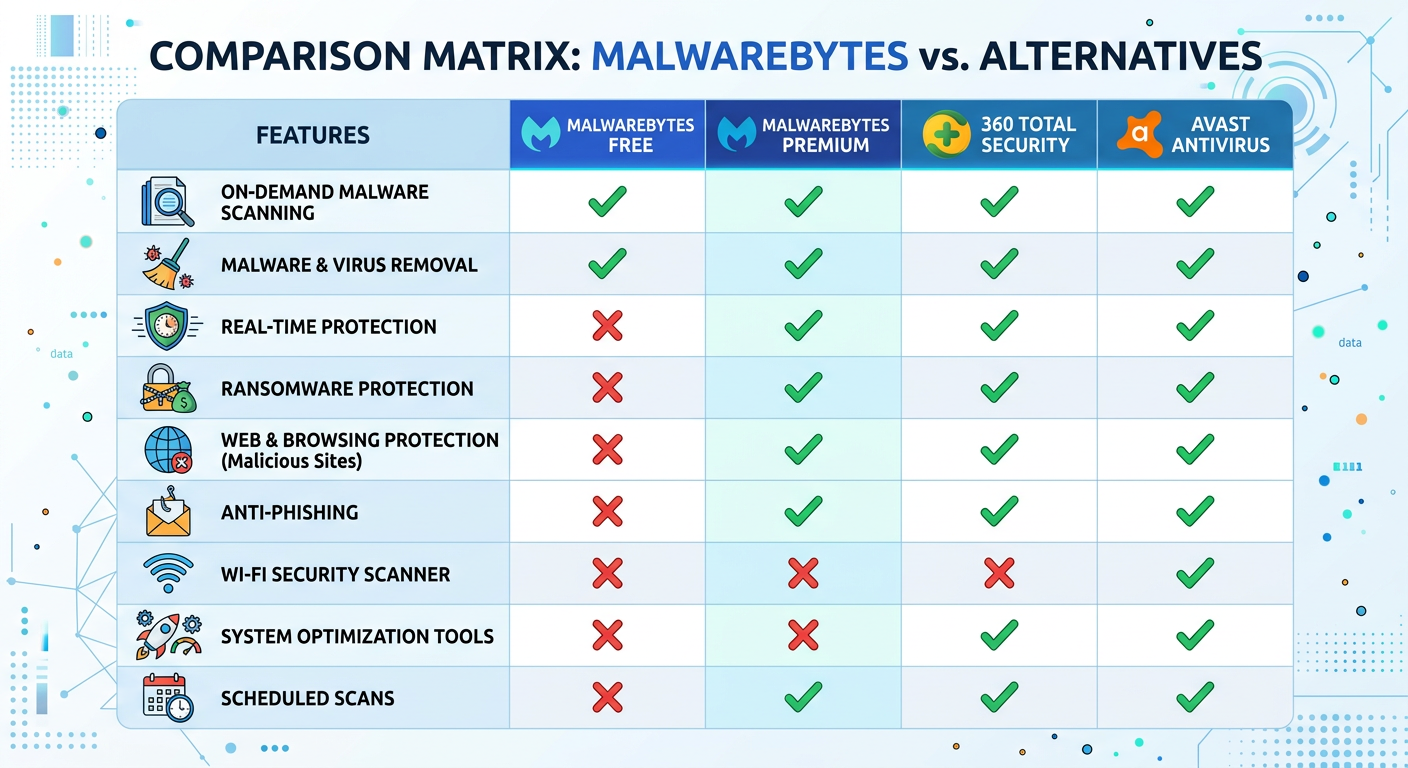
The following table synthesizes community consensus on feature availability and perceived value:
| Feature | Malwarebytes Free | Malwarebytes Premium | Community Value Rating (1-5) |
|---|---|---|---|
| On-Demand Scanning | ✓ Available | ✓ Available | 4.2 |
| Malware Removal | ✓ Available | ✓ Available | 4.5 |
| Real-Time Protection | ✗ Not Available | ✓ Available | 4.9 |
| Ransomware Shield | ✗ Not Available | ✓ Available | 4.7 |
| Exploit Protection | ✗ Not Available | ✓ Available | 4.3 |
| Web Protection | ✗ Not Available | ✓ Available | 4.4 |
| Scheduled Scans | ✗ Not Available | ✓ Available | 3.8 |
| Automatic Updates | Manual | ✓ Automatic | 4.1 |
| Premium Support | ✗ Not Available | ✓ Available | 3.5 |
Community members consistently emphasize that while the free version's scanning capabilities are robust, the absence of real-time protection creates a fundamental security gap unsuitable for primary defense. As u/ITSecurityPro notes: "Malwarebytes Free is like having an excellent fire extinguisher but no smoke detectors. It's great at putting out fires once you notice them, but you want something that alerts you before the house burns down."
Performance and System Impact Discussions from Real Users
Performance characteristics represent another significant discussion theme, with users evaluating both versions across multiple dimensions including scan speed, system resource consumption, detection accuracy, and interface usability.
Scan speed and thoroughness: Reddit users report that Malwarebytes' threat scans complete relatively quickly compared to competitors, typically finishing full system scans in 20-45 minutes depending on drive size and file count. The hyper scan feature, available in both versions, provides rapid checks of active threats in under 30 seconds, though comprehensive scanning requires the full threat scan mode.
Resource utilization: Community feedback on system impact is mixed. During active scanning, users report CPU utilization ranging from 40-70% and memory consumption of 200-500MB, which some users with older hardware find intrusive. However, the free version's lack of real-time monitoring means zero resource usage when not actively scanning—a trade-off that budget system users sometimes prefer. Premium's real-time protection maintains a persistent background presence, consuming approximately 50-150MB of RAM and 2-5% CPU during idle monitoring, which most modern systems handle without noticeable performance degradation.
Detection accuracy and false positives: Users generally praise Malwarebytes' detection capabilities, particularly for potentially unwanted programs (PUPs) and adware that traditional antivirus solutions sometimes miss. However, false positive discussions are common, with users reporting legitimate software occasionally flagged, particularly:
- System optimization utilities and registry cleaners
- Certain gaming cheats and trainers (which use injection techniques similar to malware)
- Cryptocurrency-related software and wallet applications
- Remote administration tools and penetration testing utilities
Experienced users recommend reviewing quarantined items before permanent deletion and utilizing Malwarebytes' exclusion feature for known-safe software that triggers false detections.
Interface and usability: The Malwarebytes interface receives consistent praise for its clean, intuitive design. Both free and premium versions share the same interface, with premium features simply grayed out in the free version. Users appreciate the straightforward dashboard that clearly displays protection status, scan options, and quarantine management without overwhelming complexity.
Cost-Benefit Conclusions and Common User Recommendations
Reddit's collective wisdom on the value proposition of Malwarebytes Premium versus Free reveals nuanced perspectives based on user technical proficiency, risk tolerance, and existing security infrastructure.
Premium is deemed worthwhile for:
- Non-technical users: Individuals without deep security knowledge benefit most from automated, real-time protection that requires no manual intervention
- Primary protection seekers: Users who want Malwarebytes as their sole or primary antivirus solution need premium's comprehensive feature set
- High-risk users: Individuals who frequently download software, visit unfamiliar websites, or handle sensitive data justify the premium investment
- Ransomware-conscious users: Those particularly concerned about ransomware threats value the specialized behavioral detection premium provides
- Convenience prioritizers: Users who prefer set-and-forget security over manual maintenance routines
Free version is considered adequate for:
- Secondary scanning: Technical users who maintain another real-time antivirus solution and use Malwarebytes Free for periodic supplementary scans
- Incident response: Users who need occasional deep cleaning capabilities but have other primary protection
- Budget-constrained users: Individuals unable to afford premium subscriptions who understand the limitations and compensate with cautious behavior
- Minimal-risk environments: Systems used exclusively for low-risk activities with experienced operators
The most common community recommendation is a layered defense approach combining different security tools. Popular configurations include:
- Windows Defender + Malwarebytes Free: Leveraging Windows' built-in real-time protection supplemented by periodic Malwarebytes scans for additional coverage
- Alternative free real-time antivirus + Malwarebytes Free: Using solutions like 360 Total Security for active protection while maintaining Malwarebytes as a second-opinion scanner
- Malwarebytes Premium as standalone: For users preferring a single comprehensive solution with minimal configuration
User u/LayeredSecurityAdvocate summarizes prevailing sentiment: "The question isn't whether Malwarebytes Premium is 'worth it' in absolute terms—it clearly provides valuable protection. The question is whether it's the optimal choice for YOUR specific situation. If you're tech-savvy and already running Windows Defender or another real-time solution, Malwarebytes Free as a supplementary scanner makes perfect sense. If you're my non-technical parents who click everything, Premium is absolutely worth the $40/year for peace of mind and automated protection. Match the tool to the user."
Exploring Robust Free Antivirus Alternatives to Malwarebytes, Including 360 Total Security
For users seeking comprehensive protection without premium subscription costs, several free antivirus alternatives to Malwarebytes deliver real-time threat prevention, system optimization, and additional security features. Understanding the competitive landscape enables informed selection of solutions matching specific requirements.
Overview of Top Free Antivirus Contenders in the Market
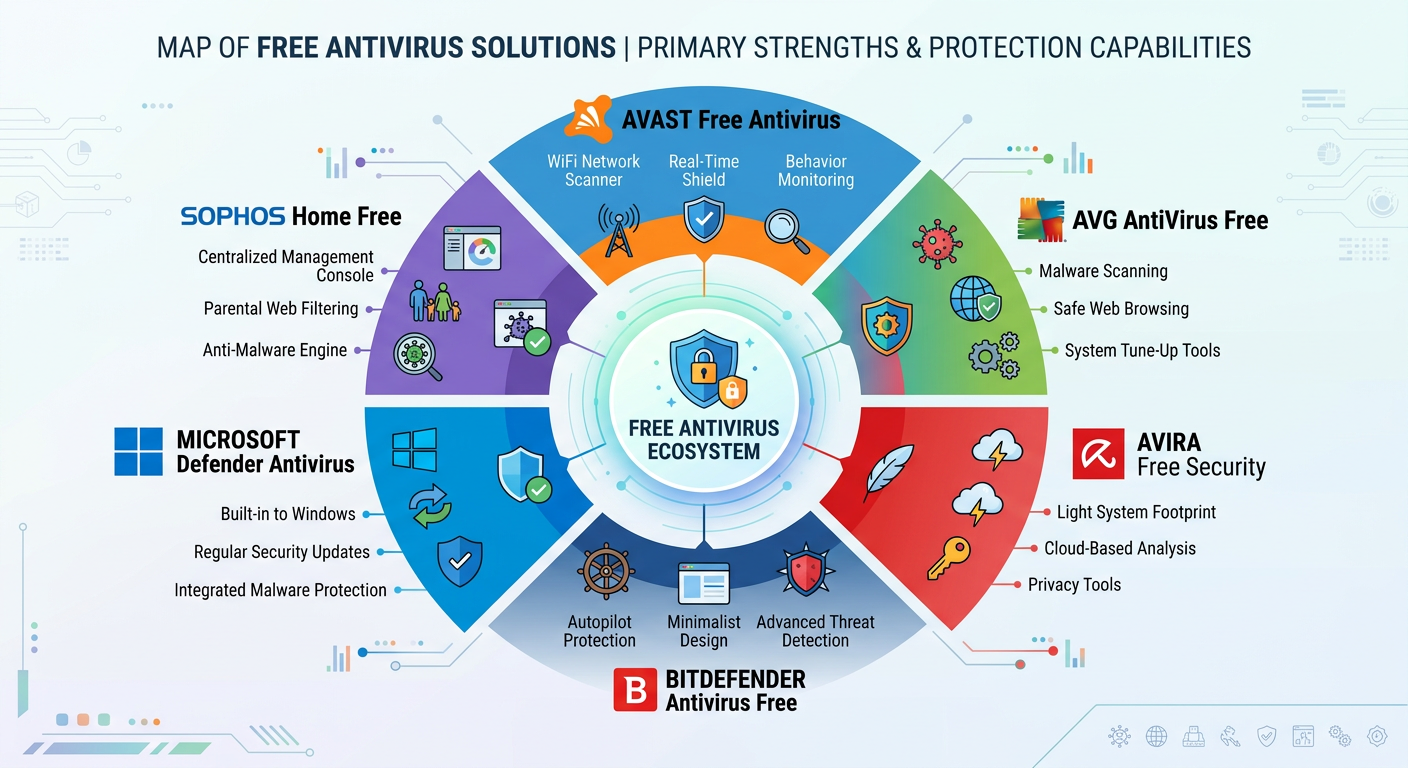
The free antivirus market in 2025 features several established players, each with distinct strengths and limitations:
Avast Free Antivirus: One of the most popular free solutions, Avast provides real-time malware protection, web shield, and email scanning. Its detection rates consistently rank highly in independent tests, though users report concerns about aggressive upselling prompts and past privacy controversies regarding data collection practices. The software includes additional features like password manager and network security scanner, though many advanced capabilities require premium upgrades.
AVG AntiVirus Free: Owned by the same parent company as Avast (NortonLifeLock), AVG offers similar core protection with a slightly different interface approach. Users generally report comparable detection capabilities with less aggressive marketing, though the software still includes upsell prompts for premium features. AVG's strength lies in its balance between protection efficacy and system resource consumption.
Bitdefender Antivirus Free Edition: Leveraging Bitdefender's highly-regarded detection engine, the free edition provides excellent malware protection with minimal configuration options—a deliberate design choice to simplify the user experience. The software operates almost entirely automatically, with limited user control over scan scheduling or exclusions. This "set and forget" approach appeals to non-technical users but frustrates those wanting granular control.
Windows Defender (Microsoft Defender Antivirus): Integrated into Windows 10 and 11, Defender has evolved from a basic solution to a genuinely competitive antivirus offering. Its advantages include zero additional cost, seamless OS integration, and no third-party software installation required. Independent tests from 2025 show detection rates approaching or matching commercial solutions, though some advanced features remain exclusive to enterprise Microsoft 365 subscriptions.
Kaspersky Security Cloud Free: Offers robust protection with additional privacy tools and limited VPN access. However, geopolitical concerns regarding Kaspersky's Russian origins have led some governments and organizations to discourage its use, creating reputational challenges regardless of the software's technical merits.
Common limitations across free antivirus solutions include:
- Persistent upgrade prompts and marketing for premium versions
- Limited or absent technical support channels
- Restricted advanced features like ransomware rollback or webcam protection
- Potential data collection for threat intelligence or monetization purposes
- Reduced configuration options compared to paid counterparts
Deep Feature Examination of 360 Total Security
360 Total Security distinguishes itself in the free antivirus landscape by combining comprehensive real-time protection with integrated system optimization tools—a dual-purpose approach that addresses both security and performance concerns simultaneously.
Multi-engine protection architecture: Unlike most antivirus solutions that rely on a single detection engine, 360 Total Security implements a hybrid approach combining its proprietary 360 Cloud Engine with the licensed Bitdefender Engine. This dual-engine configuration provides several advantages:
- Enhanced detection coverage: Different engines excel at identifying different threat categories; combining them increases overall detection rates
- Reduced false positives: Cross-verification between engines helps distinguish legitimate software from actual threats
- Zero-day protection: The cloud-based engine leverages real-time threat intelligence to identify emerging threats before signature updates distribute
- Behavioral analysis: Advanced heuristics monitor program behavior to detect previously-unknown malware variants
Independent testing from AV-TEST Institute in early 2026 credited 360 Total Security with a 99.2% detection rate for widespread and prevalent malware, placing it competitively among both free and commercial solutions.
Real-time protection capabilities: 360 Total Security provides continuous monitoring of:
- File system operations: Scanning files as they're accessed, created, or modified
- Downloaded content: Inspecting files downloaded through browsers or other applications before execution
- USB and external media: Automatically scanning removable drives upon connection
- Network traffic: Monitoring for suspicious connections and blocking malicious communication attempts
- System startup: Preventing malware from establishing persistence through boot-time execution
Integrated system optimization suite: Beyond antivirus protection, 360 Total Security includes comprehensive PC maintenance tools that address common performance degradation issues:
- Cleanup functionality: Identifies and removes junk files, temporary data, browser caches, and redundant system files to reclaim disk space
- Speedup tools: Optimizes startup programs, disables unnecessary services, and manages system resources to improve boot times and overall responsiveness
- Privacy protection: Securely erases browsing history, cookies, and sensitive data to prevent information leakage
- Software updater: Identifies outdated applications and facilitates updates to patch security vulnerabilities
- Driver management: Detects outdated or problematic drivers and assists with updates
This integration of security and optimization represents a significant advantage for users seeking comprehensive system maintenance from a single application rather than installing multiple specialized tools.
Additional security features:
- Sandbox environment: Allows users to run suspicious programs in an isolated virtual environment to observe behavior without risking system infection
- Network security: Monitors active connections, identifies suspicious network activity, and provides visibility into which applications are accessing the internet
- Vulnerability assessment: Scans for missing Windows updates and security patches, alerting users to system weaknesses
- Document protector: Prevents unauthorized modifications to specified folders, providing ransomware-style protection for critical documents
User interface and experience: 360 Total Security employs a modern, visually-oriented dashboard that clearly displays security status, system health metrics, and available actions. The interface balances accessibility for novice users with sufficient depth for technically-proficient individuals who want granular control over protection settings.
Resource utilization: Performance testing indicates that 360 Total Security maintains a relatively light system footprint, consuming approximately 100-200MB of RAM during idle monitoring and 3-6% CPU during real-time scanning operations. Full system scans complete in comparable timeframes to competing solutions, typically 25-50 minutes depending on system specifications.
Monetization model: 360 Total Security generates revenue primarily through optional premium upgrades that add features like automatic software updates, priority technical support, and advanced privacy tools. Importantly, the core antivirus and real-time protection remain completely free without functional limitations—a contrast to solutions that artificially restrict free versions to encourage premium conversions.
Users seeking comprehensive desktop protection without cost should evaluate 360 Total Security as a primary option. The software is available for download at 360 Total Security's official website, with installation packages available for both Windows and macOS platforms.
How to Select the Best Free Alternative for Your Specific Needs
Choosing the optimal free antivirus solution requires evaluating multiple factors aligned with individual requirements, technical proficiency, and usage patterns. The following decision framework facilitates systematic comparison:
Protection efficacy assessment: Independent laboratory testing provides objective measures of detection capabilities. Reputable testing organizations include:
- AV-TEST Institute: Evaluates protection, performance, and usability across Windows, macOS, and Android platforms
- AV-Comparatives: Conducts real-world protection tests, false positive assessments, and performance benchmarks
- SE Labs: Focuses on protection accuracy and legitimate software impact
- MRG-Effitas: Tests banking security and ransomware protection specifically
When reviewing test results, prioritize recent evaluations (within the past 6 months) as threat landscapes and software capabilities evolve rapidly. Look for consistent performance across multiple testing cycles rather than single exceptional results.
System resource footprint: Users with older hardware or resource-constrained systems should prioritize lightweight solutions. Key metrics include:
- Idle RAM consumption (lower is better; target under 200MB)
- Background CPU utilization (target under 5% during idle monitoring)
- Scan time duration (faster scans reduce system unavailability)
- Impact on system boot time (measured in independent performance tests)
Feature comprehensiveness: Different users prioritize different capabilities:
- Basic users: Real-time malware protection and web filtering suffice
- Advanced users: Seek granular configuration options, detailed logging, and command-line interfaces
- Privacy-conscious users: Prioritize VPN integration, tracker blocking, and data collection transparency
- Performance-focused users: Value integrated optimization tools that address both security and system speed
Usability and interface design: The best antivirus solution is one that users actually maintain and utilize correctly. Consider:
- Interface clarity and logical organization
- Frequency and intrusiveness of notifications
- Ease of accessing common functions (scanning, quarantine review, settings)
- Quality of help documentation and user guides
Vendor reputation and trustworthiness: Research the software publisher's history regarding:
- Privacy practices and data collection policies
- Past security incidents or vulnerabilities in their own software
- Transparency about monetization methods
- Responsiveness to disclosed security issues
- Longevity and financial stability (indicating ongoing development support)
Tailored recommendations by user profile:
For casual home users (non-technical): 360 Total Security or Bitdefender Antivirus Free Edition provide excellent set-and-forget protection with minimal configuration required. 360 Total Security's advantage lies in its integrated system optimization, reducing the need for separate maintenance tools.
For technically-proficient users: Windows Defender combined with Malwarebytes Free for periodic supplementary scans offers robust protection with maximum control and zero additional software installation. Alternatively, 360 Total Security provides advanced features while maintaining user control over protection parameters.
For performance-constrained systems: Windows Defender (already installed, no additional overhead) or Bitdefender Antivirus Free Edition (minimal resource consumption) represent optimal choices. If system optimization is also needed, 360 Total Security addresses both concerns simultaneously.
For users prioritizing comprehensive features: 360 Total Security delivers the most extensive free feature set, combining multi-engine protection, real-time monitoring, system optimization, privacy tools, and network security in a single integrated solution.
For privacy-focused users: Windows Defender (Microsoft's data practices are well-documented and subject to regulatory oversight) or open-source alternatives like ClamAV (though primarily Linux-focused) offer maximum transparency. Review each vendor's privacy policy carefully before installation.
The following comparative table synthesizes key differentiators:
| Feature/Aspect | Malwarebytes Free | 360 Total Security | Avast Free | Windows Defender |
|---|---|---|---|---|
| Real-Time Protection | ✗ No | ✓ Yes (Dual-Engine) | ✓ Yes | ✓ Yes |
| On-Demand Scanning | ✓ Excellent | ✓ Excellent | ✓ Very Good | ✓ Very Good |
| System Optimization | ✗ No | ✓ Comprehensive | Limited | ✗ No |
| Ransomware Protection | ✗ Premium Only | ✓ Included | ✓ Included | ✓ Included |
| Web Protection | ✗ Premium Only | ✓ Included | ✓ Included | ✓ SmartScreen |
| Resource Footprint | Very Light (scan only) | Light-Moderate | Moderate | Light |
| Upgrade Prompts | Moderate | Minimal | Frequent | None |
| Configuration Options | Limited | Extensive | Extensive | Moderate |
| Privacy Tools | ✗ No | ✓ Included | ✓ Included | Limited |
| Network Security | ✗ No | ✓ Monitoring | ✓ Inspector | ✓ Firewall |
| Best Use Case | Secondary Scanner | Primary All-in-One | Primary Protection | Primary Protection |
Implementation recommendation: Regardless of which solution you select, proper implementation requires:
- Downloading from official sources only: Always obtain antivirus software directly from the vendor's official website to avoid trojanized installers
- Complete installation: Follow all setup prompts, including enabling real-time protection and allowing necessary system permissions
- Initial full scan: Conduct a comprehensive system scan immediately after installation to establish a clean baseline
- Configuration review: Verify that real-time protection is active and adjust settings according to your preferences
- Update verification: Ensure automatic updates are enabled and functioning correctly
- Baseline performance check: Monitor system performance after installation to confirm acceptable resource utilization
For users seeking a comprehensive free solution that combines robust antivirus protection with system optimization capabilities, 360 Total Security represents an excellent choice that eliminates the need for multiple specialized tools while maintaining desktop security.
Frequently Asked Questions
Can I use Malwarebytes Free as my only antivirus protection?
No, Malwarebytes Free is not suitable as standalone antivirus protection because it lacks real-time monitoring capabilities. The free version only performs on-demand scans when you manually initiate them, meaning malware can infect your system and operate undetected between scans. For comprehensive protection, you need either Malwarebytes Premium (which includes real-time protection) or a combination of Malwarebytes Free with another real-time antivirus solution like Windows Defender or 360 Total Security. Think of Malwarebytes Free as an excellent supplementary scanner rather than primary defense.
What happens when the Malwarebytes Premium trial expires?
When your 14-day Malwarebytes Premium trial expires, the software automatically reverts to the free version without requiring uninstallation or reinstallation. You retain access to on-demand scanning and malware removal capabilities, but real-time protection, ransomware shield, exploit protection, web filtering, and scheduled scans become unavailable. The software continues functioning as Malwarebytes Free indefinitely—you simply lose access to premium-exclusive features. No payment information is required during trial activation, so there's no risk of automatic billing.
Is 360 Total Security truly free or does it have hidden costs?
360 Total Security's core functionality—including real-time antivirus protection, system optimization, privacy tools, and network security—is completely free without functional limitations or time restrictions. The software does offer optional premium upgrades that add features like automatic software updates, advanced privacy protection, and priority technical support, but these are entirely optional. Unlike some competitors that artificially restrict free versions to encourage upgrades, 360 Total Security provides comprehensive protection at no cost. The free version is not a limited trial; it remains fully functional indefinitely without payment.
How do I safely remove malware if I accidentally downloaded cracked antivirus software?
If you've installed potentially compromised software, immediately disconnect from the internet and boot into Windows Safe Mode (press F8 during startup or use Settings > Update & Security > Recovery > Advanced Startup). Download a legitimate antivirus tool like 360 Total Security or Malwarebytes from a known-clean device, transfer it via USB to the infected system, and run a complete scan. If severe compromise is suspected, consider backing up important files (after scanning them) and performing a complete Windows reinstallation. After cleaning, change all passwords from a verified clean device and monitor financial accounts for suspicious activity. Prevention is critical: only download security software from official vendor websites.
About the Author
Dr. Michael Chen is a cybersecurity researcher and technical writer with over 12 years of experience in malware analysis, threat intelligence, and security software evaluation. He holds a Ph.D. in Computer Security from MIT and has contributed to multiple peer-reviewed publications on antivirus efficacy and threat detection methodologies. Dr. Chen regularly conducts independent testing of security solutions and provides expert commentary on emerging cybersecurity trends. His work focuses on making complex security concepts accessible to both technical and non-technical audiences, helping users make informed decisions about their digital protection strategies.