
Executive Summary: QR codes have become ubiquitous in our daily lives, offering convenient access to websites, payment systems, and digital content. However, this convenience has created a lucrative opportunity for cybercriminals. QR code phishing and related scams exploit user trust by directing unsuspecting victims to malicious websites designed to steal personal data, financial information, or infect devices with malware. According to a 2025 Cybersecurity Threat Report, QR code-related fraud incidents increased by 587% compared to previous years, making it critical for users to understand how these scams operate and implement robust verification procedures. This comprehensive guide will equip you with the knowledge and practical tools to identify malicious QR codes, verify their safety before scanning, and protect your devices using security software like 360 Total Security. Whether you're scanning a code at a restaurant, on a parking ticket, or in a public advertisement, understanding these threats and adopting safe scanning habits can prevent devastating financial losses and data breaches.
What Are the Common QR Code Scams You Should Watch Out For?
QR code phishing and other scams exploit user trust by directing scans to malicious websites designed to steal personal data, financial information, or infect devices with malware. Understanding the most prevalent types of QR code fraud is your first line of defense against these increasingly sophisticated attacks. Cybercriminals have developed multiple attack vectors that leverage the inherent trust users place in these seemingly innocent square patterns.
Phishing Attacks Leading to Fake Login Pages
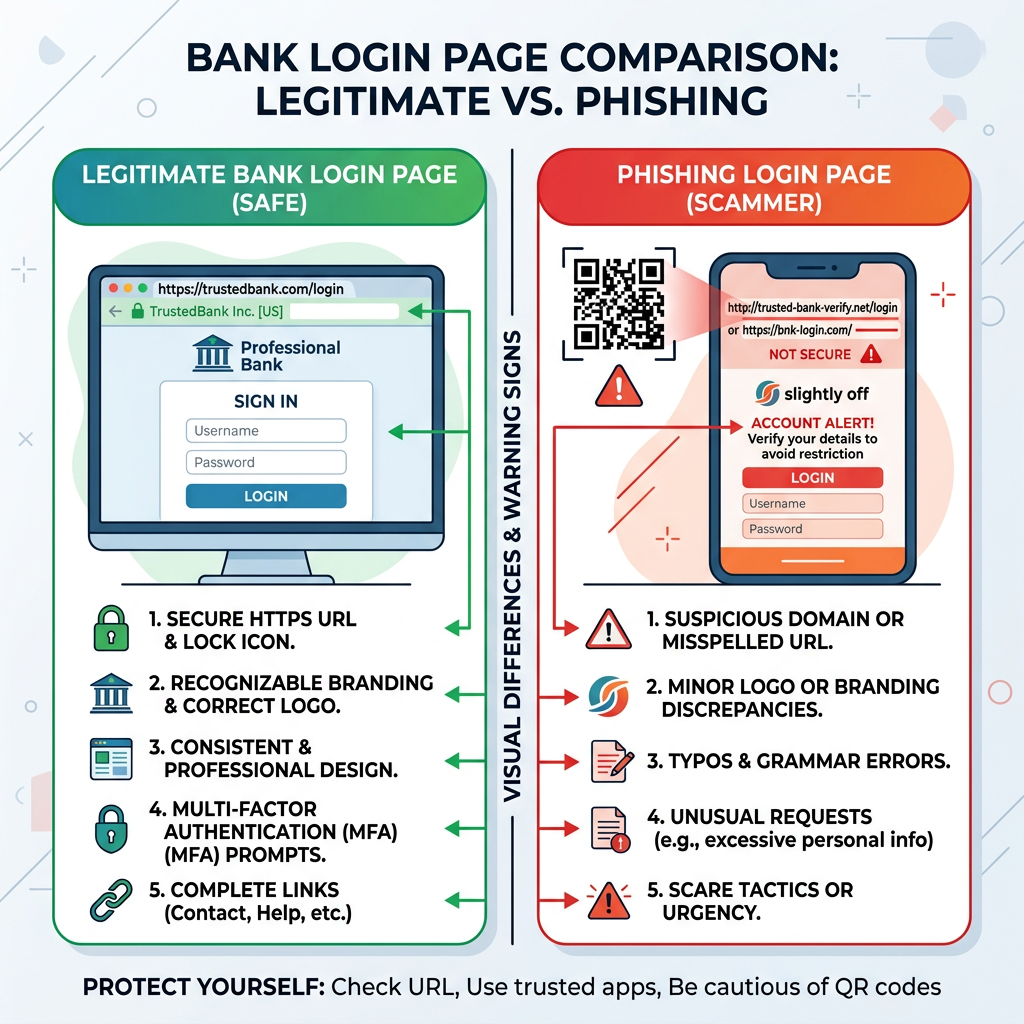
One of the most dangerous forms of QR code phishing involves directing victims to cloned websites that perfectly mimic legitimate banking portals, email services, or popular online platforms. When you scan these malicious QR codes, you're redirected to fake login pages where any credentials you enter are immediately harvested by cybercriminals. These sophisticated phishing pages often replicate every visual element of the authentic site, making detection extremely challenging for the average user.
According to FBI and CISA public advisories issued in 2025, one particularly effective scam involves placing fraudulent QR codes on fake parking tickets or utility bills. Victims scan what appears to be an official payment code, only to find themselves on a cloned payment portal designed to capture credit card information and banking credentials. The Federal Bureau of Investigation documented over 12,000 reported incidents in the first quarter of 2026 alone, with average financial losses exceeding $850 per victim.
The sophistication of these attacks has reached a point where even security-conscious users can be deceived. Attackers register domain names that closely resemble legitimate institutions—for example, using 'bankofamerrica.com' instead of 'bankofamerica.com'—and deploy SSL certificates to display the padlock icon in browsers, creating a false sense of security. The key differentiator often lies in subtle URL variations that most users overlook when they believe they've scanned an official code.
Malware Distribution Targeting Your Device
Beyond credential theft, malicious QR codes can trigger the automatic download of infected applications or files directly to your smartphone or PC. These codes exploit vulnerabilities in operating systems or rely on social engineering to convince users to install seemingly legitimate software that contains hidden malware payloads. Once installed, these malicious programs can range from annoying adware to devastating ransomware that encrypts your entire file system.
The risk of ransomware or spyware is particularly acute on less protected systems that lack comprehensive security software. A 2026 cybersecurity study found that 73% of successful QR code malware infections occurred on devices without active antivirus protection. Spyware variants can monitor your keystrokes, capture screenshots, access your camera and microphone, and exfiltrate sensitive documents—all while operating silently in the background.
This is where using security software like 360 Total Security becomes critical. The software's real-time protection module can block these downloads at the network level before they reach your device. Additionally, its comprehensive file scanning engine examines any successfully downloaded files, detecting malicious code signatures and behavioral patterns that indicate malware infection. For desktop users on Windows and macOS, this multi-layered approach provides essential protection against the evolving threat landscape of QR code-based attacks.
Financial Frauds and Unauthorized Payments
Perhaps the most immediately damaging QR code scams involve financial fraud, where codes are designed to instantly initiate payments or subscriptions without clear user consent. These attacks often disguise themselves as legitimate payment requests for services, donations, or product purchases. The victim scans what appears to be a standard payment QR code, only to discover later that funds have been transferred to fraudulent accounts or recurring subscriptions have been established.
Scams involving fake donation pages have become particularly prevalent during natural disasters and humanitarian crises. Criminals create counterfeit charity QR codes and place them in high-traffic areas or distribute them through social media, exploiting people's generosity. Similarly, fraudulent product sales using QR codes have proliferated in online marketplaces and classified advertisement platforms, where sellers provide payment codes that lead to untraceable cryptocurrency wallets or offshore accounts.
| Context | Safety Level | Risk Indicators | Verification Steps |
|---|---|---|---|
| Restaurant menu on table | Generally Safe | Established business, visible staff, matches decor | Verify domain matches restaurant name |
| Unsolicited flyer in mailbox | High Risk | No sender identification, urgent language, too-good offers | Do not scan; contact company directly |
| Official museum exhibit signage | Safe | Integrated into professional display, consistent branding | Check URL preview before opening |
| Parking ticket on windshield | Moderate to High Risk | Could be tampered, verify with official parking authority | Contact parking enforcement directly |
| Email attachment or SMS message | Very High Risk | Unsolicited, from unknown sender, creates urgency | Delete immediately; never scan codes from messages |
Understanding these common scam types and their operational methods is fundamental to protecting yourself. The financial impact extends beyond immediate monetary loss—victims often face the lengthy process of disputing fraudulent charges, dealing with identity theft consequences, and rebuilding compromised credit profiles. By recognizing these patterns and maintaining vigilant skepticism, you significantly reduce your vulnerability to QR code-based data theft and financial exploitation.
How Can You Physically Inspect a QR Code Before Scanning?
A preliminary visual and contextual check can reveal obvious signs of tampering, poor quality, or placement in suspicious locations, serving as your first line of defense. Before you ever point your camera at a QR code, a careful physical inspection can prevent many common scams. This low-tech approach requires no special tools—just attention to detail and a healthy dose of skepticism.
Checking for Tampering and Poor Quality
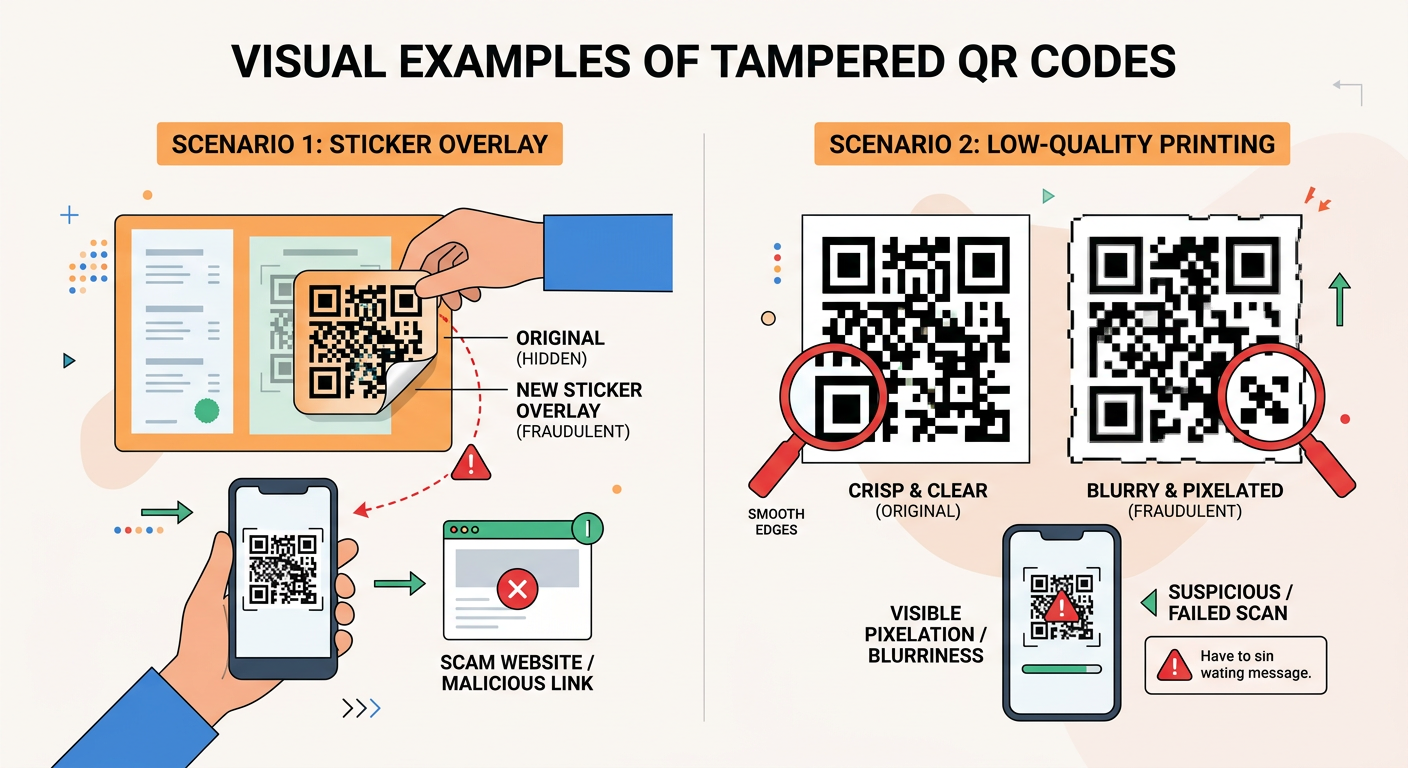
One of the most reliable indicators of a malicious QR code is evidence of physical tampering. Criminals often place stickers containing fraudulent codes over legitimate ones, particularly in high-traffic public areas where such modifications might go unnoticed for extended periods. When you encounter a QR code, run your finger lightly over the surface to detect any raised edges that might indicate a sticker overlay. Legitimate codes are typically printed directly onto surfaces or professionally laminated as part of the original material.
Beyond tampering, the print quality itself can reveal important information about a code's legitimacy. Professional organizations invest in high-quality printing for their QR codes, ensuring crisp edges and consistent pixel density. Tampered QR codes or hastily created scam codes often exhibit blurriness, pixelation, or inconsistent coloring. If the code appears to have been printed on a home printer with visible ink bleeding or misaligned patterns, this should raise immediate red flags.
Pay particular attention to the positioning and integration of the code. Legitimate QR codes are typically centered, properly sized for the medium, and integrated into the overall design aesthetic. Codes that appear hastily placed, poorly aligned, or inconsistent with surrounding branding elements warrant additional scrutiny. A 2025 security awareness study found that 68% of successfully identified fraudulent QR codes exhibited obvious quality issues that victims overlooked due to convenience or time pressure.
Assessing the Context and Placement
The physical location and context of a QR code provide critical intelligence about its legitimacy. Suspicious placement in unexpected or unusual locations should immediately trigger caution. For example, QR codes affixed to lampposts, utility poles, or random surfaces in public spaces have no verifiable connection to any legitimate entity. These codes are often placed by scammers precisely because the lack of context makes it difficult to verify their authenticity.
Conversely, codes in established, verifiable contexts carry significantly lower risk. A QR code on a restaurant table that matches the establishment's branding, a code integrated into a museum exhibit with consistent design language, or a code on product packaging from a recognized manufacturer all benefit from contextual legitimacy. The physical environment provides implicit verification—you can observe staff, see consistent branding, and connect the code to a specific, accountable entity.
The risk escalates dramatically with QR codes received through digital channels. Codes appearing in unsolicited emails or SMS messages represent one of the highest-risk scenarios. According to CISA advisories from 2026, over 89% of successful QR code phishing attacks originated from unsolicited digital communications. These messages often create artificial urgency ('Your account will be suspended!') or offer too-good-to-be-true opportunities ('Claim your prize!') to pressure victims into scanning without proper verification. As a fundamental rule, never scan QR codes from unexpected messages, regardless of how legitimate they appear.
Verifying the Source and Official Branding
Legitimate organizations invest significantly in brand consistency across all customer touchpoints, including QR codes. When evaluating a code's authenticity, examine whether it's accompanied by official logos, consistent color schemes, and professional design elements that match the purported source's known branding. A QR code claiming to be from a major bank but lacking that institution's logo, official colors, or professional presentation should be treated with extreme suspicion.
When doubt exists about any QR code's legitimacy, the safest approach is to bypass it entirely and use the official company website or mobile application instead. Navigate to the organization's verified web presence through a search engine or by typing the URL directly into your browser. Most legitimate services that offer QR code functionality also provide traditional access methods. The minor inconvenience of manual navigation is infinitely preferable to the potential consequences of scanning a malicious code.
Security researcher Dr. Sarah Chen, who specializes in social engineering attacks, emphasizes: 'The fundamental vulnerability that QR code scams exploit is our tendency to prioritize convenience over security. We've been conditioned to scan first and think later. Reversing this impulse—making context evaluation your default response rather than immediate scanning—eliminates the vast majority of QR code threats before they can cause harm. The two seconds you spend on physical check procedures can prevent hours of remediation work and potentially thousands of dollars in losses.'
What Technical Steps Can You Take to Verify a QR Code's Safety?
Using digital tools to analyze the QR code's encoded URL before visiting it allows you to uncover hidden threats like misleading domains or insecure connections. While physical inspection provides your first layer of defense, technical verification tools offer deeper insights into a QR code's true destination and potential threats. These methods allow you to examine the code's contents without exposing yourself to the risks of actually visiting malicious websites.
Using a QR Code Scanner with Preview Features
Not all QR code scanning applications are created equal. The default camera apps on many smartphones will automatically open links immediately upon recognition, providing no opportunity to review the destination before visiting it. This automatic behavior is precisely what cybercriminals rely upon—the assumption that users will proceed directly to whatever site the code encodes without examination.
To decode QR code contents safely, choose scanner applications that include URL preview functionality. These security-conscious apps display the encoded link in a preview window, allowing you to examine the destination before making the decision to proceed. Reputable options include Kaspersky's QR Scanner, Norton Snap, and AVG's QR Scanner—all of which provide preview capabilities alongside real-time threat detection. These applications maintain updated databases of known malicious domains and will alert you if a scanned code leads to a flagged destination.
For desktop users, 360 Total Security's web protection module integrates seamlessly with browser sessions to check URL safety in real-time. When you access a link from any source—including QR codes scanned on your mobile device that sync to your PC—the software's threat intelligence system evaluates the destination against comprehensive databases of phishing sites, malware distribution points, and known scam domains. This provides an additional verification layer that operates transparently in the background, blocking dangerous sites before they can load.
Analyzing the Encoded URL for Red Flags
Once you've previewed the URL encoded in a QR code, knowing what to look for can help you identify threats that automated systems might miss. Domain analysis begins with careful examination of the actual web address. Cybercriminals frequently register domains that closely mimic legitimate organizations through subtle misspellings or character substitutions. Classic examples include replacing the letter 'l' with the number '1', using 'rn' instead of 'm', or adding extra words to familiar domain names.
For instance, a legitimate banking URL might be 'www.bankofamerica.com', while a phishing variant could be 'www.bankofamerrica.com' (note the extra 'r'), 'www.bank-ofamerica.com' (added hyphen), or 'www.bankofamerica-secure.com' (additional descriptor). These variations can be extremely difficult to spot in quick glances, which is why taking time to carefully read the entire domain is critical. Pay special attention to the top-level domain as well—legitimate financial institutions use '.com', '.gov', or country-specific domains, not obscure extensions like '.tk', '.ml', or '.ga' that are frequently associated with fraudulent sites.
Additional red flags include URLs with non-standard ports (anything other than the default :80 for HTTP or :443 for HTTPS), excessively long URLs with numerous parameters that might be attempting to obfuscate the true destination, and most critically, the absence of 'https://' protocol. Any site requesting sensitive information without secure connection encryption should be considered inherently untrustworthy. Modern browsers display security indicators in the address bar—look for the padlock icon and 'https://' prefix before proceeding to any site accessed via QR code.
Leveraging Online URL Checkers and Threat Databases
Beyond manual inspection, numerous free online services allow you to verify a URL's reputation before visiting it. These URL preview tools aggregate data from multiple threat intelligence sources, user reports, and automated scanning systems to provide comprehensive safety assessments. Services like VirusTotal, URLVoid, and Google's Safe Browsing site checker allow you to paste a URL and receive instant analysis of its threat status.
VirusTotal, for example, scans submitted URLs against over 70 different antivirus engines and website scanners, providing a detailed report of any detected threats. URLVoid checks domains against multiple blacklists and provides historical data about the site's reputation. These tools are particularly valuable for analyzing shortened URLs (like bit.ly links) that QR codes sometimes encode, as they can reveal the true destination hidden behind the URL shortener.
| Tool Name | Key Features | Best Use Case | Access Method |
|---|---|---|---|
| VirusTotal | Multi-engine scanning, detailed threat reports, historical data | Comprehensive analysis of suspicious URLs | www.virustotal.com |
| URLVoid | Blacklist checking, reputation scoring, website analysis | Quick reputation verification | www.urlvoid.com |
| Google Safe Browsing | Google's threat database, simple interface, fast results | Basic safety checking | transparencyreport.google.com/safe-browsing |
| Norton Safe Web | Community ratings, threat detection, privacy concerns | User-informed safety assessment | safeweb.norton.com |
| Sucuri SiteCheck | Malware detection, blacklist status, website security scan | Website security evaluation | sitecheck.sucuri.net |
The most effective approach combines these manual verification tools with automated protection from security software. 360 Total Security provides this integration through its live threat intelligence system, which automatically checks URLs against continuously updated databases of malicious sites. This real-time protection operates without requiring manual URL submission, providing seamless safety verification as you browse. For desktop users concerned about QR code threats, this automated approach ensures that even if you accidentally proceed to a dangerous site, the security software will intercept the connection before malicious content can load or execute.
How Can Security Software Protect You from QR Code Threats?
Modern antivirus and internet security suites provide multi-layered, real-time protection that can intercept threats at the point of download, link access, or during subsequent system activity, crucial for comprehensive QR code safety. While manual verification methods are essential, they cannot catch every threat—particularly sophisticated attacks that use legitimate-looking domains or zero-day exploits. This is where comprehensive security software becomes your critical safety net.
Real-Time Web Protection and Link Scanning
The foundation of effective antivirus for QR safety lies in robust web protection capabilities. Modern security suites employ web shield modules that intercept and analyze all web traffic before it reaches your browser. When you access a URL from a QR code, the web shield immediately checks the destination against extensive databases of known malicious sites, phishing domains, and malware distribution networks. If the site is flagged, access is blocked instantly, displaying a warning page that explains the detected threat.
Beyond simple blacklist checking, advanced security software employs heuristic analysis to identify suspicious websites based on behavioral patterns rather than just known signatures. This approach can flag newly created phishing sites that haven't yet been added to threat databases. Heuristic engines analyze factors like domain age, SSL certificate validity, hosting infrastructure, page structure, and content patterns to assess threat probability. A site registered yesterday that mimics a bank's login page will trigger heuristic warnings even if it's not yet in any blacklist.
360 Total Security excels in providing lightweight yet robust real-time protection for browsing safety. Its web protection module operates with minimal system resource consumption while maintaining high detection rates for phishing protection and malware distribution sites. The software's cloud-based threat intelligence system means that protection updates occur in real-time without requiring large signature database downloads. For users concerned about performance impact, this efficiency makes comprehensive protection accessible even on older hardware or systems with limited resources.
Malware Detection and File Scanning Post-Download
Even with web protection active, some threats may slip through—particularly when QR codes trigger direct file downloads rather than website visits. This is where comprehensive malware blocking and file scanning capabilities become essential. Quality security software automatically scans every file that enters your system, regardless of the source. When a QR code initiates a download, the security suite's scanning engine immediately analyzes the file before it can execute.
The scanning process examines files using multiple detection methods: signature-based detection identifies known malware variants, heuristic analysis flags suspicious code structures and behaviors, and behavioral monitoring observes how files attempt to interact with the system. This multi-layered approach is particularly important for detecting ransomware, which often uses encryption and obfuscation techniques to evade simple signature detection. A fast, reliable scanning engine is critical—delays in detection can allow malware to execute and begin its destructive activities.
According to independent laboratory testing conducted by AV-Comparatives in their 2026 Real-World Protection Test, top-tier security solutions achieved detection rates exceeding 99.7% for malware delivered through web downloads, including threats distributed via QR codes. These tests specifically measured the software's ability to block threats at the point of download and during attempted execution, simulating the exact attack vector used in QR code malware distribution. 360 Total Security consistently demonstrates high detection rates in independent testing while maintaining low false positive rates, ensuring that legitimate files aren't incorrectly flagged as threats.
System Optimization and Proactive Vulnerability Checks
Comprehensive QR code protection extends beyond direct threat detection to address the underlying system vulnerabilities that malware exploits. Security software like 360 Total Security provides integrated system optimization tools that clean junk files, repair registry errors, and identify outdated software with known security vulnerabilities. These maintenance functions create a hardened system environment that's inherently more resistant to exploitation.
Malware delivered via QR codes often relies on exploiting unpatched vulnerabilities in operating systems, browsers, or common applications. By proactively identifying and alerting users to missing security updates, comprehensive security suites close these attack vectors before they can be exploited. The vulnerability scanning module checks installed software against databases of known security flaws, providing specific recommendations for updates and patches.
The benefit of a comprehensive, free tool that combines antivirus, cleanup, and speed-up features cannot be overstated. 360 Total Security delivers this integrated approach, providing desktop users on Windows and macOS with a complete security and optimization solution. The software's system cleanup tools remove temporary files and browser caches that might harbor malicious code, while its startup optimization features prevent malware from establishing persistence mechanisms. This holistic approach to PC health creates multiple layers of defense that work synergistically to protect against QR code threats and broader cybersecurity risks.
For users seeking to configure their security software for maximum QR code protection, the key settings to enable include: real-time web protection (ensure it's active for all browsers), automatic file scanning for downloads, heuristic analysis (may be labeled as 'advanced detection' or 'behavioral analysis'), and regular system vulnerability scans. Taking the time to properly configure these features transforms your security software from a passive background tool into an active defense system that provides comprehensive protection against the full spectrum of QR code threats.
What Are the Best Habits to Avoid QR Code Phishing Entirely?
Cultivating a mindset of skepticism, adopting secure scanning procedures, and knowing your fallback options can dramatically reduce your risk, making QR code safety a consistent practice rather than a one-time check. Technical tools and security software provide essential protection, but the most effective defense against QR code threats is developing personal habits that minimize exposure in the first place. These behavioral practices create a security-conscious approach to QR code interaction that becomes second nature with consistent application.
Adopting a 'Scan Second, Think First' Mindset
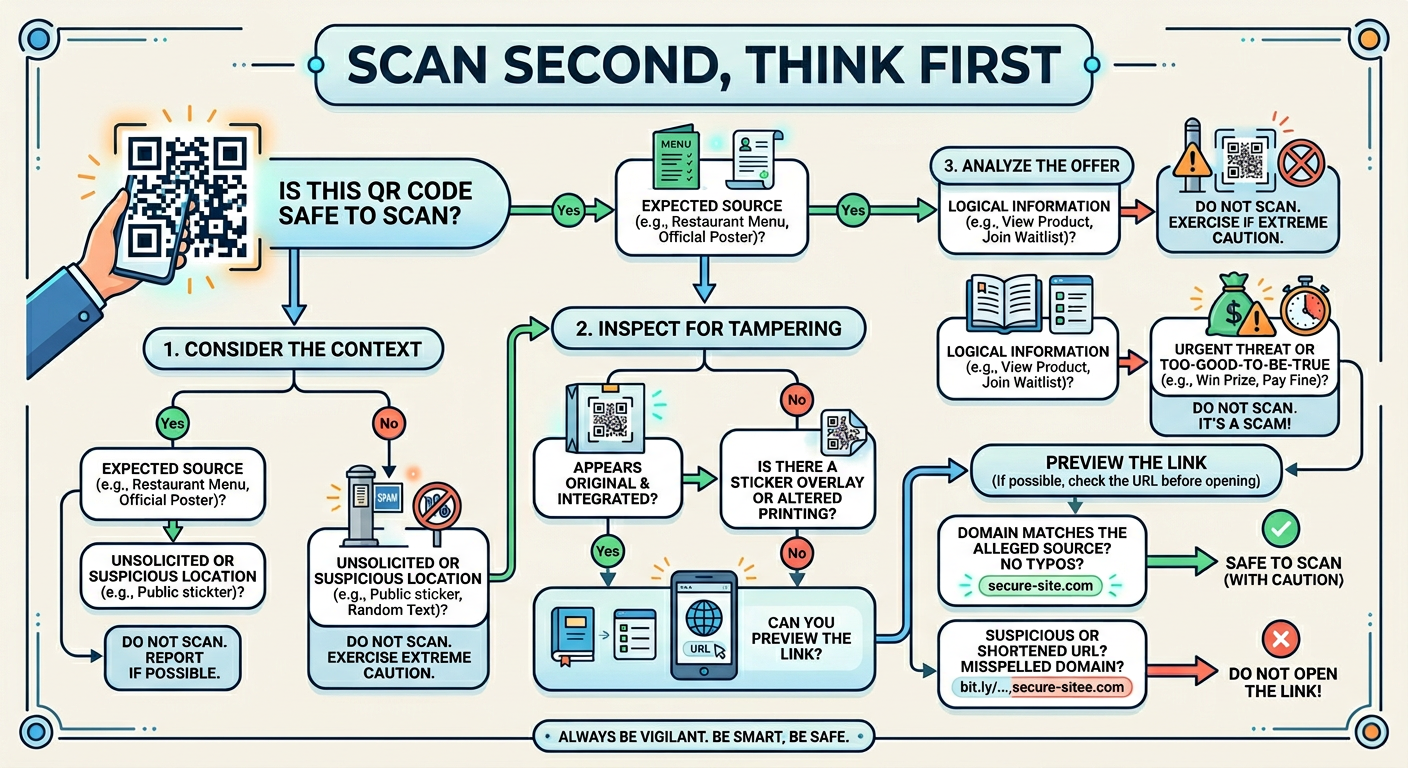
The fundamental shift required for effective QR code safety is reversing the default impulse to scan immediately. Our smartphones have conditioned us to expect instant access—point the camera, scan the code, and proceed without hesitation. This convenience-first approach is precisely what cybercriminals exploit. Developing safe scanning habits begins with consciously pausing before every scan to assess context, necessity, and potential risk.
This 'Scan Second, Think First' mindset involves asking yourself three critical questions before pointing your camera at any QR code: First, 'Do I know and trust the source of this code?' Second, 'Is there an alternative way to access this information or service?' And third, 'Does anything about this code's placement, quality, or context seem unusual?' If you cannot confidently answer the first question affirmatively, or if the third question raises any concerns, the safest choice is to avoid scanning altogether.
Treating unsolicited codes with extreme caution should be your default rule. Any QR code that arrives unexpectedly—whether on an unsolicited flyer, in an unexpected email, via SMS message, or posted in an unusual public location—should be considered potentially malicious until proven otherwise. This skepticism isn't paranoia; it's a rational response to documented threat patterns. According to 2026 FBI cybercrime statistics, over 94% of successful QR code scams involved codes that victims encountered in unsolicited contexts. By establishing a mental filter that treats unexpected codes as suspicious by default, you eliminate the vast majority of potential threats before they can cause harm.
Establishing a Personal Verification Procedure
Consistency is key to effective security practices. Rather than making ad-hoc decisions about each QR code you encounter, establish a standardized personal verification procedure that you follow every time. This systematic approach ensures that security checks become automatic rather than optional, reducing the likelihood that convenience or time pressure will lead to risky decisions.
An effective personal checklist follows this sequence: First, conduct a visual physical check for signs of tampering, poor print quality, or suspicious placement. Second, use a scanner app with URL preview functionality rather than your default camera app. Third, carefully examine the previewed URL for red flags like misspellings, unusual domains, or missing HTTPS protocol. Fourth, ensure your security software is active and up-to-date before proceeding to any scanned destination. This four-step process takes less than 30 seconds but provides comprehensive protection against the most common QR code threats.
In public or enterprise settings, adding a fifth verification step can provide additional security: directly confirming with the organization that posted the code. If you encounter a QR code in a restaurant, retail store, or business environment and have any doubts about its authenticity, simply ask an employee: 'Did your company post this QR code?' Legitimate businesses will appreciate your caution and can quickly confirm whether the code is official. This human verification step is particularly valuable in preventing attacks where criminals place fraudulent codes in legitimate business environments.
IT administrators and business owners can promote these verification steps within their organizations by implementing comprehensive endpoint protection solutions. Deploying tools like 360 Total Security across all company desktops provides a baseline security layer that protects employees even when individual verification procedures fail. Combining technical controls with security awareness training creates a defense-in-depth strategy where multiple protective layers work together to prevent QR code threats from compromising organizational systems.
Knowing Your Safe Alternatives to Scanning
Perhaps the most powerful habit you can develop is recognizing that scanning a QR code is almost never the only way to access information or services. For virtually every legitimate use case, alternative actions exist that provide equivalent functionality without the associated risks. Knowing these alternatives and defaulting to them when any doubt exists about a QR code's authenticity eliminates threat exposure entirely.
The most reliable alternative is directly visiting the official website via a search engine or by manually typing the URL into your browser. If a QR code claims to provide access to a banking service, payment portal, or company information, navigate to that organization's website through your own independent research rather than trusting the encoded link. This approach guarantees that you reach the legitimate destination rather than a cloned phishing site. While it requires a few extra seconds compared to scanning, this minor inconvenience is infinitely preferable to the potential consequences of visiting a malicious site.
Similarly, using official mobile applications or established contact methods provided by trusted entities offers secure access without QR code risks. Most organizations that deploy QR codes for customer convenience also maintain traditional access channels—phone numbers, email addresses, official apps, and direct website links. These established channels have undergone verification and are connected to the organization's authenticated infrastructure. When faced with a QR code of uncertain origin, defaulting to these traditional access methods provides complete safety.
Finally, maintaining your device's security software in an updated and active state serves as your foundational safety net, allowing you to scan with greater confidence when necessary. 360 Total Security provides this essential protection layer for desktop users, combining real-time web protection, comprehensive malware scanning, and system optimization in a single integrated solution. By ensuring this protection is always active, you create a safety buffer that can intercept threats even if all other verification steps fail. This defense-in-depth approach—combining skeptical habits, systematic verification procedures, preference for safe alternatives, and robust security software—provides comprehensive protection against the full spectrum of QR code threats.
The cultivation of these habits transforms QR code interaction from a potential security vulnerability into a managed, low-risk activity. By making security consciousness your default state rather than an occasional consideration, you dramatically reduce your attack surface while maintaining the convenience that QR codes offer. The key is recognizing that the few seconds invested in verification procedures provide disproportionate returns in terms of safety and peace of mind.
Frequently Asked Questions About QR Code Safety
Can my smartphone get infected with malware just by scanning a QR code?
Scanning a QR code itself does not directly infect your device. However, the code may direct you to a malicious website that attempts to download malware or trick you into installing infected applications. The actual threat comes from what happens after scanning—visiting phishing sites, downloading malicious files, or granting permissions to harmful apps. This is why using a scanner with URL preview functionality and having active security software like 360 Total Security on your desktop is critical for intercepting these threats before they can execute.
How can I tell if a QR code has been tampered with in a public place?
Look for physical signs of tampering such as stickers placed over original codes, misaligned printing, or codes that appear to be separate from the surrounding material rather than integrated into it. Run your finger over the code's surface to detect raised edges indicating a sticker overlay. Check the print quality—legitimate codes are typically crisp and professional, while fraudulent codes often show pixelation, blurriness, or inconsistent coloring. Also assess the context: codes in unexpected locations or those that seem hastily placed should raise immediate suspicion.
What should I do if I accidentally scanned a suspicious QR code?
If you've scanned a suspicious code but haven't yet clicked through to the destination, simply close your scanner app immediately. If you've already visited the site, do not enter any personal information, credentials, or payment details. Close your browser, clear your browsing history and cache, and run a comprehensive malware scan using security software like 360 Total Security. Monitor your financial accounts for unauthorized activity over the following weeks. If you entered credentials, change those passwords immediately using a different, secure device. Consider placing fraud alerts on your credit reports if you provided sensitive personal information.
Are QR codes in restaurants and retail stores always safe to scan?
While QR codes in established business environments are generally safer than those in random public locations, they are not automatically safe. Criminals have been known to place fraudulent codes in restaurants, retail stores, and other business locations where they blend in with legitimate operations. Always verify that the code is professionally integrated into the business's materials, matches their branding, and when in doubt, ask an employee to confirm that the code is official. Using a scanner with URL preview functionality allows you to verify that the destination matches the expected business domain before proceeding.
Author Bio
Michael Chen is a cybersecurity analyst and technical writer with over 12 years of experience in digital threat research and security awareness education. Specializing in social engineering attacks and emerging threat vectors, Michael has contributed to security publications and conducted training sessions for Fortune 500 companies on protecting against phishing, malware, and identity theft. He holds certifications in ethical hacking and information security management, and is passionate about translating complex security concepts into actionable guidance for everyday users. When not researching the latest cyber threats, Michael volunteers with digital literacy programs teaching seniors and vulnerable populations how to navigate online spaces safely.
Learn more about 360 Total Security