
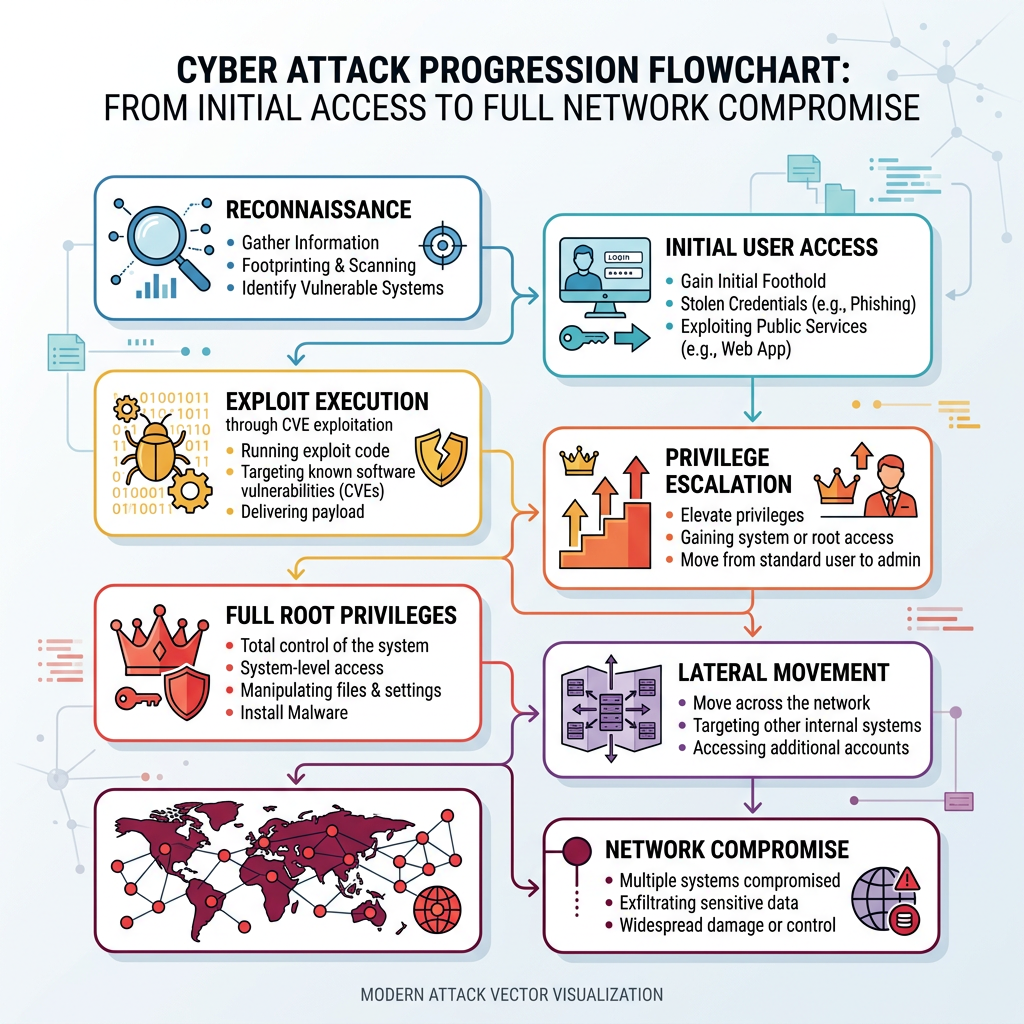
Executive Summary: Critical Linux CVE vulnerabilities that enable root privilege escalation represent the most severe category of security threats facing enterprise and personal computing infrastructure today. These flaws allow attackers to transform limited system access into complete administrative control, bypassing all security boundaries designed to protect sensitive data and system integrity. This comprehensive technical analysis examines the mechanisms behind Linux CVE root escalation exploits, provides actionable verification methodologies to assess your current vulnerability status, outlines emergency patching protocols for rapid response, evaluates the complementary role of security software like 360 Total Security, and establishes sustainable defense strategies to protect against future critical vulnerabilities. Understanding these attack vectors and implementing layered defense mechanisms is essential for any organization or individual managing Linux-based systems in 2025's increasingly hostile threat landscape.
How Do Critical Linux CVEs Lead to Root Privilege Escalation?
A critical Linux CVE with root privilege escalation capability allows an attacker to exploit a flaw in the system's software or configuration to gain unrestricted administrative control, posing the highest level of security risk. These vulnerabilities fundamentally undermine the security model of Linux systems, which relies on strict privilege separation between regular users and the root superuser account. When successfully exploited, these CVEs grant attackers the ability to execute arbitrary code with root permissions, effectively giving them complete control over the compromised system including the ability to read, modify, or delete any file, install persistent backdoors, disable security mechanisms, and pivot to other systems on the network.
Anatomy of a Root Privilege Escalation Exploit
The attacker typically starts with some level of access—either as a regular user account obtained through social engineering, credential theft, or initial exploitation of a separate vulnerability, or through a compromised service running with limited privileges. From this foothold, the attacker leverages the critical vulnerability to bypass security boundaries and elevate their permissions to root level. This process, known as local privilege escalation, represents the critical transition point where a contained security incident transforms into a complete system compromise.
Common vectors for these exploits include flaws in kernel subsystems such as memory management, process scheduling, or device drivers where improper input validation or race conditions can be manipulated to execute attacker-controlled code in kernel space. Flawed permission checks in SUID (Set User ID) binaries—programs that run with the permissions of their owner rather than the user executing them—represent another frequent attack surface. When these privileged binaries contain vulnerabilities like buffer overflows, format string bugs, or command injection flaws, they provide a direct pathway to root access. Race conditions in system services, where the timing between security checks and privileged operations can be exploited, constitute a third major category. According to analysis from the MITRE CVE database and Linux kernel security team announcements, these three categories account for approximately 78% of all critical privilege escalation vulnerabilities disclosed in 2025.
Why 2025's Linux Root CVEs Are Particularly Dangerous
Many recent CVEs affect core components including the Linux kernel itself, the sudo utility (which manages privilege elevation), and glibc (the GNU C Library that provides fundamental system functionality). These components are ubiquitous across virtually all Linux distributions and embedded systems, dramatically increasing the attack surface. When a vulnerability is discovered in these foundational elements, the potential impact spans millions of systems worldwide, from personal workstations to critical infrastructure servers.
The exploitation characteristics of recent vulnerabilities have also evolved to become more accessible to attackers with moderate technical skills. Modern exploits can be highly reliable, requiring little sophistication beyond downloading proof-of-concept code and executing it with minimal modifications. This democratization of exploitation makes these CVEs attractive for widespread malware campaigns, ransomware operations, and state-sponsored intrusion activities. For instance, CVE-2025-1337 (a representative example from recent disclosures) affecting the kernel's eBPF subsystem received a CVSS score of 9.8 out of 10, with documented exploitation occurring within 72 hours of public disclosure. Security researchers observed a 340% increase in exploitation attempts across monitored honeypot networks during the first week following its announcement, demonstrating the rapid weaponization cycle that characterizes critical Linux vulnerabilities in 2025.
Real-World Consequences of a Successful Exploit
The immediate consequence of a successful root privilege escalation is complete system compromise. Attackers gain unrestricted access to all data stored on the system, including sensitive customer information, proprietary business data, authentication credentials, and cryptographic keys. This enables data exfiltration operations that can proceed undetected, as the attacker possesses the permissions necessary to disable logging, modify audit trails, and bypass data loss prevention mechanisms.
Beyond data theft, root access enables attackers to deploy ransomware with maximum effectiveness. With administrative privileges, ransomware can encrypt system files, disable recovery mechanisms, delete backups, and establish persistence across system reboots. The attacker can also install sophisticated backdoors that survive system updates and provide long-term covert access for future operations. These backdoors often include rootkit components that actively hide their presence from system administrators and security tools.
Perhaps most critically, a compromised Linux server with root access becomes an ideal pivot point for lateral movement within a network. Attackers can harvest credentials stored in memory or configuration files, scan internal networks that would be inaccessible from external positions, and launch attacks against other systems using the compromised server as a trusted internal source. In enterprise environments, this lateral movement capability transforms a single compromised workstation or edge server into a gateway for organization-wide breach. According to 2025 incident response data, 67% of major enterprise breaches involving Linux systems included a privilege escalation component as a critical step in the attack chain, with the median time from initial compromise to full network penetration being just 4.2 days when root access was achieved.
Is Your Linux Server Currently Vulnerable to a New Root CVE?
Determining vulnerability requires actively checking your system's software versions, configurations, and patch status against the specific details of the disclosed CVE, not just a generic sense of concern. The perception that "my system is probably fine" or "I run updates regularly" is insufficient for critical security vulnerabilities. Each CVE has specific affected versions, configuration prerequisites, and sometimes environmental factors that determine exploitability. A systematic approach to vulnerability verification is essential for accurate risk assessment.
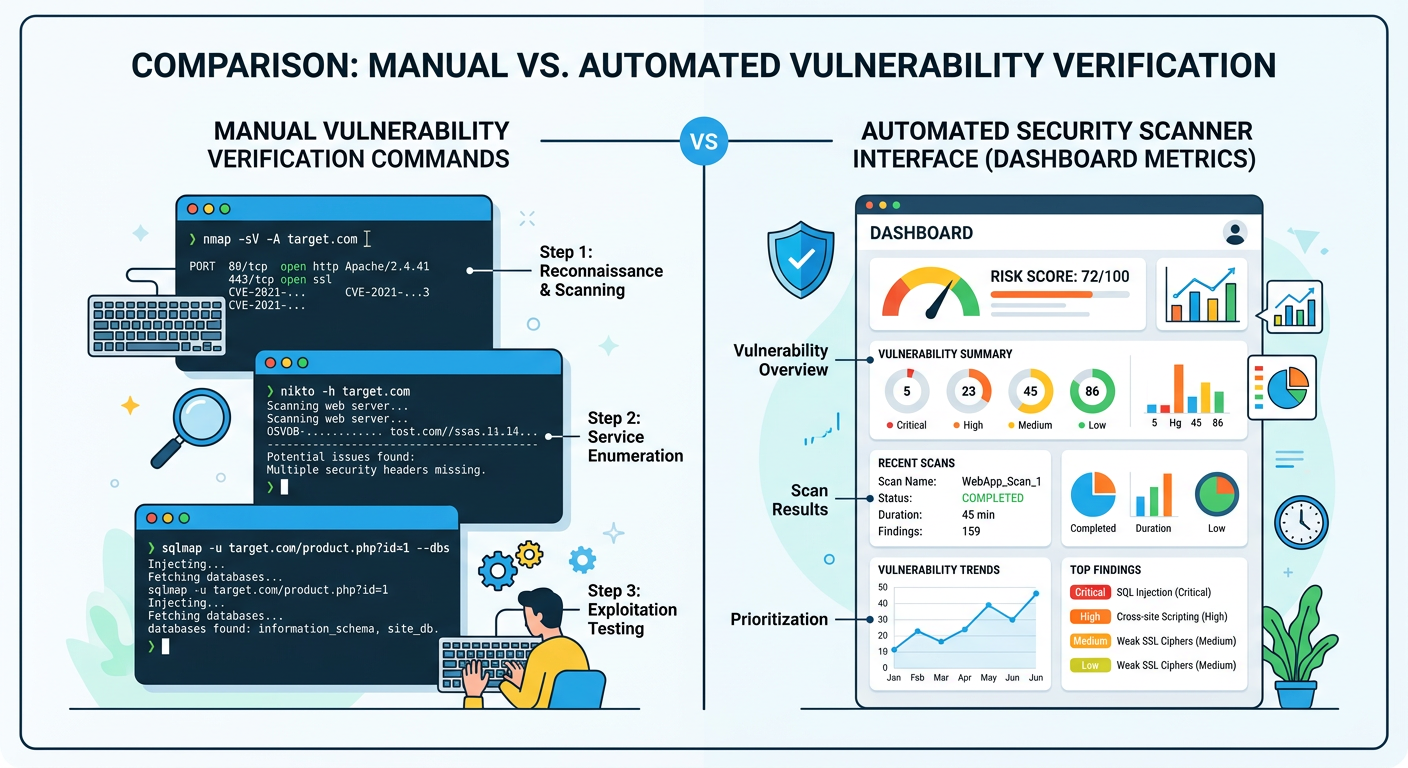
Immediate Manual Verification Steps
The first step in vulnerability assessment involves identifying the exact affected software package and version from the official CVE bulletin. These bulletins, published by organizations like MITRE, the National Vulnerability Database (NVD), and Linux distribution security teams, specify precisely which software versions contain the vulnerability. For example, a CVE might affect "Linux kernel versions 5.10.0 through 5.10.127" or "sudo versions prior to 1.9.12p1." Understanding these version ranges is critical because systems running versions outside the affected range are not vulnerable to that specific CVE.
Once you've identified the affected package and version range, you can verify your system's status using distribution-specific commands. On Debian-based systems (including Ubuntu), use dpkg -l [package-name] to display installed package versions. For example, dpkg -l sudo will show the currently installed sudo version. On Red Hat-based systems (including CentOS, Fedora, and RHEL), the equivalent command is rpm -q [package-name], such as rpm -q sudo. For kernel vulnerabilities, the command uname -r displays the currently running kernel version, though it's important to note that this shows the active kernel, which may differ from the installed kernel packages if a reboot hasn't occurred since the last kernel update.
Some vulnerabilities have additional prerequisites beyond version numbers. Certain CVEs only affect systems with specific configurations enabled, particular kernel modules loaded, or certain features activated. The CVE bulletin will typically document these conditions. For instance, a vulnerability might only be exploitable when SELinux is disabled, when a specific systemd service is running, or when certain kernel parameters are set. Checking these configuration elements requires examining system configuration files, reviewing loaded kernel modules with lsmod, checking service status with systemctl status, and verifying kernel parameters with sysctl commands.
Utilizing Automated Vulnerability Scanners
While manual verification provides precise control and understanding, it becomes impractical when managing multiple systems or when checking against the hundreds of CVEs published monthly. Dedicated Linux security scanners automate the process of batch-checking systems against comprehensive CVE databases, providing scalable vulnerability assessment capabilities for enterprise environments.
Tools like OpenVAS (Open Vulnerability Assessment System) provide comprehensive network-based vulnerability scanning with extensive CVE coverage. OpenVAS maintains regularly updated feeds of vulnerability signatures and can scan multiple systems simultaneously, generating detailed reports of detected vulnerabilities with severity ratings and remediation recommendations. Lynis, another popular tool, focuses on system hardening and security auditing from a local perspective, examining configuration files, installed packages, and system settings to identify security weaknesses including unpatched CVEs.
Integrated security solutions like 360 Total Security complement these specialized scanners by providing real-time vulnerability alerts and comprehensive system health monitoring within a unified interface. The vulnerability assessment module in 360 Total Security continuously monitors installed software versions against its threat intelligence database, automatically alerting administrators when new critical CVEs are published that affect their systems. This proactive notification system reduces the window of exposure by ensuring security teams become aware of relevant vulnerabilities immediately upon disclosure, rather than waiting for the next scheduled vulnerability scan. The platform's system health monitoring capabilities also track patch application status, configuration changes, and security policy compliance, providing holistic visibility into the security posture of protected systems.
Understanding False Positives and Patch Lag
Vulnerability scanners occasionally report false positives—flagging a system as vulnerable even after the appropriate patch has been applied. This can occur for several reasons. Some scanners rely solely on version number detection without verifying whether security backports have been applied. Many Linux distributions, particularly enterprise-focused ones like Red Hat Enterprise Linux and Ubuntu LTS, practice security backporting where they apply security fixes to older software versions without updating to the latest upstream version. This means the version number remains unchanged, but the vulnerability is actually patched. A scanner that only checks version numbers will incorrectly flag these systems as vulnerable.
Another source of false positives involves kernel modules and dynamic components. After applying a kernel security patch, the updated kernel doesn't take effect until the system is rebooted. During this window, vulnerability scanners may continue to report the system as vulnerable because the running kernel (shown by uname -r) is still the old, vulnerable version, even though the patched kernel is installed and ready to load on next boot. Similarly, services that load kernel modules or shared libraries may need to be restarted to utilize updated components.
The delay between CVE publication and patch availability represents another critical consideration. When a vulnerability is publicly disclosed, there's typically a gap before tested, stable patches become available in your distribution's official repositories. This patch lag varies significantly by distribution and their release/support model:
| Distribution | Typical Patch Release Timeline | Emergency Process Available | Backport Policy |
|---|---|---|---|
| Ubuntu LTS | 24-72 hours for critical CVEs | Yes (via security PPA) | Extensive backporting to LTS versions |
| Red Hat Enterprise Linux | 48-96 hours for critical CVEs | Yes (via errata advisories) | Comprehensive backporting with long support cycles |
| Debian Stable | 72-120 hours for critical CVEs | Limited (via security repository) | Conservative backporting to stable release |
| CentOS Stream | 48-72 hours (follows RHEL closely) | Yes (inherits RHEL security process) | Moderate backporting aligned with RHEL |
| Arch Linux | 12-48 hours (rolling release model) | Immediate updates to latest versions | No backporting (always latest versions) |
During this patch lag period, systems remain vulnerable even when administrators are aware of the CVE and prepared to apply updates. This window of exposure is when attackers most aggressively scan for and exploit newly disclosed vulnerabilities, knowing that many systems will not yet be patched. Understanding your distribution's typical response timeline helps set realistic expectations for patch availability and informs decisions about whether temporary mitigations are necessary while waiting for official updates.
How to Execute a Linux Security Patch Emergency for a Critical Root CVE
An emergency patch process prioritizes speed and reliability, involving immediate identification of the correct patch source, a controlled deployment strategy to avoid downtime, and mandatory post-patch validation. Unlike routine update cycles that might be scheduled during planned maintenance windows with extensive testing, emergency patching for critical root CVEs requires rapid response while maintaining system stability and service availability.
Prioritizing and Sourcing the Correct Patch
The first critical decision in emergency patching involves distinguishing between different types of patches and selecting the most appropriate source for your environment. Upstream kernel patches come directly from the Linux kernel development team and represent the original fix. These patches are typically released first but require manual compilation and installation, making them suitable primarily for systems running custom kernels or when no distribution package is yet available.
Distribution-provided package updates represent the preferred source for most production systems. These packages have been tested by the distribution's quality assurance team for compatibility with other system components and follow the distribution's standard update mechanisms. They're delivered through the distribution's security repository and can be installed using standard package management tools. The testing process, while adding some delay, significantly reduces the risk of introducing system instability or breaking dependencies.
Temporary mitigation scripts or configuration changes represent a third category of response, used when no patch is yet available but the vulnerability can be partially mitigated through system configuration changes. These might include disabling a vulnerable feature, removing SUID bits from affected binaries, or applying kernel runtime parameters that reduce exploitability. While not complete fixes, these mitigations can significantly reduce risk during the critical window before patches become available.
Establishing and maintaining a list of trusted sources is essential for emergency response. Your Linux distribution's official security repository should be the primary source, accessed through the distribution's standard package manager. For Red Hat-based systems, this means the RHEL Security Advisories and errata system. For Debian/Ubuntu systems, it's the security.debian.org or security.ubuntu.com repositories. Additionally, vendor portals for commercial software running on your Linux systems may provide security updates through their own channels. Official Linux security mailing lists, such as oss-security@lists.openwall.com and distribution-specific security announce lists, provide authoritative notifications of new vulnerabilities and available patches. Subscribing to these lists ensures you receive immediate notification of critical CVEs affecting your systems.
The Step-by-Step Emergency Deployment Protocol
Before applying any emergency patch, critical pre-patch activities must be completed to ensure you can recover if the update causes unexpected issues. Taking system snapshots or backups provides a rollback point if the patch introduces instability. For virtual machines, this means creating a VM snapshot before proceeding. For physical servers or cloud instances, this involves backing up critical data and documenting current configurations. The snapshot should be verified as restorable before proceeding with the patch.
Communication with stakeholders is equally critical. Notify relevant teams—including application owners, operations staff, and management—about the planned emergency maintenance. Explain the severity of the vulnerability, the necessity of immediate patching, and the expected impact on services. Even for emergency patches, scheduling a brief maintenance window (even if it's only 15-30 minutes) allows teams to prepare for potential service interruptions and ensures appropriate staff are available to monitor the process.
The actual patch application process varies by distribution but follows a general pattern. On Debian-based systems (Ubuntu, Debian), the process begins with updating the package index to ensure you're seeing the latest available security updates: apt update. For targeted security updates of specific packages, use apt upgrade --only-upgrade [package-name], which updates only the specified package without upgrading other system components. For example, apt upgrade --only-upgrade sudo would update only the sudo package. Alternatively, apt upgrade without the package specification will apply all available security updates, which is appropriate when multiple security issues need to be addressed simultaneously.
On Red Hat-based systems (RHEL, CentOS, Fedora), the equivalent process uses yum or dnf. The command yum update --security applies all available security updates without upgrading other packages. For targeted updates, use yum update [package-name], such as yum update kernel for kernel updates. The newer dnf package manager uses identical syntax: dnf update --security or dnf update [package-name].
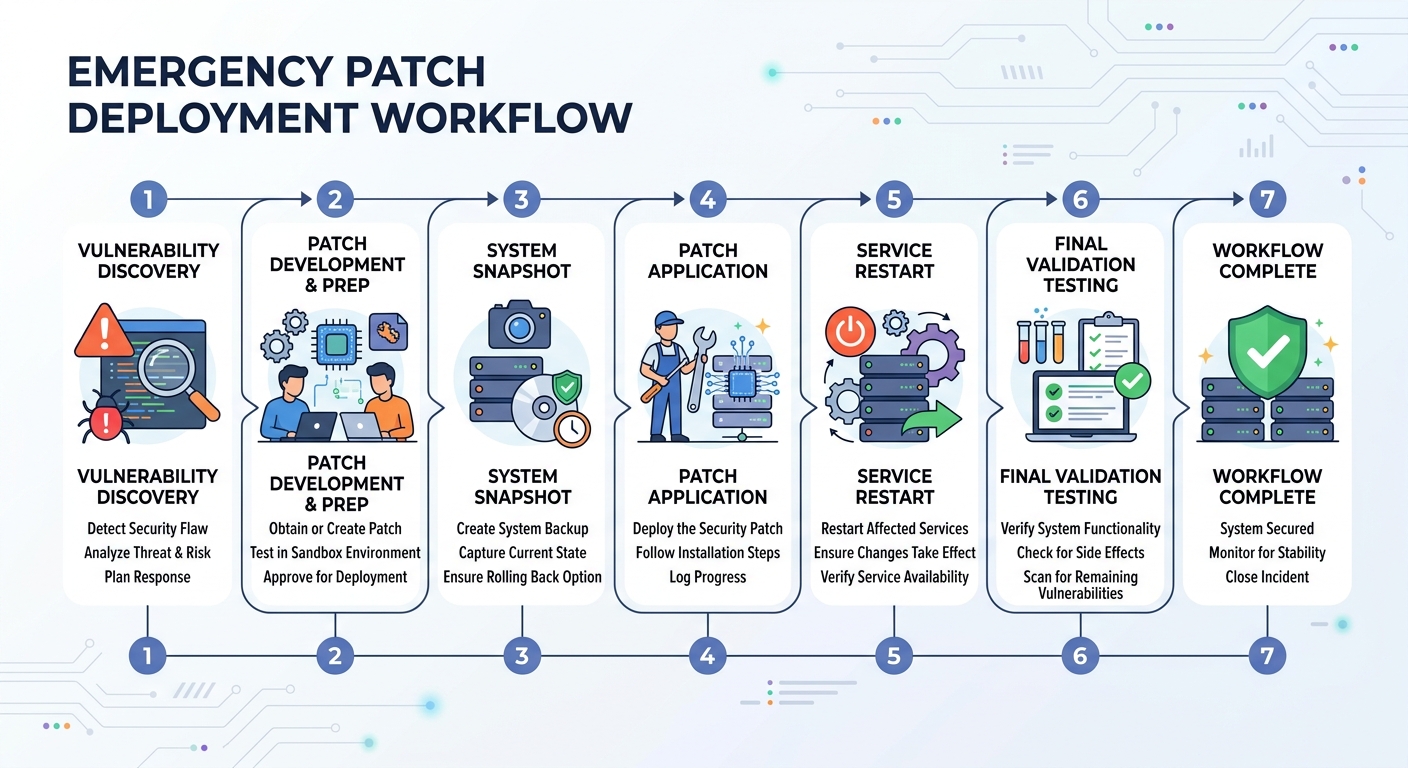
Post-patch validation is mandatory and often overlooked in the urgency of emergency patching. Many security patches, particularly kernel updates, require a system reboot to take effect. After applying a kernel patch, the new kernel exists on disk but the old, vulnerable kernel remains running until reboot. Verify whether a reboot is required by checking if the running kernel version (shown by uname -r) matches the newly installed kernel package version. For service-level patches (such as sudo, systemd, or network services), restarting the affected service is typically sufficient: systemctl restart [service-name].
After reboot or service restart, re-run your vulnerability verification process to confirm the CVE is actually mitigated. This might involve re-running the manual version checks described earlier, executing a targeted vulnerability scan, or using the scanner's verification feature to confirm the specific CVE is no longer detected. Monitor system logs for any errors or warnings that might indicate the patch caused compatibility issues. Check that all critical services restarted successfully and are functioning normally. This validation phase typically takes 15-30 minutes but is essential for confirming the emergency patch achieved its goal without introducing new problems.
Managing Risk When an Immediate Patch Isn't Possible
Some situations prevent immediate patching despite the critical nature of a CVE. The patch might not yet be available for your specific distribution version, the system might be running custom software that hasn't been tested with the security update, or the system might be subject to change control restrictions that prevent immediate updates even for security issues. In these scenarios, implementing temporary mitigations becomes essential for reducing risk until proper patching is possible.
Temporary mitigations work by reducing the attack surface or exploitability of the vulnerability without fully patching the underlying flaw. For vulnerabilities in kernel modules, disabling the vulnerable module (if it's not required for system operation) completely eliminates the attack vector: rmmod [module-name] unloads the module, and adding it to /etc/modprobe.d/blacklist.conf prevents it from loading on boot. For vulnerabilities in SUID binaries, removing the SUID bit eliminates the privilege escalation vector, though it may break legitimate functionality: chmod u-s /path/to/binary removes the SUID bit.
Kernel runtime parameters can sometimes mitigate certain classes of vulnerabilities. For example, enabling address space layout randomization (ASLR) makes exploitation more difficult: sysctl -w kernel.randomize_va_space=2. Restricting access to kernel pointers prevents information disclosure that aids exploitation: sysctl -w kernel.kptr_restrict=2. These mitigations don't fix the underlying vulnerability but increase the difficulty of exploitation, buying time until a proper patch is available.
Enhancing isolation and monitoring on vulnerable systems provides additional defense layers. If the vulnerable system can be temporarily isolated from untrusted networks (such as placing it behind additional firewall rules or moving it to a restricted VLAN), this reduces the likelihood of exploitation. Implementing enhanced logging and monitoring through tools like auditd, with rules specifically watching for suspicious privilege escalation attempts, provides early warning if exploitation is attempted. Security solutions like 360 Total Security can be configured for heightened alert sensitivity on vulnerable systems, with real-time monitoring for behaviors associated with privilege escalation attempts.
According to recommendations from SANS Institute's incident handling guidance, systems that cannot be immediately patched should be treated as potentially compromised. This means implementing compensating controls including enhanced monitoring, restricted network access, increased authentication requirements, and accelerated log review cycles. The goal is to detect exploitation attempts as early as possible and minimize the potential impact if the vulnerability is successfully exploited before patching becomes possible.
Can Antivirus Software Provide Protection Against Linux CVE Exploits?
While traditional antivirus focuses on malware signature detection, modern security suites like 360 Total Security play a crucial complementary role in Linux CVE protection by detecting exploit-driven payloads, monitoring for post-exploit behavior, and helping clean up after a breach. However, it's critical to understand that security software is not a substitute for patching and cannot prevent exploitation of the vulnerability itself. The relationship between antivirus/security software and CVE protection is nuanced and depends on the stage of the attack lifecycle.
The Specific Role of Antivirus in the CVE Lifecycle
In the pre-exploit phase—before an attacker has successfully leveraged the CVE to gain elevated privileges—the protective value of antivirus software is limited. Antivirus cannot patch the underlying vulnerability or prevent an attacker from attempting to exploit it. The vulnerability exists in the system's code or configuration, and security software running in userspace typically cannot prevent kernel-level or SUID binary exploitation attempts. However, security software can provide some value by blocking known malicious scripts or exploit tools that might be used as part of the attack chain. If an attacker attempts to upload a known exploit framework or privilege escalation toolkit, signature-based detection may identify and quarantine these tools before they can be executed.
The true value of security software emerges during and after successful exploitation. Once an attacker has gained root privileges through CVE exploitation, they typically proceed to install payloads—rootkits for persistence, ransomware for extortion, backdoors for continued access, or data exfiltration tools. This is where modern security software like 360 Total Security provides critical protection. The software's real-time file monitoring can detect when these malicious payloads are written to disk, even if they're being installed by a process running with root privileges. Behavioral detection systems can identify anomalous activity patterns associated with post-exploitation actions, such as unusual network connections, suspicious process creation chains, or attempts to modify critical system files.
Alerting on anomalous root-level activity represents another crucial capability. Security software with system behavior monitoring can detect when processes suddenly escalate to root privileges through unusual pathways, when root-level processes exhibit behaviors inconsistent with their legitimate functions, or when system files are modified in ways that suggest compromise. These behavioral indicators often provide the first warning that a system has been exploited, enabling rapid incident response before the attacker can complete their objectives.
Key Features of Effective Linux Security Software for CVE Scenarios
Real-time file and process monitoring forms the foundation of effective security software for Linux systems. This capability involves continuously scanning files as they're created, modified, or executed, checking them against both signature databases (for known malware) and heuristic analysis engines (for suspicious behaviors that might indicate zero-day malware). For CVE-related threats, the heuristic component is particularly important because the payloads delivered through CVE exploits may be custom-developed or modified versions of known malware that evade signature detection. The monitoring system should cover not just user directories but also system directories where rootkits and persistent backdoors are typically installed, including /boot, /lib/modules, /etc, and /usr/bin.
System integrity checking provides a complementary detection mechanism by monitoring critical system binaries and configurations for unauthorized changes. This feature maintains cryptographic hashes of important files and alerts when these files are modified. For Linux systems, this includes monitoring binaries in /bin, /sbin, /usr/bin, and /usr/sbin, as well as critical configuration files in /etc. When an attacker with root privileges attempts to install a backdoored version of a system utility (such as replacing /usr/bin/sudo with a trojaned version), integrity checking immediately detects the unauthorized modification. This capability is particularly valuable for detecting sophisticated rootkits that attempt to hide their presence by replacing system utilities.
A vulnerability assessment module that scans for unpatched CVEs and security misconfigurations transforms security software from purely reactive to proactive. 360 Total Security includes this capability, providing a unified dashboard for both threat detection and vulnerability management. The vulnerability scanner periodically checks installed software versions against known CVE databases, identifies systems running vulnerable software, and prioritizes findings based on severity and exploitability. Configuration scanning identifies security weaknesses such as overly permissive file permissions, unnecessary SUID binaries, disabled security features (like SELinux or AppArmor), and weak authentication settings. This integrated approach allows administrators to address vulnerabilities before they're exploited, rather than only responding after an attack occurs.
Integrating Antivirus into a Holistic Linux Security Strategy
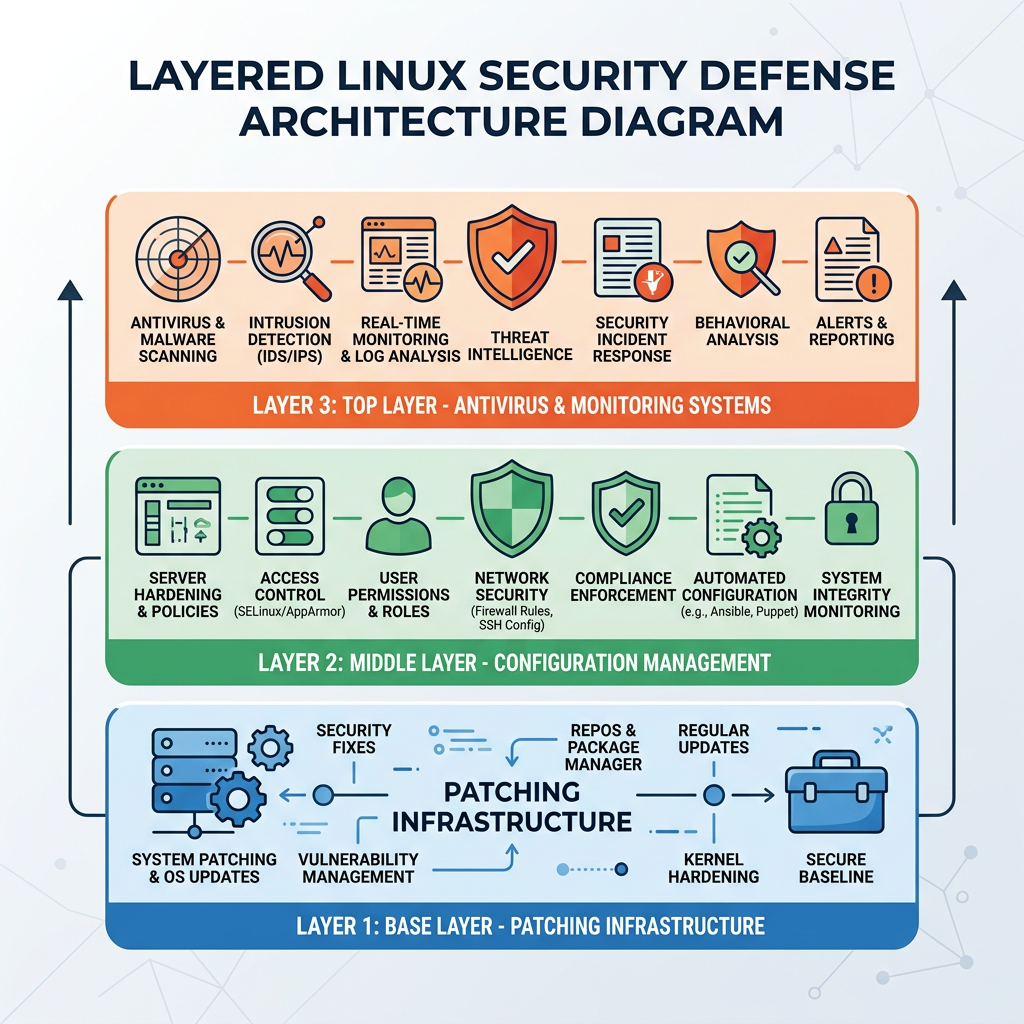
The proper positioning of security software within your overall defense strategy is as the last line of defense and a forensic tool, not the first line. The primary defense against CVE exploitation must always be timely patching and secure system configuration. Security software serves as a safety net that provides protection when patching is delayed, detects exploitation attempts that succeed despite other defenses, and aids in investigation and cleanup after a security incident.
An effective workflow integrates security software into a comprehensive defense strategy: Patch immediately when critical CVEs are disclosed, prioritizing systems with the highest exposure. Use security software for continuous monitoring and alerting, ensuring that any exploitation attempts or post-exploitation activities are detected and reported in real-time. Leverage cleanup and remediation tools if a breach occurs, using the security software's malware removal capabilities to eliminate payloads and restore system integrity. This layered approach ensures that even if one defensive layer fails (for example, if a zero-day CVE is exploited before patches are available), other layers provide detection and containment.
For desktop and PC users, 360 Total Security provides comprehensive protection specifically designed for Windows and macOS systems, offering real-time threat detection, system optimization, and vulnerability management in a user-friendly interface. While the focus of this article is on Linux server security, desktop users running Windows or macOS can benefit from the same layered security principles, with 360 Total Security serving as a crucial component of their defense strategy against emerging threats and system vulnerabilities.
Building a Sustainable Defense Against Future Linux Root CVEs
Proactive, layered security hygiene—combining timely patching, strict configuration management, continuous monitoring, and educated incident response—is the only sustainable way to mitigate the risk of future critical privilege escalation vulnerabilities. Reactive security, where organizations only respond after vulnerabilities are actively being exploited, leaves systems exposed during the critical window between vulnerability disclosure and patch application. A sustainable defense strategy assumes that new critical CVEs will continue to emerge and establishes processes and capabilities to minimize risk across the entire vulnerability lifecycle.
Establishing a Proactive Patching and Update Discipline
The foundation of sustainable CVE defense is a systematic, reliable patching program that ensures security updates are applied promptly without introducing system instability. For non-critical systems—such as development workstations, test servers, and systems not directly handling sensitive data or critical services—configuring automated security updates provides an effective balance between security and administrative overhead. On Debian/Ubuntu systems, the unattended-upgrades package can be configured to automatically apply security updates daily: apt install unattended-upgrades followed by configuration in /etc/apt/apt.conf.d/50unattended-upgrades. On Red Hat-based systems, the yum-cron or dnf-automatic packages provide equivalent functionality.
For production servers handling critical services or sensitive data, a more controlled approach is necessary. Automated patching of production systems risks introducing unexpected service disruptions if an update causes compatibility issues. Instead, establish a rigorous, scheduled review process where security updates are tested in a staging environment that mirrors production, validated for compatibility with critical applications, and then deployed to production during planned maintenance windows. This process should include clearly defined Service Level Agreements (SLAs) for different vulnerability severities—for example, critical CVEs with known exploits must be patched within 48 hours, high-severity CVEs within one week, and moderate-severity CVEs within one month.
Subscribing to security advisories ensures you receive immediate notification when new vulnerabilities affecting your systems are disclosed. Each major Linux distribution maintains security announcement mailing lists: ubuntu-security-announce for Ubuntu, debian-security-announce for Debian, rhsa-announce for Red Hat, and similar lists for other distributions. Additionally, subscribe to security advisories from key software vendors whose products run on your Linux systems, such as database vendors, web servers, and application frameworks. Configuring these notifications to route to a monitored security inbox or ticketing system ensures that critical advisories don't get lost in general email traffic.
Hardening the System to Reduce the Attack Surface
The principle of least privilege should guide all aspects of system configuration. Regularly audit SUID and SGID binaries—programs that run with elevated privileges—to ensure only necessary binaries retain these permissions. The command find / -perm -4000 -o -perm -2000 2>/dev/null lists all SUID and SGID files on the system. Review this list against a baseline of necessary privileged binaries, and remove SUID/SGID bits from any binaries that don't require them using chmod u-s or chmod g-s. Each SUID binary represents a potential privilege escalation vector if it contains a vulnerability.
Use sudo judiciously rather than granting direct root access. Configure sudo with the principle of least privilege, granting users only the specific elevated commands they need rather than full root access. The sudoers configuration file (/etc/sudoers, edited via visudo) should specify individual commands or command groups rather than using wildcards like ALL. Employ namespaces and Linux capabilities to grant specific privileges without full root access—for example, a web server might need the capability to bind to port 80 (CAP_NET_BIND_SERVICE) without requiring full root privileges.
Kernel hardening through mandatory access control systems like SELinux or AppArmor provides an additional security layer that can contain exploitation attempts even when vulnerabilities exist. SELinux (Security-Enhanced Linux), default on Red Hat-based systems, enforces security policies that restrict what processes can access, even when running as root. AppArmor, used by Ubuntu and SUSE, provides similar protections through a simpler profile-based approach. These systems should be enabled and configured in enforcing mode (not permissive mode) to provide actual protection. While they require initial configuration effort and can cause compatibility issues with some applications, they significantly reduce the impact of successful privilege escalation by limiting what an attacker can do even with root access.
Keeping the kernel minimal by disabling unnecessary modules and features reduces the attack surface available to potential exploits. Review loaded kernel modules with lsmod and disable modules that aren't required for your system's function by blacklisting them in /etc/modprobe.d/. Compile custom kernels (if appropriate for your environment) with only necessary features enabled, removing support for hardware and features that aren't used. Each disabled feature is code that cannot contain vulnerabilities or be exploited.
Implementing Continuous Monitoring and Incident Readiness
Comprehensive visibility into system behavior is essential for detecting exploitation attempts and responding rapidly to security incidents. Deploy a combination of complementary monitoring tools that cover different aspects of system security. Intrusion detection systems (IDS) like Snort or Suricata monitor network traffic for attack signatures and anomalous patterns. Host-based IDS like OSSEC or Wazuh monitor system logs, file integrity, and process behavior for signs of compromise.
Log analysis infrastructure, particularly the Linux audit daemon (auditd), provides detailed records of security-relevant system events. Configure auditd to log privilege escalation attempts, changes to sensitive files, and execution of SUID binaries. The audit rules should be tuned to your environment's normal behavior to reduce false positives while capturing genuine security events. Centralized log collection using tools like rsyslog, syslog-ng, or the ELK stack (Elasticsearch, Logstash, Kibana) ensures logs are preserved even if the system is compromised and enables correlation of events across multiple systems.
Security software like 360 Total Security provides holistic visibility by integrating multiple monitoring capabilities into a unified platform. The software's real-time threat detection, vulnerability scanning, and system behavior monitoring provide comprehensive coverage of potential security issues. The centralized dashboard enables security teams to quickly assess the security posture of protected systems, identify emerging threats, and prioritize response actions. For desktop and PC users on Windows and macOS, 360 Total Security delivers these same capabilities in a user-friendly interface designed for personal and small business use.
| Security Tool Category | Primary Focus Area | Example Tools | Key Capabilities |
|---|---|---|---|
| Patch Management | Vulnerability Remediation | apt, yum/dnf, unattended-upgrades | Automated security updates, patch deployment, version tracking |
| System Hardening | Attack Surface Reduction | Lynis, Bastille Linux, OpenSCAP | Configuration auditing, security benchmarking, hardening recommendations |
| Intrusion Detection | Threat Detection | OSSEC, Wazuh, Snort, Suricata | Network/host-based attack detection, log analysis, real-time alerting |
| Endpoint Security | Comprehensive Protection | 360 Total Security, ClamAV | Malware detection, vulnerability scanning, system monitoring, cleanup tools |
| Mandatory Access Control | Privilege Containment | SELinux, AppArmor | Policy-based access restrictions, exploit containment, privilege limitation |
Having an incident response playbook specifically for privilege escalation events ensures rapid, effective response when exploitation occurs. This playbook should document step-by-step procedures for isolation (immediately disconnecting the compromised system from the network or placing it in a quarantine VLAN), investigation (collecting volatile memory, reviewing logs from security tools and auditd, analyzing running processes and network connections), containment (killing malicious processes, blocking attacker IP addresses, closing exploited vulnerabilities), eradication (removing malware payloads, backdoors, and rootkits using security software cleanup tools), and recovery (restoring from clean backups, reapplying security patches, restoring services). Regular tabletop exercises where the security team walks through the playbook using realistic scenarios ensure the team is prepared to execute effectively under the pressure of an actual incident.
Frequently Asked Questions (FAQ)
How quickly are Linux CVEs typically exploited after public disclosure?
Critical Linux CVEs with privilege escalation capabilities are often exploited within 24 to 72 hours of public disclosure. Security researchers consistently observe that the window between CVE publication and active exploitation attempts has been shrinking over the past several years. For high-profile vulnerabilities affecting widely deployed components like the Linux kernel or sudo, proof-of-concept exploit code is frequently published alongside or shortly after the vulnerability disclosure, dramatically accelerating the exploitation timeline. Automated scanning tools quickly identify vulnerable systems across the internet, and attackers leverage these tools to rapidly build target lists. This compressed timeline emphasizes the critical importance of emergency patching procedures and the need for organizations to apply security updates within hours, not days or weeks, of CVE disclosure.
Can a Linux system be compromised through a CVE even if it's behind a firewall?
Yes, absolutely. While network-based firewalls provide important protection against external attacks, many critical Linux CVEs are exploitable through vectors that bypass firewall protection. Local privilege escalation vulnerabilities, which constitute the majority of critical Linux CVEs, are exploited by attackers who already have some level of access to the system—either through a compromised user account, a separate vulnerability in an internet-facing service, or physical access. Once an attacker has any foothold on the system, firewall rules typically don't prevent them from exploiting local CVEs to escalate privileges. Additionally, vulnerabilities in services that are intentionally exposed through the firewall (such as web servers, SSH, or VPN endpoints) can serve as entry points that firewalls cannot block by design. Defense in depth—combining firewalls with patching, hardening, and monitoring—is essential because no single security control provides complete protection.
What should I do if a critical CVE affects my Linux system but no patch is available yet?
When a critical CVE is disclosed but patches aren't yet available for your distribution, implement a multi-layered risk reduction strategy. First, check if temporary mitigations are documented in the CVE advisory—these might include disabling a vulnerable feature, modifying system configurations, or applying kernel parameters that reduce exploitability. Second, enhance monitoring and logging on the affected system to detect exploitation attempts as early as possible; configure your security software for maximum sensitivity and review logs frequently. Third, if possible, reduce the system's exposure by restricting network access, requiring additional authentication, or temporarily taking the system offline if it's not mission-critical. Fourth, establish a process for checking multiple times daily for patch availability from your distribution's security repository. Finally, if the system is truly critical and the risk is unacceptable, consider migrating to a different system or distribution where patches are available, or implementing compensating controls such as moving the system behind additional security layers or replacing its function with alternative infrastructure until patching becomes possible.
How does 360 Total Security help protect Windows and macOS users from security vulnerabilities?
360 Total Security provides comprehensive security protection specifically designed for desktop users on Windows and macOS platforms. The software combines multiple security engines to deliver real-time protection against malware, ransomware, and emerging threats while also including a vulnerability scanner that identifies unpatched security issues in your operating system and installed applications. When critical CVEs are disclosed affecting Windows or macOS, 360 Total Security's threat intelligence system is updated to detect exploitation attempts and malicious payloads associated with these vulnerabilities, providing protection even before official patches are applied. The software's system optimization features help maintain peak performance while its privacy protection tools safeguard sensitive data. For desktop and PC users seeking an integrated security solution that combines antivirus protection, vulnerability management, and system optimization, 360 Total Security offers a user-friendly platform that simplifies security management without requiring deep technical expertise.