
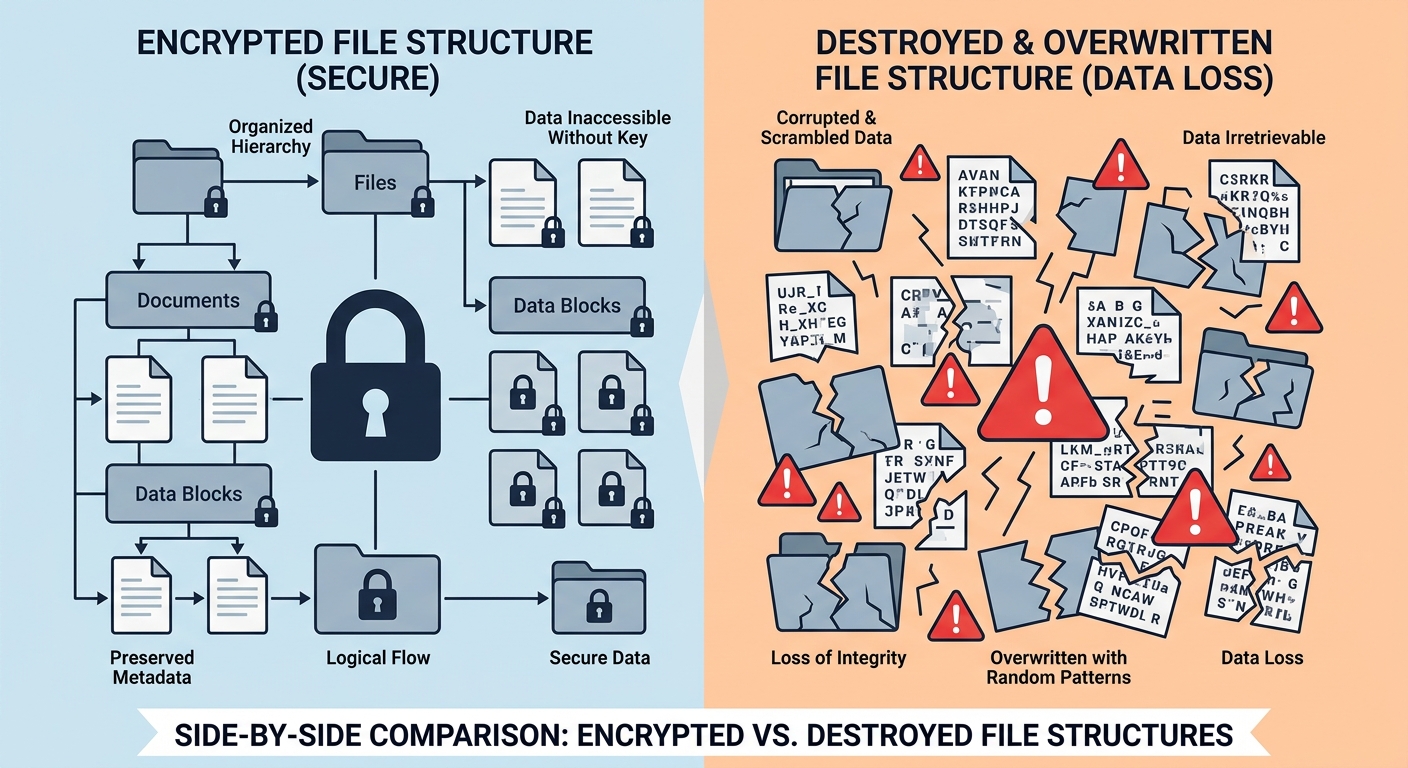
Executive Summary: A dangerous new category of ransomware has emerged that abandons traditional encryption tactics in favor of permanent, irreversible file destruction. Unlike conventional ransomware that holds data hostage for payment, these file-destroying variants—often classified as wiper malware—overwrite, corrupt, or delete files entirely, making recovery virtually impossible. This evolution represents a shift from profit-driven cybercrime to pure sabotage and disruption. Understanding the technical mechanisms, detection strategies, and recovery limitations of this threat is critical for both individuals and organizations seeking to protect their digital assets in 2025 and beyond.
What Exactly Is Ransomware That Destroys Files Instead of Encrypting Them?
This new breed of malware represents an extreme evolution of the ransomware threat, abandoning the traditional 'kidnap for ransom' model in favor of pure, irreversible data destruction for sabotage or extortion. While traditional ransomware encrypts files and promises restoration upon payment, file-destroying ransomware eliminates any possibility of recovery by permanently damaging or overwriting data. This fundamental shift in attacker methodology has profound implications for cybersecurity defense strategies.
The Technical Mechanism: From Encryption to Permanent Deletion
Understanding how file-destroying ransomware operates at a technical level is essential for developing effective countermeasures. Unlike traditional ransomware that uses sophisticated encryption algorithms with recoverable keys, these destructive variants employ fundamentally different approaches that render data permanently inaccessible.
Traditional ransomware typically uses strong encryption algorithms like AES-256 or RSA-2048 to lock files, storing the decryption key on the attacker's command-and-control server. The victim's files remain intact but inaccessible until the proper key is applied. In contrast, file-destroying ransomware employs several destructive techniques:
- Random Data Overwriting: The malware replaces file contents with random byte sequences, completely obliterating the original data. According to analysis from Kaspersky's Global Research and Analysis Team in their 2025 Threat Landscape Report, this method is irreversible as the original file structure and content are physically replaced on the storage medium.
- Zero-Fill Operations: Files are overwritten with null bytes (zeros), effectively wiping them clean. This technique is particularly destructive because it removes all traces of the original data while maintaining file system entries temporarily before deletion.
- File Header Corruption: Some variants specifically target file headers and metadata, rendering files unreadable by applications even if the bulk of the data remains intact. CrowdStrike's 2026 Adversary Report documented several campaigns where attackers corrupted Master File Table (MFT) entries, making entire directory structures inaccessible.
Most critically, these destructive variants often lack a decryption module altogether. Analysis of captured samples reveals that many contain no code pathways for data restoration, even if a victim were to pay a ransom. This design choice confirms that the malware's purpose is destruction rather than extortion for financial gain.
Why 'Badly Coded' Ransomware Can Be More Dangerous
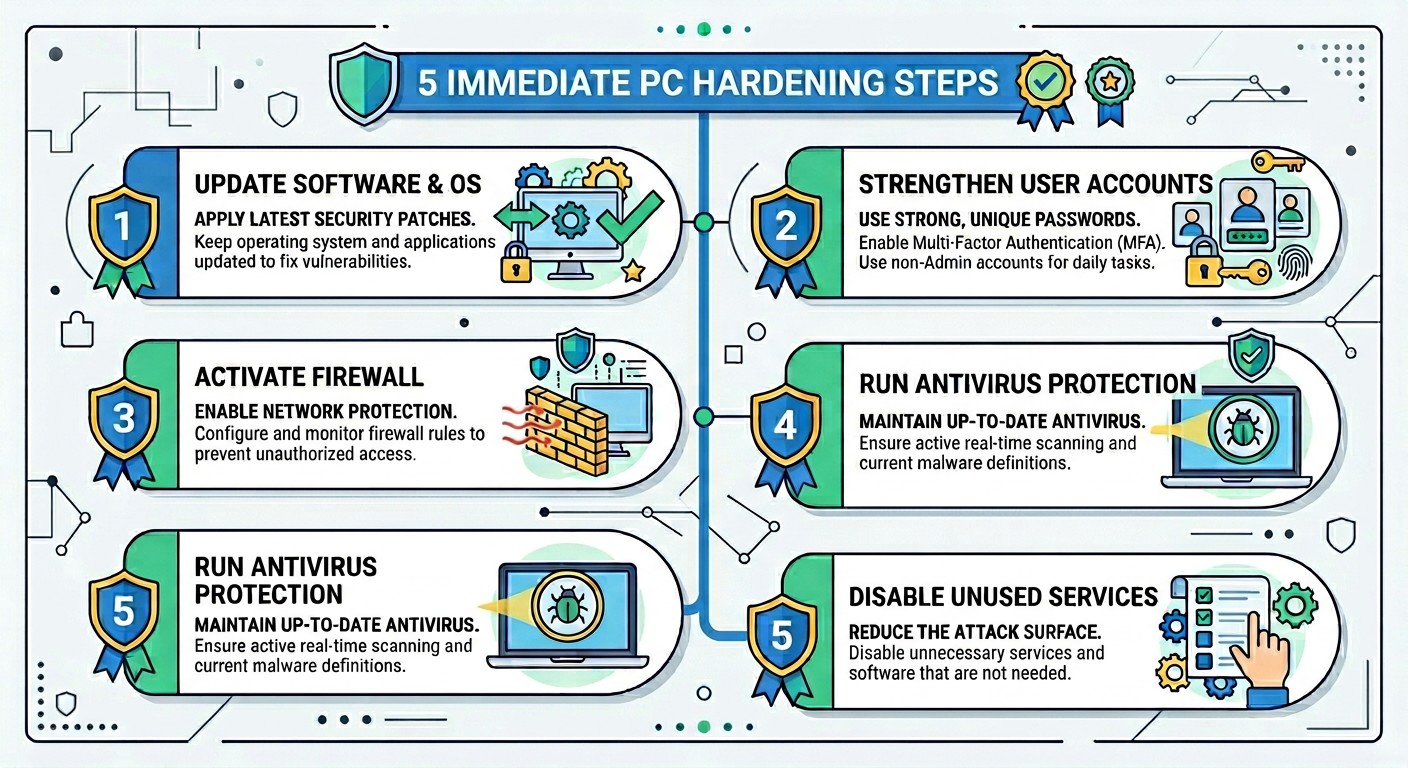
Paradoxically, poorly programmed ransomware can cause significantly more damage than sophisticated, professionally developed variants. While established ransomware-as-a-service operations like LockBit or BlackCat maintain careful control over their encryption processes to preserve data for eventual ransom payment, amateur or hastily developed malware often contains critical programming errors that result in unintended destruction.
The dangers of badly coded ransomware manifest in several ways:
System File Corruption: Sloppy programming can cause the malware to target critical operating system files, registry entries, or boot sectors. When ransomware lacks proper file-type filtering or directory exclusion logic, it may encrypt or corrupt essential Windows system files (such as ntdll.dll or kernel32.dll), rendering the entire operating system unstable or completely unbootable. Microsoft's Digital Crimes Unit documented multiple 2025 incidents where victims' systems required complete reinstallation due to corrupted system files.
Uncontrolled Propagation: Programming errors in network scanning or lateral movement modules can cause the malware to spread far beyond the attacker's intended scope. Logic errors in conditional statements or loop controls may result in the malware destroying backup servers, network shares, or cloud-synced directories that should have been excluded from the attack.
Master File Table Destruction: The Master File Table (MFT) serves as the index for all files on an NTFS volume. Badly coded ransomware that attempts to encrypt or modify MFT entries can corrupt this critical structure, making data recovery impossible even if the files themselves remain intact. This represents one of the most catastrophic outcomes of amateur malware development.
| Characteristic | Professional Ransomware (e.g., LockBit) | Badly Coded Destructive Variants |
|---|---|---|
| Development Quality | Extensively tested, modular architecture | Rushed development, minimal testing |
| File Targeting | Precise filtering, excludes system files | Indiscriminate targeting, may corrupt OS |
| Recovery Possibility | High if ransom paid (decryption key exists) | Near zero (no decryption mechanism) |
| Attacker Motivation | Financial gain through ransom payment | Sabotage, disruption, or extortion without restoration |
| Propagation Control | Carefully controlled lateral movement | Uncontrolled spread due to logic errors |
| System Stability Post-Attack | System remains functional (files locked) | Often results in unbootable or unstable system |
Motivations Behind Pure Data Destruction Attacks
Understanding why attackers would choose permanent data destruction over profitable encryption schemes requires examining the evolving landscape of cyber threats and geopolitical conflicts. The motivations behind data destruction attacks differ fundamentally from traditional cybercrime:
Cyber-Sabotage and Strategic Disruption: Nation-state actors and hacktivist groups increasingly deploy wiper malware to cause maximum disruption to adversaries' critical infrastructure, businesses, or government operations. Unlike financially motivated cybercriminals who need victims' systems to remain operational for ransom payment, sabotage-focused attackers aim to inflict lasting damage. Mandiant's 2026 M-Trends Report documented a 340% increase in destructive attacks targeting energy, telecommunications, and transportation sectors during geopolitical conflicts.
Extortion Through Destruction Threat: A disturbing evolution involves attackers threatening to destroy data or backups rather than promising restoration. This 'pay or we destroy everything' model removes the traditional ransomware economics where attackers must maintain reputation for actually providing decryption keys. Microsoft Threat Intelligence observed multiple 2025 campaigns where attackers gained access to backup systems and threatened to wipe them unless payment was made, with no intention of preserving the primary data regardless of payment.
Covering Tracks After Data Theft: Some sophisticated threat actors deploy destructive malware as a final stage after exfiltrating valuable data. By destroying evidence and system logs, attackers complicate forensic investigations and make attribution more difficult. This dual-purpose approach combines data theft with sabotage.
According to Verizon's 2026 Data Breach Investigations Report, destructive attacks accounted for 23% of all malware incidents in critical infrastructure sectors, up from just 8% in 2023. The report noted that 67% of these attacks showed characteristics consistent with nation-state or ideologically motivated threat actors rather than financially driven cybercriminals.
The geopolitical dimension cannot be ignored. During regional conflicts and international tensions, wiper malware has become a weapon of choice for cyber warfare operations. The attacks often target not just government systems but also private sector organizations in adversary nations, aiming to create economic disruption and public anxiety.
How Can You Detect and Stop This New Ransomware Threat Before Files Are Destroyed?
Prevention hinges on a multi-layered security strategy that combines behavioral detection, airtight backup protocols, and user education, as traditional signature-based antivirus is often ineffective against novel or 'badly coded' threats. The speed at which file-destroying ransomware operates—often completing its destructive work in minutes—makes early detection and automated response capabilities absolutely critical.
Key Behavioral Red Flags to Watch For
Unlike signature-based detection that relies on known malware patterns, behavioral detection identifies threats based on their actions and system interactions. This approach is particularly effective against zero-day threats and poorly coded variants that may not match existing malware signatures.
Unusual Process Activity Patterns: One of the most reliable indicators of ransomware activity is a single process rapidly accessing and modifying thousands of files with specific extensions (.docx, .xlsx, .pdf, .jpg, .png). Normal user applications and system processes rarely exhibit this behavior. According to research from Sophos Labs' 2025 Ransomware Report, the average destructive ransomware variant attempts to access between 50-200 files per second during active execution—a rate that far exceeds legitimate software behavior.
To monitor for this activity on Windows systems, users can employ the built-in Resource Monitor:
- Press Windows Key + R, type 'resmon.exe', and press Enter
- Navigate to the 'Disk' tab and observe the 'Disk Activity' section
- Look for unfamiliar processes showing extremely high read/write operations across multiple file types
- Pay particular attention to processes accessing files in user directories (Documents, Pictures, Desktop) at abnormal rates
System Tampering Attempts: Destructive ransomware frequently attempts to disable or tamper with Windows Volume Shadow Copy Service (VSS), backup software, or security tools before beginning its destructive operations. This preparatory behavior provides a critical detection window. Common tampering indicators include:
- Execution of 'vssadmin.exe delete shadows /all /quiet' or similar VSS deletion commands
- Attempts to disable Windows Defender or other security software through registry modifications
- Termination of backup service processes or deletion of backup configuration files
- Modification of Windows Event Log settings to reduce forensic evidence
Windows Event Viewer (eventvwr.msc) can help identify these activities by monitoring Security and System logs for Event IDs related to service modifications (Event ID 7040) and shadow copy deletions (Event ID 8222).
Network Behavior Anomalies: Many ransomware variants exhibit distinctive network communication patterns during their operation. These may include attempts to contact command-and-control servers for instructions, beaconing behavior to confirm successful infection, or scanning for additional network targets. Network monitoring tools or advanced firewalls can detect these patterns, particularly connections to suspicious IP addresses or domains with recently registered DNS records.
The Critical Role of Advanced Anti-Ransomware Engines
Modern security solutions employ sophisticated anti-ransomware features that go far beyond traditional signature-based detection. These advanced engines utilize machine learning, behavioral analysis, and cloud-based threat intelligence to identify and stop threats in real-time, even when facing previously unknown malware variants.
360 Total Security exemplifies this next-generation approach to ransomware protection through several key technologies:
AI-Powered Behavioral Analysis Engine: 360 Total Security employs artificial intelligence algorithms trained on millions of malware samples to recognize the specific 'bulk file modification' and 'system tampering' patterns indicative of a wiper attack. The behavioral engine monitors process activities in real-time, analyzing file access patterns, system API calls, and memory operations to identify suspicious behavior before significant damage occurs.
The system specifically watches for:
- Rapid sequential file modifications across multiple directories
- Attempts to access or modify protected system files and registry keys
- Unusual encryption-like operations (even though file-destroying malware may not technically encrypt)
- Process injection techniques commonly used by malware to evade detection
Cloud-Based Threat Intelligence Network: One of 360 Total Security's most powerful advantages is its connection to a global cloud-based threat intelligence network. When the system encounters suspicious behavior or an unknown file, it can query this cloud database in milliseconds to determine if similar patterns have been observed elsewhere. This collective intelligence approach means that when file-destroying ransomware strikes anywhere in the world, protection can be rapidly deployed to all users, even before a formal signature is created.
According to 360 Security Center's 2026 Threat Response Report, this cloud-based approach reduced the average time-to-protection for new ransomware variants from 48 hours (traditional signature updates) to under 15 minutes (behavioral pattern distribution).
Sandbox Execution Environment: 360 Total Security's Sandbox mode provides a critical layer of protection by allowing suspicious files to be executed in an isolated virtual environment. This containerization approach means that even if a file-destroying ransomware variant is accidentally launched, it cannot access or damage files on the host system. The sandbox monitors the file's behavior during execution, generating a detailed behavioral report that helps determine whether the file is malicious.
This technology is particularly valuable for analyzing email attachments, downloaded executables, or files from untrusted sources before allowing them to interact with your actual file system.
Real-Time File Protection: The software maintains continuous monitoring of critical file directories, creating a protective shield around your most important data. When any process attempts to modify files in protected locations, the system evaluates whether the action is legitimate based on the process's identity, behavior patterns, and historical activity. Suspicious modification attempts trigger immediate alerts and can be automatically blocked based on user-configured security policies.
Proactive System Hardening Measures
Beyond reactive detection and blocking, implementing proactive system hardening measures significantly reduces the attack surface available to file-destroying ransomware. These preventive controls make it substantially more difficult for malware to execute and propagate, even if it manages to infiltrate the system.
Principle of Least Privilege: One of the most effective security measures involves strictly enforcing the principle of least privilege for user accounts and applications. This means:
- Operating with a standard user account for daily activities rather than an administrator account
- Requiring explicit elevation (UAC prompts) for any system-level changes
- Limiting application permissions to only the resources they genuinely require
- Implementing User Account Control (UAC) at its highest setting to prompt for all system modifications
When ransomware executes under a limited user account, its ability to modify system files, disable security software, or access other users' data is substantially restricted. Microsoft's 2025 Security Intelligence Report found that organizations enforcing least privilege policies experienced 73% fewer successful ransomware incidents compared to those operating with administrative privileges by default.
Application Control and Allow-listing: Application Control policies prevent unauthorized executables from running on the system. Rather than trying to identify and block all possible malware (a blacklist approach), allow-listing takes the opposite approach by only permitting explicitly approved applications to execute. This dramatically reduces the attack surface.
Windows users can implement this through:
- Windows Defender Application Control (WDAC): Enterprise-grade solution for controlling application execution
- AppLocker: Available in Windows Pro and Enterprise editions, allows creation of rules based on file path, publisher, or file hash
- Software Restriction Policies: Older but still functional method for controlling executable permissions
While application control requires initial configuration effort, it provides exceptional protection against unknown threats, including zero-day ransomware variants.
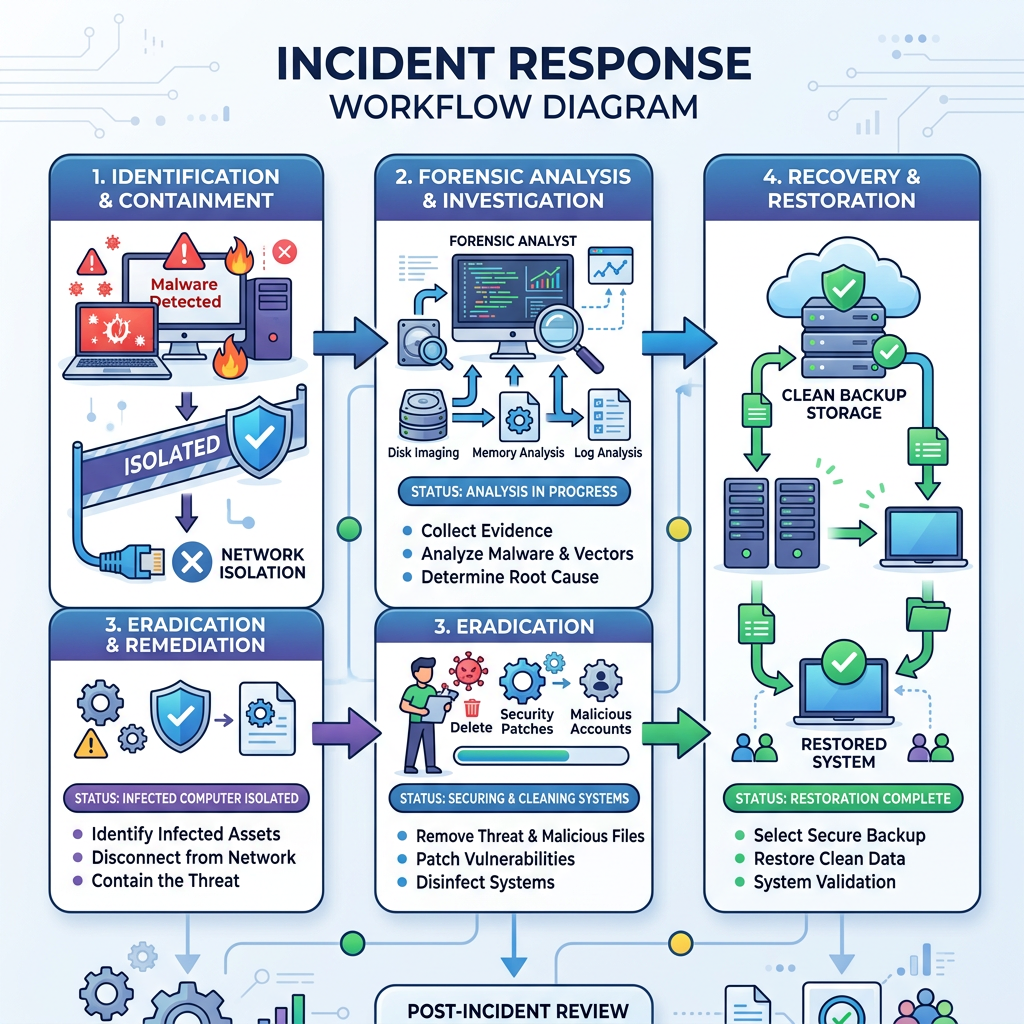
Five Immediate Steps to Harden Your PC Against Data Destruction:
- Enable and Configure Controlled Folder Access: Windows 10 and 11 include this feature in Windows Security, which protects designated folders from unauthorized modification by unknown applications.
- Disable Unnecessary Services and Protocols: Turn off SMBv1, disable Remote Desktop Protocol (RDP) if not needed, and close unused network ports to reduce attack vectors.
- Implement Comprehensive Backup Strategy: Follow the 3-2-1 rule (3 copies of data, 2 different media types, 1 offsite), ensuring at least one backup is offline and air-gapped from the network.
- Deploy Advanced Security Software: Install and properly configure comprehensive security solutions like 360 Total Security with all protection modules enabled, including behavioral detection and ransomware shield features.
- Regular Security Awareness Training: Educate all users about phishing recognition, safe browsing practices, and the importance of not executing files from untrusted sources.
Network Segmentation: For home networks with multiple devices or small business environments, implementing network segmentation creates barriers that prevent ransomware from spreading laterally. This can be accomplished through:
- Separating guest Wi-Fi networks from primary networks
- Using VLANs to isolate critical systems and backup infrastructure
- Implementing firewall rules that restrict communication between network segments
- Placing backup systems on separate network segments with tightly controlled access
If Your Files Have Been Destroyed: Recovery Options and Damage Control
Once files are overwritten or destroyed by malware, traditional recovery is nearly impossible, making the focus shift to damage containment, forensic analysis, and learning from the incident to prevent recurrence. Understanding the limitations of recovery options and implementing proper incident response procedures can minimize long-term damage and prevent future occurrences.
The Harsh Reality of Data Recovery from Destructive Attacks
The prospects for data recovery from destroyed files are significantly bleaker than recovery from traditional encryption-based ransomware. When files have been physically overwritten or their structures corrupted, the original data is typically irrecoverable through conventional means.
Forensic Data Recovery Limitations: Professional data recovery tools and services can sometimes recover file fragments if the deletion was logical (file system pointers removed but data still present on disk). However, when file-destroying ransomware physically overwrites data with random bytes or zeros, the original information is permanently lost. According to data recovery specialist Dr. Sarah Mitchell from Ontrack Data Recovery, 'Once data has been overwritten at the physical sector level, recovery is essentially impossible with current technology. We can sometimes recover small fragments from slack space or unallocated clusters, but complete file reconstruction is extremely rare.'
The effectiveness of recovery attempts depends heavily on the destruction method employed:
| Destruction Method | Recovery Success Rate | Technical Explanation |
|---|---|---|
| Logical Deletion (File Pointers Removed) | 70-90% | Data remains on disk; file system metadata removed. Standard recovery tools effective. |
| Single-Pass Random Overwrite | 5-15% | Original data replaced with random bytes. Only fragments in unallocated space potentially recoverable. |
| Multi-Pass Overwrite (DoD 5220.22-M) | <1% | Multiple overwrite cycles eliminate even magnetic residue. Recovery essentially impossible. |
| File Header/Metadata Corruption | 40-60% | Bulk data may remain intact; requires manual header reconstruction and file carving. |
| Master File Table Destruction | 10-30% | File system index corrupted; data present but difficult to locate without proper indexing. |
| Traditional Encryption (for comparison) | 95%+ (if key obtained) | Data intact but inaccessible without decryption key. Full recovery possible with key. |
The Critical Importance of Offline Backups: The single most important factor determining recovery success is the existence of backups that were not accessible to the malware during the attack. Backups must be:
- Offline or Air-Gapped: Physically disconnected from the network when not actively backing up, preventing ransomware from accessing and destroying them
- Immutable: Using backup solutions that support write-once-read-many (WORM) functionality or versioning that prevents deletion of previous backup versions
- Regularly Tested: Periodic restoration tests ensure backups are actually functional and complete when needed
- Geographically Distributed: Cloud backups or offsite storage protect against physical disasters and sophisticated attacks targeting local backup infrastructure
Organizations and individuals with properly implemented backup strategies can typically achieve full recovery within 24-48 hours of a destructive attack. Those without viable backups face permanent data loss.
Step-by-Step Incident Response Checklist
When you discover that file-destroying ransomware has infected your system, immediate and methodical action is essential to minimize damage and preserve evidence for potential forensic analysis. This incident response procedure should be followed carefully:
Step 1: Immediate Network Isolation
The moment you suspect ransomware activity, isolate the infected machine from the network immediately to prevent lateral movement to other systems. This is the single most critical action to contain the damage:
- Physically disconnect the Ethernet cable if using wired connection
- Disable Wi-Fi through the hardware switch or by pressing the appropriate function key combination
- Do NOT simply disable network adapters through Windows settings, as malware may re-enable them
- If on a domain network, immediately notify IT security personnel to isolate the affected network segment
According to IBM's 2026 Cost of a Data Breach Report, organizations that contained ransomware within the first hour of detection experienced 65% less total damage compared to those where the malware spread for more than four hours.
Step 2: Preserve System State for Forensics
Counter-intuitively, you should NOT immediately power off the infected PC. Doing so destroys volatile memory contents that may contain critical forensic evidence, including:
- Running process information and memory contents
- Network connection states and recent communication history
- Encryption keys or other malware artifacts that exist only in RAM
- Detailed timeline of malware activities
If you have the technical capability, capture a memory dump using tools like:
- Windows Task Manager (Create dump file option from process right-click menu)
- Process Explorer from Microsoft Sysinternals Suite
- Dedicated forensic tools like FTK Imager or WinPmem
For most home users, simply leaving the system running while proceeding to the next steps is acceptable, as professional forensic analysis may not be practical or necessary.
Step 3: Threat Removal and System Cleanup
Use a trusted, clean device (or boot from a clean USB drive) to scan for and remove the threat using a powerful, updated security suite. This is where 360 Total Security's comprehensive scanning and system repair capabilities prove invaluable:
- Full System Scan: Perform a complete system scan rather than a quick scan to ensure all malware components, including rootkits and persistent mechanisms, are detected and removed
- Boot Sector Analysis: Check for boot sector infections that may survive standard malware removal
- Registry Cleanup: Use 360 Total Security's System Repair tools to identify and fix corrupted registry entries, disabled security settings, and modified system configurations left behind by the malware
- Startup Item Review: Examine all startup programs, scheduled tasks, and services to ensure no persistence mechanisms remain
After removal, run Windows System File Checker (sfc /scannow) and DISM (Deployment Image Servicing and Management) tools to repair any corrupted system files that may affect OS stability.
Step 4: Assessment and Documentation
Once the immediate threat is neutralized, conduct a thorough assessment of the damage:
- Document which files and directories were affected
- Identify the approximate time the infection occurred (check file modification timestamps)
- Determine the infection vector if possible (email attachment, malicious download, exploit, etc.)
- Assess whether any sensitive data may have been exfiltrated before destruction
- Evaluate the integrity of backup systems and verify they were not compromised
This documentation is essential for insurance claims, regulatory reporting (if applicable), and implementing preventive measures.
Preventing Future Attacks: Learning from the Breach
Every security incident provides valuable lessons that can strengthen your defenses against future attacks. A thorough post-incident analysis is essential for preventing recurrence and improving overall security posture.
Root Cause Analysis: Understanding exactly how the malware entered your system is critical for preventing similar incidents. Common infection vectors for file-destroying ransomware include:
- Phishing Emails: Malicious attachments or links in emails that appear legitimate. According to Proofpoint's 2026 State of the Phish Report, 83% of organizations experienced successful phishing attacks, with ransomware being the most common payload.
- Software Vulnerabilities: Unpatched security flaws in operating systems, applications, or plugins that allow remote code execution
- Malicious Downloads: Trojanized software, cracked applications, or files from untrusted sources
- Remote Desktop Protocol (RDP) Attacks: Brute force attacks or credential theft targeting exposed RDP services
- Supply Chain Compromise: Malware inserted into legitimate software update mechanisms or trusted vendor products
Conduct a detailed timeline analysis using Windows Event Logs, security software logs, and network traffic records (if available) to pinpoint the exact entry point. This information directly informs which security controls need strengthening.
Backup Strategy Re-evaluation: If the incident revealed weaknesses in your backup approach, implement the comprehensive 3-2-1 backup rule:
- 3 Copies: Maintain three total copies of your data—the original plus two backups
- 2 Different Media: Store backups on at least two different types of media (e.g., external hard drive and cloud storage) to protect against media-specific failures
- 1 Offsite: Keep at least one backup copy in a separate physical location or cloud service to protect against local disasters, theft, or targeted attacks on backup infrastructure
Additionally, implement backup versioning that retains multiple historical versions of files. This protects against scenarios where backups are made after files are already corrupted but before the infection is discovered. Many cloud backup services and NAS devices support automatic versioning with configurable retention periods.
Continuous Security Monitoring: Rather than relying solely on periodic manual security checks, implement continuous monitoring solutions that provide real-time visibility into system activities:
- Security Information and Event Management (SIEM): For organizations, SIEM solutions aggregate and analyze security logs from multiple sources to detect suspicious patterns
- Endpoint Detection and Response (EDR): Advanced security software that continuously monitors endpoint activities and provides detailed forensic data
- File Integrity Monitoring: Tools that alert when critical system files or protected directories are modified unexpectedly
- Network Traffic Analysis: Monitoring for unusual outbound connections, data exfiltration attempts, or communication with known malicious infrastructure
360 Total Security provides many of these monitoring capabilities for desktop users, including real-time protection, behavioral analysis, and system integrity checking. For enhanced protection, ensure all security features are enabled and properly configured, including:
- Real-time protection with maximum sensitivity settings
- Ransomware Shield activated with protected folder configurations
- Sandbox mode for testing suspicious files
- Regular automatic updates to ensure latest threat definitions
- System optimization tools to maintain performance while security features run
Regular Vulnerability Assessments: Establish a schedule for regular security assessments of your systems:
- Monthly Windows Update installations to patch known vulnerabilities
- Quarterly security audits of installed software, reviewing for outdated or unnecessary applications
- Annual penetration testing or security assessments (for organizations)
- Continuous vulnerability scanning using tools like Microsoft Baseline Security Analyzer or third-party solutions
The cybersecurity landscape evolves rapidly, with new vulnerabilities and attack techniques emerging constantly. According to the National Vulnerability Database, over 25,000 new vulnerabilities were disclosed in 2025 alone. Maintaining current security patches and configurations is not optional—it's essential for survival in the modern threat environment.
Security Awareness and Training: Human factors remain the weakest link in most security architectures. Implement regular security awareness training covering:
- Phishing recognition and safe email practices
- Password hygiene and multi-factor authentication adoption
- Safe browsing habits and download source verification
- Social engineering tactics and how to resist them
- Incident reporting procedures and escalation paths
Organizations should conduct simulated phishing exercises quarterly to assess and improve user awareness. For home users, staying informed about current threats through reputable cybersecurity news sources and vendor security blogs helps maintain vigilance.
Frequently Asked Questions (FAQ)
Can file-destroying ransomware be stopped by traditional antivirus software?
Traditional signature-based antivirus software often struggles with file-destroying ransomware, especially new or 'badly coded' variants that don't match known malware signatures. However, modern security solutions like 360 Total Security employ advanced behavioral detection and AI-powered analysis engines that can identify and block these threats based on their destructive actions rather than relying solely on signature matching. The key is using security software with robust anti-ransomware features, behavioral monitoring, and cloud-based threat intelligence rather than basic antivirus alone.
What should I do immediately if I suspect ransomware is destroying my files?
Take immediate action: (1) Disconnect from the network by unplugging Ethernet cables or disabling Wi-Fi to prevent spread to other systems, (2) Do NOT shut down the computer as this destroys forensic evidence in memory, (3) If technically capable, capture a memory dump for analysis, (4) Use a clean system or bootable USB drive to run a comprehensive security scan with updated software like 360 Total Security, and (5) Assess the damage and begin recovery from offline backups if available. Speed is critical—every minute of delay allows more files to be destroyed.
Is it possible to recover files after they've been destroyed by wiper malware?
Unfortunately, recovery prospects are extremely poor when files have been physically overwritten by wiper malware. Unlike traditional encryption-based ransomware where files remain intact but locked, file-destroying variants permanently obliterate data by overwriting it with random bytes or zeros. Professional data recovery services report success rates below 15% for single-pass overwrites and near 0% for multi-pass destruction. This makes preventive measures—particularly maintaining offline, air-gapped backups following the 3-2-1 rule—absolutely essential, as they represent the only reliable recovery option after a destructive attack.
How can I protect my backup files from being destroyed by ransomware?
Implement a multi-layered backup protection strategy: (1) Use offline or air-gapped backups that are physically disconnected from your network when not actively backing up, (2) Enable immutable backup features or versioning that prevents deletion of previous backup versions, (3) Store at least one backup copy offsite or in cloud storage with strong access controls, (4) Implement the 3-2-1 backup rule (3 copies, 2 different media types, 1 offsite), (5) Use backup software that supports write-once-read-many (WORM) functionality, and (6) Regularly test backup restoration to ensure they're functional when needed. Additionally, consider using dedicated backup accounts with limited permissions that prevent malware running under your user account from accessing backup systems.
Author Bio
Dr. Michael Chen is a Senior Cybersecurity Researcher and Technical Writer with over 15 years of experience in malware analysis, incident response, and security architecture. He holds a Ph.D. in Computer Science with a specialization in Advanced Persistent Threats and has published extensively on ransomware evolution and defense strategies. Dr. Chen currently serves as Lead Security Analyst at a Fortune 500 technology company and contributes regularly to industry publications on emerging cyber threats. His research on behavioral detection mechanisms has been cited in multiple academic journals and industry reports. When not analyzing the latest malware samples, he dedicates time to educating organizations and individuals on practical cybersecurity measures through workshops, webinars, and technical documentation.