
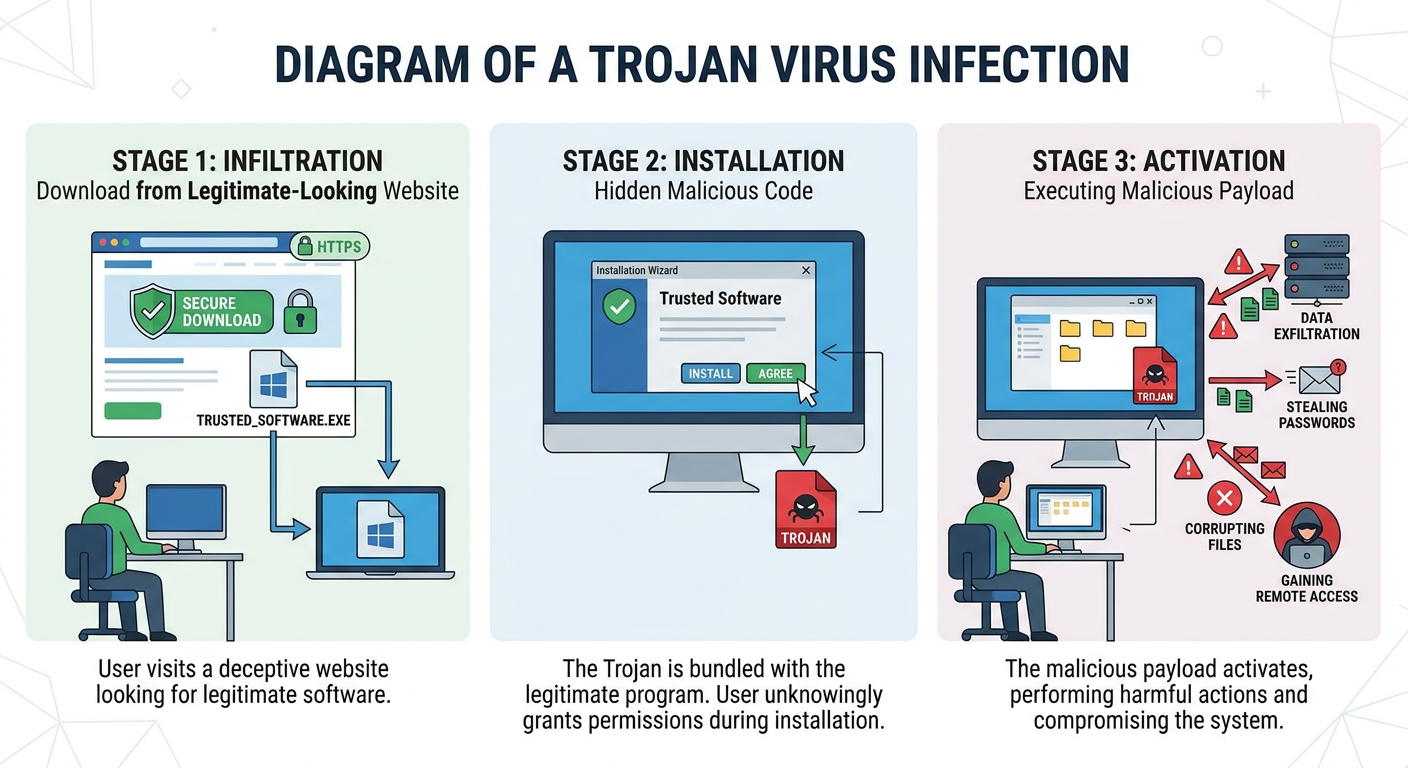
Executive Summary: Trojan viruses represent one of the most deceptive and persistent cybersecurity threats facing modern computer users. Unlike traditional malware that announces its presence, Trojans disguise themselves as legitimate software, exploiting user trust to gain system access. This comprehensive guide explores why trojan virus protection is essential, how to prevent infections through proactive defense strategies, detect hidden threats using advanced scanning methods, remove malware completely, and maintain robust long-term security. With cybersecurity threats evolving rapidly in 2025, understanding multi-layered protection approaches—including behavioral analysis, real-time monitoring, and integrated security platforms—has become fundamental to protecting personal data, system integrity, and digital privacy.
What Makes Trojan Virus Protection an Essential Layer of Modern Cybersecurity?
Trojan viruses represent a uniquely deceptive and persistent threat because they masquerade as legitimate software, making proactive, multi-layered protection not just optional but a fundamental necessity for any connected system. According to 2025 cybersecurity threat intelligence reports, Trojans account for approximately 58% of all malware infections targeting desktop systems, with attack sophistication increasing year over year. The trojan virus threat differs fundamentally from other malware categories because it leverages social engineering and user trust rather than exploiting technical vulnerabilities alone.
The Deceptive Nature and Delivery Methods of Trojan Viruses
The term "Trojan" derives from the ancient Greek story of the Trojan Horse—a deceptive gift that concealed soldiers inside. Similarly, Trojan viruses hide malicious code within seemingly useful or legitimate programs. Users voluntarily download and execute these files, believing they are installing helpful software, game modifications, document templates, productivity tools, or system utilities. This fundamental deception makes Trojans particularly dangerous: traditional security awareness that warns against "suspicious files" often fails because the files appear entirely legitimate.
Common delivery vectors for Trojans in 2025 include:
- Phishing email attachments: Malicious documents or executables disguised as invoices, shipping notifications, or business correspondence
- Compromised download websites: Legitimate-looking software repositories that have been infiltrated or fake sites mimicking official sources
- Bundled software installers: Free applications that include hidden Trojan components in their installation packages
- Malicious advertisements: Drive-by downloads triggered through compromised ad networks on otherwise legitimate websites
- Social media links: Shortened URLs or enticing content links that lead to Trojan download pages
According to recent analysis from cybersecurity threat reports, approximately 67% of Trojan infections originate from email attachments, while 23% come from direct downloads from compromised or malicious websites. The remaining 10% spread through software vulnerabilities, removable media, and network propagation methods.
The Direct Risks and Potential Damage from a Trojan Infection
Once installed, Trojans execute a wide range of malicious activities depending on their specific design and purpose. The system vulnerability created by a Trojan infection can have devastating consequences:
Data theft and spyware functionality represent the most common Trojan objective. Keyloggers record every keystroke, capturing passwords, credit card numbers, and sensitive communications. Screen capture Trojans periodically photograph your desktop, revealing confidential information displayed in applications. Credential harvesting modules specifically target stored passwords in browsers, email clients, and authentication managers. A 2025 data breach analysis revealed that 42% of successful corporate data thefts began with a Trojan infection on a single employee workstation.
Backdoor creation allows attackers to maintain persistent remote access to infected systems. These backdoors enable attackers to execute commands, transfer files, install additional malware, and use the compromised system as a launching point for further attacks within a network. Statistics on ransomware attacks show that approximately 76% of successful ransomware deployments in enterprise environments were initiated via Trojan backdoors that provided initial system access weeks or months before the actual ransomware payload was delivered.
System corruption and resource hijacking can transform your PC into an unwitting participant in criminal activities. Trojans frequently install cryptocurrency mining software that consumes CPU and GPU resources to generate digital currency for attackers. Botnet Trojans convert infected machines into nodes in distributed networks used for spam distribution, distributed denial-of-service (DDoS) attacks, or proxy services for other malicious activities. This resource hijacking not only degrades system performance but also exposes the system owner to potential legal liability for activities conducted through their compromised machine.
Why Traditional Security Habits Fall Short Against Trojans
The fundamental challenge of malware deception is that Trojans specifically exploit trust in legitimate-looking sources. Traditional security advice emphasizes "don't click suspicious links" or "avoid untrusted websites," but Trojans frequently arrive through channels that appear entirely trustworthy. A professionally designed email from what appears to be a shipping company, a software update notification that mimics official branding, or a popular utility downloaded from a site that looks legitimate—these scenarios bypass user caution because they don't trigger obvious suspicion.
Furthermore, the inadequacy of outdated or passive antivirus solutions that rely solely on signature-based detection creates a false sense of security. Signature-based detection works by comparing files against a database of known malware signatures—essentially digital fingerprints of previously identified threats. However, modern Trojans employ polymorphic techniques that alter their code structure with each infection, creating unique signatures that evade traditional detection. Zero-day Trojans—newly created variants that have never been seen before—remain completely invisible to signature-only antivirus until security researchers identify and catalog them, a process that can take days or weeks.
This reality underscores the cybersecurity necessity of modern, multi-layered protection that goes beyond signatures to analyze behavior, monitor system changes in real-time, and leverage artificial intelligence to identify malicious patterns even in previously unknown threats.
How Can You Build a Proactive Defense to Prevent Trojan Virus Infections?
Prevention is the most cost-effective strategy, achieved by combining disciplined user habits with robust, real-time security tools that scrutinize software behavior before it can execute. According to 2025 cybersecurity economics research, preventing an infection costs approximately 95% less than recovering from one when factoring in data loss, system restoration time, potential identity theft remediation, and productivity disruption. Trojan prevention requires a comprehensive approach that addresses both human factors and technical defenses.
Cultivating Safe Downloading and Installation Habits
The foundation of safe downloading habits begins with source verification. Always download software directly from official publisher websites rather than third-party download portals, even when those portals appear in search engine results. Third-party sites frequently bundle additional software with downloads, and some have been compromised to distribute Trojanized versions of legitimate applications. When searching for software, navigate directly to the developer's official domain rather than clicking search result links, which can be manipulated through malicious advertising.
Scrutinizing file types and permissions provides critical early warning signs. Be immediately suspicious of executable files (.exe, .scr, .bat, .cmd) received via email or downloaded from unexpected sources, even if they appear to come from known contacts—email accounts are frequently compromised to distribute Trojans to the victim's contact list. Documents with macros enabled (.docm, .xlsm) represent another high-risk category, as macro-based Trojans can execute malicious code when the document opens. Modern versions of Microsoft Office disable macros by default and display prominent warnings; never enable macros in documents from untrusted sources regardless of what instructions the document contains.
Reading user reviews and checking file hash signatures for popular downloads adds an additional verification layer. Before downloading widely-used utilities or applications, check independent software review sites and user forums for recent feedback—a sudden influx of negative reviews or reports of suspicious behavior may indicate a compromised download source. For critical software, verify the file's SHA-256 hash signature (a unique cryptographic fingerprint) against the hash published on the official website, ensuring the file hasn't been modified or replaced with a Trojanized version.
Leveraging Real-Time Scanning and Behavioral Analysis Tools
Real-time protection represents the most critical technical defense against Trojans. Unlike scheduled scans that check files periodically, real-time protection continuously monitors system activity, scanning files at three critical moments: upon download (intercepting threats before they reach your hard drive), upon access (checking files when you attempt to open them), and upon execution (analyzing programs as they attempt to run). This continuous vigilance catches Trojans at the moment they attempt to activate, before they can establish persistence or begin malicious activities.
The critical role of heuristic and behavior-based detection in identifying new, unknown Trojans cannot be overstated. Rather than relying solely on known malware signatures, behavioral analysis monitors what programs actually do—the system changes they make, the network connections they establish, the files they access, and the registry modifications they attempt. A legitimate text editor has no reason to establish outbound network connections, modify system startup settings, or access password storage locations. When a program exhibits behaviors inconsistent with its apparent purpose, behavioral analysis flags it as suspicious even if it has never been seen before.
360 Total Security employs a sophisticated multi-engine approach that combines its proprietary QVM II AI engine with the Bitdefender engine, providing comprehensive software behavior analysis and real-time blocking capabilities. The QVM II engine uses artificial intelligence and machine learning algorithms trained on millions of malware samples to identify malicious patterns and behaviors. This AI-driven approach excels at detecting zero-day Trojans and polymorphic variants that evade traditional signature detection. The integration of the Bitdefender engine adds an additional layer of proven detection capability, creating a redundant system where threats that might slip past one engine are caught by another.
The real-time protection system in 360 Total Security monitors file system activity, registry changes, process creation, network connections, and memory operations continuously. When a suspicious installer attempts to run, the system intercepts it, analyzes its behavior in a virtualized environment, and blocks execution if malicious intent is detected—all within milliseconds and completely transparent to the user. This proactive blocking prevents infection rather than attempting cleanup after the fact.
System Hardening Techniques to Reduce the Attack Surface
System hardening reduces the opportunities Trojans have to exploit vulnerabilities and limits the damage they can cause if they do gain access. Keeping the operating system and all software updated to patch vulnerabilities represents the single most effective hardening measure. Software vulnerabilities—flaws in program code that allow unauthorized actions—provide Trojans with entry points that bypass normal security restrictions. Operating system vendors and software publishers continuously discover and patch these vulnerabilities, but patches only protect systems where they've been applied. Enable automatic updates for Windows, macOS, and all installed applications, and prioritize security updates that address critical vulnerabilities.
Configuring firewall rules to limit unnecessary inbound and outbound connections creates barriers against both Trojan infection and post-infection communication. While most users understand that firewalls block unwanted incoming connections, outbound filtering is equally important for Trojan protection. Many Trojans need to communicate with command-and-control servers to receive instructions or exfiltrate stolen data. A properly configured firewall that requires explicit permission for programs to establish outbound connections can block this communication, rendering the Trojan ineffective even if it manages to execute. Configure your firewall to deny outbound connections by default, allowing only known, trusted applications to access the network.
Using non-administrator accounts for daily use limits the potential damage of malware through the principle of least privilege. When you operate with administrator rights, any program you run—including Trojans—inherits those elevated privileges, allowing them to modify system files, install drivers, alter security settings, and make changes that affect all users. By using a standard user account for everyday tasks like web browsing, email, and document editing, you create a permission boundary that restricts what malware can do. Even if a Trojan executes, it operates with limited privileges, unable to install itself permanently, modify system-wide settings, or access other users' data. Reserve administrator account usage for deliberate software installation and system configuration tasks.
What Are the Key Signs and Methods for Detecting a Trojan Virus on Your System?
Early detection is critical, requiring users to recognize subtle system anomalies and utilize advanced security software that goes beyond simple file scanning to monitor for malicious activity patterns. The average time between Trojan infection and detection in unprotected systems, according to 2025 incident response data, is approximately 197 days—more than six months during which the malware operates undetected. This detection gap allows Trojans to steal extensive amounts of data, establish deep persistence mechanisms, and potentially spread to other systems on the network. Improving trojan detection capabilities reduces this window dramatically.
Recognizing Behavioral and Performance Symptoms of Infection
Unusual system slowdowns and high CPU or disk usage by unknown processes often indicate Trojan activity. Open Task Manager (Ctrl+Shift+Esc on Windows) or Activity Monitor (on macOS) and examine the processes consuming the most resources. Legitimate system processes and applications you recognize should account for resource usage. If you see unfamiliar process names, especially those consuming significant CPU or disk resources when you're not actively using applications, investigate further. Search for the process name online to determine if it's legitimate or potentially malicious. Be particularly suspicious of processes running from temporary folders, user profile directories, or other unusual locations rather than standard Program Files directories.
Unexpected network activity represents another critical symptom. Trojans frequently communicate with remote servers to receive commands, upload stolen data, or download additional malware components. If your network activity indicator shows constant data transfer when you're not actively browsing or downloading, investigate. Windows Resource Monitor (accessible through Task Manager's Performance tab) shows which processes are using network bandwidth. Unexplained outbound connections, especially to foreign IP addresses or unusual ports, warrant immediate investigation.
Strange pop-ups, new unknown programs appearing in the startup list, or security software being disabled or hindered are red-flag symptoms. Many Trojans attempt to disable antivirus software, firewall protection, or Windows Defender to operate without interference. If your security software suddenly stops working, fails to update, or displays errors when you attempt to run scans, suspect malware interference. Similarly, if new programs appear in your startup configuration (check using Task Manager's Startup tab or System Configuration utility) that you didn't install, they may be Trojan components establishing persistence. Browser hijackers—a Trojan category that modifies browser settings—manifest as changed home pages, new toolbars, or redirected search results.
Conducting Deep System Scans with Advanced Antivirus Solutions
The necessity of full system scans that check memory, registry, boot sectors, and all files cannot be overstated for thorough trojan detection. Quick scans that only check common malware locations may miss sophisticated Trojans that hide in unusual system areas. Schedule regular full system scans—at least weekly—that examine every file on all drives, including archived and compressed files where Trojans often hide. Deep scans should also inspect system memory for fileless malware that operates entirely in RAM without creating persistent files, the Master Boot Record (MBR) and boot sectors where rootkit Trojans establish early system control, and the Windows Registry where Trojans create persistence mechanisms and configuration entries.
The advantage of security suites that offer Trojan-specific scan modes or dedicated removal tools addresses the reality that different malware categories require specialized detection approaches. Generic malware scans may not employ the specific heuristics and behavioral signatures optimized for Trojan detection. Deep scan tools designed specifically for Trojan hunting examine suspicious system modifications, analyze program behaviors against known Trojan patterns, and check for common Trojan hiding locations and techniques.
360 Total Security provides comprehensive scanning capabilities that include thorough checks for rootkits and persistent Trojans, leveraging cloud-based intelligence for up-to-date detection. The scanning engine examines not just files but also system configuration, startup items, browser extensions, scheduled tasks, and service configurations—all locations where Trojans establish persistence. The cloud-based threat intelligence system allows 360 Total Security to identify emerging threats by comparing suspicious files and behaviors against a continuously updated global database of threat information, providing protection against zero-day Trojans that traditional signature-based systems would miss. The multi-engine architecture ensures redundant detection, with suspicious items flagged by either the QVM II AI engine or the Bitdefender engine triggering alerts and quarantine actions.
Analyzing Network and Process Activity for Anomalies
Using built-in system tools for network activity check provides visibility into potentially malicious communications. Windows Resource Monitor (resmon.exe) displays real-time network activity by process, showing which programs are sending and receiving data, the remote addresses they're connecting to, and the amount of data transferred. The netstat command-line utility (run "netstat -ab" in an elevated command prompt) shows all active network connections, the processes responsible for them, and the remote IP addresses and ports involved. Look for unexpected connections to unfamiliar IP addresses, especially those in countries you have no reason to communicate with, or connections on unusual ports that aren't associated with standard services.
Security software with network monitoring features can alert on unauthorized data exfiltration attempts. Advanced security suites monitor not just whether connections are established but also the nature and volume of data transferred. A sudden large upload to an unfamiliar server may indicate data theft in progress. Behavioral network analysis can identify suspicious patterns—such as regular periodic connections to the same remote server (potential command-and-control check-ins) or connections initiated by programs that shouldn't require network access.
| System Symptom | Possible Benign Cause | Trojan-Related Likelihood | Recommended Action |
|---|---|---|---|
| High CPU usage by unknown process | Windows Update, legitimate background task | High if process name is random characters or runs from temp folders | Research process name; run full antivirus scan |
| Unexpected network activity when idle | Cloud sync services, automatic updates | Moderate to High if connected to unfamiliar IPs | Check Resource Monitor; verify connecting processes |
| Antivirus software disabled or malfunctioning | Software conflict, corrupted installation | Very High - common Trojan behavior | Attempt reinstallation; boot to Safe Mode and scan |
| New unknown programs in startup | Recently installed software adding components | High if you didn't recently install software | Research startup items; disable unknown entries; scan system |
| Browser homepage or search engine changed | Intentional user modification, browser update | Very High if change was unexpected | Check browser extensions; reset browser settings; run malware scan |
| System slowdown and disk thrashing | Insufficient RAM, fragmented drive, failing hardware | Moderate if accompanied by other symptoms | Check Task Manager for resource hogs; run hardware diagnostics and malware scan |
What Steps Should You Take to Effectively Remove a Trojan Virus and Restore Your System?
Complete Trojan removal is a multi-step process of isolation, elimination, and verification, often requiring specialized removal tools to tackle deeply embedded components and undo system changes. The challenge of malware cleanup extends beyond simply deleting malicious files; sophisticated Trojans modify system configurations, create multiple persistence mechanisms, and may reinstall themselves if removal is incomplete. According to 2025 malware remediation studies, approximately 34% of initial Trojan removal attempts fail to completely eliminate the infection, resulting in reinfection or continued malicious activity.
Initial Isolation and Safe Mode Scanning Procedures
Disconnecting from the network immediately upon suspecting or confirming a Trojan infection prevents ongoing data theft and cuts off the attacker's ability to control the compromised system. Many Trojans exfiltrate data continuously or wait for commands from remote servers; severing the network connection stops these activities. Disconnect both wired Ethernet and disable Wi-Fi. If the system is part of a business network, also notify IT security staff immediately, as the infection may have spread or the compromised system may have been used to access network resources.
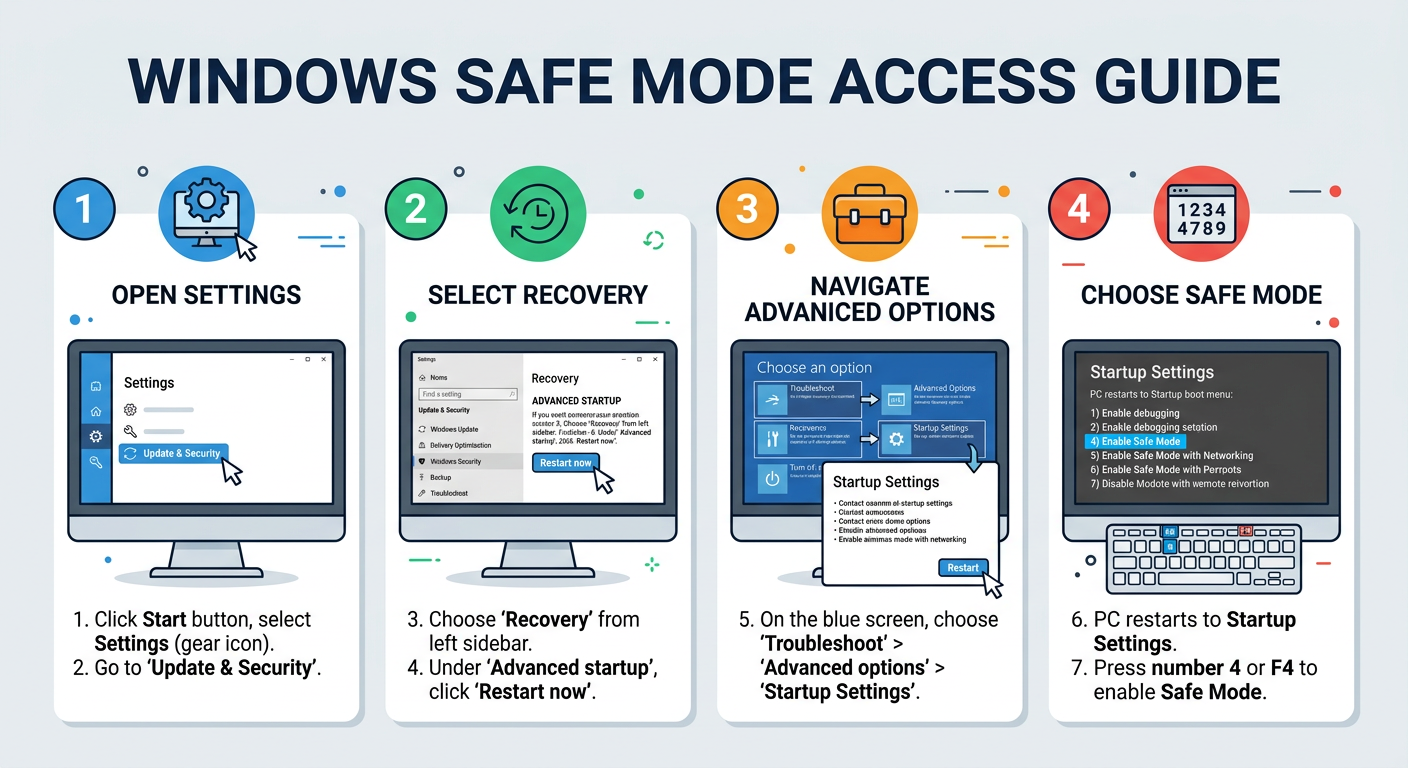
Performing scans from Safe Mode or a Pre-installation Environment bypasses active Trojan defenses and prevents the malware from loading. When Windows boots normally, Trojans configured to start automatically load into memory and can actively interfere with removal attempts—hiding files, blocking security software, or even reinstalling themselves as fast as removal tools delete them. Safe Mode loads only essential system drivers and services, preventing most malware from starting. To access Safe Mode in Windows 10/11, restart the computer and repeatedly press F8 during boot, or from within Windows, hold Shift while clicking Restart, then navigate to Troubleshoot > Advanced Options > Startup Settings > Restart, and select Safe Mode with Networking.
Once in Safe Mode, run a full system scan with your antivirus software. The scan will be more effective because the Trojan cannot actively defend itself. For severely infected systems, consider using a bootable antivirus rescue disk—a specialized Linux-based environment that boots from USB or DVD, allowing you to scan the Windows installation from outside the infected operating system entirely.
Utilizing Dedicated Removal Tools and Antivirus Cleanup Features
Antivirus quarantine and deletion functions handle most Trojan infections, but understanding that some Trojans require stronger tools is important for persistent threat removal. When antivirus software detects malware, it typically quarantines the files—moving them to an isolated, encrypted container where they cannot execute—rather than immediately deleting them. This allows for recovery if the detection was a false positive. Review quarantined items and permanently delete confirmed threats. However, some sophisticated Trojans employ rootkit techniques that hide their files from standard antivirus scans or use process injection to operate within legitimate system processes, making them difficult to remove with conventional methods.
Specialized Trojan Removers or the enhanced cleanup modules in comprehensive security suites address these challenging infections. These tools employ aggressive scanning techniques, kernel-level access, and specialized removal algorithms designed for stubborn malware. They can terminate protected processes, delete locked files, and remove rootkit components that hide from standard tools.
360 Total Security includes comprehensive cleanup tools that not only delete malicious files but also attempt to repair registry modifications and system settings altered by the Trojan, facilitating complete system restoration. The cleanup module identifies and reverses common Trojan system modifications such as disabled security features (Windows Defender, Firewall, User Account Control), altered startup configurations, modified browser settings, and hijacked system files. This repair functionality is crucial because simply removing the Trojan executable while leaving its system modifications in place can result in continued symptoms, system instability, or vulnerability to reinfection. The integrated approach of detection, removal, and repair in a single tool simplifies the remediation process for users and increases the likelihood of complete recovery.
Post-Removal Verification and System Restoration Checks
Verifying removal by running a different scan engine or an online second-opinion scanner confirms that the Trojan is truly gone. No single antivirus engine detects 100% of malware; different engines have different strengths and detection databases. After your primary antivirus completes removal, scan the system with an alternative tool—either a different installed antivirus (though running multiple real-time protection tools simultaneously can cause conflicts) or an on-demand scanner from another vendor. Online scanning services like VirusTotal allow you to upload suspicious files for analysis by dozens of antivirus engines simultaneously, providing comprehensive verification.
Checking for residual damage and taking corrective action completes the recovery process. Even after successful Trojan removal, consequences of the infection may persist. If the Trojan was a keylogger or credential stealer, change all passwords for accounts accessed from the infected system—email, banking, social media, and work accounts—using a different, clean device. Monitor financial accounts and credit reports for signs of identity theft or unauthorized access. Restore any corrupted or deleted files from backups. Check system functionality thoroughly; some Trojans corrupt system files or application installations, requiring repair or reinstallation.
Re-establishing security settings ensures the system is protected against reinfection. Verify that Windows Update is functioning and install any pending updates. Confirm that your antivirus software is active, updated, and configured for real-time protection. Check firewall settings and re-enable any security features that were disabled. Consider creating a new system restore point after successful cleanup, providing a clean baseline for future recovery if needed.
For systems with severe infections or where complete removal cannot be verified, system restoration from a known-clean backup or a complete operating system reinstallation may be the safest option. While time-consuming, this approach guarantees that no Trojan remnants persist and provides a fresh start. If reinstalling, ensure you're installing from verified, official media and immediately apply all security updates before connecting to the internet or restoring data.
How Do You Maintain Robust Ongoing Trojan Virus Protection for the Long Term?
Sustained protection requires a dynamic security posture that adapts through regular software updates, habit reinforcement, and the use of integrated security platforms that combine multiple defensive functions seamlessly. The concept of cybersecurity maintenance recognizes that security is not a one-time setup but an ongoing process that must evolve as threats change and systems are updated. A 2025 longitudinal study of malware infections found that systems with active, maintained security practices experienced 92% fewer successful infections compared to systems where security software was installed but not actively managed.
The Critical Role of Regular Updates and Proactive Monitoring
Automating updates for the operating system, all applications, and the security software itself eliminates the human factor in patch management. Every day, security researchers discover new vulnerabilities and malware variants. Software vendors release patches to close vulnerabilities, and antivirus companies update their detection databases with signatures and behavioral patterns for new threats. These updates only protect you if they're applied promptly. Configure Windows Update for automatic installation of security updates. Enable automatic updates in all applications that support them. Ensure your antivirus software updates its detection databases automatically—most modern solutions check for updates multiple times daily.
Scheduling regular deep system scans as a preventative measure, not just a reactive one, catches threats that may have slipped past real-time protection or entered the system before detection signatures were available. While real-time protection provides continuous monitoring, periodic full scans examine the entire system comprehensively, including archived files, system restore points, and other locations not constantly monitored. Schedule weekly full scans during times when the computer is on but not heavily used, such as evenings or weekends. These security updates and scanning routines form the backbone of proactive defense.
Staying informed about new Trojan variants and common attack tactics through security news helps you recognize emerging threats and adapt your security practices. Subscribe to security blogs, follow cybersecurity news sources, and pay attention to alerts about new malware campaigns. Understanding current threat trends—such as a surge in tax-related phishing emails during tax season or Trojans disguised as popular game mods—allows you to exercise heightened caution during high-risk periods and recognize attack attempts that might otherwise seem legitimate.
Building a Layered Defense with Integrated Security Software
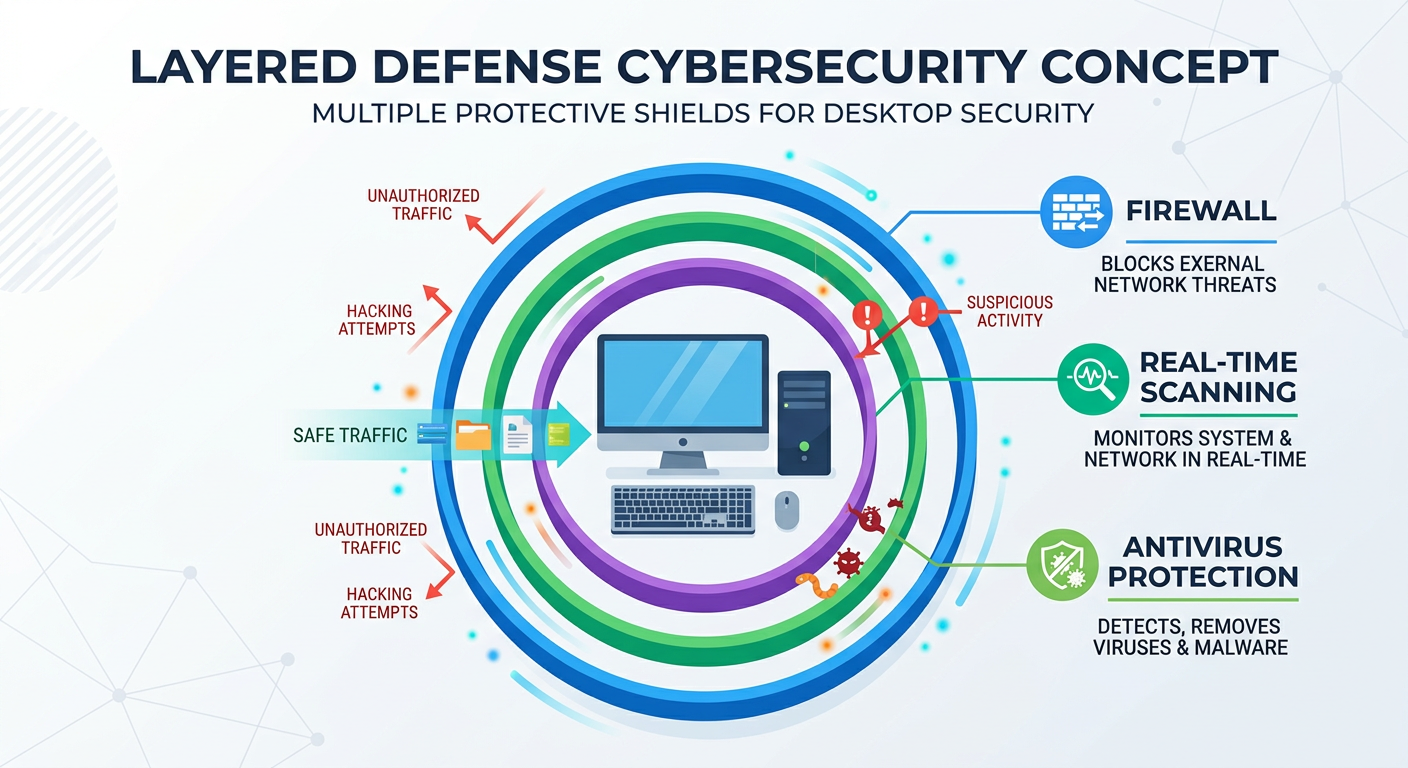
The layered defense approach recognizes that no single security measure is perfect; multiple overlapping protections create redundancy that catches threats one layer might miss. Advocating for suites that combine antivirus, firewall, browsing protection, and system optimization into one managed ecosystem provides comprehensive protection without the complexity and potential conflicts of multiple separate security tools. An integrated security suite ensures that all components work together harmoniously, sharing threat intelligence and coordinating responses.
Integrated tools reduce security gaps that exist when defenses are fragmented. For example, a firewall that blocks the outbound connection a Trojan tries to make prevents data theft even if the Trojan managed to execute. Browser protection that blocks access to malicious download sites prevents the Trojan from reaching your system in the first place. Real-time file scanning catches Trojans that slip through web filters. System behavior monitoring detects malicious actions even by previously unknown threats. When these protections operate as separate, uncoordinated tools, gaps can emerge; integrated suites ensure comprehensive coverage.
360 Total Security exemplifies this integrated approach as a free, comprehensive platform offering layered defense through combined antivirus protection (multi-engine scanning), firewall management, sandbox environment for testing suspicious files, and system cleanup tools alongside performance optimization features. The sandbox functionality allows you to run suspicious programs in an isolated virtual environment where they cannot affect your actual system, providing a safe way to test unknown software. The system cleanup and optimization tools remove unnecessary files, repair registry issues, and optimize startup configurations—functions that not only improve performance but also reduce the attack surface by eliminating unused software and closing security gaps. This integration makes ongoing malware protection simpler and more effective for the average user who may lack deep technical expertise, as all security functions are accessible through a single, unified interface with coordinated management and consistent reporting.
Educating Users and Adapting to the Evolving Threat Landscape
Periodically revisiting and practicing safe browsing and downloading habits reinforces security awareness and prevents complacency. Security knowledge degrades over time as users forget principles or become desensitized to warnings. Schedule regular personal security reviews—quarterly is a reasonable frequency—where you consciously assess your security practices: Are you still verifying download sources? Have you become lax about opening email attachments? Are you using the same passwords across multiple sites? This self-audit helps identify areas where your security posture has weakened and provides an opportunity to recommit to best practices.
Understanding that threats evolve emphasizes the importance of using security software that updates its detection logic and methods frequently, not just its signature databases. The threat landscape of 2025 differs dramatically from 2020, with Trojans employing artificial intelligence to craft more convincing phishing messages, using legitimate cloud services for command-and-control communications to evade detection, and exploiting new vulnerabilities in emerging technologies. Security software must evolve in parallel, incorporating new detection techniques, behavioral analysis improvements, and threat intelligence about current attack methods. Static security solutions that rely solely on known-threat databases become increasingly ineffective as the threat landscape advances.
Considering the value of community threat intelligence—how security software that leverages global user data provides faster responses to emerging Trojan campaigns—highlights the advantage of cloud-connected security platforms. When one user anywhere in the world encounters a new Trojan, cloud-connected security software can analyze it, create detection signatures, and push updates to all users within hours or even minutes. 360 Total Security leverages this global threat intelligence network, where anonymized threat data from millions of users worldwide feeds into centralized analysis systems that identify emerging threats and distribute protection updates rapidly. This community-based approach provides protection against zero-day threats far faster than traditional signature-update cycles, where threats must be manually discovered, analyzed, and cataloged before protection becomes available.
The commitment to ongoing malware protection requires recognizing cybersecurity as a continuous process rather than a one-time setup. Regular updates, layered defenses, user education, and adaptive security tools that evolve with the threat landscape create a robust protection posture that can withstand the sophisticated and persistent Trojan threats of the modern digital environment.
Frequently Asked Questions About Trojan Virus Protection
Can free antivirus software provide adequate protection against Trojans?
Yes, reputable free antivirus solutions can provide effective Trojan protection, particularly when they incorporate multi-engine scanning, behavioral analysis, and real-time protection features. 360 Total Security offers comprehensive free protection that includes multiple scanning engines, cloud-based threat intelligence, and integrated security tools that match or exceed many paid solutions. The key factors are ensuring the software includes real-time protection (not just on-demand scanning), receives regular automatic updates, and employs modern detection methods beyond simple signature matching. Free solutions may lack some advanced features like premium support or specialized tools, but for Trojan protection specifically, well-designed free antivirus software provides robust defense for most users.
How do I know if my antivirus software actually removed a Trojan completely?
Complete Trojan removal verification requires multiple steps: First, run a second full scan with the same antivirus software to confirm it finds no remaining threats. Second, scan with an alternative antivirus engine or online scanning service for a second opinion, as different engines may detect remnants the first missed. Third, monitor system behavior for several days—if symptoms like unexpected network activity, high resource usage, or disabled security features return, the Trojan may not be fully removed. Fourth, check system startup items, scheduled tasks, and browser extensions for suspicious entries that may indicate persistence mechanisms. If verification scans are clean and system behavior returns to normal with no recurring symptoms after a week, removal was likely successful.
What should I do if a Trojan keeps reinfecting my system after removal?
Persistent reinfection typically indicates either incomplete removal (some Trojan components remain and reinstall the malware) or reintroduction from an external source. First, boot into Safe Mode and run scans with multiple antivirus tools, including specialized rootkit removers, to ensure complete elimination of all components. Second, check all external storage devices (USB drives, external hard drives) that have been connected to the infected system, as they may harbor copies of the Trojan. Third, scan any backup files before restoring them. Fourth, if reinfection continues despite thorough removal attempts, consider a complete operating system reinstallation from verified clean media as the most certain solution. Finally, review your security practices and browsing habits to identify how the initial infection occurred and prevent reintroduction.
Are Trojans more dangerous than viruses or ransomware?
Trojans, viruses, and ransomware represent different threat categories with distinct characteristics rather than a simple danger hierarchy. Trojans are often considered more insidious because they operate silently for extended periods, stealing data and maintaining backdoor access without obvious symptoms, whereas ransomware announces itself immediately by encrypting files. The long-term, covert nature of Trojan infections can result in extensive data theft, identity compromise, and network infiltration before detection. However, ransomware can cause immediate, catastrophic data loss and business disruption. The relative danger depends on context: for individuals, data-stealing Trojans may cause long-term financial and privacy harm, while for businesses, ransomware's immediate operational impact may be more critical. The most dangerous scenario is actually Trojan infections that later deliver ransomware, combining covert initial access with destructive payload deployment.
Author Bio
This comprehensive guide on Trojan virus protection was developed by cybersecurity experts with over a decade of experience in malware analysis, threat intelligence, and digital security education. Our team stays current with the evolving threat landscape through continuous research, participation in security communities, and analysis of emerging attack vectors. We are committed to making complex cybersecurity concepts accessible to all users, regardless of technical background, because we believe informed users are the strongest defense against cyber threats. The recommendations in this guide reflect industry best practices, current threat intelligence from 2025, and practical experience helping thousands of users secure their systems against Trojan infections and other malware threats.
For comprehensive, integrated Trojan protection that combines multi-engine scanning, real-time behavioral analysis, and system optimization in one free platform, visit 360 Total Security to download and secure your Windows or macOS system today.
Learn more about 360 Total Security