
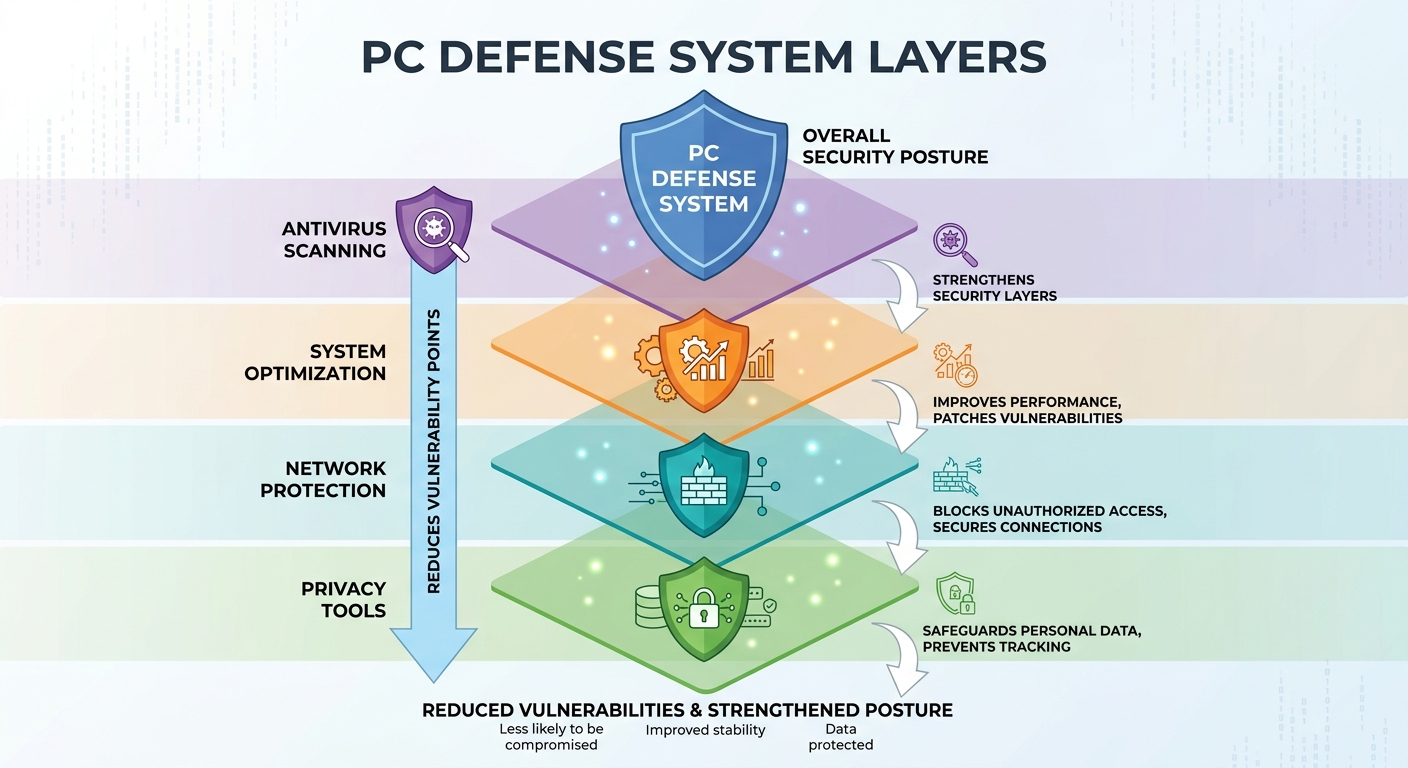
Executive Summary: Modern cyber threats have evolved far beyond the simple viruses that traditional antivirus software was designed to combat. Today's digital environment demands comprehensive PC protection that integrates real-time malware scanning, behavioral threat analysis, system optimization, network security, and privacy tools into a single, cohesive defense strategy. This guide examines the critical gaps in basic antivirus solutions, provides a framework for evaluating security software, explores advanced protection features, and demonstrates how all-in-one platforms like 360 Total Security address the complete security ecosystem — helping you make informed decisions about safeguarding your Windows or macOS desktop PC against the full spectrum of modern threats.
The Evolution of Cyber Threats and Why Basic Antivirus Is No Longer Enough
The cybersecurity landscape has undergone a dramatic transformation over the past decade. Where antivirus software once needed only to match file signatures against a database of known malware, today's threat actors deploy sophisticated, multi-vector attacks that exploit behavioral patterns, system vulnerabilities, and human psychology simultaneously. Understanding this evolution is the first step toward building a defense strategy that actually works in the current environment.
The Evolution of Cyber Threats Beyond Traditional Viruses
The most significant shift in the modern threat landscape is the rise of ransomware, phishing attacks, and zero-day exploits — attack categories that are specifically engineered to bypass signature-based detection. Ransomware, for example, does not need to match any known malware signature to be dangerous. It simply needs to access your file system and begin encrypting documents. By the time a traditional antivirus database is updated to recognize a new ransomware variant, thousands of systems may already be compromised.
According to a 2026 Global Cybersecurity Threat Report, ransomware attacks increased by over 67% in enterprise and consumer environments combined, with a growing proportion targeting home users who rely on outdated or basic security solutions. Phishing campaigns have similarly evolved, now leveraging AI-generated content to craft highly convincing emails and websites that evade both human and automated detection filters.
Zero-day exploits represent perhaps the most insidious threat category. These attacks target previously unknown vulnerabilities in operating systems and applications, meaning no patch exists at the time of exploitation. A 2025 vulnerability analysis from a leading cybersecurity research firm found that the average time between a zero-day vulnerability being discovered by threat actors and its public disclosure was approximately 69 days — a window during which systems relying solely on signature-based antivirus have virtually no protection.
This is precisely why real-time behavioral analysis has become essential. Rather than asking "does this file match a known threat?", behavioral analysis asks "is this program behaving like a threat?" — monitoring actions like unauthorized file encryption, suspicious registry modifications, or attempts to disable security processes. This proactive approach catches novel threats that signature databases simply cannot anticipate.
Common Security Gaps in Basic Antivirus Solutions
Even well-regarded basic antivirus programs leave significant security gaps that sophisticated attackers actively exploit. Understanding these gaps is critical for anyone serious about complete PC protection.
System cleanup deficiencies represent one of the most overlooked vulnerabilities. Temporary files, cached browser data, and system clutter are not merely performance annoyances — they are potential malware hiding spots. Malicious scripts and payloads frequently embed themselves in temporary directories, browser cache folders, and application data remnants precisely because basic antivirus programs do not routinely scan or clean these locations. A system bloated with junk files is not only slower but measurably less secure.
The absence of network protection features is another critical gap. Basic antivirus solutions typically focus on files already present on your system, offering little or no protection against threats entering through your network connection. Without firewall enhancement, Wi-Fi security scanning, and intrusion detection capabilities, your PC remains exposed to network-level attacks including man-in-the-middle interceptions, DNS hijacking, and unauthorized access through vulnerable router configurations.
Privacy protection tools are similarly absent from most basic solutions. According to a 2025 data privacy study, over 78% of internet users have browser tracking cookies from hundreds of third-party domains installed on their systems without their knowledge. These tracking mechanisms not only represent privacy violations but can also serve as vectors for malicious redirects and targeted phishing campaigns. Browser data residue, including saved credentials and autofill information, creates additional exposure that basic antivirus programs do not address.
Perhaps most critically, a 2026 cybersecurity breach analysis found that approximately 60% of successful cyberattacks exploited known vulnerabilities in outdated software or unoptimized system configurations — issues that fall entirely outside the scope of traditional virus scanning.
Why Performance Optimization Is a Security Feature
The connection between system performance and security is more direct than most users realize. A slow, resource-constrained PC is not merely inconvenient — it is genuinely more vulnerable to attack. Security software requires system resources to function effectively. When those resources are consumed by unnecessary startup programs, fragmented disk structures, or accumulated system clutter, real-time protection becomes sluggish and less responsive, creating windows of vulnerability during which threats can establish persistence.
Startup optimization directly reduces the attack surface available to malware. Many malware variants survive reboots by inserting themselves into startup sequences, autorun registries, or scheduled task queues. A system with a clean, optimized startup environment not only boots faster but also presents fewer opportunities for malicious persistence mechanisms to take hold.
Disk cleanup similarly contributes to security by eliminating the clutter in which malware commonly hides. Temporary file directories, orphaned application data, and redundant system files create a complex environment that is difficult to monitor comprehensively. Removing this clutter reduces the number of locations that need to be scanned and monitored, improving both the speed and thoroughness of security checks.
How to Evaluate and Choose Comprehensive Security Software for Your Needs
With hundreds of security solutions available across a wide range of price points and feature sets, selecting the right protection for your PC requires a structured evaluation framework. The goal is not simply to find software with the highest virus detection rate — though that matters — but to identify a solution that addresses your complete security and performance needs without creating unacceptable system overhead.
Essential Protection Layers Every Security Suite Should Have
A genuinely comprehensive security solution must provide multiple overlapping protection layers. Real-time virus and malware scanning with continuously updated threat databases remains the foundation. However, the quality of this foundation varies significantly between products. Look for solutions that update their threat databases multiple times daily and that leverage cloud-based intelligence to supplement local scanning capabilities.
Proactive threat detection through behavioral analysis and sandboxing technology is the second essential layer. Behavioral analysis monitors running processes for suspicious activity patterns — such as attempting to modify system files, establishing unauthorized network connections, or injecting code into other processes — and flags or blocks these behaviors regardless of whether the responsible program is in any known malware database. Sandboxing complements this by executing suspicious programs in an isolated virtual environment where they cannot harm your actual system, allowing the security software to observe their full behavior before permitting them to run normally.
The third essential layer is network security, encompassing firewall management, intrusion prevention, and connection monitoring. A robust firewall does more than block unauthorized inbound connections — it also monitors outbound traffic for signs of data exfiltration or command-and-control communications that indicate an active infection. Intrusion prevention systems add another dimension by identifying and blocking attack patterns at the network level before malicious payloads even reach your file system.
The Role of System Optimization in Security Effectiveness
When evaluating security software, the presence of integrated system optimization tools should be weighted as a security feature, not merely a convenience bonus. Startup management capabilities that allow you to review and control which programs launch at boot are directly relevant to malware prevention and remediation. Many malware infections persist specifically through autostart mechanisms, and the ability to identify and disable suspicious startup entries is a meaningful security capability.
Disk cleanup and registry optimization serve a dual purpose in the security context. From a performance perspective, they free up storage space and reduce system overhead. From a security perspective, they eliminate the accumulation of temporary files, cached data, and registry remnants that can harbor malicious scripts or provide cover for malware components. A security suite that includes thorough disk cleanup is performing a security function every time it removes system clutter.
Browser protection and privacy cleanup tools have become first-line defenses against web-based threats, which now account for the majority of consumer malware infections. These tools should go beyond simply blocking known malicious URLs — they should also scan browser extensions for suspicious behavior, clean tracking cookies and cached credentials, and alert users to potentially compromised saved passwords. Given that phishing and drive-by downloads are among the most common infection vectors, browser-level protection is no longer optional.
Balancing Performance Impact with Protection Level
One of the most common complaints about comprehensive security software is its impact on system performance. This concern is legitimate — poorly optimized security suites can consume significant CPU and memory resources, particularly during active scans. However, the solution is not to settle for lighter protection but to choose software that has been engineered for efficiency.
Understanding how different scanning engine architectures affect resource consumption is essential. Cloud-assisted scanning, for example, offloads much of the computational burden of threat analysis to remote servers, significantly reducing local resource consumption while maintaining high detection accuracy. Solutions that rely entirely on local processing tend to have a heavier system footprint, particularly during full system scans.
Gaming and silent modes represent an important usability feature that also has security implications. These modes suppress non-critical notifications and defer non-urgent background tasks during specified activities, preventing security software from interrupting important work or gaming sessions. Crucially, well-implemented silent modes maintain real-time protection while minimizing performance impact — they delay optional tasks rather than disabling security features.
| Feature Category | Basic Free Antivirus | Standard Paid Suite | 360 Total Security (Free) |
|---|---|---|---|
| Virus Detection Rate | 85–90% | 95–99% | Up to 99%+ (multi-engine) |
| Real-Time Protection | Limited | Full | Full |
| Behavioral Analysis | Rarely included | Standard | Included (QVMII AI Engine) |
| System Optimization Tools | Not included | Sometimes included | Fully integrated |
| Network/Wi-Fi Security | Not included | Sometimes included | Included |
| Browser Protection | Basic | Standard | Included |
| Sandbox Technology | Not included | Premium tiers only | Included |
| System Performance Impact | Low | Medium–High | Low–Medium |
| Cost | Free | $30–$100/year | Free (Premium available) |
Maximizing Your Protection: Advanced Features in Modern Security Solutions
Once the foundational protection layers are in place, advanced security features can dramatically expand your defensive capabilities. These tools address specific threat vectors that basic protection leaves exposed, from network-level vulnerabilities to sophisticated malware techniques and privacy erosion. Understanding what these features do and how to use them effectively is key to achieving genuinely comprehensive protection.
Network Protection and Wi-Fi Security Scanning
Your home or office network is both your PC's gateway to the internet and a potential entry point for attackers. Built-in firewalls and network scanners in advanced security suites go significantly beyond the basic Windows Firewall, offering granular control over application network permissions, real-time monitoring of active connections, and automated detection of suspicious traffic patterns that may indicate malware attempting to communicate with command-and-control servers.
Wi-Fi security checks have become increasingly important as home networks have grown more complex, with multiple devices sharing a single connection. A comprehensive Wi-Fi security scanner will assess your router's configuration for common vulnerabilities — including weak or default passwords, outdated firmware, insecure encryption protocols (such as WEP or older WPA configurations), and the presence of unauthorized devices on your network. Identifying an unknown device connected to your Wi-Fi is often the first indication of a security breach that extends beyond your PC.
Protection against DNS hijacking and malicious redirects represents a particularly important network security capability. DNS hijacking attacks intercept your browser's domain name resolution requests and redirect them to malicious servers, allowing attackers to serve fake versions of legitimate websites — including banking and email platforms — without any visible indication in your browser's address bar. Advanced security solutions monitor DNS resolution processes and alert users to suspicious redirections, providing a layer of protection that browser-level tools alone cannot offer.
As network security specialist Dr. Marcus Webb noted in a 2025 cybersecurity conference presentation: "The perimeter of home network security has dissolved. Effective defense requires layered protection that monitors not just what enters your device, but what your device is communicating with and through — treating the network itself as both an asset to protect and a potential threat vector to monitor."
Proactive Defense: Sandbox and Behavioral Analysis
Sandbox technology represents one of the most powerful tools in the modern security arsenal. When you download an executable file from an unfamiliar source, or when your security software flags a program as potentially suspicious, sandbox mode allows that program to run in a fully isolated virtual environment — a contained simulation of your actual system. Within the sandbox, the program can execute its full code without any ability to access, modify, or communicate with your real files, registry, or network connections.
This approach is particularly effective against zero-day malware and novel threat variants that have not yet been added to any signature database. By observing the program's actual behavior in isolation — does it attempt to modify system files? Does it try to establish encrypted connections to unknown servers? Does it attempt to disable security processes? — sandbox analysis can identify malicious intent with high accuracy even for previously unknown threats.
Behavioral analysis extends this proactive approach to programs already running on your system. Rather than relying on periodic scans to catch malware, behavioral analysis continuously monitors all active processes for suspicious activity patterns. This real-time monitoring is particularly effective against fileless malware — a growing attack category that operates entirely in system memory without writing files to disk, making it invisible to traditional file-scanning approaches. Behavioral analysis detects fileless malware through its actions rather than its presence, flagging unauthorized memory injections, suspicious PowerShell executions, and other behavioral signatures of this attack type.
Ransomware protection deserves special attention as a distinct security feature. Dedicated ransomware protection works by monitoring file system access patterns for the characteristic behavior of encryption attacks — specifically, the rapid sequential reading and writing of large numbers of files that indicates an encryption process is underway. When this pattern is detected, the protection module immediately suspends the responsible process and alerts the user, potentially stopping a ransomware attack before it can encrypt more than a handful of files.
Privacy Protection and System Cleanup Integration
Privacy protection has evolved from a nice-to-have feature into a core security requirement. Browser cleanup tools that remove tracking cookies, cached browsing history, and stored form data serve both privacy and security functions. Tracking cookies from advertising networks and data brokers represent not only a privacy concern but also a potential attack vector — compromised ad networks have repeatedly been used to serve malicious scripts to users through legitimate-looking cookie-based targeting systems.
File shredder features address a security gap that many users overlook entirely: the fact that standard file deletion does not actually remove data from your storage device. When you delete a file through normal means, the operating system simply marks the storage space as available for reuse — the actual data remains intact and recoverable using readily available forensic tools. File shredder functionality overwrites the deleted data multiple times with random patterns, ensuring that sensitive documents, financial records, and personal information cannot be recovered even by sophisticated data recovery software.
The integration of privacy protection with system cleanup creates a synergistic security benefit. A clean system with minimal data residue presents a smaller target for privacy attacks and reduces the amount of sensitive information that could be exposed in the event of a breach. This integration also simplifies the user experience, allowing a single maintenance routine to address both performance optimization and privacy hygiene simultaneously.
How 360 Total Security Provides Comprehensive Protection in One Package
Among the security solutions available for Windows and macOS desktop PCs, 360 Total Security stands out for its approach of integrating multiple antivirus engines, advanced threat detection technologies, and comprehensive system optimization tools into a single, cohesive platform. Rather than requiring users to manage separate applications for virus protection, system maintenance, network security, and privacy tools, 360 Total Security addresses all of these needs through a unified interface and shared intelligence architecture.
The Multi-Engine Advantage: Enhanced Detection Capabilities
The most distinctive technical feature of 360 Total Security is its multi-engine detection architecture. Rather than relying on a single scanning engine, the platform combines multiple complementary technologies to achieve detection coverage that no single engine could provide independently.
The core detection stack includes the 360 Cloud Scan Engine, which leverages real-time threat intelligence from a global network of sensors to identify emerging threats as they appear; the QVMII AI Engine, which uses machine learning algorithms trained on millions of malware samples to identify novel threats based on code characteristics and behavioral patterns; and optional integration with the Avira and Bitdefender engines, two of the most respected names in independent antivirus testing, which provide additional signature-based detection coverage for known malware families.
This multi-engine approach directly addresses the false negative problem that plagues single-engine solutions. A threat that evades detection by one engine — perhaps because it uses obfuscation techniques specifically designed to bypass that engine's analysis methods — may be caught by another engine using a different detection methodology. The probability of a threat evading all engines simultaneously is dramatically lower than the probability of it evading any single engine, resulting in measurably higher overall detection rates.
Cloud-based threat intelligence provides a further advantage in detection speed. When a new threat is identified anywhere in 360 Total Security's global user network, intelligence about that threat is immediately shared across the entire network through the cloud infrastructure. This means that protection against newly discovered threats can be deployed in minutes rather than the hours or days required to update traditional signature databases — a critical advantage in an environment where new malware variants emerge continuously.
Integrated System Optimization for Better Security
360 Total Security's system optimization capabilities are not an afterthought — they are deeply integrated with the platform's security functions in ways that create genuine security benefits beyond simple performance improvements.
The startup optimization module provides detailed visibility into every program configured to launch at system startup, including many that Windows' own startup manager does not display. For each startup entry, the module provides information about the program's publisher, its impact on boot time, and its reputation in the 360 threat intelligence database. This allows users to identify not only performance-degrading startup programs but also suspicious entries that may represent malware persistence mechanisms — a security function that directly complements the antivirus scanning capabilities.
Disk cleanup tools in 360 Total Security are similarly security-aware. Beyond removing standard temporary files and system cache, the cleanup engine targets specific file locations commonly used by malware to store payloads and configuration data. Regular disk cleanup through 360 Total Security therefore serves as a supplementary security measure, reducing the accumulation of potentially malicious content in system directories that might otherwise go unscanned between scheduled antivirus checks.
The process manager and speedup features provide real-time visibility into all running processes, with reputation data from the 360 cloud intelligence network overlaid on each entry. This allows users to quickly identify processes that are consuming significant resources and cross-reference them against known malware behaviors — a capability that is particularly valuable for identifying fileless malware and other memory-resident threats that may not appear in file system scans.
Additional Protection Layers: From Network to Privacy
360 Total Security's protection extends beyond the PC itself to encompass the network environment and the user's privacy. The Wi-Fi security check feature scans your connected wireless network for common vulnerabilities, including weak encryption protocols, default router credentials, and unauthorized connected devices. This network-level visibility is essential for users who work from home or connect to shared networks, as network vulnerabilities can provide attackers with pathways to your PC that bypass file-level security entirely.
Sandbox mode in 360 Total Security allows users to run any program in an isolated environment with a single click, providing a safe way to test unfamiliar software before allowing it to interact with the main system. This feature is particularly valuable for users who frequently download software from independent developers or less established sources, where the risk of encountering malicious or tampered installers is higher than with software from major publishers.
The browser protection and cleanup capabilities guard against the growing category of web-based threats by monitoring browser activity for malicious redirects, scanning downloaded files before execution, and providing regular cleanup of tracking cookies, cached credentials, and browsing history. These features work across all major browsers, ensuring consistent protection regardless of which browser a user prefers.
For users ready to experience comprehensive desktop PC protection that addresses the full spectrum of modern threats, 360 Total Security offers a free download with full access to its core protection features, including multi-engine scanning, system optimization, Wi-Fi security checking, and sandbox mode — all in a single, lightweight package designed for Windows and macOS desktop PCs.
Implementing Best Practices: Maintaining Optimal Security and Performance
Even the most sophisticated security software can only deliver its full potential when properly configured and supplemented by informed user behavior. The final component of a truly comprehensive security strategy is the establishment of regular maintenance routines and smart security habits that keep your protection current, your system optimized, and your awareness sharp enough to recognize threats that technology alone cannot always stop.
Configuring Your Security Software for Maximum Protection
Proper configuration of your security software is a one-time investment that pays ongoing dividends in protection quality. The most important configuration step is setting up scheduled scans that run automatically during periods when your PC is powered on but not in active use — typically late night or early morning hours. Scheduling comprehensive scans during low-usage periods ensures that thorough security checking occurs regularly without interfering with work or leisure activities.
Ensuring that real-time protection and automatic updates are enabled is non-negotiable for effective security. Real-time protection monitors your system continuously, catching threats at the moment they attempt to execute rather than during periodic scans. Automatic updates ensure that your threat database and security software components are always current — a critical requirement given that new malware variants emerge daily. Some users disable automatic updates to avoid unexpected software changes, but this practice creates significant security exposure that far outweighs any convenience benefit.
Understanding and customizing scan types based on your usage patterns allows you to balance thoroughness with efficiency. Quick scans focus on the most common malware locations — active memory, startup directories, and recently accessed files — and can be completed in minutes, making them suitable for daily automated scheduling. Full system scans examine every file on your storage devices and should be scheduled weekly or bi-weekly. Custom scans allow you to focus on specific directories — such as a downloads folder or an external drive — when you have reason to be concerned about specific content.
Regular Maintenance Tasks for Ongoing Security
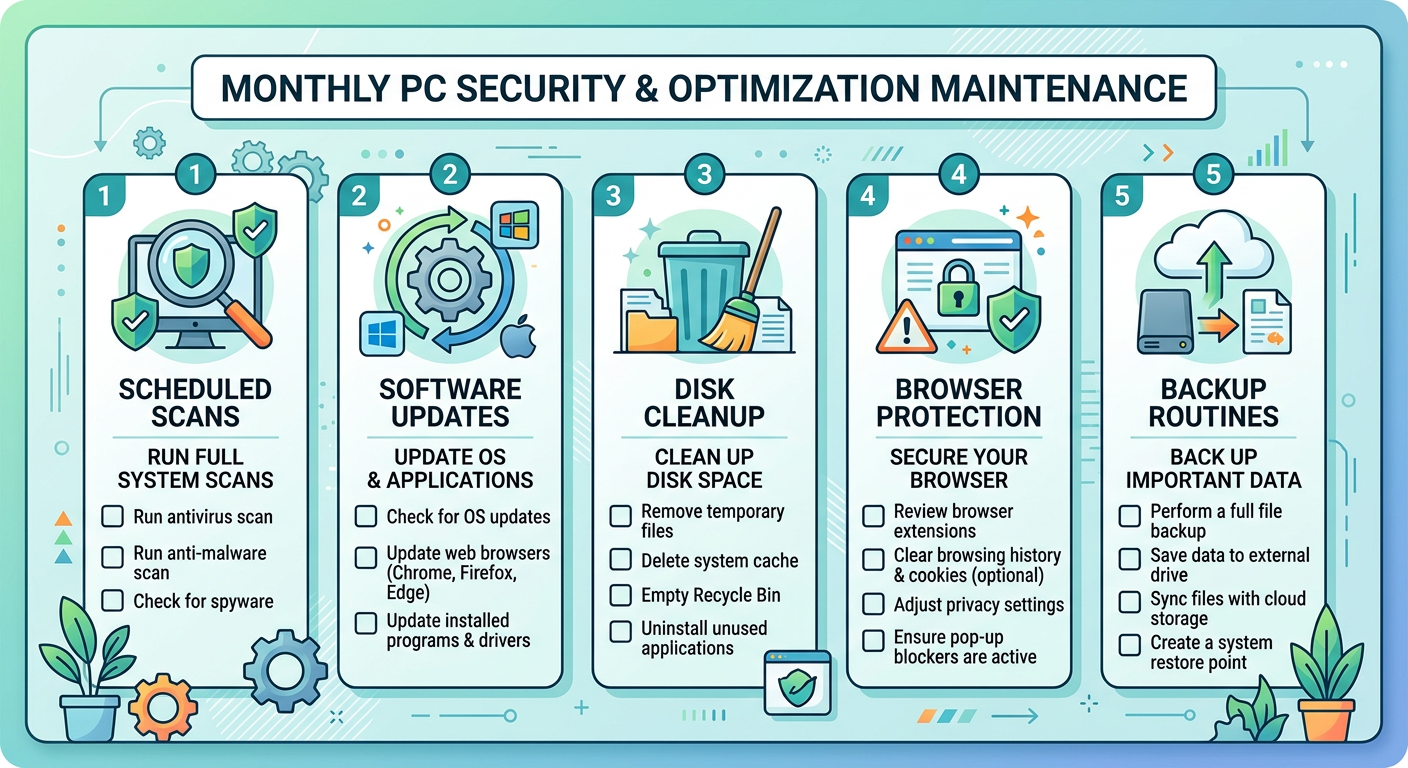
Establishing a regular maintenance rhythm is essential for sustained security effectiveness. A practical cadence for most users combines monthly deep scans — comprehensive full system scans with all detection engines active — with weekly quick scans that check the most vulnerable system areas. This balanced approach ensures that no significant period passes without thorough security checking while minimizing the performance impact of continuous intensive scanning.
Regular system optimization should be scheduled with similar consistency. Monthly disk cleanup, startup optimization review, and browser privacy cleanup address the accumulation of system clutter and data residue that both degrades performance and creates security exposure. Many security suites, including 360 Total Security, allow these optimization tasks to be scheduled alongside security scans, enabling a single automated maintenance session to address both security and performance simultaneously.
Keeping both your security software and operating system updated is perhaps the single most impactful security practice available to PC users. According to a 2026 vulnerability exploitation analysis, approximately 57% of successful cyberattacks against consumer PCs exploited known vulnerabilities for which patches had already been released — meaning that the majority of these attacks would have been prevented by timely software updates. Operating system updates, in particular, frequently include patches for critical security vulnerabilities that attackers actively target, making prompt installation of these updates a high-priority security task.
Developing Smart Security Habits Beyond Software
Technology provides powerful protection, but it cannot substitute entirely for informed user judgment. Safe browsing practices remain essential even with comprehensive browser protection enabled. Recognizing phishing attempts — including the increasingly sophisticated AI-generated phishing content that now mimics legitimate communications with high fidelity — requires active attention to URL accuracy, sender verification, and the presence of unexpected urgency or unusual requests in communications. Security software can block known phishing sites, but novel phishing pages created specifically for a targeted attack may not yet be in any threat database.
Maintaining regular backup routines is the ultimate defense against ransomware and catastrophic data loss. No security software can guarantee 100% protection against all threats, and a current backup stored on a device not continuously connected to your PC ensures that even a successful ransomware attack cannot result in permanent data loss. The recommended approach combines local backups to an external drive (disconnected after each backup session) with cloud backups for critical documents, creating redundancy that protects against both ransomware and physical hardware failure.
Monitoring system performance as a security indicator is a habit that can provide early warning of infections before they become serious. Unexplained increases in CPU or memory usage, sudden slowdowns, unfamiliar processes in the task manager, or unexpected network activity during idle periods can all indicate that malware is active on your system. Users who are familiar with their system's normal performance baseline are better positioned to notice these anomalies and respond promptly by running a security scan or consulting their security software's process monitoring tools.
Frequently Asked Questions
What is the difference between a basic antivirus and a comprehensive security suite?
A basic antivirus primarily focuses on detecting and removing known malware through signature-based scanning. A comprehensive security suite goes significantly further, adding behavioral analysis and sandboxing for unknown threats, network security and firewall management, system optimization tools, browser protection, privacy cleanup features, and often ransomware-specific defenses. The key distinction is that a full security suite addresses the entire attack surface of your PC — not just file-based malware — while also maintaining the system performance that security software needs to function effectively.
How often should I run antivirus scans for adequate protection?
For most users, a combination of continuous real-time protection (which should always be enabled), weekly automated quick scans, and monthly full system scans provides a strong security baseline. If you frequently download software from unfamiliar sources, regularly use external drives or USB devices, or work with sensitive data, increasing scan frequency to daily quick scans and bi-weekly full scans is advisable. The key is consistency — irregular scanning creates windows of exposure that persistent malware can exploit.
Can system optimization tools genuinely improve security, or are they just marketing?
System optimization tools have genuine security value when properly implemented. Startup management directly prevents malware persistence by exposing and enabling removal of unauthorized autostart entries. Disk cleanup eliminates temporary file accumulations that serve as malware hiding spots and reduces the scope of areas that need to be monitored. Browser cleanup removes tracking cookies and cached credentials that represent both privacy risks and potential attack vectors. The security benefit is real, though it is most meaningful when optimization tools are integrated with security intelligence — as in solutions like 360 Total Security — rather than offered as purely standalone utilities.
Is free antivirus software sufficient, or do I need a paid solution?
The answer depends on the specific free solution and your threat exposure level. Some free security platforms, including 360 Total Security's free tier, offer genuinely comprehensive protection that rivals paid solutions in detection rates and feature breadth. The meaningful distinctions between free and paid tiers typically involve support responsiveness, advanced features like VPN integration or premium technical support, and the absence of promotional content. For most home users, a well-chosen free security suite with multi-engine detection, real-time protection, and integrated optimization tools provides adequate protection. Users handling highly sensitive data or operating in high-risk environments may benefit from the additional features and support commitments of premium tiers.
About the Author: This article was written by a senior cybersecurity content specialist with over a decade of experience covering endpoint security, threat intelligence, and consumer PC protection strategies. The author has contributed to multiple industry publications and regularly analyzes emerging threat trends to provide actionable security guidance for both home users and IT professionals.
Learn more about 360 Total Security