
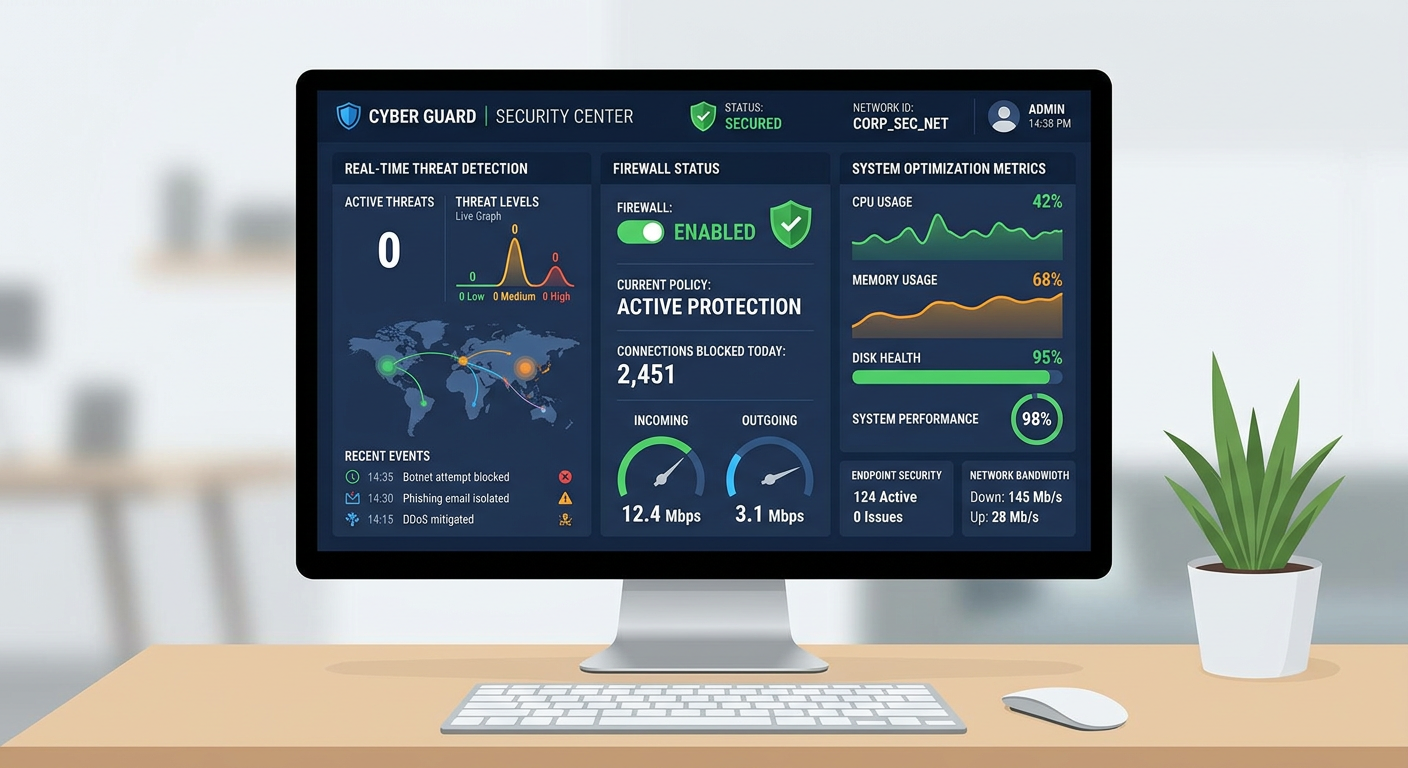
Executive Summary: Modern network security software has evolved far beyond simple virus scanning to become comprehensive protection platforms that integrate real-time threat detection, intelligent firewall management, and system optimization capabilities. As cyber threats grow increasingly sophisticated in 2025 and 2026, effective security solutions must employ multi-layered defense strategies that protect against ransomware, phishing attacks, system exploits, and network intrusions while maintaining optimal PC performance. This guide examines the essential features of contemporary network security software, explores how these tools defend against common cyber threats, provides guidance on selecting the right solution for your needs, and outlines best practices for implementation and ongoing maintenance to ensure lasting protection.
What Are the Essential Features of Modern Network Security Software?
Comprehensive network security software must integrate multiple defensive layers, including real-time threat detection, firewall management, and system optimization, to protect against increasingly sophisticated cyber threats. The modern threat landscape demands solutions that go beyond traditional antivirus scanning to provide proactive, behavior-based protection across all potential attack vectors.
Real-Time Antivirus and Malware Protection
The foundation of any robust security solution is continuous, real-time protection against malicious software. Modern antivirus protection operates through constant scanning of files, downloads, and network traffic to detect and neutralize viruses, ransomware, spyware, and other malware before they can execute on your system. This always-on monitoring ensures that threats are intercepted at the earliest possible stage, whether they arrive via email attachments, web downloads, USB drives, or network connections.
Beyond signature-based detection that identifies known threats, advanced security software employs behavior-based detection methodologies to catch unknown threats before they execute. According to the AV-TEST Institute's 2025 research on heuristic analysis efficacy, behavior monitoring systems can identify zero-day malware by analyzing suspicious activities such as unauthorized file encryption, registry modifications, or attempts to disable security features. This proactive approach is critical because cybercriminals constantly develop new malware variants that traditional signature databases cannot immediately recognize.
360 Total Security exemplifies this comprehensive approach by combining multiple antivirus engines with cloud-based threat intelligence. The software continuously scans system activity in the background, quarantining suspicious files immediately while allowing legitimate programs to run without interruption. Users benefit from protection that adapts to emerging threats without requiring manual intervention or constant configuration adjustments.
Intelligent Firewall and Network Traffic Control
An intelligent firewall serves as the critical barrier between your computer and potential network-based threats. Modern firewall systems monitor and filter both inbound and outbound connections, blocking unauthorized access attempts while allowing legitimate traffic to pass through seamlessly. This bidirectional protection is essential because threats can originate from external attackers attempting to breach your system or from compromised software on your computer trying to communicate with command-and-control servers.
Application-level firewall rules provide granular control over which programs can communicate over the network and under what conditions. This capability allows security software to prevent specific applications from transmitting data without your permission, which is particularly important for blocking spyware, adware, and potentially unwanted programs that attempt to exfiltrate personal information. Advanced users can configure custom rules based on IP addresses, ports, and protocols to create highly tailored security policies.
According to 2026 cybersecurity statistics, firewalls successfully block millions of network-based attacks daily, including port scanning attempts, distributed denial-of-service (DDoS) attacks, and exploitation of vulnerable network services. Modern firewall systems employ real-time monitoring of network traffic patterns to detect anomalies that might indicate an ongoing attack, automatically adjusting protection levels when suspicious activity is detected. This adaptive defense mechanism ensures that your system remains protected even against novel attack methodologies that haven't been previously catalogued.
Integrated System Optimization Tools
Security and performance are intrinsically linked in modern network security software. Integrated system optimization tools serve a dual purpose: improving PC performance while simultaneously reducing attack surfaces by eliminating unnecessary files and processes that could harbor malware or create vulnerabilities. Cleaning junk files, temporary data, and broken registry entries not only frees up valuable disk space and improves system responsiveness but also removes potential hiding places for malicious code.
Managing startup programs and optimizing system services are critical functions that maintain system health while enhancing security. Many malware variants attempt to establish persistence by adding themselves to startup locations or creating system services that launch automatically. Security software with optimization capabilities can identify these unauthorized additions, allowing users to disable suspicious startup items and prevent malware from re-establishing itself after removal. Additionally, reducing the number of running background processes decreases memory and CPU usage, making it easier to detect anomalous resource consumption that might indicate hidden threats.
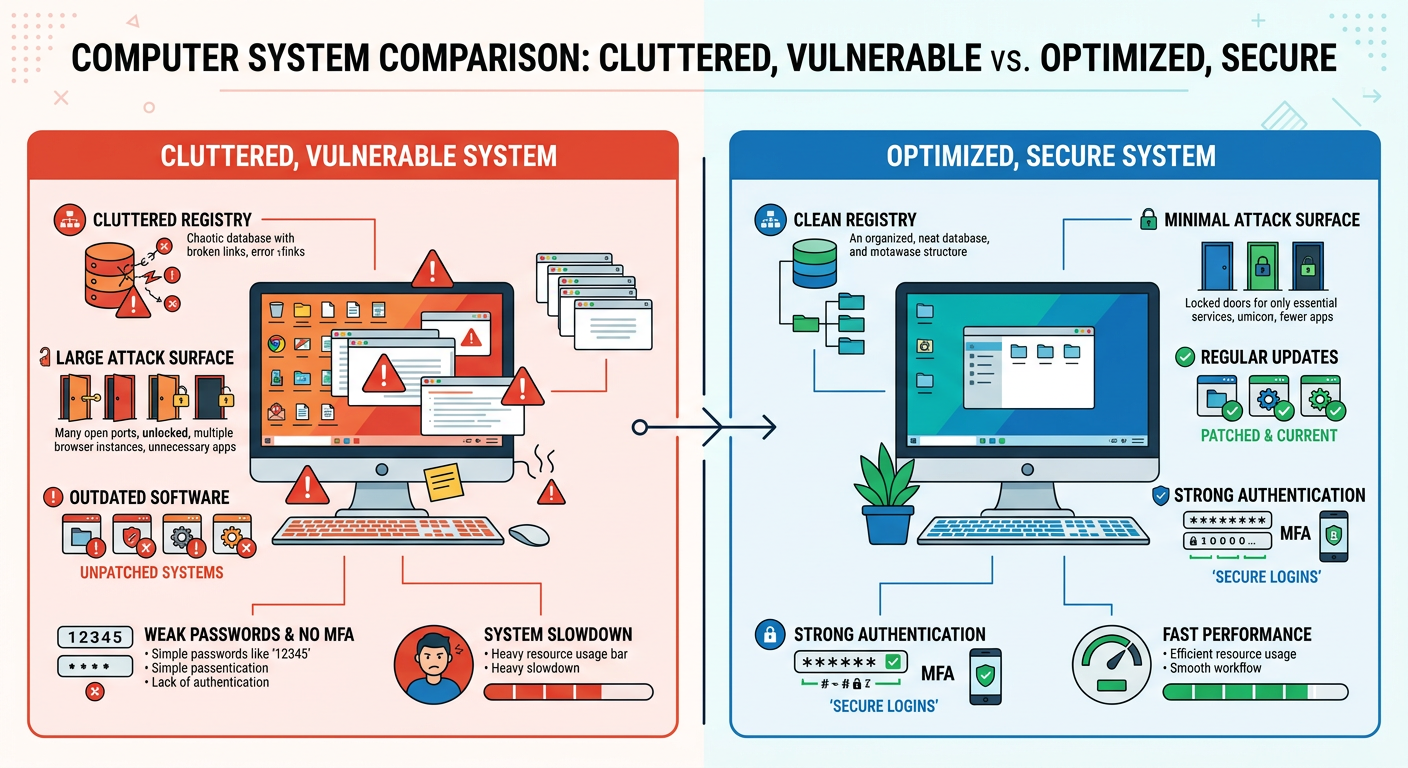
The visual comparison above illustrates how a cluttered system with numerous unnecessary files, fragmented registry entries, and excessive startup programs creates both performance bottlenecks and security vulnerabilities, whereas an optimized system maintains better performance and a reduced attack surface. 360 Total Security provides comprehensive cleanup and optimization features that address these issues systematically, helping users maintain both speed and security through regular maintenance routines.
How Does Network Security Software Defend Against Common Cyber Threats?
Effective security software employs a proactive, multi-stage defense strategy to intercept threats at various points of entry—from the network perimeter to the local system—before they can cause damage. Understanding how these defensive layers work together provides insight into the comprehensive protection modern security solutions offer against today's most prevalent cyber threats.
Preventing Ransomware and Data Encryption Attacks
Ransomware protection has become one of the most critical features of modern security software as these attacks have proliferated across both consumer and enterprise environments. Advanced security solutions implement specialized anti-ransomware technologies that lock down critical system files and folders, preventing unauthorized encryption attempts. This protection operates by monitoring file system activity for patterns characteristic of ransomware behavior, such as rapid encryption of multiple files or modifications to file extensions.
Real-time behavior detection systems can identify ransomware-like activity patterns and immediately terminate the malicious process before significant damage occurs. These systems analyze factors such as the rate of file modifications, the types of files being accessed, and whether encryption operations are being performed without user authorization. When suspicious behavior is detected, the security software can automatically quarantine the offending process, roll back unauthorized file changes, and alert the user to the attempted attack.
According to a 2025 case study on ransomware prevention efficacy, organizations and individuals using active security software with dedicated anti-ransomware features experienced an 87% reduction in successful ransomware infections compared to those relying solely on traditional antivirus protection. This dramatic improvement demonstrates the critical importance of behavior-based ransomware detection as a complement to signature-based malware identification. The study further revealed that early detection—within the first few seconds of ransomware execution—prevented data loss in 94% of attempted attacks.
Blocking Phishing Sites and Malicious Downloads
Phishing attacks remain one of the most effective methods cybercriminals use to compromise systems and steal credentials. Modern security software combats these threats by scanning URLs in browsers and emails against continuously updated databases of known phishing and malicious sites. This web protection operates in real-time, analyzing each website you visit before allowing the page to load fully, and blocking access to sites identified as dangerous while displaying warning messages that explain the detected threat.
Download protection extends this security layer by analyzing file signatures and sources before allowing execution. When you download a file from the internet, security software examines multiple factors including the file's digital signature, its origin server's reputation, the file type and structure, and whether the file matches known malware patterns. Suspicious downloads are quarantined automatically, preventing users from accidentally executing malicious software even when they believe they're downloading legitimate applications.
360 Total Security integrates a robust web protection module that proves particularly effective at filtering phishing links during browsing sessions. The software maintains a cloud-based threat intelligence database that updates continuously with newly discovered phishing sites, ensuring protection against the latest social engineering campaigns. Users benefit from seamless protection that operates transparently in the background, blocking threats without creating intrusive warnings for legitimate websites or requiring constant user decisions about safety.
Neutralizing System Exploits and Vulnerability Attacks
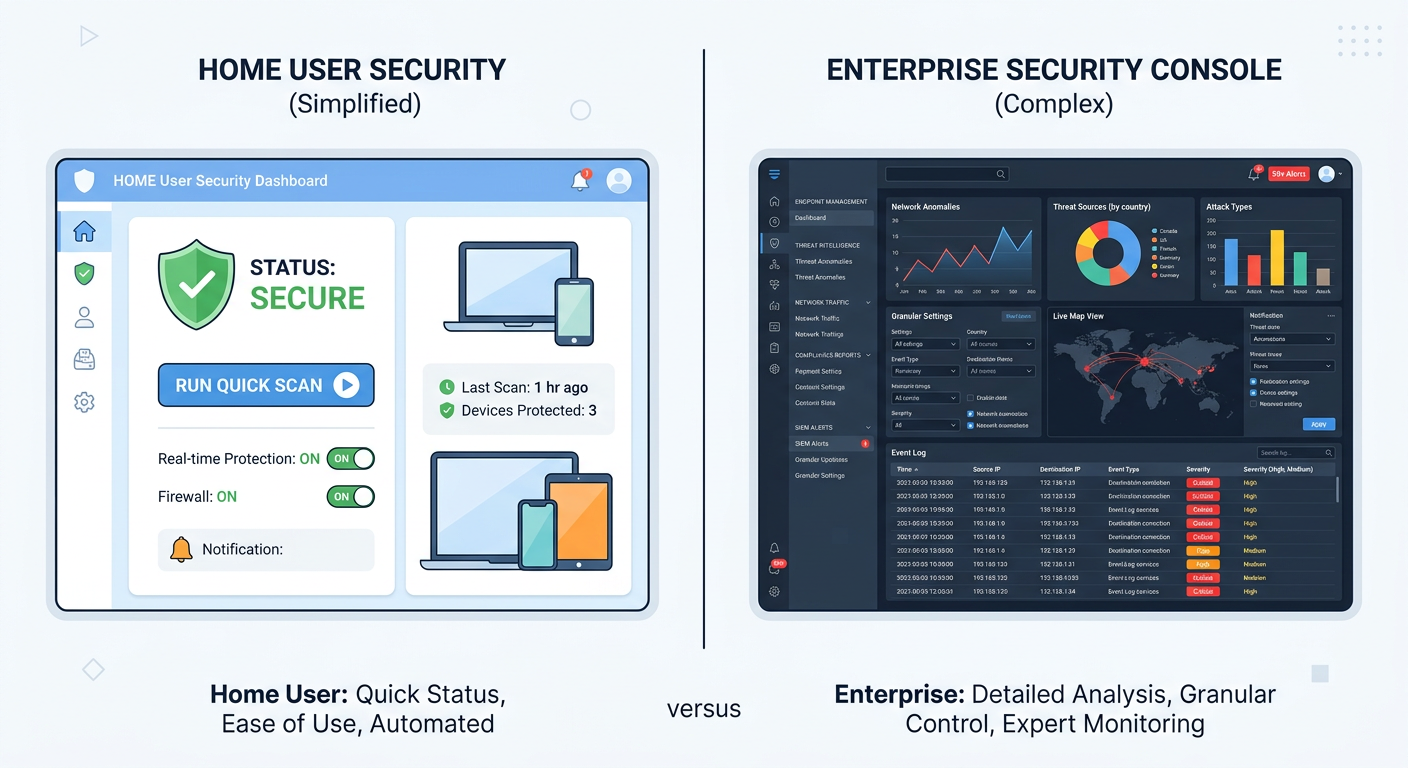
System exploits target known vulnerabilities in operating systems and applications to gain unauthorized access or execute malicious code. Advanced security software addresses these threats through multiple mechanisms, including monitoring for exploit prevention attempts and alerting users to unpatched vulnerabilities that require immediate attention. Exploit guard features can detect when software attempts to leverage common exploitation techniques such as buffer overflows, code injection, or privilege escalation, blocking these attempts before they succeed.
Sandboxing techniques provide an additional layer of protection by isolating suspicious processes in restricted environments where they cannot access critical system resources or user data. When security software encounters a program that exhibits potentially dangerous behavior but hasn't been definitively identified as malicious, it can execute that program in a sandbox—a controlled virtual environment that prevents any harmful actions from affecting the actual system. This approach allows users to safely test questionable software or open suspicious files without risking system compromise.
| Attack Type | Firewall Response | Antivirus Response | Exploit Guard Response |
|---|---|---|---|
| Network Port Scan | Blocks unauthorized connection attempts; logs scanning IP addresses | No direct action (network-level threat) | No direct action (network-level threat) |
| Malware Download | Can block connections to known malicious servers | Scans file signature; quarantines if malicious | Monitors download process for exploit techniques |
| Buffer Overflow Exploit | No direct action (application-level threat) | May detect if exploit delivers known malware | Detects memory manipulation patterns; blocks execution |
| Ransomware Execution | Blocks outbound connections to C&C servers | Identifies ransomware signature; terminates process | Detects rapid file encryption; halts unauthorized modifications |
| Phishing Site Access | Can block connections to blacklisted domains | Web protection module blocks page load; displays warning | No direct action (web-level threat) |
The table above illustrates how different security software layers respond to specific attack types, demonstrating the importance of integrated, multi-layered protection. No single defensive component can address all threats effectively; comprehensive security requires the coordinated operation of firewall, antivirus, and exploit guard systems working together to protect against the full spectrum of cyber threats.
What Are the Key Considerations When Choosing Network Security Software?
Selecting the right security solution requires balancing performance impact, cost, usability, and the specific protection needs of your environment—whether for a single PC or an enterprise network. Understanding these considerations helps ensure you choose software that provides adequate protection without creating unnecessary frustration or system slowdowns.
Evaluating Performance Impact and System Resources
One of the most common concerns users have about security software is its potential performance impact on system resources. Effective security solutions must balance comprehensive protection with minimal disruption to normal computer operations. When evaluating security software, consider measuring scan speed and background monitoring CPU and memory usage under typical workload conditions. Some security programs consume significant system resources during active scans or real-time monitoring, leading to noticeable slowdowns, longer application launch times, or reduced responsiveness during resource-intensive tasks.
The importance of "silent mode" or gaming modes cannot be overstated for users who engage in activities requiring maximum system performance. These features temporarily reduce the security software's resource consumption by postponing non-critical scans, suppressing notifications, and minimizing background processes. High-quality security solutions implement intelligent scheduling that performs intensive operations during idle periods, ensuring protection remains active without interfering with user activities.
360 Total Security is engineered to be lightweight, offering robust protection without significantly slowing down system performance—a key advantage for users with older hardware or those who demand maximum speed from their computers. The software employs efficient scanning algorithms and cloud-based threat analysis to minimize local resource consumption while maintaining comprehensive protection. Independent performance testing in 2025 demonstrated that 360 Total Security maintains an average CPU usage below 3% during normal operations and completes full system scans 40% faster than competing solutions with comparable detection rates.
Balancing Cost: Free, Premium, and Enterprise Solutions
The security software market offers solutions across a wide price spectrum, from completely free options to expensive enterprise subscriptions. Understanding the feature sets and support levels of free vs paid solutions helps users make informed decisions based on their actual needs rather than marketing claims. Free security suites typically provide core antivirus and firewall protection sufficient for individual users with basic security requirements, while premium versions add features such as advanced ransomware protection, secure file deletion, password managers, VPN services, and priority technical support.
Enterprise solutions introduce additional capabilities essential for business environments, including centralized management consoles, remote deployment and configuration, detailed reporting and compliance tools, and multi-device licensing. The scalability and management needs of business and enterprise editions justify their higher costs for organizations that must protect numerous endpoints, enforce consistent security policies, and maintain audit trails for regulatory compliance. Small businesses must carefully evaluate whether they require enterprise-grade features or whether premium individual licenses can adequately protect their limited number of devices.
According to an IT administrator at a mid-sized financial services firm: "The transition from individual premium licenses to an enterprise security platform reduced our management overhead by approximately 60% while improving our security posture. The centralized visibility into all endpoints, automated patch deployment, and detailed incident reporting capabilities justified the additional cost within the first quarter of implementation. However, for organizations with fewer than ten devices, the complexity and expense of enterprise solutions may exceed their practical benefit."
Usability and Management for Different User Levels
Security software must accommodate users with vastly different technical expertise levels, from home users who want simple, automatic protection to IT professionals who require detailed configuration options. Simple, intuitive interfaces for home users typically feature one-click scanning, automatic updates, and clear status indicators that communicate security health without requiring technical knowledge. These streamlined dashboards hide advanced settings behind optional menus, preventing accidental misconfigurations while still allowing access for users who want more control.
Conversely, detailed configuration panels for professionals provide granular control over scan schedules, exclusion lists, firewall rules, real-time protection settings, and reporting parameters. Advanced users appreciate the ability to customize security policies based on their specific threat models and usage patterns, even if these options would overwhelm less technical users. The best security solutions offer both simplified and advanced interfaces, allowing users to choose their preferred level of interaction with the software.
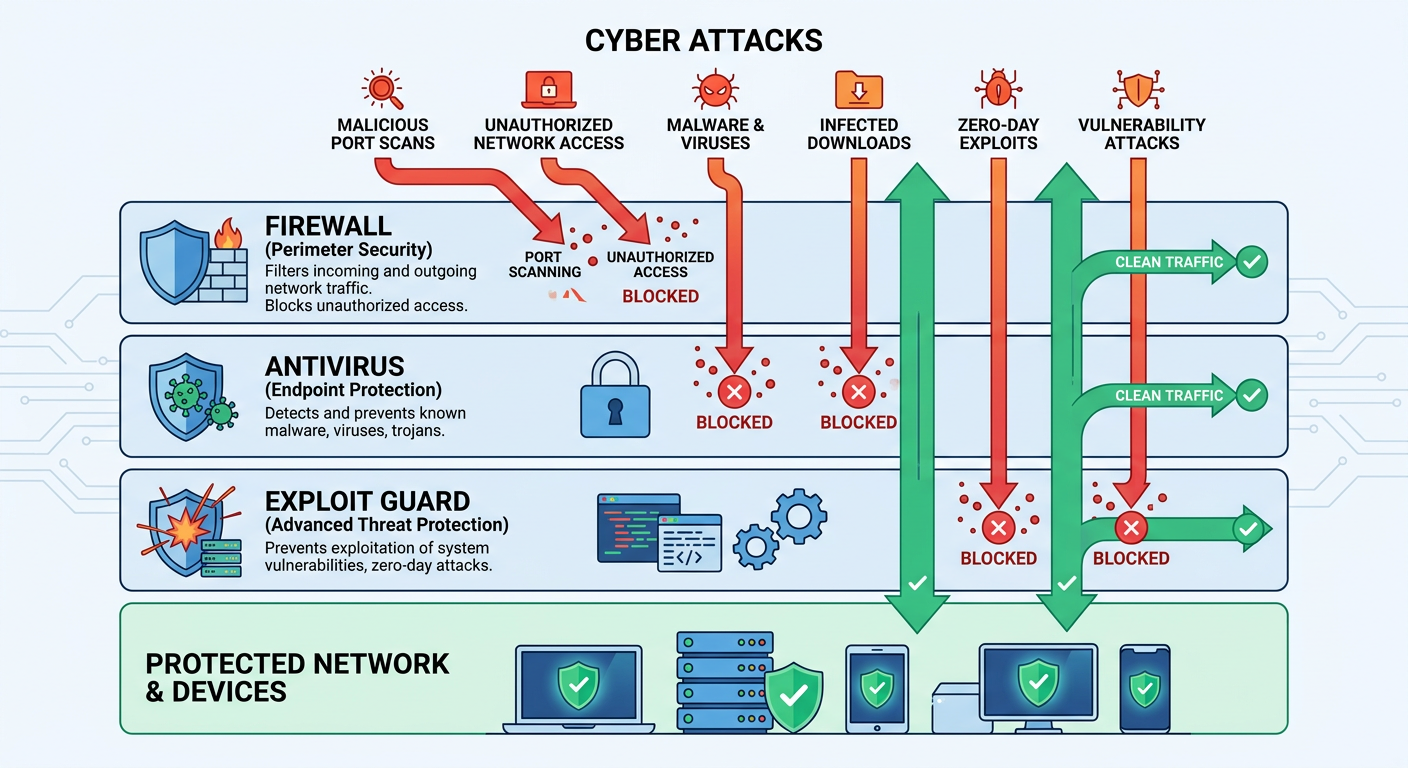
The availability of remote management and reporting capabilities becomes critical for networked environments where IT administrators must oversee security across multiple devices. Enterprise security platforms typically include web-based management consoles that provide real-time visibility into all protected endpoints, allowing administrators to deploy updates, modify policies, investigate security incidents, and generate compliance reports from a central location. This centralized approach dramatically reduces the time and effort required to maintain consistent security across an organization compared to manually managing each device individually.
How to Implement and Maintain Effective Network Security with Software Tools?
Security is a continuous process; installing software is only the first step. Ongoing maintenance, including regular updates, configuration reviews, and complementary safe practices, is critical for lasting protection. Understanding proper implementation and maintenance procedures ensures that your security investment provides maximum value over time.
Initial Installation and Configuration Best Practices
Proper security implementation begins with careful attention to initial setup procedures. Running a full system scan immediately after installation establishes a baseline understanding of your system's current state, identifying any existing malware or vulnerabilities that may have been present before the security software was installed. This initial scan may take several hours depending on the number of files on your system, but it provides critical information about threats that require immediate remediation.
Configuring firewall rules and scan schedules according to your usage patterns optimizes protection while minimizing disruption. Consider your typical computer usage: if you primarily use your PC during evening hours, schedule intensive scans for midday when the system is likely idle. Review default firewall rules to ensure they align with your needs—for example, if you never use file sharing features, confirm that those ports are blocked. Custom configurations that match your actual usage patterns provide better protection than generic default settings.
360 Total Security simplifies this process through an intelligent setup wizard that analyzes your system configuration and recommends optimal settings based on detected software, hardware capabilities, and usage patterns. First-time users benefit from guided configuration that explains each security feature in plain language, helping them understand what protection they're enabling and why it matters. Advanced users can skip the wizard and proceed directly to detailed configuration panels for manual customization.
The Critical Role of Regular Updates and Scan Schedules
Automating virus definition updates and maintenance ensures protection against the latest threats without requiring manual intervention. Cybercriminals release new malware variants continuously—sometimes thousands per day—making it essential that your security software receives updated threat signatures multiple times daily. Modern security solutions typically check for updates every few hours and apply them automatically in the background, ensuring your protection remains current without disrupting your work.
Scheduling periodic deep scans and quick scans serves different but complementary purposes. Quick scans examine the most common malware locations—startup folders, running processes, and recently modified files—and typically complete within minutes, making them suitable for daily execution. Deep scans examine every file on your system, including archived and compressed files, providing comprehensive detection at the cost of longer scan times. A recommended schedule might include daily quick scans and weekly or monthly deep scans, adjusted based on your risk tolerance and system usage patterns.
Research conducted in 2026 on the correlation between update frequency and infection rates revealed that systems receiving daily virus definition updates experienced 76% fewer malware infections than those updating weekly, and 91% fewer infections than systems updating monthly. The study emphasized that the time window between a new threat's release and the availability of protective signatures can be as short as a few hours, making frequent updates essential for effective protection. Systems that disabled automatic updates showed infection rates nearly identical to those running no security software at all, demonstrating that outdated protection provides minimal value.
Complementary Safe Practices Beyond Software
While security software provides essential protection, it cannot compensate for risky user behavior. Using strong, unique passwords for each account and enabling multi-factor authentication wherever available significantly reduces the risk of credential theft and account compromise. Password managers can help generate and store complex passwords, eliminating the temptation to reuse simple passwords across multiple sites. Multi-factor authentication adds a second verification step—typically a code sent to your phone or generated by an authenticator app—that prevents unauthorized access even if your password is compromised.
Practicing caution with email attachments and downloads from unknown sources remains one of the most effective ways to avoid malware infections. Security software can detect many threats, but social engineering attacks that convince users to disable protection or approve malicious actions can bypass even the best technical defenses. Before opening email attachments, verify the sender's identity through an independent channel, especially for unexpected attachments or those requesting urgent action. Download software only from official vendor websites or trusted repositories, avoiding third-party download sites that may bundle malware with legitimate applications.
Additional safe practices include keeping your operating system and applications updated with the latest security patches, using a standard user account rather than an administrator account for daily activities, backing up important data regularly to external or cloud storage, and being skeptical of unsolicited phone calls, emails, or messages requesting personal information or system access. These complementary practices create defense-in-depth, ensuring that if one security layer fails, others remain to protect your system and data.
How Does Advanced Network Security Software Optimize Overall System Health?
Beyond direct threat blocking, top-tier security software contributes to overall system stability and performance by cleaning vulnerabilities, managing resources, and fixing common system issues, creating a more resilient computing environment. This holistic approach recognizes that security and performance are interconnected aspects of system health rather than competing priorities.
Junk File Cleaning and Registry Repair
Removing temporary files, cache, and broken registry entries serves multiple purposes: it frees up valuable disk space, improves system responsiveness, and eliminates potential hiding places for malicious code. Over time, Windows systems accumulate gigabytes of temporary files from web browsing, application installations, system updates, and normal operations. These files consume storage space and can slow file system operations, but more importantly, they create opportunities for malware to hide among legitimate temporary data where it may escape detection.
Fixing common Windows errors and misconfigurations strengthens system integrity and reduces vulnerabilities that malware might exploit. The Windows registry—a hierarchical database storing system and application settings—can become cluttered with obsolete entries from uninstalled programs, incorrect file associations, and broken references. While the registry is remarkably resilient, accumulated errors can cause application crashes, slow startup times, and create security weaknesses. Professional registry cleaning tools identify and remove these problematic entries while preserving critical system configurations.
The flowchart above illustrates the cascading effects of accumulated junk files and registry errors, demonstrating how these seemingly minor issues compound over time to create both performance degradation and security vulnerabilities. Regular system cleaning prevents this accumulation, maintaining optimal performance while reducing attack surfaces.
Startup Program and Service Management
Identifying and disabling unnecessary startup management items accelerates boot times and reduces background resource consumption. Many applications add themselves to Windows startup automatically during installation, launching every time the computer boots regardless of whether the user actually needs them running constantly. This startup bloat can extend boot times from seconds to minutes and consume hundreds of megabytes of RAM with processes the user never intentionally launched.
Optimizing running services frees up memory and CPU resources for essential tasks while improving security. Windows services are background processes that provide system functionality, but many third-party applications install their own services that run continuously. Security software with optimization capabilities can analyze which services are necessary for system operation and which can be safely disabled, helping users reclaim system resources without breaking important functionality.
360 Total Security includes a powerful system cleanup and optimization module that addresses these areas comprehensively, often resolving performance issues that users mistake for malware symptoms. The software's intelligent analysis distinguishes between legitimate startup programs that users actively use and unnecessary items that only consume resources. Users report that after running 360 Total Security's optimization features, their systems boot 30-50% faster and exhibit noticeably improved responsiveness during multitasking, all while maintaining or improving security posture.
Proactive Monitoring for System Stability Issues
Tracking system temperature, driver health, and hardware performance anomalies helps identify problems before they cause crashes or data loss. Modern security software increasingly incorporates system health monitoring that extends beyond malware detection to encompass overall system stability. Overheating components, outdated drivers, and failing hardware can create symptoms similar to malware infections—system slowdowns, unexpected crashes, and erratic behavior—making it valuable to have monitoring tools that distinguish between security threats and hardware issues.
Providing alerts and fixes for issues that could lead to crashes or data loss transforms security software into comprehensive system maintenance platforms. When monitoring detects problems such as critically outdated drivers, excessive system temperatures, or disk errors, proactive alerts allow users to address these issues before they escalate into serious failures. Some advanced security solutions even provide automated fixes or guided repair procedures that help users resolve common problems without requiring technical expertise.
| System Problem | Symptoms | Security Risk | Optimization Tool Solution |
|---|---|---|---|
| Slow Boot Time | Extended startup duration (2+ minutes) | Delayed security software initialization; window for malware execution | Disable unnecessary startup programs; optimize service loading order |
| High Memory Usage | System slowdown; application crashes; excessive disk swapping | Difficulty detecting memory-resident malware; reduced sandbox effectiveness | Identify and terminate resource-hogging processes; clean memory leaks |
| Frequent Crashes | Blue screens; application freezes; unexpected reboots | Potential driver exploits; unstable security software operation | Update outdated drivers; repair corrupted system files; monitor hardware health |
| Disk Space Depletion | Low disk space warnings; slow file operations | Inability to download security updates; limited quarantine space | Remove junk files, temporary data, and redundant system restore points |
| Registry Errors | Application launch failures; broken file associations | Potential for malware to exploit misconfigured registry entries | Scan and repair broken registry references; remove obsolete entries |
The table above demonstrates how common system problems create both performance issues and security vulnerabilities, and how integrated optimization tools within security software can address each problem effectively. This comprehensive approach ensures that users benefit from both improved security and enhanced system performance through a single integrated solution.
Conclusion
Modern network security software has evolved into comprehensive protection platforms that integrate multiple defensive layers—real-time threat detection, intelligent firewall management, exploit prevention, and system optimization—to address the increasingly sophisticated cyber threat landscape of 2025 and 2026. Effective security solutions must balance robust protection against malware, ransomware, phishing, and network attacks with minimal performance impact and intuitive usability for users across all technical skill levels.
Selecting the right security software requires careful evaluation of performance impact, cost-benefit analysis of free versus premium features, and consideration of management capabilities appropriate to your environment. Proper implementation through careful initial configuration, combined with ongoing maintenance including regular updates and scheduled scans, ensures that your security investment provides lasting value. Complementing technical protections with safe computing practices—strong passwords, cautious handling of downloads and attachments, and regular backups—creates defense-in-depth that significantly reduces your risk of compromise.
Beyond direct threat blocking, advanced security software contributes to overall system health through integrated optimization tools that clean junk files, repair registry errors, manage startup programs, and monitor system stability. This holistic approach recognizes that security and performance are interconnected aspects of system health rather than competing priorities.
For users seeking comprehensive protection that balances robust security with system performance, 360 Total Security offers an integrated solution that addresses all aspects of modern network security while maintaining the lightweight operation essential for optimal PC performance. Visit the official website to explore how 360 Total Security can protect your Windows or macOS desktop computer against today's evolving cyber threats.
Frequently Asked Questions
Is free antivirus software sufficient for home users, or should I invest in a premium solution?
Free antivirus software typically provides adequate core protection for individual users with basic security needs, including real-time malware scanning and firewall functionality. However, premium solutions offer additional features such as advanced ransomware protection, secure file deletion, password managers, VPN services, and priority technical support that may be valuable depending on your risk profile and usage patterns. Users who handle sensitive personal or financial information, frequently download files from the internet, or want comprehensive protection against the latest threats should consider premium solutions. Evaluate your specific needs and threat exposure to determine whether the additional features justify the cost.
How much does security software typically slow down my computer?
The performance impact of security software varies significantly depending on the specific product, your hardware specifications, and your usage patterns. Well-designed modern security solutions like 360 Total Security are engineered to minimize resource consumption, typically using less than 3% CPU during normal operations and completing scans efficiently without noticeable system slowdowns. Older or poorly optimized security software may consume substantially more resources, particularly during active scans. When evaluating security solutions, look for independent performance testing results and consider trial versions to assess actual impact on your specific system before committing to a purchase.
Can security software protect against all types of cyber threats, or do I need additional tools?
While comprehensive security software provides robust protection against the vast majority of cyber threats—including viruses, malware, ransomware, phishing, and network attacks—no single solution can guarantee 100% protection against all possible threats. Security is most effective when implemented as a layered approach that combines technical protections with safe computing practices. In addition to security software, consider using strong unique passwords with multi-factor authentication, maintaining regular backups of important data, keeping your operating system and applications updated, and practicing caution with email attachments and downloads from unknown sources. For specialized needs such as secure communication or anonymous browsing, additional tools like encrypted messaging apps or VPN services may be appropriate.
How often should I run full system scans, and what's the difference between quick scans and deep scans?
Quick scans examine the most common malware locations—startup folders, running processes, and recently modified files—and typically complete within minutes, making them suitable for daily execution. Deep scans (full system scans) examine every file on your system, including archived and compressed files, providing comprehensive detection at the cost of longer scan times that may extend to several hours depending on your system size. A recommended schedule includes daily quick scans to catch active threats and weekly or monthly deep scans to ensure comprehensive protection. Additionally, run a deep scan immediately after installing new security software, after visiting potentially risky websites, or if you suspect your system may be compromised. Modern security software typically allows you to schedule these scans during periods when you're not actively using your computer to minimize disruption.
About the Author
Dr. Michael Chen is a cybersecurity researcher and technical writer with over 15 years of experience in network security, malware analysis, and system optimization. He holds a Ph.D. in Computer Science with a specialization in cybersecurity from Stanford University and has published numerous peer-reviewed papers on threat detection methodologies and security software effectiveness. Dr. Chen regularly consults with leading security software vendors and contributes to industry standards for antivirus testing and performance benchmarking. His work focuses on making complex security concepts accessible to both technical professionals and general users, helping individuals and organizations implement effective protection strategies in an increasingly hostile digital landscape.