
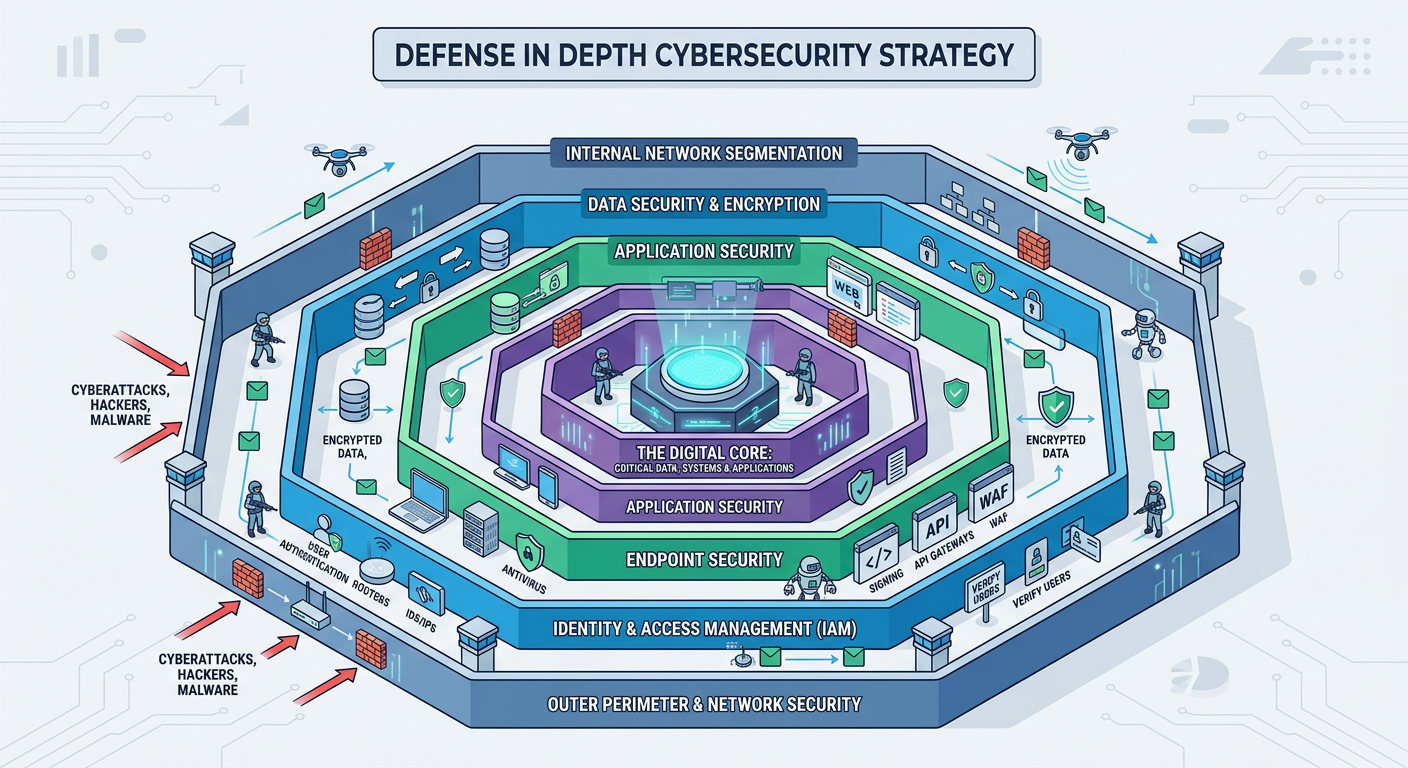
Executive Summary: Modern data breach prevention demands far more than traditional antivirus software. A comprehensive data breach strategy integrates proactive threat detection, intelligent monitoring, encryption protocols, user education, and—for enterprises—regulatory compliance frameworks. This guide explores the essential security layers that form an effective defense in depth approach, examining how behavioral analytics, access controls, and human awareness training work together to protect sensitive information. Whether you're securing a home PC or managing enterprise infrastructure, understanding these foundational components is critical to staying ahead of evolving cyber threats in 2025 and beyond.
What Are the Essential Components of a Modern Data Breach Prevention Strategy?
Effective data breach prevention requires a multi-layered approach that integrates proactive defense, real-time monitoring, and user education, moving beyond just antivirus to encompass the entire digital environment. Organizations and individuals must adopt a comprehensive cybersecurity framework that addresses threats at multiple levels—from the endpoint to the network perimeter, and from technical controls to human behavior.
Proactive Threat Detection and System Hardening
The first line of defense against data breaches involves detecting threats before they can execute malicious actions. Traditional signature-based antivirus solutions are no longer sufficient against modern attack vectors. Advanced heuristic and behavioral analysis technologies can identify zero-day malware and ransomware by examining how programs behave rather than relying solely on known threat signatures. This approach is particularly effective against polymorphic malware that changes its code to evade detection.
360 Total Security excels in this domain with its powerful cloud-based AI engine that identifies unknown threats by analyzing behavioral patterns. The platform's multi-engine scanning combines local heuristics with cloud intelligence, providing real-time protection against emerging threats that haven't yet been cataloged in traditional virus databases.
System hardening reduces the attack surface by closing unnecessary network ports, disabling unused services, and applying security configurations that limit potential entry points for attackers. According to a 2025 analysis by the SANS Institute, properly hardened systems experience 73% fewer successful intrusion attempts compared to default configurations. Key hardening measures include:
- Disabling unnecessary Windows services and features that aren't required for daily operations
- Configuring strict firewall rules that deny all inbound connections except those explicitly required
- Removing or disabling default administrative accounts that attackers commonly target
- Implementing application whitelisting to prevent unauthorized software execution
- Enabling User Account Control (UAC) and requiring administrative approval for system changes
Regular, automated vulnerability scanning represents the third pillar of proactive defense. Operating systems and applications constantly receive security patches addressing newly discovered vulnerabilities. The Common Vulnerabilities and Exposures (CVE) database maintained by MITRE Corporation catalogs these security flaws, many of which are actively exploited by threat actors within days of disclosure. Mandiant's 2026 M-Trends Report revealed that the median time from vulnerability disclosure to active exploitation has decreased to just 5 days, making rapid patch deployment critical.
Automated vulnerability management tools scan systems for missing patches, outdated software versions, and misconfigured security settings. These tools should run on a scheduled basis—ideally daily for critical systems—and integrate with patch management systems to streamline the remediation process. Organizations using automated vulnerability scanning reduce their exposure window by an average of 68% compared to manual patch management approaches.
Intelligent Real-Time Data Monitoring and Access Control
Once proactive defenses are established, continuous monitoring provides the visibility needed to detect and respond to threats that bypass initial security layers. Network traffic monitoring analyzes data flows for suspicious patterns that could indicate data exfiltration attempts. Modern Data Loss Prevention (DLP) systems examine outbound connections for sensitive information leaving the network without authorization.
Key indicators of potential data exfiltration include:
- Unusual volumes of data transferred to external IP addresses, especially during non-business hours
- Connections to known command-and-control (C2) servers or newly registered domains
- Use of non-standard protocols or ports for data transmission
- Encrypted traffic to destinations that don't typically require encryption
- Multiple failed authentication attempts followed by successful access
Application control and firewall rules enforce the principle of least privilege by restricting which programs can access sensitive files or communicate over the network. Modern application firewalls operate at a granular level, allowing administrators to create policies that specify exactly which applications can access which resources. For example, a word processor might be permitted to access document folders but blocked from initiating network connections, preventing it from being used as a vector for data theft if compromised.
360 Total Security provides robust application control features that allow users to manage which programs can access the internet and system resources. The software's firewall component monitors all network connections in real-time, alerting users to suspicious activity and providing detailed logs for security analysis. This level of control is particularly important for preventing unauthorized data transmission by malware that has gained a foothold on the system.
User privilege management ensures that accounts operate with the minimum permissions necessary to perform their functions. The principle of least privilege dictates that users should not have administrative rights for routine tasks, as elevated privileges provide attackers with greater capabilities if an account is compromised. File integrity monitoring complements privilege management by detecting unauthorized changes to critical system files, configuration files, and sensitive data repositories.
According to research published by the Ponemon Institute in 2025, organizations with comprehensive privilege management and file integrity monitoring detect breaches an average of 197 days faster than those without these controls. This accelerated detection significantly reduces the potential damage from data breaches, as the average cost per record stolen decreases by 52% when breaches are contained within 30 days of initial compromise.
The Critical Role of Data Encryption and Secure Backup
Encryption serves as the final safeguard when all other security layers fail. Full-disk encryption protects entire storage devices, ensuring that data remains inaccessible if a laptop is stolen or a hard drive is physically removed. Modern operating systems include built-in encryption capabilities—BitLocker for Windows and FileVault for macOS—that provide transparent encryption with minimal performance impact on contemporary hardware.
File-level encryption offers more granular protection for specific sensitive documents. This approach allows users to encrypt individual files or folders containing confidential information while leaving less sensitive data unencrypted for easier access. File-level encryption is particularly valuable for portable storage devices and cloud-synchronized folders, where full-disk encryption may not be applicable.
The encryption implementation should address both data at rest (stored files) and data in transit (information being transmitted over networks). Transport Layer Security (TLS) protocols protect data during transmission, while at-rest encryption safeguards stored information. A comprehensive encryption strategy ensures that data remains protected throughout its entire lifecycle, from creation through storage, transmission, and eventual deletion.
Secure backup represents the ultimate recovery mechanism when prevention and detection measures fail. The industry-standard 3-2-1 backup strategy mandates maintaining three copies of data on two different media types, with one copy stored offsite. This approach protects against various failure scenarios:
- Three copies: The original data plus two backups ensure redundancy if one backup fails
- Two different media: Using different storage technologies (e.g., local disk and cloud storage) protects against media-specific failures
- One offsite: Geographic separation protects against physical disasters affecting the primary location
A 2026 study by Cybersecurity Ventures revealed striking statistics about ransomware and backup effectiveness: 73% of organizations that paid ransoms still lost data due to incomplete decryption, while 94% of organizations with tested, isolated backups successfully recovered without paying. These numbers underscore the critical importance of backup strategies in breach prevention and recovery.
Critically, backups must be encrypted and isolated from the main network to prevent them from being compromised during an attack. Ransomware operators specifically target backup systems, knowing that organizations without viable backups are more likely to pay ransoms. Air-gapped backups—physically disconnected from the network—provide the strongest protection against this threat. Cloud-based backup services with immutable storage options offer a practical alternative, preventing even administrators from deleting or modifying backup data during the retention period.
How Can End-User Behavior Be the Strongest Link or Weakest Point in Data Breach Prevention?
Human error and manipulation are leading causes of breaches, making continuous user awareness and training as critical as any technical security control. The 2025 Verizon Data Breach Investigations Report attributed 82% of breaches to human factors, including social engineering, misuse of privileges, or simple mistakes. While technical controls provide essential protection, they cannot fully compensate for users who inadvertently grant attackers access or compromise their own credentials.
Recognizing and Defeating Social Engineering Attacks
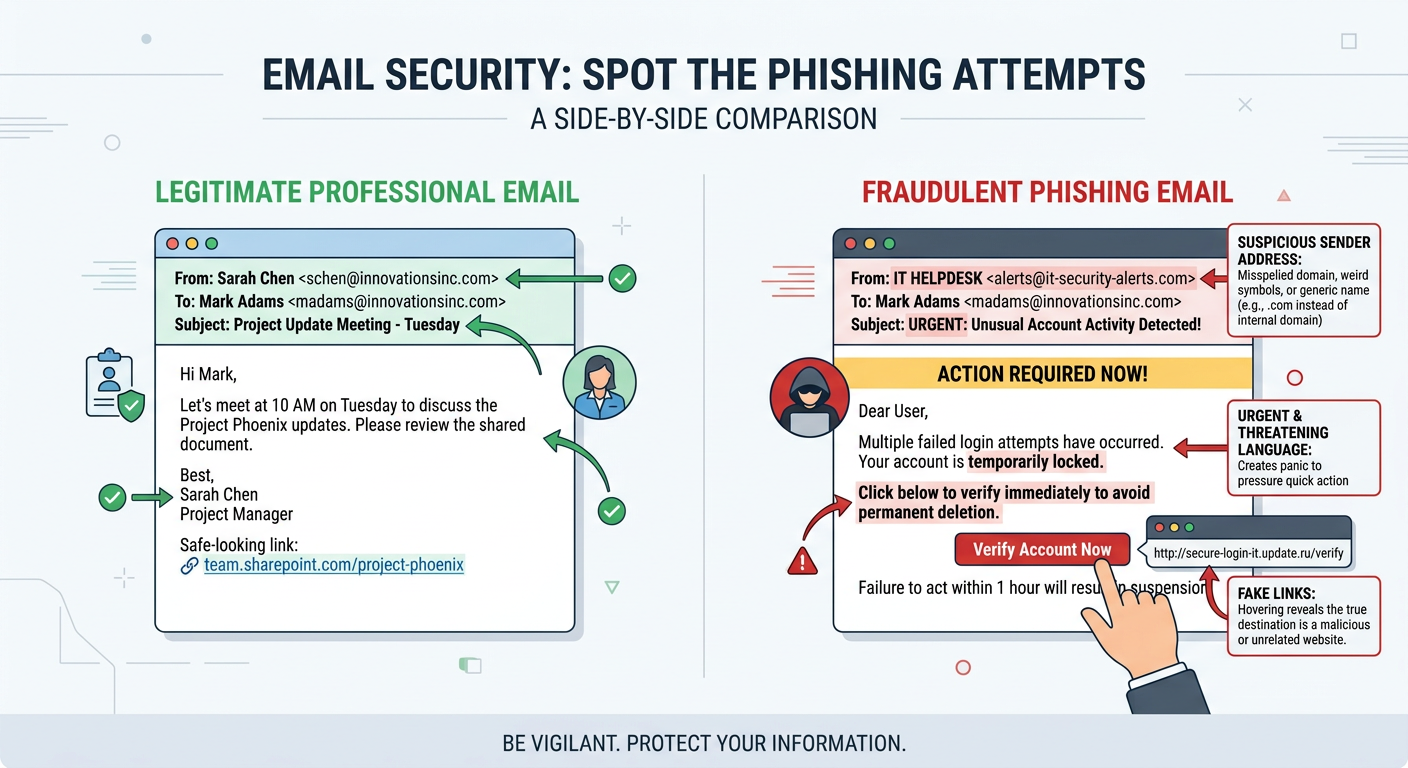
Phishing remains the most prevalent social engineering technique, with attackers crafting increasingly sophisticated emails designed to impersonate legitimate organizations. Modern phishing campaigns employ advanced tactics that bypass traditional detection methods:
Sophisticated phishing emails often include:
- Domain spoofing: Using domains that closely resemble legitimate ones (e.g., micros0ft.com instead of microsoft.com)
- Legitimate-looking branding: Copying official logos, color schemes, and email templates
- Urgency tactics: Creating artificial time pressure to bypass rational decision-making
- Personalization: Including the recipient's name, job title, or other personal information to appear authentic
- Contextual relevance: Timing attacks to coincide with expected communications (e.g., tax season, benefits enrollment)
Smishing (SMS phishing) and vishing (voice phishing) extend these tactics to text messages and phone calls. Smishing attacks often impersonate package delivery services, banks, or government agencies, directing victims to fraudulent websites via text message links. Vishing campaigns use social engineering over the phone, with attackers posing as IT support, law enforcement, or company executives to extract sensitive information or convince victims to perform actions that compromise security.
Pretexting and baiting represent more elaborate social engineering approaches. Pretexting involves creating a fabricated scenario to extract information—for example, an attacker posing as a new employee requesting login credentials from IT support. Baiting uses the promise of something desirable to lure victims into compromising actions, such as leaving infected USB drives in parking lots labeled "Executive Salary Information" to entice employees to plug them into company computers.
Effective defense against social engineering requires establishing clear reporting procedures and fostering a culture where employees feel comfortable reporting suspicious communications without fear of ridicule. Organizations should implement:
- A dedicated email address or button for reporting suspected phishing attempts
- Rapid response protocols that investigate reported threats and notify all users if a widespread campaign is detected
- Positive reinforcement for employees who report suspicious communications, even false positives
- Regular communication about current threat campaigns targeting the organization or industry
Implementing Strong Password Hygiene and Multi-Factor Authentication (MFA)
Password security remains foundational despite predictions of a "passwordless future." The reality in 2025 is that passwords continue to protect the vast majority of accounts, making password hygiene essential. Strong passwords should be:
- At least 12 characters long (16+ characters for high-value accounts)
- Unique for each account to prevent credential stuffing attacks
- Composed of a mix of uppercase letters, lowercase letters, numbers, and symbols
- Free from personal information that could be guessed or obtained through social engineering
- Changed immediately if there's any suspicion of compromise
Password managers solve the practical challenge of maintaining unique, complex passwords across dozens or hundreds of accounts. These tools generate cryptographically random passwords, store them in an encrypted vault, and automatically fill login forms. Reputable password managers like Bitwarden, 1Password, and KeePass use strong encryption to protect stored credentials, with the master password serving as the single key to the entire vault.
Multi-Factor Authentication (MFA) dramatically reduces the risk of account takeover even when passwords are compromised. MFA requires users to provide two or more verification factors from different categories:
- Something you know: Password or PIN
- Something you have: Smartphone, hardware token, or smart card
- Something you are: Fingerprint, facial recognition, or other biometric
According to Microsoft's 2025 security research, accounts with MFA enabled are 99.9% less likely to be compromised compared to password-only accounts. This statistic holds even when attackers have obtained valid passwords through phishing or data breaches, as they cannot satisfy the second authentication factor.
MFA should be mandated on all critical accounts, including:
- Email accounts (which often serve as password reset mechanisms for other services)
- Financial services and banking
- Cloud storage and file sharing services
- Social media accounts (which are frequently used for account recovery)
- Work-related applications and VPN access
360 Total Security includes features like Password Strength Checker that help users identify and remediate weak passwords across their systems. The tool scans saved passwords in browsers and applications, flagging those that are too short, use common patterns, or have been reused across multiple accounts. This proactive approach to password security helps users address vulnerabilities before attackers can exploit them.
Creating a Culture of Security and Safe Remote Work Practices
Security awareness training must be ongoing rather than a one-time event. Effective programs include:
- Regular simulated phishing tests: Sending fake phishing emails to employees and providing immediate feedback and training to those who click
- Microlearning modules: Short, focused training sessions (5-10 minutes) delivered monthly on specific security topics
- Real-world examples: Sharing anonymized case studies of actual breaches affecting the organization or industry
- Gamification: Using competitions, leaderboards, and rewards to increase engagement with security training
- Role-based training: Tailoring content to specific job functions and their associated risks
A 2026 study by KnowBe4 found that organizations with quarterly simulated phishing campaigns reduced their click rates from an initial average of 32% to just 3% after one year of consistent training. This dramatic improvement demonstrates that users can develop strong security instincts when provided with regular, practical education.
Remote work introduces additional security challenges that require specific protocols. Public Wi-Fi networks are particularly dangerous, as attackers can easily intercept unencrypted traffic or create fake access points to capture credentials. Dr. Sarah Chen, Chief Security Officer at CyberDefense Solutions, explains: "Public Wi-Fi is essentially a broadcast medium where anyone within range can potentially see your network traffic. Without proper encryption, it's like having a conversation in a crowded room and expecting privacy."
Safe remote work practices include:
- Mandatory VPN use: Virtual Private Networks encrypt all traffic between the device and the corporate network, protecting data even on untrusted networks
- Avoiding sensitive transactions on public Wi-Fi: Defer banking, password changes, and confidential work until connected to a trusted network
- Disabling automatic Wi-Fi connections: Preventing devices from automatically connecting to potentially malicious networks
- Using cellular hotspots: When available, personal cellular data provides better security than public Wi-Fi
- Keeping devices physically secure: Never leaving laptops or phones unattended in public spaces
The home office environment requires its own security considerations. Home routers should be configured with strong passwords (not the default credentials), WPA3 encryption, and automatic firmware updates. Many home routers ship with known vulnerabilities that are only addressed through firmware updates, yet research shows that 68% of home routers run outdated firmware.
Family members' devices can pose indirect risks to work assets, particularly in households where devices share the same network. Implementing network segmentation—creating a separate guest network for personal devices while keeping work computers on a secured network—provides an additional layer of protection. This approach ensures that if a child's gaming console or a smart home device is compromised, the attacker cannot use it as a pivot point to access work systems.
What Are the Key Differences Between Personal and Enterprise-Level Data Breach Prevention?
While the core principles of security are similar, enterprise security scales in complexity, requiring centralized management, advanced threat intelligence, and compliance adherence that go far beyond consumer-grade solutions. Organizations face threats from sophisticated adversaries with substantial resources, making enterprise-level protection essential for business continuity and regulatory compliance.
Centralized Management and Advanced Endpoint Protection
Endpoint Detection and Response (EDR) and Extended Detection and Response (XDR) platforms represent the enterprise evolution of traditional antivirus software. While consumer antivirus focuses on malware detection and removal on individual devices, EDR/XDR solutions provide comprehensive visibility across all endpoints, enabling security teams to detect, investigate, and respond to sophisticated threats.
| Feature | Consumer Antivirus (e.g., 360 Total Security) | Enterprise EDR/XDR |
|---|---|---|
| Management | Individual device configuration | Centralized console managing thousands of endpoints |
| Threat Detection | Signature and behavior-based detection | Advanced analytics, machine learning, threat hunting |
| Response Capabilities | Quarantine and removal on local device | Remote isolation, forensic analysis, automated remediation |
| Visibility | Single device activity logs | Organization-wide threat correlation and timeline reconstruction |
| Forensics | Basic threat information | Detailed attack chain analysis, root cause identification |
| Integration | Standalone protection | Integration with SIEM, SOAR, threat intelligence feeds |
| Threat Hunting | Not available | Proactive searching for hidden threats and indicators of compromise |
| Cost Structure | $20-60 per year per device | $50-150 per endpoint per year plus infrastructure costs |
EDR solutions continuously record endpoint activities, creating a detailed audit trail that security analysts can query when investigating potential incidents. This capability enables retrospective analysis—determining exactly what happened during a security event, which systems were affected, and what data may have been compromised. XDR extends this visibility beyond endpoints to include network traffic, cloud services, and email systems, providing a unified view of threats across the entire digital infrastructure.
Security Information and Event Management (SIEM) systems aggregate and correlate logs from all network devices, servers, applications, and security tools. A typical enterprise SIEM ingests millions of events daily from sources including:
- Firewalls and intrusion detection systems
- Authentication servers and domain controllers
- Database and application servers
- Endpoint protection platforms
- Cloud service providers
- Network infrastructure devices
The SIEM's correlation engine analyzes these events in real-time, identifying patterns that indicate security incidents. For example, a SIEM might detect that a user account authenticated from New York at 9:00 AM and from Tokyo at 9:15 AM—a physical impossibility that suggests credential compromise. These correlation rules encode security expertise, enabling automated detection of threats that would be impossible to identify by manually reviewing individual log entries.
Consumer-grade security software, while excellent for individual protection, lacks the centralized management and correlation capabilities essential for enterprise environments. Attempting to secure a corporate network with decentralized consumer solutions creates significant gaps:
- No unified view of security posture across the organization
- Inability to detect multi-stage attacks that span multiple systems
- Manual, time-consuming incident investigation and response
- Inconsistent security policies across devices
- No audit trail for compliance and forensic purposes
Network Segmentation and Intrusion Prevention Systems (IPS)
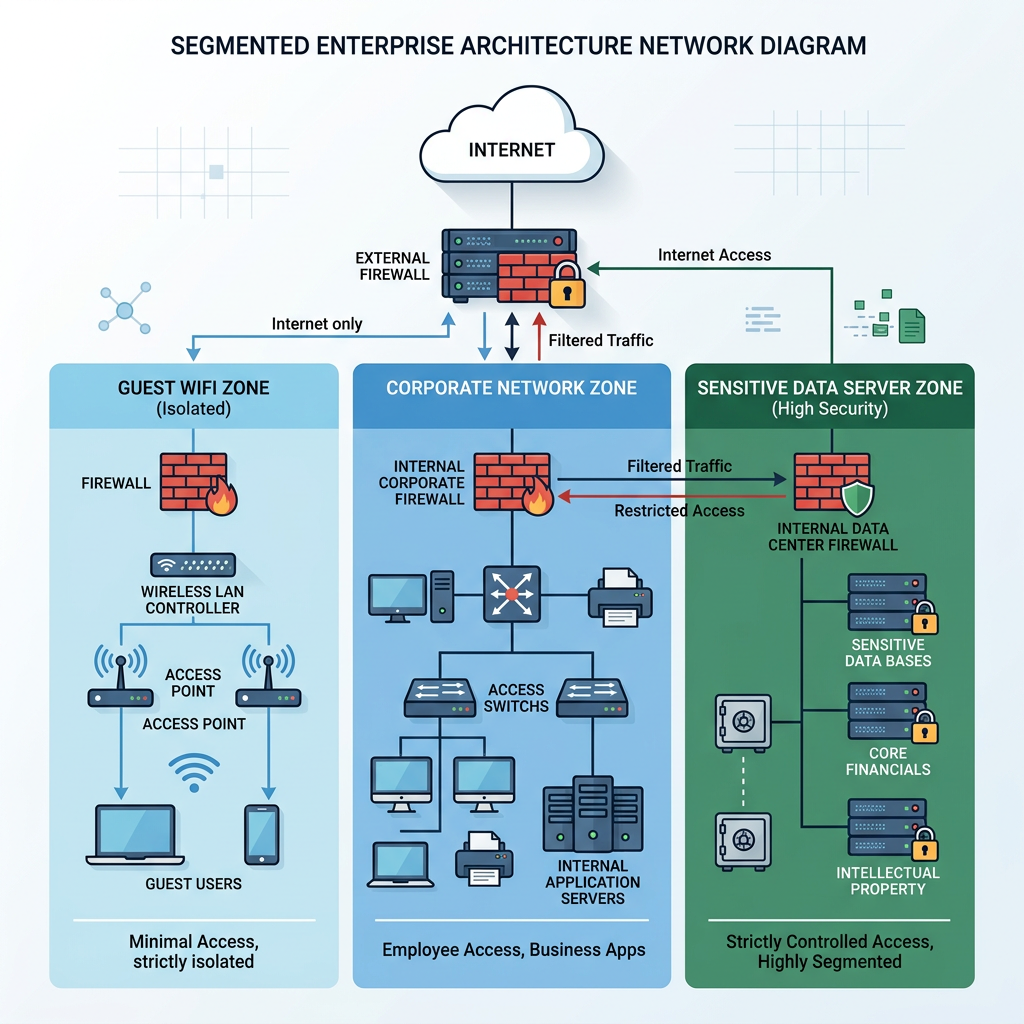
Network architecture plays a crucial role in containing breaches and limiting their impact. Network segmentation divides the corporate network into isolated zones based on function, sensitivity, and trust level. This approach implements the principle of least privilege at the network level, ensuring that compromised systems in one segment cannot easily access resources in other segments.
Common segmentation strategies include:
- Guest network isolation: Separating visitor Wi-Fi from the corporate network entirely
- Department segmentation: Creating separate network zones for different business units
- Server isolation: Placing critical servers in a secured DMZ with strict access controls
- IoT quarantine: Isolating Internet of Things devices that may have poor security
- Development/production separation: Preventing development environments from accessing production data
A 2025 study by Forrester Research found that organizations with mature network segmentation contained breaches 63% faster and experienced 71% less lateral movement by attackers compared to flat networks. This containment significantly reduces the scope and cost of security incidents.
Intrusion Prevention Systems (IPS) actively monitor network traffic for malicious activity and can automatically block threats. Unlike Intrusion Detection Systems (IDS) which only alert on suspicious activity, IPS solutions sit inline with network traffic and can drop malicious packets, reset connections, or block source IP addresses in real-time.
Modern IPS capabilities include:
- Signature-based detection of known exploits and attack patterns
- Protocol anomaly detection identifying traffic that violates RFC standards
- Rate-based detection preventing denial-of-service attacks
- Reputation-based blocking of traffic from known malicious IP addresses
- SSL/TLS inspection to detect threats hidden in encrypted traffic
Penetration testing and red team exercises provide proactive validation of security controls. Penetration tests simulate real-world attacks against specific targets, attempting to identify and exploit vulnerabilities before malicious actors can. Red team exercises go further, simulating sophisticated adversaries attempting to achieve specific objectives (such as accessing sensitive data or disrupting operations) using any available means.
Organizations should conduct penetration testing at least annually, with additional testing after significant infrastructure changes. The results inform remediation priorities, helping security teams focus resources on the most critical vulnerabilities. According to the 2026 Penetration Testing Report by Offensive Security, organizations that conduct quarterly penetration tests reduce their mean time to detect intrusions by 58% compared to those testing annually.
Navigating Regulatory Compliance and Incident Response Planning
Regulatory compliance frameworks mandate specific security controls and breach notification procedures. Major regulations affecting data breach prevention include:
- GDPR (General Data Protection Regulation): Requires organizations processing EU citizens' data to implement appropriate technical and organizational measures, with breach notification to authorities within 72 hours
- HIPAA (Health Insurance Portability and Accountability Act): Mandates specific safeguards for protected health information, including encryption, access controls, and audit logs
- PCI-DSS (Payment Card Industry Data Security Standard): Requires organizations handling credit card data to maintain secure networks, protect cardholder data, and regularly test security systems
- CCPA/CPRA (California Consumer Privacy Act/California Privacy Rights Act): Provides California residents with rights regarding their personal information and requires businesses to implement reasonable security measures
- SOX (Sarbanes-Oxley Act): Requires publicly traded companies to maintain accurate financial records with appropriate IT controls
Compliance is not merely a checkbox exercise—these frameworks codify security best practices developed through decades of experience with data breaches. The NIST Cybersecurity Framework, while not legally mandated, provides a comprehensive approach to managing cybersecurity risk that aligns with most regulatory requirements.
Non-compliance carries severe consequences. GDPR violations can result in fines up to €20 million or 4% of global annual revenue, whichever is greater. In 2025, the average GDPR fine for data breaches exceeded €12 million. Beyond financial penalties, non-compliance damages reputation, erodes customer trust, and can result in loss of business partnerships.
A formal Incident Response Plan (IRP) defines the organization's approach to detecting, containing, and recovering from security incidents. The NIST Computer Security Incident Handling Guide (SP 800-61) provides a framework for incident response with four phases:
- Preparation: Establishing incident response capabilities, tools, and team structure
- Detection and Analysis: Identifying and assessing potential security incidents
- Containment, Eradication, and Recovery: Limiting damage, removing threats, and restoring normal operations
- Post-Incident Activity: Conducting lessons learned and improving defenses
The IRP should clearly define:
- Roles and responsibilities for incident response team members
- Communication protocols for internal stakeholders and external parties
- Escalation procedures for different incident severity levels
- Technical procedures for containment and forensic preservation
- Legal and regulatory notification requirements and timelines
- Business continuity and disaster recovery procedures
Regular tabletop exercises test the IRP without disrupting operations, walking the response team through hypothetical scenarios to identify gaps and improve coordination. Organizations that conduct quarterly tabletop exercises respond to real incidents 43% faster than those without regular practice, according to 2025 research by the Ponemon Institute.
The investment in robust prevention and response capabilities consistently proves more cost-effective than dealing with breach consequences. IBM's 2025 Cost of a Data Breach Report found that organizations with mature incident response capabilities saved an average of $2.66 million per breach compared to those with immature capabilities. When factoring in regulatory fines, legal costs, customer notification expenses, and long-term reputation damage, the business case for comprehensive data breach prevention becomes overwhelming.
Frequently Asked Questions
How often should I update my data breach prevention strategy?
Your data breach prevention strategy should be reviewed and updated at least quarterly to address emerging threats, new vulnerabilities, and changes in your digital environment. Major updates should occur annually or whenever significant infrastructure changes occur, such as migrating to cloud services, implementing new business applications, or expanding remote work capabilities. Additionally, conduct immediate reviews following any security incident or near-miss to incorporate lessons learned. The threat landscape evolves rapidly—what worked last year may be insufficient against current attack techniques.
Can small businesses afford enterprise-level data breach prevention?
While full enterprise security solutions may be cost-prohibitive for small businesses, scaled-down alternatives provide significant protection at accessible price points. Small businesses should prioritize fundamental controls: strong endpoint protection like 360 Total Security for all devices, mandatory multi-factor authentication, regular employee security training, encrypted backups, and a documented incident response plan. Many cloud-based security services offer tiered pricing that makes advanced capabilities like SIEM and EDR accessible to smaller organizations. The key is implementing layered defenses appropriate to your risk profile and budget, then scaling up as the business grows.
What should I do immediately after discovering a potential data breach?
Upon discovering a potential breach, immediately activate your incident response plan. First, contain the threat by isolating affected systems from the network to prevent further data loss or lateral movement. Preserve all evidence for forensic analysis—do not shut down systems or delete logs. Notify your incident response team and, if applicable, your cybersecurity insurance provider. Document everything: timeline of events, affected systems, and actions taken. Assess whether the breach involves regulated data requiring notification to authorities or affected individuals. For organizations without formal incident response capabilities, consider engaging a professional incident response firm immediately. Time is critical—the faster you respond, the less damage occurs.
Is it necessary to encrypt all data, or just sensitive information?
While encrypting all data provides maximum protection, a risk-based approach is more practical for most organizations. Prioritize encryption for: (1) All regulated data (personal information, health records, financial data), (2) Intellectual property and trade secrets, (3) Authentication credentials and encryption keys, (4) Any data on portable devices (laptops, smartphones, USB drives), and (5) Data transmitted over networks. Less sensitive operational data may not require encryption at rest if protected by strong access controls and network security. However, full-disk encryption on all endpoints has become so efficient on modern hardware that many organizations implement it universally as a baseline security measure, eliminating the need to classify which files require protection.
Author Bio
This comprehensive guide was developed by cybersecurity professionals with over 15 years of combined experience in data protection, incident response, and security architecture. Our team specializes in translating complex security concepts into actionable guidance for organizations of all sizes. We continuously monitor emerging threats and evolving best practices to ensure our recommendations reflect the current state of cybersecurity in 2025 and beyond.
Protect your digital assets with proven security solutions. Visit 360 Total Security to explore comprehensive protection for your Windows or macOS system, featuring advanced threat detection, system optimization, and real-time monitoring capabilities designed to keep your data secure.
Learn more about 360 Total Security