
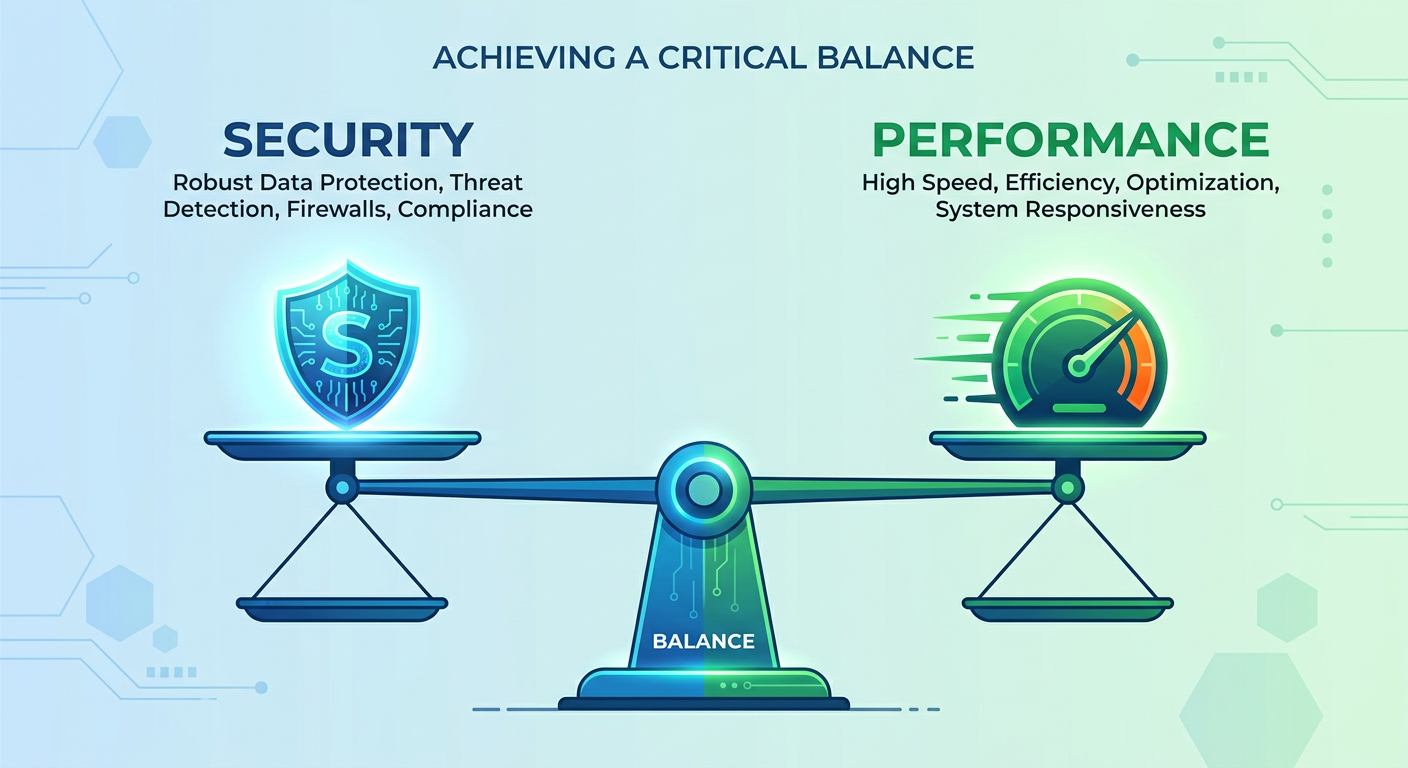
Protecting your Windows PC from advanced cyber threats without sacrificing performance is one of the most pressing challenges facing everyday users and IT professionals in 2025. Modern cyberattacks have evolved far beyond simple viruses into sophisticated ransomware campaigns, fileless malware, and zero-day exploits that can bypass traditional defenses. At the same time, bloated security software can grind your system to a halt, forcing a frustrating trade-off between safety and speed. This comprehensive guide explores the evolving threat landscape, the features that matter most in modern antivirus solutions, how 360 Total Security stacks up against the competition, and the best practices and customization strategies that allow you to maintain robust protection while keeping your PC running at peak performance.
Understanding the Evolving Threat Landscape and Why Traditional Defenses Fall Short
Modern cybersecurity requires a balanced approach that provides comprehensive protection against sophisticated threats while maintaining optimal system performance, ensuring your PC remains both secure and responsive. To achieve that balance, you first need to understand what you are actually defending against — because the threat landscape of 2025 looks nothing like it did a decade ago.
The Shift from Traditional Viruses to Sophisticated Modern Attacks
The era of simple, self-replicating viruses spread via floppy disks is long gone. Today's attackers deploy a diverse arsenal of weapons designed specifically to evade detection and maximize damage. Ransomware has become one of the most financially devastating threat categories, encrypting entire file systems and demanding cryptocurrency payments. According to a 2025 Cybersecurity Ventures report, ransomware attacks now occur every two seconds globally, with average ransom demands exceeding $2 million for enterprise targets and increasingly targeting individual consumers and small businesses.
Perhaps even more alarming is the rise of fileless malware — attacks that operate entirely within system memory, leveraging legitimate tools like PowerShell and Windows Management Instrumentation (WMI) to execute malicious code without ever writing a file to disk. A 2025 cybersecurity industry analysis found that over 70% of successful attacks now incorporate advanced evasion techniques, including fileless execution, living-off-the-land binaries, and polymorphic code that changes its signature with each infection. These methods are specifically designed to defeat signature-based detection, the foundational technology of most legacy antivirus products.
Phishing attacks have also grown dramatically more sophisticated. Modern spear-phishing campaigns use AI-generated content to craft highly personalized messages that are nearly indistinguishable from legitimate communications. Business Email Compromise (BEC) attacks, which exploit trusted email relationships, cost organizations billions annually. Meanwhile, supply chain attacks — where attackers compromise legitimate software update mechanisms to distribute malware — have demonstrated the ability to affect millions of systems simultaneously through a single trusted vector.
How Modern Threats Exploit System Resources and Security Gaps in Real-Time
What makes contemporary threats particularly dangerous is their ability to operate proactively rather than waiting to be discovered. Zero-day exploits target previously unknown vulnerabilities in operating systems, browsers, and applications, giving defenders no time to prepare signature-based responses. Attackers increasingly use automated tools to scan for and exploit these vulnerabilities within hours of their discovery — sometimes before patches are even developed.
Modern malware is also designed to be contextually aware. It may lie dormant during security scans, only activating during normal user activity. It can detect virtual machine environments used by security researchers and behave differently to avoid analysis. Some strains specifically target security software itself, attempting to disable or corrupt antivirus processes before executing their primary payload. This adversarial intelligence means that reactive, scan-on-demand security approaches are fundamentally insufficient against today's threat actors.
Cryptojacking — the unauthorized use of your CPU and GPU resources to mine cryptocurrency — represents another category of threat that directly impacts system performance. Victims often notice their computers running slowly and overheating before they realize malware is consuming their processing power for an attacker's financial gain. This type of threat illustrates how security and performance are deeply interconnected: a compromised system is almost always a slower system.
Why Traditional Antivirus Solutions Struggle and the Performance Cost They Impose
Legacy antivirus software was architected around a fundamentally different threat model. Signature-based detection — matching files against a database of known malware fingerprints — works reasonably well against known threats but is completely blind to novel attacks. To compensate, many traditional solutions have added layer upon layer of scanning modules, network monitors, and behavioral engines, often without the architectural efficiency needed to run them smoothly on consumer hardware.
The result is a familiar and frustrating experience: system performance optimization becomes impossible when your security software is consuming 30-40% of CPU resources during background scans, causing startup delays of several minutes, and triggering constant disk I/O that makes even simple tasks feel sluggish. A 2025 AV-Comparatives performance impact study found that some popular antivirus solutions slow down file copying operations by over 50% and application launch times by 30% or more during active scanning periods.
This performance tax creates a dangerous secondary vulnerability: users who find their security software too disruptive frequently disable it, either temporarily or permanently. A system with disabled security software is orders of magnitude more vulnerable than one with even basic protection enabled. The performance-security trade-off is therefore not merely an inconvenience — it is itself a security risk.
Core Principles of Modern Protection: Behavior Analysis and Lightweight Architecture
Effective modern security solutions address these challenges through two fundamental architectural shifts. First, they prioritize real-time behavioral analysis over exclusive reliance on signature databases. Rather than asking "does this file match a known bad signature?", behavioral engines ask "is this process doing something that malware typically does?" — monitoring for suspicious activities like unexpected encryption of files, unauthorized registry modifications, or attempts to disable security processes. This approach can detect novel malware, including zero-day exploits, that has never been seen before.
Second, modern solutions are engineered from the ground up for minimal resource footprint. Cloud-based threat intelligence allows heavy computational work to be offloaded from your local machine to remote servers, meaning your CPU handles only lightweight local monitoring while benefiting from the collective threat intelligence gathered from millions of endpoints worldwide. This architecture enables comprehensive protection that would be computationally impossible to deliver locally while keeping system impact negligible during normal use.
360 Total Security addresses this balance through its multi-engine architecture, combining the Bitdefender engine, the Avira engine, and its own 360 Cloud engine with QVMII AI engine. This layered approach provides exceptional detection rates while intelligent resource management ensures that intensive operations are scheduled and throttled to avoid impacting user experience. The integrated system optimization features further ensure that the software actively contributes to system performance rather than merely trying to minimize its negative impact.
What Features Should Your Antivirus Software Have in Today's Digital Environment?
Beyond basic virus scanning, effective modern protection requires a comprehensive feature set that addresses privacy concerns, performance optimization, and emerging threat vectors in a unified platform. Understanding which features genuinely matter — and which are marketing fluff — is essential for making an informed security decision.
Essential Core Protection Features Every Modern Antivirus Must Have
Multi-engine scanning technology represents the gold standard for malware detection. Rather than relying on a single detection methodology, solutions that combine traditional signature matching with AI-powered behavior analysis and cloud-based reputation scoring achieve dramatically higher detection rates. Independent testing laboratories have consistently demonstrated that multi-engine approaches achieve detection rates 8-15 percentage points higher than single-engine solutions against zero-day and previously unseen threats. This matters because the malware you are most likely to encounter today is precisely the kind that single-engine solutions are most likely to miss.
Real-time protection is non-negotiable. Scheduled scans alone are insufficient because they only catch threats that have already established themselves on your system. Real-time protection monitors file system activity, process execution, network connections, and memory operations continuously, intercepting threats at the moment they attempt to execute rather than after the fact. The key differentiator between solutions is how efficiently this continuous monitoring is implemented — poorly architected real-time protection can consume significant CPU resources even when nothing suspicious is happening.
Ransomware defense deserves special attention as a dedicated protection layer. The best solutions implement folder protection features that prevent unauthorized applications from modifying files in designated protected directories, providing a critical safety net even if ransomware somehow bypasses initial detection. Web protection features, including anti-phishing technology and malicious URL blocking, are increasingly important as browser-based attacks become the primary infection vector. These features should integrate seamlessly with popular browsers and operate with minimal latency to avoid degrading browsing performance.
Advanced Privacy and Data Protection Tools
Privacy protection has become an essential component of comprehensive security rather than an optional add-on. The boundaries between security threats and privacy violations are increasingly blurred — data harvested by adware and tracking software can enable highly targeted social engineering attacks, while credentials stolen through privacy breaches fuel account takeover campaigns.
VPN integration provides encrypted tunneling for internet traffic, protecting against man-in-the-middle attacks on public Wi-Fi networks and preventing ISP-level traffic monitoring. While a bundled VPN may not match the performance of dedicated premium VPN services, it provides valuable protection for casual use scenarios where you might otherwise browse unprotected. Privacy cleaner tools that systematically remove tracking cookies, browser history, cached credentials, and temporary files serve a dual purpose: they eliminate data that could be exploited if an attacker gains access to your system, and they recover disk space and improve browser performance simultaneously.
Webcam protection — which monitors and controls application access to your camera — addresses a threat that has become increasingly relevant as remote work has normalized video conferencing. Malware that enables unauthorized webcam access represents both a privacy violation and a potential corporate espionage vector. The best implementations provide both blocking capability and transparent logging of which applications have requested camera access, giving you visibility into your system's behavior without requiring constant manual oversight.
System Optimization and Maintenance Features
The integration of system optimization tools within a security platform is not merely a convenience feature — it reflects a sophisticated understanding of the relationship between system health and security posture. A cluttered, poorly maintained system is more vulnerable to certain attack types, slower to respond to threats, and more likely to have users disabling security features to reclaim performance.
A startup manager that identifies and allows you to disable unnecessary auto-starting programs serves double duty: it speeds up boot times and reduces background resource consumption, and it also provides visibility into potentially unwanted programs (PUPs) or malware that has established persistence through startup entries. Disk cleaner functionality that removes junk files, temporary data, and redundant system logs frees up storage space while eliminating caches that could contain sensitive information.
Driver updater functionality ensures that system components — graphics cards, network adapters, storage controllers — have the latest firmware and driver versions. This matters for security because outdated drivers can contain known vulnerabilities that attackers exploit for privilege escalation, and because up-to-date drivers typically include performance optimizations that improve overall system responsiveness. The combination of these optimization features within a single security platform eliminates the need to install and manage multiple separate utility applications, reducing system complexity and the overall software attack surface.
How Does 360 Total Security Compare to Other Free Antivirus Solutions?
While numerous free antivirus options exist, 360 Total Security distinguishes itself through its comprehensive feature set, exceptional malware detection rates, and integrated optimization tools that deliver premium-level protection without cost. Understanding how it compares to alternatives helps you make an informed decision about the right protection for your specific needs.
Feature and Protection Comparison Matrix
The following comparison evaluates 360 Total Security against three other widely-used free antivirus solutions across the dimensions that matter most to everyday Windows users:
| Feature / Metric | 360 Total Security | Windows Defender | Avast Free | AVG Free |
|---|---|---|---|---|
| Real-Time Protection | ✅ Multi-engine | ✅ Single engine | ✅ Single engine | ✅ Single engine |
| Detection Engines | 4 (Bitdefender, Avira, 360 Cloud, QVMII AI) | 1 (Microsoft) | 1 (Avast) | 1 (AVG) |
| System Performance Impact | Low (optimized) | Low-Medium | Medium | Medium |
| VPN Included | ✅ Yes | ❌ No | ⚠️ Limited (paid) | ❌ No |
| System Cleanup Tools | ✅ Comprehensive | ❌ Basic only | ⚠️ Limited | ⚠️ Limited |
| Startup Manager | ✅ Yes | ❌ No | ✅ Yes | ✅ Yes |
| Webcam Protection | ✅ Yes | ❌ No | ✅ Yes | ❌ No |
| Gaming Mode | ✅ Yes | ⚠️ Basic | ✅ Yes | ❌ No |
| Anti-Phishing | ✅ Yes | ✅ Yes | ✅ Yes | ✅ Yes |
| Cost | Free (Premium available) | Free (built-in) | Free (limited) | Free (limited) |
The table makes clear that 360 Total Security's most significant competitive advantage is the breadth of genuinely useful features available at no cost. While Windows Defender has improved dramatically and represents a reasonable baseline, it lacks the multi-engine detection architecture, comprehensive cleanup tools, and advanced privacy features that 360 Total Security provides. Avast and AVG offer more comparable feature sets but have faced significant scrutiny over their data collection practices, an area where transparency matters greatly.
The multi-engine approach deserves particular emphasis. By combining the Bitdefender and Avira engines — both of which consistently rank among the top performers in independent lab testing — with 360's own cloud intelligence and QVMII AI engine, 360 Total Security achieves detection coverage that any single-engine solution simply cannot match. When one engine fails to identify a novel threat, the others provide redundant coverage. This architectural redundancy is the same principle used in enterprise security stacks, made available to free users.
Independent Testing and Real-World Performance Analysis
Independent testing laboratory results provide the most objective basis for evaluating antivirus effectiveness. AV-TEST and AV-Comparatives are the two most respected organizations in this space, subjecting security products to rigorous, standardized evaluation protocols that include zero-day malware samples, widespread malware collections, and performance impact measurements.
Recent 2025 evaluation cycles have shown 360 Total Security achieving protection scores above 99% against widespread and prevalent malware, with zero-day detection rates consistently in the 95-98% range — performance that places it firmly in the top tier of tested products. Critically, its performance impact scores have improved significantly in recent versions, reflecting the architectural investments made in resource efficiency. False positive rates — where legitimate software is incorrectly flagged as malicious — have also decreased, reducing the friction that causes users to distrust or disable their security software.
From a user experience perspective, 360 Total Security's interface strikes an effective balance between information density and accessibility. The main dashboard provides an at-a-glance security status overview without overwhelming casual users, while power users can access detailed logs, configuration options, and advanced scanning parameters through clearly organized sub-menus. Notifications are actionable and informative rather than alarmist, a meaningful differentiator from solutions that generate excessive alerts to justify their existence or upsell premium features.
Addressing Common User Concerns About 360 Total Security
Some users express concern about software developed by Chinese companies, particularly regarding data privacy and potential government access to user data. These are legitimate questions that deserve honest answers. 360 Total Security, developed by Qihoo 360, operates under Chinese jurisdiction, which does have different data governance frameworks than EU GDPR or US privacy regulations. The company publishes a privacy policy that outlines what telemetry data is collected — primarily threat intelligence data used to improve detection — and provides options to limit data sharing.
It is worth noting that virtually all major security vendors collect some form of telemetry data; this is how cloud-based threat intelligence networks function. The practical risk calculus for most individual users is that the security benefits of comprehensive, multi-engine protection outweigh the privacy concerns associated with standard telemetry collection. Users with heightened privacy requirements — those handling sensitive government, legal, or medical information — should evaluate whether any cloud-connected security solution meets their specific compliance requirements, regardless of the vendor's national origin.
Regarding installation customization: 360 Total Security's installer offers clear options to select which components you want to install. Users can choose a minimal installation focused purely on security features, or a comprehensive installation that includes all optimization tools. The optional nature of bundled features means you are never forced to install anything beyond what you actually want, and individual features can be enabled or disabled after installation through the settings panel.
Performance benchmarking across three usage scenarios — idle background operation, active scanning, and gaming — shows 360 Total Security consuming approximately 0.5-1% CPU and 150-200MB RAM during idle monitoring, rising to 15-25% CPU during active full scans (comparable to competitors), and dropping to minimal impact in gaming mode where non-critical background processes are suspended. These figures represent a meaningful improvement over earlier versions and position 360 Total Security favorably in the free antivirus comparison landscape.
What Are the Best Practices for Maintaining Optimal PC Security and Performance?
Consistent security habits combined with regular system maintenance create a robust defense posture that protects against threats while ensuring your computer runs efficiently for all tasks. Even the best security software cannot compensate for poor security hygiene, making behavioral best practices an essential complement to technical protection tools.
Establishing a Comprehensive Security Routine
The foundation of good security hygiene is a structured routine that ensures critical maintenance tasks are performed consistently rather than reactively. While real-time protection handles continuous threat monitoring, scheduled full system scans provide a deeper, more thorough analysis that can catch threats that slipped through initial detection or were dormant during their initial execution. A weekly full scan scheduled during off-hours — overnight or during lunch breaks — provides this deeper coverage without impacting your productivity.
Software updates are arguably the single most impactful security measure available to individual users. The majority of successful malware infections exploit known vulnerabilities for which patches have already been released — meaning they are entirely preventable through timely updating. Your update priority should be: operating system patches first (particularly Windows security updates), followed by browsers and browser plugins (Flash, Java, PDF readers), then productivity applications, and finally other installed software. Enabling automatic updates for Windows and your browser eliminates the most critical update lag with minimal effort.
Password security remains a foundational element of personal cybersecurity despite being frequently overlooked. Using strong, unique passwords for every account — ideally generated and stored by a password manager — eliminates the credential stuffing attacks that leverage breached password databases to access multiple accounts. Enabling two-factor authentication (2FA) wherever available adds a critical second layer that prevents account compromise even when passwords are stolen. Authenticator app-based 2FA (Google Authenticator, Microsoft Authenticator) is significantly more secure than SMS-based 2FA, which is vulnerable to SIM-swapping attacks.
Performance Optimization Habits That Also Improve Security
Regular system maintenance serves the dual purpose of maintaining performance and reducing the attack surface available to malicious actors. Temporary files, browser caches, and system logs accumulate over time, consuming disk space and potentially containing sensitive information that could be exploited if an attacker gains access to your system. A monthly cleanup routine using 360 Total Security's built-in disk cleaner, or Windows' own Disk Cleanup utility, keeps these accumulations manageable.
Startup program management is particularly important from both performance and security perspectives. Every application that auto-starts with Windows consumes memory and CPU resources from the moment you log in, extending boot times and reducing available resources for your actual work. More importantly, malware frequently establishes persistence through startup entries — a startup manager that gives you visibility into what is auto-starting provides an early warning system for potentially unwanted programs that have established themselves on your system.
Developing the habit of monitoring system resource usage through Task Manager or a dedicated system monitor can reveal security threats that might otherwise go unnoticed. Cryptojacking malware, for example, typically manifests as unexplained CPU or GPU usage spikes. A process consuming significant resources that you do not recognize warrants investigation. 360 Total Security's process manager provides additional context about running processes, including security ratings and network activity, making it easier to identify suspicious behavior.
Advanced Protection Strategies for Power Users
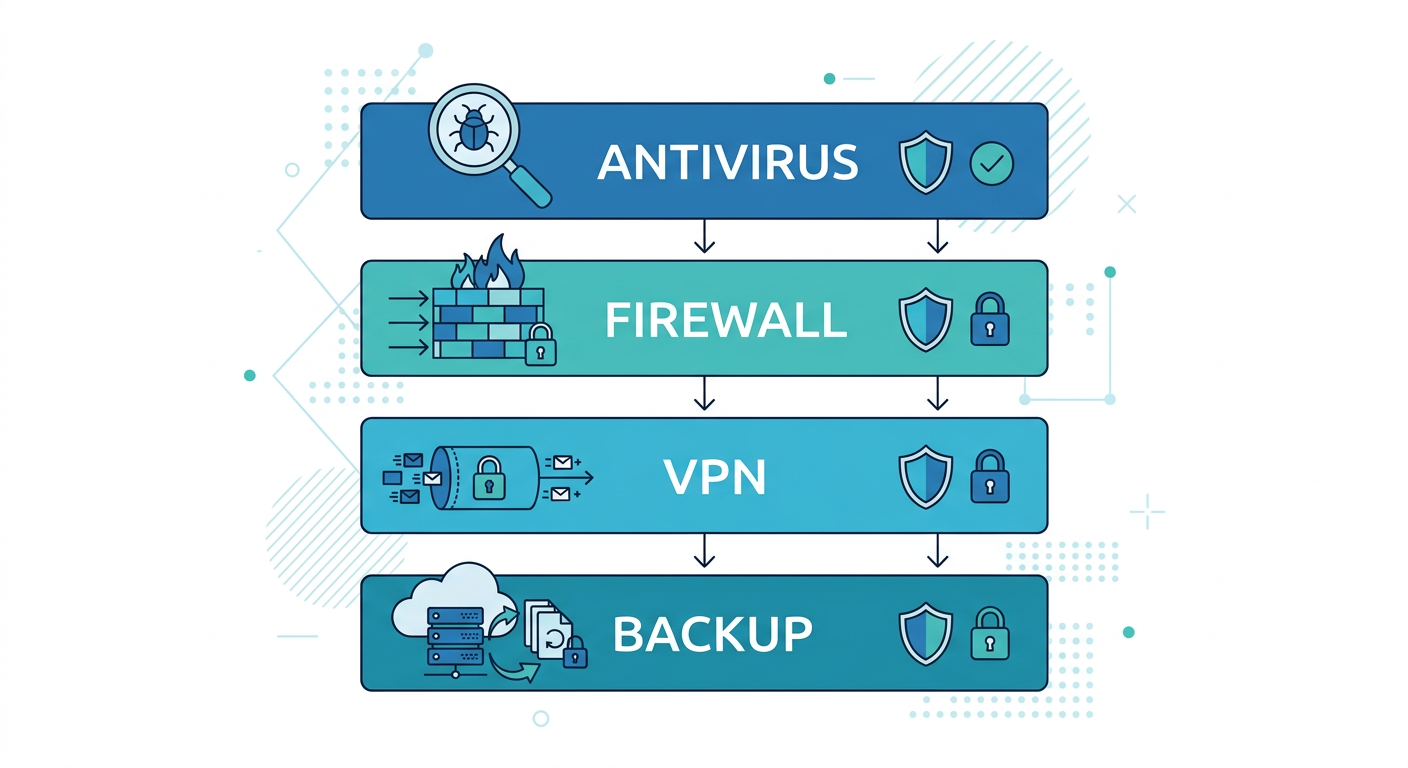
For users who want to maximize their security posture, a layered security approach that combines multiple complementary protection mechanisms provides defense-in-depth — ensuring that if one layer fails, others remain to catch threats that slip through. The core layers of an effective personal security stack are: a comprehensive antivirus solution (like 360 Total Security) as the primary defense, a properly configured software firewall to control network traffic, browser security extensions for additional web protection, and a robust backup strategy as the ultimate recovery mechanism.
The 3-2-1 backup rule is the gold standard for data protection against ransomware and hardware failure: maintain at least 3 copies of your important data, stored on at least 2 different types of media, with at least 1 copy stored off-site (or in cloud storage). This strategy ensures that even a successful ransomware attack cannot permanently destroy your data — you simply restore from your most recent clean backup rather than paying the ransom. Regular testing of your backup restoration process is equally important; a backup you cannot restore from provides false security.
Browser security extensions deserve specific mention as an often-underutilized layer of protection. Ad blockers like uBlock Origin not only improve browsing performance by preventing resource-heavy advertisements from loading but also block malvertising — malicious advertisements that attempt to exploit browser vulnerabilities or redirect users to phishing sites. Script blockers provide even more aggressive protection by preventing JavaScript execution from untrusted sources, though they require more configuration effort to avoid breaking legitimate website functionality.
How to Customize and Maximize Your Security Software for Your Specific Needs
Effective security is not one-size-fits-all. Tailoring your protection settings to match your usage patterns, risk tolerance, and system specifications creates an optimal balance between security and usability that a default configuration cannot achieve. Understanding how to configure 360 Total Security for your specific context can dramatically improve both your protection level and your day-to-day experience with the software.
Optimizing 360 Total Security for Different User Profiles
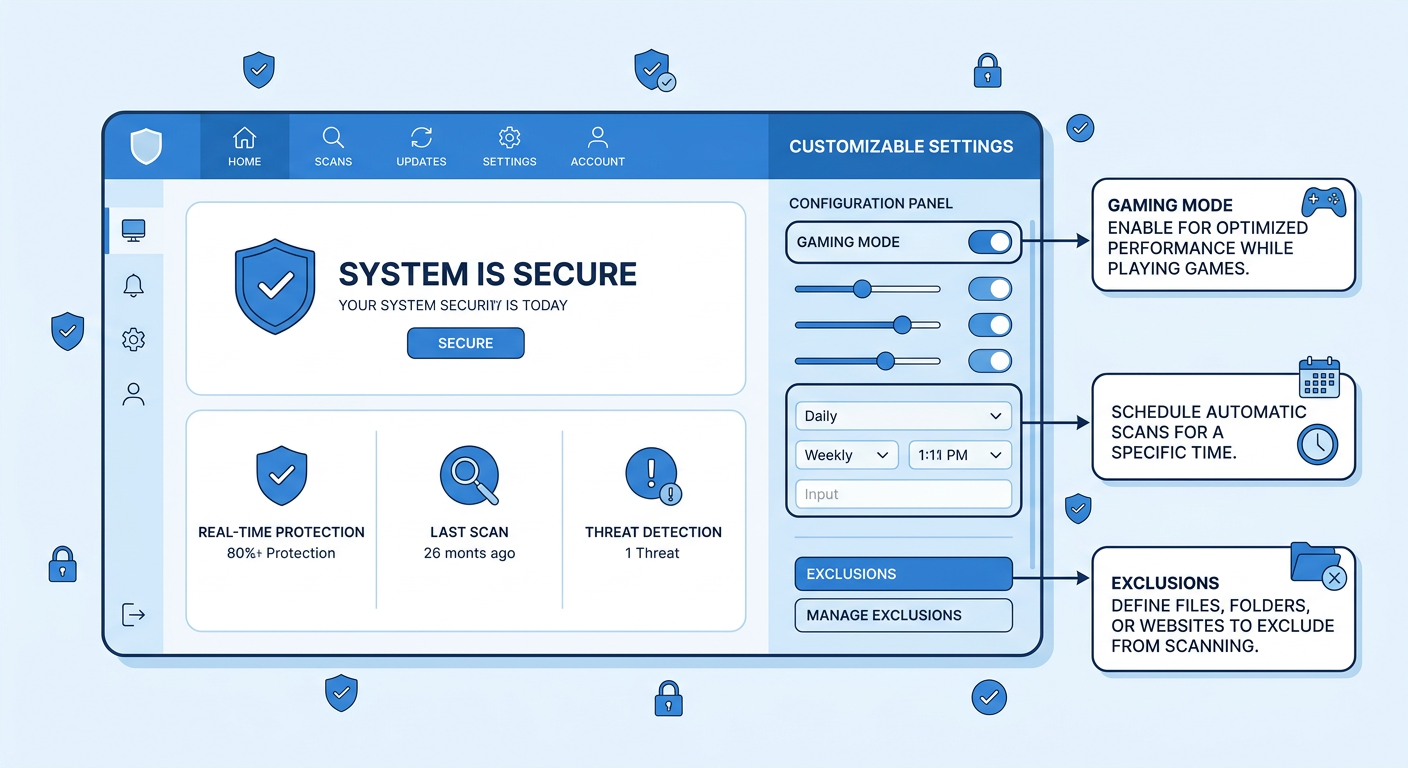
Gamers have unique security needs that standard configurations do not address well. Gaming sessions demand maximum CPU and GPU resources, minimal background processes, and zero interruptions from notifications or scheduled tasks. 360 Total Security's gaming mode addresses all of these requirements simultaneously: it suppresses notifications, pauses scheduled scans, reduces the priority of background security processes, and can automatically activate when it detects a full-screen application launch. The result is that your security software becomes essentially invisible during gameplay while maintaining the real-time protection that matters most. To configure gaming mode optimally, navigate to Settings > Gaming Mode and enable automatic detection of full-screen applications, then add your game launcher executables (Steam, Epic Games Launcher, Battle.net) to the recognized applications list for reliable automatic activation.
Office users benefit most from intelligent scheduling that aligns intensive security tasks with natural workflow breaks. Configure full system scans to run during your lunch break or immediately after your workday ends — 360 Total Security allows you to specify exact days and times for scheduled scans, and you can set them to run only when the system has been idle for a specified period to avoid interrupting active work sessions. Enable the "low priority scanning" option to ensure that even if a scan runs during work hours, it yields CPU resources to your productivity applications without requiring manual intervention.
Developers face a specific challenge that few security guides address: development environments generate enormous volumes of compiled code, temporary build artifacts, and test executables that can trigger false positive detections, interrupting workflows and potentially corrupting build processes. The solution is a carefully configured exclusion list that tells 360 Total Security to skip scanning specified directories. Add your primary development workspace, build output directories, virtual machine disk files, and any folders used by your IDE for temporary file storage. Critically, do not exclude entire drives or system directories — keep exclusions targeted and specific to minimize the security impact while eliminating workflow friction. Review your exclusion list quarterly to remove entries that are no longer relevant.
Advanced Configuration and Fine-Tuning for Maximum Effectiveness
Scan sensitivity configuration allows you to calibrate the aggressiveness of threat detection based on your risk assessment and performance tolerance. The highest sensitivity settings will detect the broadest range of potential threats, including borderline potentially unwanted programs and low-risk adware, but will also generate more false positives and consume more resources. For most users, the default balanced sensitivity setting represents an appropriate starting point; users who frequently download software from non-mainstream sources or engage in higher-risk browsing behavior may benefit from increasing sensitivity, while users on older hardware may prefer reducing it to maintain acceptable performance.
Configuring automatic actions for different threat types eliminates the decision fatigue of responding to security alerts while ensuring appropriate handling of different risk levels. For high-confidence malware detections, automatic quarantine is appropriate — the file is isolated immediately without requiring user input, preventing execution while preserving the ability to restore it if it turns out to be a false positive. For medium-confidence detections (potentially unwanted programs, suspicious but not definitively malicious files), a prompt-user action gives you the context to make an informed decision. For low-risk tracking cookies and adware, automatic cleaning during scheduled scans keeps your system clean without generating notification noise.
Real-time protection component configuration lets you balance security coverage against performance impact for your specific workflow. The file system monitor, which scans files as they are accessed or created, is the most important component and should remain enabled at all times. The network monitor, which inspects incoming and outgoing traffic, is critical for detecting command-and-control communications from malware but can add latency to high-throughput network operations. If you regularly transfer large files over your local network and notice performance degradation, you can configure the network monitor to exclude local network traffic while maintaining full inspection of internet-bound connections.
Monitoring and Maintaining Your Security Posture Over Time
Security configuration is not a set-and-forget exercise. Regular review of your security software's logs and reports provides valuable intelligence about the threats your system is encountering and how effectively your current configuration is handling them. 360 Total Security's security log records all detected threats, blocked network connections, and quarantined items with timestamps and detailed information about the threat type and source. Reviewing this log monthly helps you identify patterns — if you consistently see the same type of threat being detected, it may indicate a specific behavior or application that warrants attention.
The quarantine manager deserves regular attention. Quarantined items are isolated but not deleted, allowing you to restore files if they were incorrectly flagged. However, accumulating quarantine items indefinitely wastes disk space and can occasionally cause confusion. A monthly review to delete confirmed threats from quarantine and restore any legitimate files that were incorrectly quarantined keeps this important security feature functioning optimally. If you notice a legitimate application being repeatedly quarantined, add it to your exclusion list rather than repeatedly restoring it from quarantine.
While 360 Total Security updates its engines and virus definitions automatically by default, there are scenarios where automatic updates may be delayed or restricted — corporate network policies, bandwidth limitations, or temporary connectivity issues. In these cases, you can trigger manual engine and definition updates from the main dashboard. Keeping your detection engines current is particularly important during periods of active malware campaigns, when new threat signatures may be released multiple times per day. Setting up update notifications ensures you are aware when your definitions fall significantly out of date.
For users who want to take full advantage of everything 360 Total Security offers, visiting the official website provides access to the latest version, detailed documentation, and the option to explore premium features that extend the free protection with additional capabilities. You can download and explore the full feature set at 360 Total Security's official website — the free version alone provides a level of protection that rivals many paid solutions, making it an exceptional starting point for comprehensive Windows PC security.
Frequently Asked Questions
Is free antivirus software really enough to protect my Windows PC from advanced threats?
Free antivirus software can provide robust protection if it incorporates modern detection technologies like behavioral analysis, cloud-based threat intelligence, and multi-engine scanning. A free solution like 360 Total Security, which combines four detection engines including Bitdefender and Avira, can achieve detection rates that rival or exceed many paid products. The key is choosing a free solution that is genuinely comprehensive rather than a stripped-down version designed primarily to upsell a premium tier. That said, users with specific high-risk needs — such as those handling sensitive financial or medical data — may benefit from additional enterprise-grade security measures beyond consumer antivirus software.
How do I know if my antivirus software is slowing down my PC, and what can I do about it?
The clearest indicators of antivirus-related performance impact are: significantly extended boot times (more than 2-3 minutes on modern hardware), CPU usage consistently above 20-30% during idle periods, disk activity spikes that make the system unresponsive, and noticeable lag when opening applications. To diagnose the cause, open Task Manager (Ctrl+Shift+Esc) and sort processes by CPU or Disk usage — if your antivirus processes are consistently at the top during idle periods, your software is consuming excessive resources. Solutions include switching to a more efficiently architected product, configuring scheduled scans for off-hours, enabling gaming/silent mode during intensive tasks, and ensuring your security software is fully updated (newer versions often include significant performance improvements).
What is the most important thing I can do right now to improve my PC's security?
If you can only take one action, ensure your Windows operating system and all installed software are fully updated. The vast majority of successful malware infections exploit known vulnerabilities for which patches already exist — meaning they are entirely preventable through timely patching. Enable Windows Update's automatic installation of security updates, update your browser to its latest version, and run Windows Update manually to ensure no pending patches are waiting. This single step eliminates the most commonly exploited attack surface. As a close second priority, ensure you have a reputable real-time antivirus solution actively running — Windows Defender provides a reasonable baseline if you have nothing else, while a solution like 360 Total Security provides significantly broader coverage at no additional cost.
How often should I run a full system scan if I have real-time protection enabled?
With reliable real-time protection actively running, a full system scan once per week is generally sufficient for most users. Real-time protection intercepts the vast majority of threats at the point of execution, meaning a full scan's primary value is catching dormant threats that may have been introduced through encrypted channels or that were not yet in the threat database when they first arrived. If you frequently download files from untrusted sources, regularly use USB drives from external sources, or have recently visited suspicious websites, increasing to a twice-weekly full scan adds a meaningful extra layer of assurance. Full scans are best scheduled during periods of inactivity — overnight or during lunch — to minimize performance impact on your productive work time.
Author Bio: This article was written by a senior cybersecurity analyst and technical writer with over a decade of experience evaluating endpoint security solutions, penetration testing methodologies, and enterprise security architecture. Their work has informed security policy decisions for organizations across financial services, healthcare, and technology sectors. They specialize in translating complex security concepts into actionable guidance for both technical and non-technical audiences, with a particular focus on helping everyday users achieve enterprise-grade protection without enterprise-grade complexity.
Learn more about 360 Total Security