
Executive Summary: In an era where ransomware attacks, zero-day exploits, and fileless malware are redefining the boundaries of digital risk, relying on a basic or outdated antivirus solution is no longer sufficient. This comprehensive guide explores why modern cyber threats demand a more intelligent defense, what features define a truly effective free antivirus, how integrated security and optimization suites outperform standalone scanners, and how to build a holistic digital defense strategy that protects both your data and your system's performance. Whether you are evaluating your first security solution or upgrading from legacy software, this guide equips you with the knowledge to make an informed, confident decision.
Why Should You Consider a Better Antivirus Solution in Today's Cyber Threat Landscape?
The cybersecurity landscape of today bears little resemblance to the relatively simple threat environment of even a decade ago. Traditional security solutions were engineered to combat viruses and malware that operated in predictable, well-documented ways. Modern threats, however, are engineered by sophisticated adversaries who continuously adapt their tactics to circumvent conventional defenses. Understanding why your current antivirus may be falling short is the first step toward building a genuinely resilient security posture.
The core challenge is this: legacy antivirus tools were built for a different era. They relied heavily on signature-based detection — essentially matching incoming files against a database of known malicious code. While this approach remains a necessary component of any security strategy, it is wholly inadequate as a standalone defense against the sophisticated, polymorphic, and behavior-driven malware that dominates the modern threat landscape. Users who notice persistent slowdowns, unexpected crashes, or strange network activity even while running antivirus software are often experiencing the consequences of this protection gap.
The Evolving Nature of Modern Malware
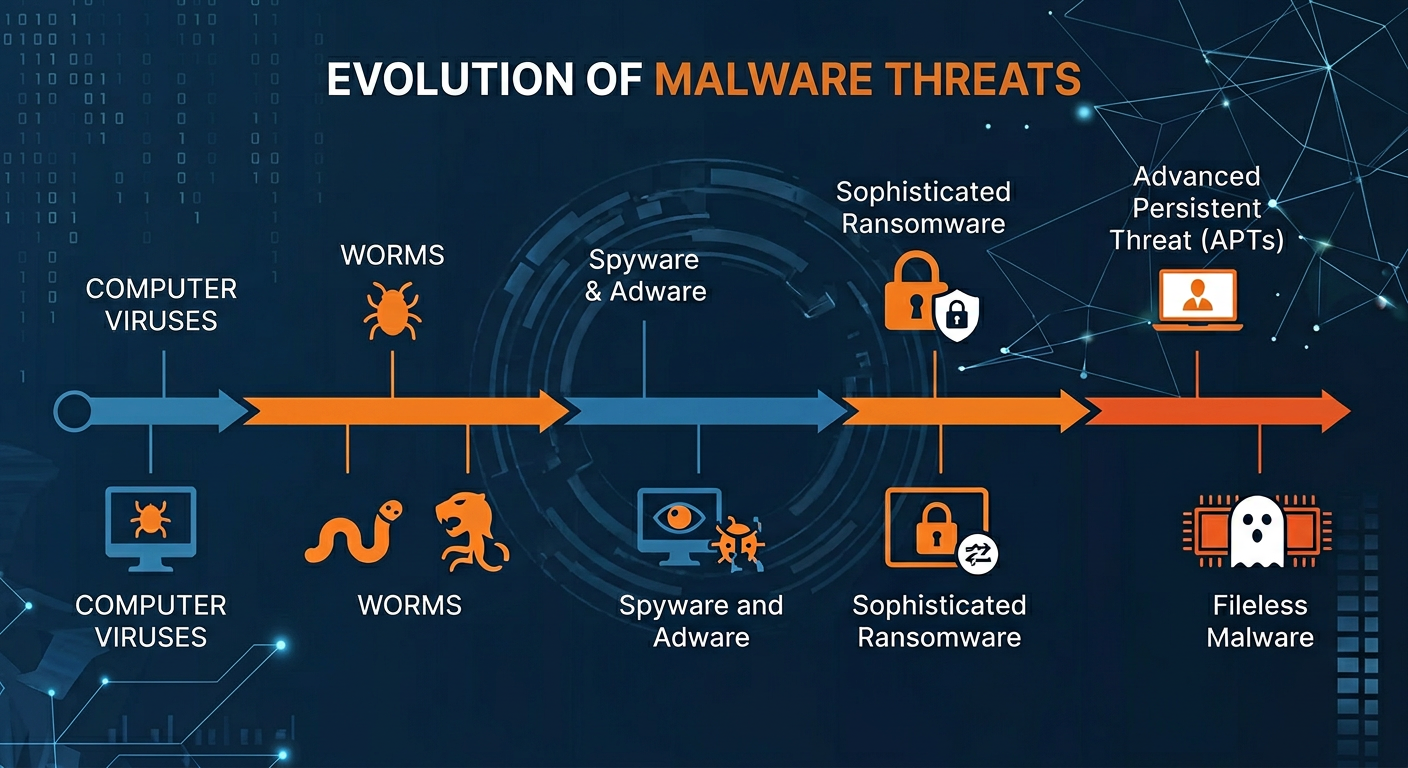
Modern malware is not the clumsy, easily spotted virus of the early internet era. Today's threats are engineered with surgical precision, designed to evade detection, persist silently, and cause maximum damage before being discovered. Three categories of modern threats illustrate this evolution most clearly.
Sophisticated Ransomware: Ransomware has evolved from a relatively blunt instrument into a highly targeted weapon. According to advisories published by the Cybersecurity and Infrastructure Security Agency (CISA), modern ransomware strains now employ advanced encryption algorithms, double-extortion tactics (encrypting data and threatening to publish it), and even Ransomware-as-a-Service (RaaS) models that allow less technically skilled criminals to deploy enterprise-grade attacks. Critically, many of these strains are specifically engineered to bypass signature-based detection by using polymorphic code that changes its signature with each infection. A 2026 cybersecurity industry report projected that global ransomware damages would exceed $275 billion annually, underscoring the urgency of deploying defenses that go beyond traditional scanning.
Fileless Malware: Perhaps the most insidious evolution in the threat landscape is the proliferation of fileless malware. Unlike conventional malicious software that writes executable files to disk — files that a traditional scanner can detect — fileless malware operates entirely in a system's memory (RAM) and leverages legitimate, trusted system tools like Windows PowerShell or Windows Management Instrumentation (WMI). Because it leaves no file footprint on disk, traditional signature-based scanners are effectively blind to it. Detection requires behavioral analysis and memory scanning capabilities that many legacy tools simply do not possess.
Social Engineering and Phishing: Technical defenses, no matter how sophisticated, can be circumvented by exploiting the human element. Social engineering attacks — particularly phishing — have become the primary delivery mechanism for malware. Attackers craft convincing emails, fake login pages, and fraudulent notifications designed to trick users into voluntarily bypassing security measures, such as disabling antivirus alerts or entering credentials on spoofed websites. According to a 2025 global threat intelligence report, phishing accounted for over 80% of reported security incidents, making human-targeted deception the single most effective attack vector in use today.

Performance and Usability Trade-offs of Outdated Tools
Beyond the protection gap, outdated security software introduces a second, often overlooked problem: it actively degrades the user experience. A security tool that makes your computer slower, more frustrating to use, or that constantly interrupts your workflow is a tool that users will eventually disable or ignore — which, from a security perspective, is the worst possible outcome.
System Performance Degradation: Legacy antivirus engines were not designed with modern multi-core processors, SSDs, or the complex software environments of today's PCs in mind. Their scanning engines can be highly inefficient, consuming disproportionate amounts of CPU and RAM during background scans. This translates directly into slower boot times, delayed application launches, and sluggish system responses. Independent testing labs such as AV-TEST regularly publish system impact scores for security suites, and the performance differential between modern, optimized engines and legacy tools can be dramatic — sometimes representing a 30-50% difference in application launch times during active scanning.
Intrusive User Experience: Poorly designed security software often compensates for its technical limitations with an aggressive notification strategy — frequent pop-ups, upsell prompts, confusing alert dialogs, and settings menus that require expert knowledge to navigate. This creates alert fatigue, a well-documented psychological phenomenon where users begin ignoring all security notifications because they are overwhelmed by irrelevant ones. When a genuine threat alert appears, it may be dismissed along with the noise.
Security as a Liability: The fundamental irony of poor security software is that it can create more risk than it mitigates. A tool that slows down a system so significantly that users disable it, or that generates so many false positives that real threats are ignored, has failed its primary purpose. A security tool that hampers productivity is not an asset — it is a liability that creates a false sense of protection while leaving real vulnerabilities unaddressed.
The Need for an Integrated Security and Optimization Approach
The logical response to these dual challenges — inadequate protection and performance degradation — is a solution that addresses both simultaneously. Modern users need a security suite that not only blocks threats in real time but also actively optimizes system health. This integrated approach recognizes a critical truth: malware, bloatware, and system clutter are not separate problems. They are interconnected causes of a degraded, vulnerable computing environment.
When malware infects a system, it rarely leaves cleanly. Even after the malicious executable is removed, it may leave behind registry entries, startup items, orphaned files, and modified system settings that continue to degrade performance and create vulnerabilities. A security solution that removes the threat but ignores the residue has only partially solved the problem. The synergy between real-time threat protection and integrated system cleanup tools creates a more resilient, efficient, and genuinely secure PC environment — one where threats are blocked, residue is cleaned, and performance is actively maintained.
How to Choose the Best Free Antivirus for Maximum Protection
The market for free antivirus software is crowded, and the quality differential between products is significant. Choosing an effective free antivirus requires moving beyond marketing claims and evaluating software against a rigorous checklist of essential features, performance characteristics, and trustworthiness indicators. The price tag of zero dollars is not a sufficient criterion — what matters is the protection value delivered.
A common misconception is that free antivirus solutions are inherently inferior to paid alternatives. While premium suites do offer additional features, many high-quality free solutions provide robust core protection that is more than adequate for the majority of users. The key is knowing what to look for and understanding the trade-offs involved in each choice.
Non-Negotiable Core Security Features
Any antivirus solution worth considering — free or paid — must deliver on a set of fundamental security capabilities. These are not optional extras; they are the baseline requirements for meaningful protection in today's threat environment.
Real-Time Antivirus and Anti-Spyware Protection: This is the most foundational requirement. Real-time protection means the security engine is continuously monitoring your system in the background — scanning files as they are accessed, downloads as they arrive, and processes as they execute. Without real-time protection, a security tool is reactive at best, only capable of finding threats after they have already had the opportunity to cause damage. Anti-spyware capabilities are equally important, as spyware — software that secretly monitors your activities and transmits data to third parties — represents a significant and growing privacy threat that many basic antivirus tools fail to adequately address.
Behavioral Detection (Heuristics and AI-Based Analysis): Given the limitations of signature-based detection against new, unknown, or polymorphic malware, behavioral detection has become a non-negotiable capability. Heuristic analysis works by monitoring the behavior of programs and processes in real time, looking for suspicious actions — such as attempting to modify system files, encrypt large numbers of documents, or establish hidden network connections — rather than matching them against a database of known malware signatures. Modern implementations of this technology incorporate machine learning and artificial intelligence to improve accuracy and reduce false positives. A free antivirus that lacks robust behavioral detection is poorly equipped to handle the zero-day and fileless threats that dominate the current threat landscape.
Web Protection and Anti-Phishing: Since the web browser is the primary attack surface for most users, web protection is an essential component of any security suite. This feature works by checking URLs against databases of known malicious websites, analyzing page content for phishing indicators, and blocking access to sites that are identified as threats before they can load in the browser. Anti-phishing specifically targets the fraudulent pages designed to mimic legitimate banking, shopping, or login portals in order to steal credentials. Given that phishing is the dominant malware delivery mechanism, a security solution without strong web and anti-phishing protection has a critical gap in its defenses.
Evaluating Performance and System Impact
A security suite that protects your files but cripples your system's performance is not a good solution. Performance evaluation is therefore a critical dimension of any antivirus selection process, and fortunately, there are objective, independent resources available to inform this evaluation.
Independent Lab Certifications: Organizations like AV-TEST (based in Germany) and AV-Comparatives (based in Austria) conduct rigorous, standardized testing of security products and publish their results publicly. Their evaluations cover three primary dimensions: Protection (detection rates against known and unknown malware), Performance (system impact during various tasks), and Usability (false positive rates). When evaluating a free antivirus, look for products that carry certification from these labs, particularly those that score well on the Performance dimension, as this is where many otherwise capable products fall short.
Game Mode and Silent Mode: For users who engage in gaming, video editing, or any other full-screen, resource-intensive activity, the availability of a Game Mode or Silent Mode is an important usability feature. These modes automatically detect when a resource-intensive application is running in full screen and temporarily suppress non-critical notifications and reduce background scanning intensity to minimize system impact. This ensures that security protection is maintained without interrupting the user experience during demanding tasks.
The following table provides a comparative framework for evaluating free antivirus solutions across the most important criteria:
| Evaluation Criterion | What to Look For | Why It Matters | Red Flags |
|---|---|---|---|
| Lab Protection Score | AV-TEST or AV-Comparatives certification; score of 5.5/6 or higher | Validates real-world malware detection capability against independent standards | No independent lab testing; self-reported scores only |
| System Performance Impact | Low impact rating from AV-TEST; minimal slowdown during file copy and launch tests | Ensures security software does not degrade daily computing experience | High CPU/RAM usage during idle scans; slow boot times reported |
| Web and Phishing Protection | URL filtering, real-time phishing page detection, browser extension support | Blocks the primary delivery vector for modern malware and credential theft | Web protection only available in paid tier; no browser integration |
| Behavioral Detection | Heuristic and AI-based analysis; zero-day threat detection capability | Essential for catching unknown and fileless malware that bypasses signature scanning | Signature-only detection; no heuristic engine disclosed |
| Gaming / Silent Mode | Automatic full-screen detection; suppression of non-critical alerts | Maintains usability during resource-intensive tasks without compromising protection | Constant pop-ups during gaming; no way to suppress notifications |
| Update Frequency | Multiple virus database updates per day; automatic engine updates | Ensures protection against the latest threats as they emerge | Infrequent updates; manual update process required |
The Hidden Value: Built-in Optimization Tools
One of the most significant differentiators among free security suites is the inclusion of integrated system optimization tools. While basic antivirus products focus exclusively on threat detection and removal, more comprehensive free solutions recognize that system performance and security are deeply interconnected and address both within a single platform.
PC Cleanup and Junk File Removal: Many premium free suites include tools that scan for and remove temporary files, browser cache, system logs, and other categories of digital clutter that accumulate over time and consume valuable disk space. These tools can often recover gigabytes of storage and contribute meaningfully to improved system responsiveness — particularly on older hardware with limited storage capacity.
360 Total Security as an Integrated Example: 360 Total Security distinguishes itself in the free security market by integrating a powerful System Cleanup and Speed Up toolset directly alongside its multi-engine antivirus core. Rather than treating security and performance optimization as separate concerns, 360 Total Security addresses them as two dimensions of the same problem: a healthy, well-performing PC. This holistic approach — where threat removal and system optimization are unified in a single, coherent interface — represents a significant practical advantage for users who want comprehensive protection without managing multiple specialized tools. Users looking for an all-in-one solution that handles both security and PC health will find this integrated approach particularly compelling. You can explore the full feature set at the 360 Total Security official website.
Automatic Updates as a Security Imperative: Regardless of which security solution you choose, the frequency and reliability of automatic updates is a critical selection criterion. The value of any virus database or behavioral detection engine is directly proportional to how current it is. Threat actors release new malware variants continuously — sometimes thousands per day — and a security solution that is not updated multiple times daily is perpetually behind the threat curve. Look for solutions that update their virus databases automatically and frequently, without requiring user intervention.
What Makes a Comprehensive PC Security and Optimization Suite Stand Out?
The most effective modern security solutions operate on a fundamentally different philosophy than basic antivirus tools. Rather than providing a single layer of protection — signature-based scanning — they implement a multi-layered defense architecture in which each layer addresses a different category of threat or attack vector. This defense-in-depth approach ensures that even if one layer is bypassed, others remain in place to detect and neutralize the threat. Combined with proactive system maintenance capabilities, these comprehensive suites create a computing environment that is both fortified against attack and optimized for performance.
Understanding what distinguishes a truly comprehensive suite from a basic antivirus tool requires examining the specific protective layers and optimization capabilities that define the category. The following sections break down these distinguishing features in detail.
Advanced Protective Layers Beyond Basic Scanning
A multi-layered security architecture incorporates specialized defensive capabilities that address specific threat categories that basic scanning cannot adequately handle.
Proactive Ransomware Protection: Given the catastrophic impact of ransomware attacks — which can result in the permanent loss of irreplaceable personal files, financial data, and business records — dedicated ransomware protection has become one of the most critical features to look for in a security suite. Unlike generic malware protection, ransomware-specific defenses monitor for the behavioral signatures of encryption attacks: rapid access to large numbers of files, modifications to file extensions, and attempts to delete shadow copies (Windows backup snapshots). By detecting and blocking these behaviors in real time — before the encryption process completes — ransomware protection can prevent the damage that signature-based detection would only identify after the fact. According to a 2026 threat analysis report, organizations and individuals with dedicated ransomware behavioral protection experienced significantly lower rates of successful encryption compared to those relying on signature-based detection alone.
Sandbox Technology: The security sandbox is one of the most powerful and underappreciated tools in the modern security arsenal. A sandbox is an isolated virtual environment — completely separated from your real operating system and file system — in which unknown or potentially risky programs can be executed and observed without any risk to the actual system. If a program behaves maliciously within the sandbox — attempting to modify system files, establish network connections, or deploy secondary payloads — it is contained and can be terminated without consequence. This technology is particularly valuable for users who need to test software from untrusted sources, open suspicious email attachments, or evaluate applications of uncertain provenance. The sandbox effectively eliminates the risk associated with running unknown code by ensuring that any malicious behavior occurs in a consequence-free environment.
Vulnerability Patch Management: One of the most consistently exploited attack vectors in cybersecurity is unpatched software. Attackers routinely scan for systems running known vulnerable versions of operating systems, browsers, plugins, and applications, then exploit those vulnerabilities to gain unauthorized access. Vulnerability patch management tools within a security suite automate the process of identifying outdated or unpatched software and, in many cases, facilitate or automate the patching process. This capability is particularly important for non-technical users who may not be aware of the need to manually update software beyond Windows itself, or who may not realize that applications like PDF readers, media players, and browser plugins represent significant attack surfaces when left unpatched.
Network and Privacy Safeguards
Beyond protecting against file-based threats, a comprehensive security suite must also defend the network connections and privacy of the user. Modern attacks frequently target network communications and personal data as much as they target files and system integrity.
Robust Firewall Protection: A firewall monitors and controls both incoming and outgoing network traffic based on a defined set of security rules. An inbound firewall blocks unauthorized external attempts to connect to your system — essential for preventing direct network-based attacks. An outbound firewall monitors programs attempting to establish network connections from your system, which is a critical capability for detecting malware that attempts to communicate with command-and-control servers or exfiltrate stolen data. While Windows includes a built-in firewall, the firewalls integrated into comprehensive security suites typically offer more granular control, better default rule sets, and more informative alerts that help users understand what is happening on their network.
Webcam Protection: The unauthorized access of a computer's webcam by malware — often referred to as camfecting — is a serious and underappreciated privacy threat. Malicious software can silently activate a webcam and transmit video feeds to remote attackers without any visible indicator to the user. Webcam protection features monitor all application requests to access the camera and alert the user or block access from applications that have not been explicitly authorized. This feature has become increasingly important as remote work and video conferencing have made webcams ubiquitous components of the modern PC setup.
Secure File Shredder: When a file is deleted through normal means — including emptying the Recycle Bin — the data is not actually erased from the storage medium. The operating system simply marks the space as available for reuse, but the original data remains intact and recoverable using widely available data recovery tools. A secure file shredder overwrites the data multiple times using established algorithms (such as the DoD 5220.22-M standard) before deletion, ensuring that sensitive files — financial records, personal documents, confidential business data — are permanently and irrecoverably destroyed. This is an essential privacy tool for anyone who handles sensitive information on their PC.
Integrated System Optimization for Sustained Performance
The integration of system optimization tools within a security suite is not merely a convenience feature — it reflects a sophisticated understanding of the relationship between system health and security. A well-maintained, optimized system is inherently more secure: it has fewer vulnerabilities from outdated software, fewer attack surfaces from unnecessary running processes, and better performance that encourages users to keep their security tools active rather than disabling them to reclaim resources.
Startup Manager: Over time, the number of programs that automatically launch at system startup tends to grow, as software installers frequently add startup entries without explicit user consent. Each additional startup program consumes system resources from the moment Windows loads, contributing to slow boot times and reduced available memory for productive tasks. A startup manager provides a clear, accessible interface for reviewing all startup entries and disabling those that are unnecessary, resulting in significantly faster boot times and a leaner, more responsive system from the moment it powers on.
Disk Cleaner: Modern operating systems and applications generate substantial quantities of temporary files, cache data, log files, and other digital detritus as a normal byproduct of operation. While individually small, these files accumulate over time and can consume gigabytes of storage space. Beyond the storage impact, excessive temporary files can slow down disk operations and, in some cases, obscure malicious files that use similar naming conventions to blend in with legitimate system clutter. A disk cleaner systematically identifies and removes these unnecessary files, recovering storage space and improving overall system responsiveness.
Process Manager and Driver Updater: A process manager provides real-time visibility into all running processes and their resource consumption, enabling users to identify applications that are consuming disproportionate amounts of CPU or RAM. This visibility is valuable both for performance optimization and for security — an unknown process consuming significant resources may be an indicator of malware activity. A driver updater complements this by ensuring that hardware drivers — the software that enables the operating system to communicate with hardware components — are kept current. Outdated drivers are a common cause of system instability, performance issues, and security vulnerabilities.
This combination of cleaning, tuning, and monitoring capabilities is where suites like 360 Total Security provide exceptional value. When malware is removed, the cleanup tools address the residual impact — registry entries, startup items, temporary files — that often persist and continue to degrade performance even after the threat itself has been eliminated. This comprehensive approach ensures that the system is not just secure, but genuinely restored to optimal health. Visit the 360 Total Security website to learn more about its integrated security and optimization capabilities for Windows PCs.
Step-by-Step Guide to Fortifying Your PC with Advanced Security Software
Selecting the right security suite is only the first step. The true value of any security solution is realized through proper installation, thoughtful configuration, and consistent maintenance practices. Many users install security software and assume that the default settings provide optimal protection — but in reality, taking the time to configure your security suite correctly and establish a regular maintenance routine can dramatically increase both your protection level and your system's performance. This section provides a structured, actionable guide to getting the most from your security software.
Initial Installation and Deep System Scan
The installation phase is more consequential than most users realize. The steps taken before, during, and immediately after installation can significantly affect the thoroughness and reliability of your initial security baseline.
Pre-Installation Preparation: Before installing your chosen security suite, take three preparatory steps. First, create a system restore point through Windows System Properties — this provides a recovery option if the installation causes any unexpected compatibility issues. Second, close all running applications to ensure that the installer has full access to system components and that no running processes interfere with the installation. Third, if you are replacing existing security software, use the previous vendor's dedicated removal tool (rather than the standard Windows uninstaller) to ensure complete removal of all components — residual files from old security software can cause conflicts with the new installation.
Immediate Full System Scan: Running a full system scan immediately after installation is a critical first step that many users skip. This initial scan establishes a security baseline — a confirmed clean state of your system — and identifies any threats that may have been present before the new software was installed. For maximum thoroughness, solutions like 360 Total Security offer a Boot-Time Scan capability, which schedules a scan to run before Windows fully loads. This is particularly important for detecting rootkits — a category of malware specifically designed to hide from security software that runs within the normal Windows environment by operating at a lower system level.
As security professionals consistently advise: "The first scan after installing new security software is the most important one you will ever run. It establishes your baseline and often reveals threats that previous solutions missed entirely. Do not skip it, and do not rush it." This initial investment of time pays dividends in the form of a confirmed clean starting point from which your ongoing protection can operate effectively.
Reviewing the Scan Report: After the initial scan completes, review the report carefully rather than simply clicking through to accept recommended actions. Understanding what was found — the category of threat, the location of the infected file, and the recommended remediation — builds your awareness of your system's security history and helps you make informed decisions about quarantine versus deletion. Files that are quarantined are isolated but not removed, allowing you to restore them if they turn out to be false positives.
Optimizing Security and Performance Settings
Default settings are designed to balance protection and usability for the broadest possible range of users. However, taking the time to review and customize your security suite's configuration can significantly improve both its protective effectiveness and its system impact.
Enabling Critical Protection Modules: Verify that the following modules are active and properly configured: Real-Time Protection (continuous background monitoring of files and processes), Web Protection (URL filtering and phishing detection in the browser), and Ransomware Protection (behavioral monitoring for encryption attack patterns). In some security suites, particularly free versions, certain modules may be disabled by default or require explicit activation. Navigate through the security suite's settings interface to confirm that all critical protection layers are enabled.
Scheduling Scans Strategically: Configure your security suite to run scheduled scans during periods when the system is on but not in active use — such as during lunch breaks or overnight. Schedule quick scans (which check the most commonly targeted system areas) on a daily or every-other-day basis, and full system scans (which examine every file on every drive) on a weekly or bi-weekly basis. This scheduling approach ensures comprehensive, regular coverage without impacting system performance during productive work hours.
Running Initial Optimization: After completing the security configuration, run the built-in optimization tools to establish a performance baseline. Execute the System Cleanup to remove accumulated junk files, then use the Startup Optimizer to review and disable unnecessary startup entries. The impact of these steps can be substantial — particularly on systems that have been in use for an extended period without regular maintenance. Users frequently report significantly faster boot times and more responsive application launching after completing this initial optimization pass.
Building a Proactive Security Maintenance Habit
The most sophisticated security suite in the world cannot protect a system that is not actively maintained. Building consistent security maintenance habits is the final and perhaps most important component of a robust personal security strategy.
Comprehensive Automatic Updates: Configure automatic updates not just for your security software, but for Windows itself and all other installed applications. The Windows Update service should be set to download and install updates automatically. For third-party applications — browsers, office suites, media players, PDF readers — enable automatic updates within each application's settings, or use the vulnerability scan feature of your security suite to identify outdated software that requires attention.
Using the Sandbox for Untrusted Software: Develop the habit of using the Sandbox feature whenever you need to run software from an untrusted or unfamiliar source. This includes software downloaded from unofficial websites, email attachments from unknown senders, or applications recommended by sources you cannot fully verify. The sandbox provides a risk-free environment for evaluating unknown software before allowing it to run on your actual system, effectively eliminating one of the most common vectors for malware infection.
Monthly Vulnerability Scans: Schedule a monthly vulnerability scan to identify applications and system components that have known security vulnerabilities but have not yet been patched. This is a particularly important practice because many users update their operating system diligently but neglect third-party applications, which are increasingly targeted by attackers who recognize that users are more likely to keep Windows updated than the dozens of other applications installed on a typical PC.
Beyond Antivirus: Building a Holistic Digital Defense Strategy
Even the most advanced, comprehensively configured security suite represents only one component of a complete digital defense strategy. Cybersecurity professionals universally advocate for a defense-in-depth approach — layering multiple, complementary defensive measures so that the failure of any single layer does not result in a catastrophic breach. This section explores the human, behavioral, and technical dimensions of a holistic security posture that extends beyond the capabilities of any antivirus software.
The central insight of this approach is that technology alone cannot provide complete security. Human behavior — how we interact with email, websites, software, and other people online — is consistently the most exploited attack vector. Building a holistic defense therefore requires educating and empowering the human element of the security equation, not just deploying technical tools.
The Human Firewall: Cultivating Safe Online Habits
The concept of the "human firewall" recognizes that individual users, through their daily online behaviors, represent either a significant vulnerability or a powerful defensive asset. Cultivating safe online habits is not about paranoia — it is about developing informed, consistent practices that dramatically reduce the likelihood of falling victim to the social engineering attacks that account for the majority of successful security breaches.
Identifying Phishing Attempts: Phishing emails are designed to create urgency, fear, or curiosity that overrides the recipient's critical thinking. Learning to recognize the hallmarks of phishing attempts is one of the highest-value security skills any user can develop. Key indicators include: sender email addresses that do not match the purported organization's domain (e.g., an email claiming to be from your bank but sent from a Gmail address), urgent language demanding immediate action ("Your account will be suspended in 24 hours"), requests for sensitive information via email or through links (legitimate organizations never request passwords or full financial details via email), and links whose hover text reveals a destination URL different from the displayed text. When in doubt, navigate directly to the organization's website by typing the address manually rather than clicking any link in the email.
Safe Software Download Practices: Only download software from official developer websites, established software repositories, or platform-native app stores. Avoid third-party download sites that bundle software with additional programs, browser extensions, or toolbars — these bundles are a primary distribution mechanism for adware, spyware, and potentially unwanted programs (PUPs). Before downloading any software, verify the developer's reputation, check user reviews from independent sources, and confirm that the download is served over HTTPS.
Public Wi-Fi Caution: Public Wi-Fi networks — in cafes, airports, hotels, and other shared spaces — are inherently insecure. Traffic on these networks can be intercepted by other users on the same network, a technique known as a man-in-the-middle attack. When using public Wi-Fi, avoid accessing sensitive accounts (banking, email, work systems) unless absolutely necessary. If you must access sensitive services on public Wi-Fi, use a reputable Virtual Private Network (VPN) to encrypt your traffic and protect it from interception.
Fortifying Your Accounts and Data
Strong account security and robust data backup practices form the backbone of a resilient personal security posture. These measures address two of the most common and damaging consequences of security breaches: account compromise and data loss.
Password Manager Implementation: The majority of people reuse passwords across multiple accounts — a practice that creates catastrophic cascading risk. When one account's credentials are compromised in a data breach (a distressingly common occurrence, with billions of credentials exposed in breaches reported in 2025 alone), attackers systematically test those credentials against other popular services in a technique called credential stuffing. A password manager solves this problem by generating and securely storing unique, complex, randomly generated passwords for every account. The user needs to remember only a single master password to access the vault. This single change — moving to a password manager — eliminates credential stuffing as an attack vector entirely.
Two-Factor Authentication (2FA): Two-factor authentication adds a second verification step to the login process, requiring not just something you know (your password) but also something you have (a time-based code from an authenticator app, a hardware security key, or an SMS message). Even if an attacker obtains your password through a data breach, phishing, or other means, they cannot access your account without also possessing the second factor. Enable 2FA on all accounts that offer it, prioritizing high-value accounts: email (which is the recovery mechanism for most other accounts), banking and financial services, and social media. Authenticator app-based 2FA (such as Google Authenticator or Authy) is significantly more secure than SMS-based 2FA, which is vulnerable to SIM-swapping attacks.
The 3-2-1 Backup Rule: Data backup is the ultimate defense against ransomware and one of the most neglected aspects of personal cybersecurity. The 3-2-1 rule, widely recommended by cybersecurity professionals and organizations including CISA, provides a simple framework for resilient data protection: maintain 3 copies of your data (the original plus two backups), on 2 different types of storage media (for example, an internal drive and an external drive), with 1 copy stored offsite (such as a cloud backup service). The offsite copy is the critical element — it ensures that a physical disaster (fire, flood, theft) or a ransomware attack that encrypts all locally connected drives cannot destroy all copies of your data simultaneously.
| Backup Solution | Pros | Cons | Estimated Cost | Best For |
|---|---|---|---|---|
| External Hard Drive (HDD/SSD) | Fast local backup; one-time cost; no ongoing subscription; large capacity | Vulnerable to physical damage/theft; must be manually connected; no offsite protection if kept at home | $50–$150 (one-time) | Local backup copy; fast recovery of large datasets |
| Network Attached Storage (NAS) | Automated backups over home network; RAID redundancy options; accessible from multiple devices | Higher upfront cost; requires setup and maintenance; still vulnerable to local disasters | $200–$500+ (one-time, plus drives) | Power users; home offices; multiple device backup |
| Cloud Storage (Backblaze, OneDrive, Google Drive) | Offsite protection; automatic continuous backup; accessible from anywhere; scales with storage needs | Ongoing subscription cost; dependent on internet connection speed; privacy considerations | $2–$10 per month (consumer plans) | Offsite backup copy; ransomware protection; disaster recovery |
Leveraging Your Security Suite's Full Potential
A comprehensive security suite like 360 Total Security contains a wealth of tools that many users never fully explore. Maximizing the value of your security investment means regularly engaging with the full breadth of available features, not just the core antivirus scanner.
Exploring the Toolbox: Most comprehensive security suites include a toolbox or utilities section that houses specialized tools for specific security and maintenance tasks. The File Shredder is invaluable for permanently destroying sensitive documents before disposing of or repurposing a computer. The Disk Analyzer helps identify large, unnecessary files that are consuming storage space — a common culprit being old installation packages, duplicate media files, and forgotten downloads. The Network Monitor provides real-time visibility into all active network connections, allowing you to identify unusual outbound connections that might indicate malware communicating with external servers. Regularly exploring and using these tools transforms your security suite from a passive background process into an active, comprehensive system management platform.
Reviewing Logs and Alerts: Security software generates logs of its activity — threats detected and blocked, websites filtered, suspicious behaviors flagged. Most users never review these logs, but doing so provides valuable insights into the threat landscape your system is navigating daily. Understanding what types of threats your security suite is blocking reinforces the importance of maintaining protection and helps identify patterns — such as repeated detection of threats associated with a particular website or application — that might prompt behavioral changes. This active engagement with your security software's reporting capabilities transforms it from a black box into an informative partner in your security strategy.
The Value of Comprehensive Solutions: The final and perhaps most important point to emphasize is the compounding value of a solution that addresses both threat removal and performance optimization in a unified platform. When malware is detected and removed, the damage it caused — modified registry entries, added startup items, corrupted system settings, accumulated temporary files — does not automatically repair itself. A security suite that includes integrated cleanup and optimization tools can address this residual damage as part of the remediation process, restoring the system to a healthy state rather than simply eliminating the immediate threat. This comprehensive approach, exemplified by solutions like 360 Total Security, delivers a more complete and ultimately more satisfying security experience than standalone antivirus tools that treat threat removal and system health as separate, unrelated concerns.
Ready to experience comprehensive PC protection that goes beyond basic antivirus? Visit 360 Total Security to discover a free, integrated security and optimization solution built for the modern threat landscape — protecting your Windows PC with multiple detection engines, real-time threat defense, and powerful system optimization tools, all in one lightweight package.
Frequently Asked Questions
Is free antivirus software actually effective against modern threats like ransomware?
Yes, high-quality free antivirus solutions can provide effective protection against ransomware and other modern threats, provided they include behavioral detection capabilities rather than relying solely on signature-based scanning. The key is to choose a free solution that has been independently verified by testing organizations like AV-TEST or AV-Comparatives and that specifically includes ransomware behavioral monitoring. Solutions like 360 Total Security offer robust free protection that includes multi-engine scanning and real-time threat detection suitable for defending against contemporary ransomware attacks on Windows PCs.
How do I know if my computer has already been infected with malware?
Common indicators of malware infection include: unexplained slowdowns or crashes, unusual network activity (high data usage when the system should be idle), unfamiliar programs appearing in the startup list or installed applications, browser homepage or search engine changes you did not make, unexpected pop-up advertisements, and files that have been encrypted or renamed with unfamiliar extensions (a hallmark of ransomware). If you observe any of these symptoms, run a full system scan immediately using a reputable security suite. Consider using a boot-time scan option, which can detect rootkits and other deeply embedded threats that hide from scans conducted within the normal Windows environment.
What is the 3-2-1 backup rule and why is it important for ransomware protection?
The 3-2-1 backup rule is a data protection framework that recommends maintaining 3 copies of your data, stored on 2 different types of media, with 1 copy kept offsite. It is particularly critical for ransomware protection because ransomware attacks frequently target all locally connected and networked storage — including external drives and network shares — encrypting everything accessible from the infected machine. An offsite backup (such as a cloud storage service) is not accessible to the ransomware and therefore cannot be encrypted, ensuring you always have a clean copy of your data that can be used to restore your system without paying a ransom.
Can a security suite really improve my PC's performance, or is that just marketing?
The performance improvement claims made by security suites with integrated optimization tools are genuine, though the magnitude of improvement varies depending on the current state of the system. Systems that have accumulated years of temporary files, unnecessary startup entries, outdated drivers, and malware residue can experience substantial performance gains from systematic cleanup and optimization. Independent user reports and benchmark comparisons consistently show meaningful reductions in boot times and improvements in application launch speeds following optimization with tools like those included in 360 Total Security. The key is that these tools address the root causes of performance degradation — not just the symptoms — delivering sustained improvements rather than temporary fixes.
About the Author: This article was researched and written by a Senior Technical Writer specializing in cybersecurity, endpoint protection, and PC optimization. With over a decade of experience covering the security software industry — including analysis of independent lab testing methodologies, threat intelligence reporting, and enterprise security architecture — the author focuses on translating complex security concepts into actionable guidance for everyday users and IT professionals alike. Areas of expertise include malware analysis, security suite evaluation, and the intersection of system performance and digital security.
Learn more about 360 Total Security