
Executive Summary: Choosing the right antivirus software for your PC in 2025 is no longer a simple matter of picking a program that scans for viruses. Modern cybersecurity demands a multi-layered approach that integrates real-time threat detection, behavioral analysis, system optimization, and proactive user habits into a unified defense strategy. This comprehensive guide walks you through every critical dimension of modern PC security — from evaluating antivirus features and comparing free versus paid solutions, to managing enterprise deployments and optimizing system performance. Whether you are a home user, IT administrator, or power user, this resource provides the actionable intelligence you need to make informed decisions and build a genuinely resilient digital environment.
What Makes a Good Antivirus for Modern PC Security?
A modern antivirus must go far beyond basic virus scanning to provide a multi-layered defense against evolving threats while maintaining system performance and user-friendliness. The threat landscape has transformed dramatically over the past decade, and the tools designed to counter it must evolve in lockstep. Understanding what separates a genuinely effective security solution from an outdated one is the essential first step toward meaningful protection.
The Evolution from Basic Scanners to Complete Security Suites
The earliest antivirus programs operated on a deceptively simple principle: maintain a database of known malware signatures and flag any file that matches. While this approach worked reasonably well in the era of floppy-disk viruses and early internet worms, it is fundamentally inadequate against the sophisticated, polymorphic, and fileless threats that dominate today's cybercrime ecosystem. Modern attackers craft malware that mutates its own code with every infection, rendering static signature databases obsolete almost as soon as they are updated.
This reality has driven the industry toward a paradigm shift. According to a 2026 Cybersecurity Ventures report, over 450,000 new malware samples are registered every single day, a volume that no signature-only system could feasibly track. The response from leading security vendors has been to embed behavioral analysis and artificial intelligence directly into their detection engines. Rather than asking "does this file match a known threat?", modern engines ask "does this program behave like a threat?" — monitoring for suspicious actions like unauthorized registry modifications, attempts to encrypt user files, or unexpected network communication with remote servers.
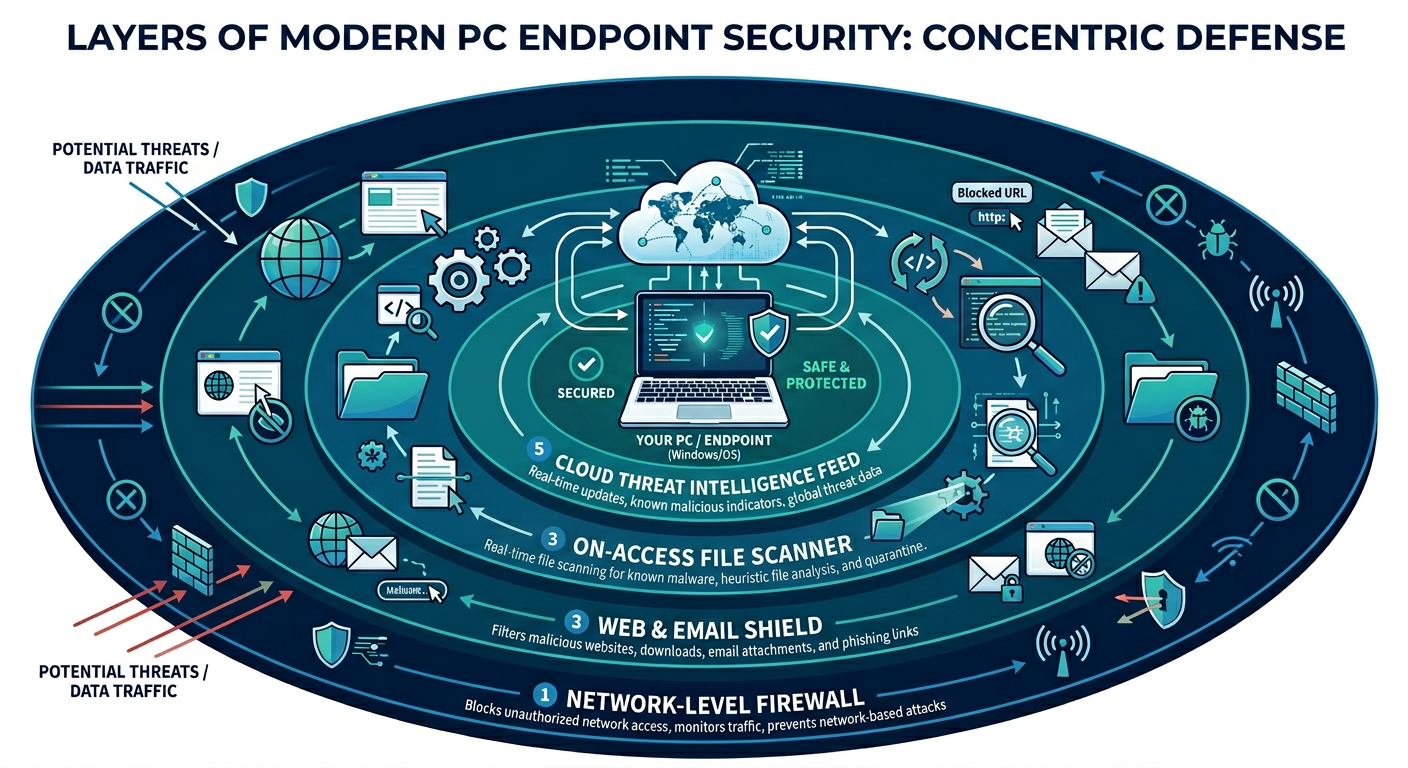
According to Gartner's analysis of the Endpoint Protection Platform market, the most competitive solutions now integrate multiple security layers into a single, cohesive system. This integration typically encompasses a network-level firewall, web protection and URL filtering, email scanning, vulnerability assessment, and behavioral analysis — all managed through a unified interface and sharing a common threat intelligence feed. The advantage of this integrated architecture is not merely convenience; it is synergy. When the web shield detects a suspicious download and immediately shares that intelligence with the behavioral engine and the firewall, the entire system responds faster and more accurately than any collection of siloed tools could.
This architectural evolution means that when evaluating any modern antivirus, the first question should not be "how large is its signature database?" but rather "how sophisticated is its behavioral detection, and how well do its various protective layers communicate with each other?"
Balancing Robust Protection with System Performance
Even the most technically advanced security suite is counterproductive if it renders the system it protects frustratingly slow. This tension between protection depth and system impact is one of the most critical and often underappreciated dimensions of antivirus selection. A security program that consumes 40% of your CPU during a background scan, stutters your gaming session, or delays your system boot by two minutes is one that users will inevitably disable — at which point it provides zero protection at all.
The engineering challenge is substantial. Real-time protection requires continuous monitoring of file system events, network traffic, and process behavior. Done naively, this monitoring creates enormous overhead. The most respected solutions address this through several technical strategies: lightweight scanning engines that use efficient code paths and minimal memory footprints, cloud-offloading of the most computationally intensive analysis tasks, and smart scheduling that defers intensive operations to periods of system inactivity.
A particularly user-centric innovation is the introduction of dedicated performance modes. Gaming mode (sometimes called "silent mode" or "do not disturb mode") automatically detects when a resource-intensive application — a game, a video editing suite, a virtual machine — is running in full screen and temporarily suppresses non-critical notifications, defers scheduled scans, and reduces background resource consumption. The result is uninterrupted performance during the moments that matter most, without permanently compromising the security posture of the system.
When benchmarking antivirus solutions for system impact, look for independent testing from organizations like AV-TEST and AV-Comparatives, which publish regular performance impact assessments. Solutions like 360 Total Security are specifically engineered around a lightweight core, ensuring that the protection layer remains largely invisible during normal use while still delivering enterprise-grade detection capabilities.
The Non-Negotiable: Real-Time Protection and Automatic Updates
If behavioral analysis is the brain of a modern antivirus, then real-time protection is its nervous system — the always-on monitoring infrastructure that ensures threats are intercepted before they can execute and cause damage. The distinction between real-time protection and on-demand scanning is fundamental: an on-demand scanner only catches threats when you explicitly run it, meaning any malware that arrives and executes between scans operates freely. Real-time protection, by contrast, intercepts threats at the moment of first contact — when a file is downloaded, when an executable is launched, when a script attempts to run.
This always-on monitoring is especially critical in the context of zero-day exploits and ransomware. Zero-day attacks target vulnerabilities that have not yet been publicly disclosed or patched, meaning no signature exists for them in any database. Behavioral detection — watching for the suspicious patterns of behavior that exploitation attempts tend to exhibit — is the primary defense. Ransomware, which can encrypt thousands of files within minutes of execution, requires detection and termination within seconds; even a brief delay can result in catastrophic data loss.
Complementing real-time protection is the mechanism of cloud-based threat intelligence. Rather than relying solely on a locally stored virus database that might be hours or days out of date, modern security suites maintain a continuous connection to cloud-based threat intelligence networks. When a new threat is identified anywhere in the world — by any sensor in the vendor's global network — that intelligence is propagated to all connected clients within minutes. According to a 2025 industry analysis by SANS Institute, the average time between a new threat's first detection in the wild and its incorporation into cloud-based threat feeds has dropped to under 15 minutes for leading vendors, compared to 24 hours or more for traditional signature update cycles. This near-instantaneous propagation is the practical realization of the promise that real-time protection makes to users.
How to Choose Between Free and Paid Antivirus Solutions
The choice between free and paid antivirus hinges on a clear understanding of your specific risk profile, required feature set, and the true value of advanced support and privacy tools. This is a decision that many users approach with insufficient information, either assuming that free solutions are hopelessly inadequate or that paid subscriptions are invariably worth their cost. The reality is considerably more nuanced.
Understanding the Capabilities of Top Free Antivirus Software
The most important thing to understand about top-tier free antivirus software is that the core detection engine — the component responsible for identifying and neutralizing malware — is typically identical to or very close in capability to its paid counterpart. This is not a marketing concession; it is a technical and commercial reality. Security vendors build and maintain a single detection engine, and the differentiation between free and paid tiers is achieved primarily by enabling or disabling feature modules, not by crippling the fundamental malware detection capability.
This means that for a user whose primary concern is protection against viruses, trojans, spyware, and ransomware, a well-chosen free antivirus solution can provide genuinely robust protection. The same cloud intelligence feeds, the same behavioral analysis algorithms, and the same real-time scanning infrastructure are typically available in the free tier.
Where free solutions commonly fall short is in the extended feature set that transforms a malware scanner into a comprehensive security suite. Most free versions lack an advanced configurable firewall (relying instead on the operating system's built-in firewall), offer severely limited VPN data allowances (often just a few hundred megabytes per day), and omit entirely features like dedicated password managers, parental controls, identity theft monitoring, and advanced system optimization tools.
The following table provides a clear comparison of core security features available in the free tiers of major antivirus solutions:
| Feature | 360 Total Security (Free) | Avast Free | AVG AntiVirus Free | Bitdefender Free |
|---|---|---|---|---|
| Real-Time Protection | ✅ Yes | ✅ Yes | ✅ Yes | ✅ Yes |
| On-Demand Scan | ✅ Yes | ✅ Yes | ✅ Yes | ✅ Yes |
| Web Shield / URL Filtering | ✅ Yes | ✅ Yes | ✅ Yes | ✅ Yes |
| System Cleanup / Optimizer | ✅ Yes (Full) | ⚠️ Limited | ⚠️ Limited | ❌ No |
| Firewall (Advanced) | ⚠️ Basic | ❌ Paid Only | ❌ Paid Only | ❌ No |
| Password Manager | ❌ No | ❌ Paid Only | ❌ No | ❌ No |
| Sandbox / Behavior Shield | ✅ Yes | ⚠️ Limited | ⚠️ Limited | ✅ Yes |
What makes 360 Total Security particularly notable in the free tier is the inclusion of a fully functional system cleanup and optimization module alongside its core security features — a combination that most competitors reserve for paid subscriptions. This provides genuine additional value for users who want both security and performance management without a financial commitment.
When a Paid Subscription Becomes Essential
While free antivirus solutions serve many home users admirably, there are clear scenarios where the investment in a paid subscription is not merely justified but necessary for adequate protection and management.
For businesses and organizations, the calculus shifts dramatically. A paid business-tier solution provides a centralized management console that allows IT administrators to deploy policies, monitor endpoint status, schedule scans, and respond to threats across an entire fleet of devices from a single interface. It also typically includes Endpoint Detection and Response (EDR) capabilities — advanced tools that not only detect threats but provide forensic-level visibility into how an attack unfolded, which systems were affected, and what lateral movement occurred. For regulated industries, paid solutions also provide compliance reporting capabilities that generate audit-ready documentation of the organization's security posture.
For families, the premium features that justify a paid subscription center on protection for the most vulnerable users. Robust parental controls — including content filtering, screen time management, and location monitoring — are almost exclusively a paid feature. Identity theft protection services, which monitor the dark web for leaked personal information and provide credit monitoring, add a layer of financial security that no free tool offers. Premium password managers included in many paid suites provide a secure, cross-device solution for managing the dozens of credentials that modern digital life requires.
For power users and IT administrators managing their own systems, the value of paid tiers often lies in advanced system management tools. Driver updaters that automatically identify and install the latest hardware drivers, disk optimization utilities, network performance analyzers, and advanced startup managers are frequently bundled into premium suites. These tools address the reality that a secure system is not just a malware-free system — it is also a well-maintained, up-to-date, and optimally configured system.
Evaluating the Total Cost Beyond the Price Tag
When evaluating the cost of antivirus software, the price tag is only one input in a more complex equation. The more important calculation involves the potential cost of not having adequate protection. According to a 2026 IBM Security Cost of a Data Breach Report, the average cost of a data breach for individuals and small businesses — accounting for data recovery, system restoration, lost productivity, and potential regulatory fines — has risen significantly. A single ransomware infection that encrypts a home user's irreplaceable photos and documents, or a business's client database, can result in losses that dwarf years of subscription fees.
The hidden value of dedicated customer support in paid plans is also frequently underestimated. When a security incident occurs, having access to a knowledgeable support team that can guide you through remediation steps — rather than navigating community forums in a state of panic — has real, quantifiable value. Similarly, paid plans typically guarantee defined update cycles and service level agreements that ensure your protection remains current and functional.
360 Total Security exemplifies a particularly compelling value model in this landscape. By offering a genuinely feature-rich core experience — including real-time protection, behavioral detection, web shield, system cleanup, and performance optimization — entirely free of charge, it removes the financial barrier to meaningful protection for the broadest possible audience. For users who require additional capabilities, the upgrade path is transparent and clearly articulated, ensuring that users pay only for features they genuinely need rather than for access to basic protection that should be universally available.
Essential Features for IT Administrators Managing Multiple PCs
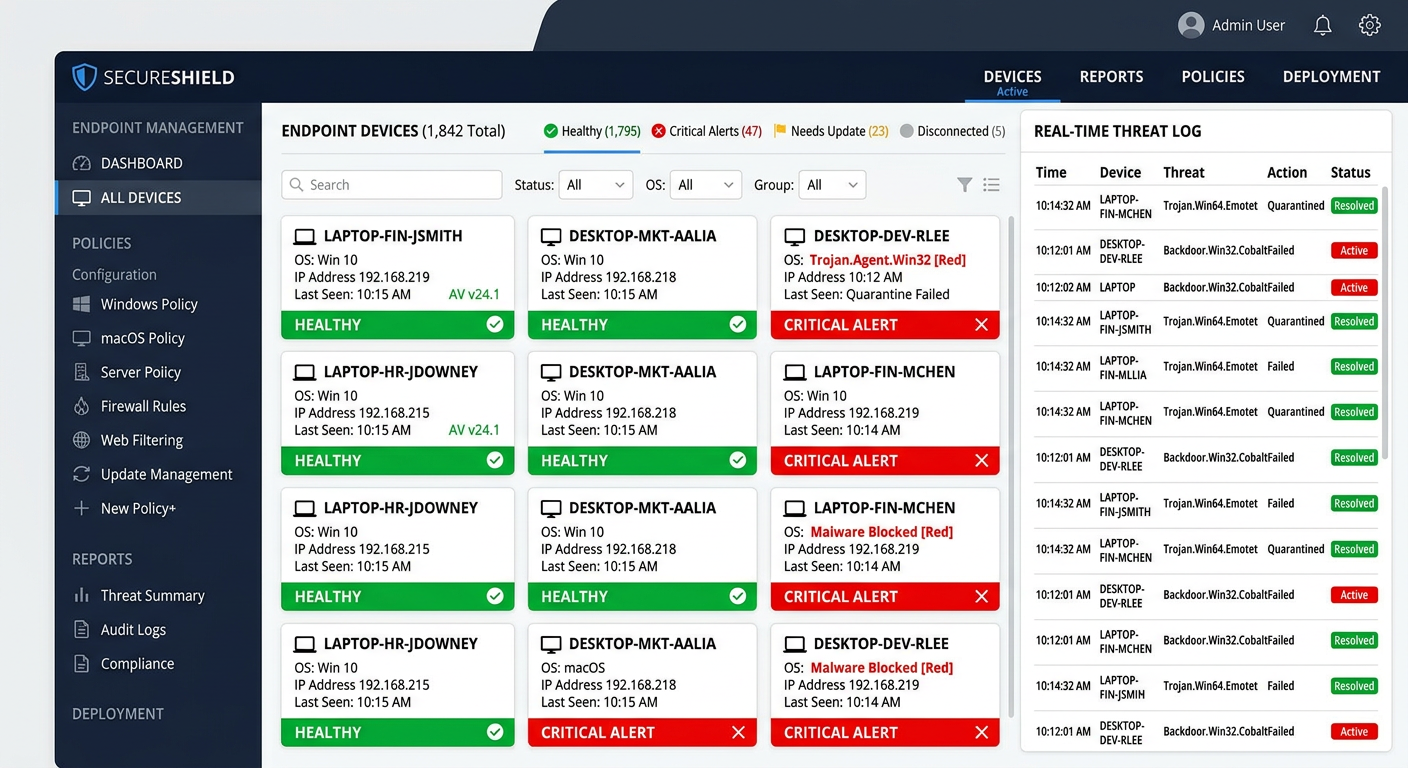
For IT administrators, an antivirus solution must function as a manageable security platform rather than merely a collection of endpoint agents. The ability to centrally control, monitor, and respond across an entire network of devices is what separates a professional-grade security solution from a consumer product installed in bulk. Efficiency, visibility, and control are the three pillars upon which enterprise antivirus selection should be evaluated.
Centralized Management Console: The Command Center
The centralized management console is, without question, the most critical feature for any IT administrator responsible for more than a handful of endpoints. Without it, managing security across 20, 50, or 500 machines becomes an exercise in manual repetition — physically visiting or remotely connecting to each machine individually to push updates, review scan results, or adjust policies. This approach is not merely inefficient; it is dangerously inconsistent, as the administrative burden virtually guarantees that some endpoints will fall behind in updates or configuration.
A well-designed management console enables administrators to define and push security policies to all endpoints simultaneously — specifying scan schedules, defining exclusion lists, configuring firewall rules, and setting alert thresholds — from a single interface. Updates to virus definitions and software versions can be deployed network-wide with a single action, ensuring that every machine in the organization is operating with identical, current protection parameters.
Equally important is the implementation of role-based access control (RBAC) within the management console. In larger IT teams, not every team member requires — or should have — full administrative privileges over the entire security infrastructure. RBAC allows the primary administrator to delegate specific tasks to junior team members: a helpdesk technician might be granted permission to view threat alerts and run on-demand scans but not to modify security policies or whitelist applications. This principle of least privilege is itself a security best practice, limiting the potential damage from compromised administrative credentials.
Modern management consoles are increasingly web-based, accessible from any browser without requiring a dedicated management workstation, and increasingly offer mobile-responsive interfaces for administrators who need to respond to alerts while away from their desks.
Granular Reporting and Alerting Systems
Visibility is the prerequisite for control. An IT administrator who cannot see what is happening across their endpoint fleet cannot make informed decisions about security posture, resource allocation, or incident response. Granular reporting and alerting capabilities transform raw security event data into actionable intelligence.
Effective reporting systems generate several categories of critical documentation. Threat incident reports provide a chronological record of every detected threat across all endpoints, including the nature of the threat, the affected machine, the action taken, and the outcome. Scan history reports confirm that scheduled scans are executing as planned and that no endpoints are falling through the cracks. Security posture summaries provide a high-level view of the organization's overall health — percentage of endpoints with current definitions, number of unresolved threats, machines with outdated software containing known vulnerabilities — that is invaluable for both internal management and external compliance audits.
Complementing scheduled reporting is the real-time alerting system. Configurable alerts ensure that critical events — a malware detection on a sensitive server, a firewall breach attempt, an endpoint that has gone offline and stopped receiving updates — immediately notify the appropriate personnel via email, SMS, or integration with ticketing systems like ServiceNow or Jira. According to a 2025 Ponemon Institute study, organizations with automated real-time alerting reduced their mean time to detect (MTTD) security incidents by an average of 68% compared to organizations relying on manual log review. This reduction in detection time directly translates to reduced breach impact and lower remediation costs.
The most sophisticated reporting platforms also support trend analysis — visualizing threat patterns over time to identify recurring attack vectors, particularly vulnerable departments or user groups, or seasonal spikes in specific threat categories. This intelligence enables proactive defensive measures rather than purely reactive responses.
Streamlined Deployment and Remote Troubleshooting
The operational efficiency of a security platform is measured not just by what it can do in steady state, but by how quickly and reliably it can be deployed to new endpoints and how effectively it enables remote remediation when incidents occur.
For large-scale deployments, the ability to use silent installers — installation packages that execute without requiring user interaction or displaying installation dialogs — is essential. Combined with Group Policy Objects (GPO) in Active Directory environments, silent installers allow administrators to deploy the security agent to every machine in the domain automatically, triggered by login events or scheduled tasks, without any manual intervention or end-user involvement. This approach ensures consistent, complete deployment across the entire organization and eliminates the risk of users inadvertently misconfiguring the installation.
Once deployed, the ability to perform remote diagnostics and remediation without requiring physical access to the affected machine is equally critical. When a threat is detected on a remote employee's laptop or a machine in a branch office, the administrator needs to be able to quarantine the affected files, terminate suspicious processes, run a targeted scan of specific directories, and review detailed event logs — all from the central console. This capability transforms what might otherwise require a costly on-site visit or hours of guided remote support into a matter of minutes of centralized action.
Solutions like 360 Total Security, while primarily designed for individual users, can serve as a strong foundation for small business security environments, particularly when combined with companion management tools. Its lightweight agent, consistent update delivery, and comprehensive feature set make it a practical choice for small IT teams that need reliable endpoint protection without the complexity and cost overhead of enterprise-only platforms.
Optimizing Your PC Performance Alongside Security
True system health requires a dual approach: proactive security to prevent infections and active optimization to clean up the digital clutter and misconfigurations that slow down a PC over time. Many users install antivirus software and then wonder why their computer still feels sluggish — the answer often lies not in malware but in the accumulated digital debris that accumulates through normal system use. Understanding and addressing both dimensions is essential for a genuinely high-performing, secure PC.
Identifying and Cleaning Digital Junk
Every interaction your computer has with software, the internet, and its own operating system generates residual data. Application installers leave behind temporary extraction folders. Software updates create backup copies of previous versions. Web browsers accumulate cached pages, cookies, and download history. Windows itself generates log files, error reports, and prefetch data. Individually, each of these items is trivial. Collectively, over months and years of use, they can consume gigabytes of storage space and, more significantly, contribute to a fragmented, cluttered file system that degrades read/write performance and slows down system operations.
Beyond temporary files, broken registry entries represent a more subtle performance drain. The Windows Registry is a hierarchical database that stores configuration information for the operating system and installed applications. When applications are uninstalled, they frequently leave orphaned registry entries pointing to files and directories that no longer exist. While a single orphaned entry is inconsequential, thousands of them — accumulated over years of software installation and removal — can marginally slow registry queries and, in some cases, cause application errors or unexpected behavior.
The safe use of registry cleaners requires a degree of caution. As experienced system engineers consistently advise, aggressive registry cleaning carries real risks: the Windows Registry is a complex, interdependent structure, and removing entries that appear orphaned but are in fact referenced by other system components can cause application failures or system instability. The best practice is to use registry cleaning tools that are conservative in their approach — targeting only well-documented categories of safe-to-remove entries — and to always create a registry backup before making any changes.
360 Total Security's built-in Cleanup tool takes precisely this conservative, safety-first approach. Its cleanup algorithms are tuned to identify and remove categories of junk that are unambiguously safe to delete — temporary files, browser caches, Windows update caches, recycle bin contents, and similar debris — while avoiding the aggressive registry manipulation that characterizes less reputable cleanup tools. Users regularly report recovering multiple gigabytes of disk space in a single cleanup session, with measurable improvements in system responsiveness.
Managing Startup Programs and Background Processes
One of the most impactful and frequently overlooked factors in PC performance is the number of programs configured to launch automatically at system startup. Every application that adds itself to the startup sequence — whether explicitly by the user or silently during installation — consumes a portion of the system's boot time and continues to consume memory and CPU cycles in the background for as long as the system is running.
The accumulation of startup programs is gradual and largely invisible. Over the lifetime of a typical PC, dozens of applications may add themselves to the startup sequence: chat clients, cloud synchronization services, printer utilities, software update checkers, browser extensions, and more. Each individual addition seems reasonable in isolation, but the cumulative effect on boot time and background resource consumption can be dramatic.
The following table illustrates the measurable impact of startup program optimization on a typical mid-range Windows PC:
| Metric | Before Optimization | After Optimization | Improvement |
|---|---|---|---|
| Boot Time (seconds) | 87 | 34 | 61% faster |
| RAM Usage at Idle (MB) | 3,840 | 2,210 | 42% reduction |
| CPU Usage at Idle (%) | 18% | 4% | 78% reduction |
| Startup Programs Active | 31 | 9 | 22 disabled |
A good startup manager does more than simply list running programs — it provides context to help users make informed decisions. Information about each startup entry's publisher, its impact rating (high, medium, or low resource consumer), and whether it is genuinely essential for system function or merely convenient helps users confidently disable non-critical items without fear of breaking their system. Browser extension management is an equally important dimension, as poorly optimized or malicious extensions can significantly degrade browser performance and represent a security vector in their own right.
Leveraging Built-in System Maintenance Tools
Beyond cleanup and startup management, comprehensive system maintenance encompasses several additional dimensions that directly impact both performance and security. Disk defragmentation (for traditional spinning hard drives) reorganizes fragmented file data to improve sequential read performance. SSD optimization (specifically the TRIM command for solid-state drives) ensures that the drive's internal garbage collection operates efficiently, maintaining write performance over time. These are distinct operations requiring different tools, and a good security suite should intelligently detect the storage type and apply the appropriate optimization.
Driver updates represent both a performance and security concern. Outdated device drivers can cause hardware instability, reduce performance, and — critically — contain known security vulnerabilities that attackers can exploit. Manually checking for driver updates across all hardware components (graphics card, network adapter, audio device, chipset) is tedious and error-prone. An integrated driver updater that automatically scans for outdated drivers and facilitates their installation closes this security gap efficiently.
The strategic advantage of scheduling automated maintenance during off-hours cannot be overstated. Full disk scans, defragmentation passes, and comprehensive cleanup operations are all resource-intensive tasks that, if run during working hours, degrade the user experience. Configuring these operations to execute automatically during overnight hours or other periods of system inactivity ensures that maintenance happens consistently and completely without ever interrupting productive work.
The all-in-one approach exemplified by 360 Total Security is particularly valuable in this context. By consolidating security scanning, system cleanup, startup management, disk optimization, and driver updates into a single, unified interface, it eliminates the complexity and potential conflicts that arise from running multiple standalone utilities. Competing tools can interfere with each other's operations, generate conflicting recommendations, or redundantly consume system resources. A single integrated platform avoids all of these issues while providing a simpler, more coherent user experience. You can explore the full feature set and download the solution at the 360 Total Security official website.
Building a Proactive Defense: Best Practices Beyond Installation
Installing antivirus software is just the first step; maintaining a secure system requires cultivating safe user habits, implementing smart configurations, and understanding the broader security ecosystem. The most sophisticated security software in the world cannot fully compensate for consistently risky user behavior, and the most security-conscious user behavior cannot substitute for properly configured technical controls. True security emerges from the intelligent combination of both.
Cultivating Safe Browsing and Download Habits
The web browser has become the single most consequential attack surface on a modern PC. The vast majority of malware infections today originate through browser-based vectors: malicious downloads, drive-by exploits targeting browser vulnerabilities, phishing pages harvesting credentials, and malvertising campaigns delivering malware through legitimate advertising networks. Understanding and managing this attack surface is therefore among the highest-impact security behaviors a user can adopt.
Browser extensions deserve particular scrutiny. While many extensions are legitimate and valuable, the extension ecosystem has historically been a vector for malware distribution. Malicious extensions can intercept web traffic, steal form data including passwords and credit card numbers, inject advertisements into web pages, and redirect searches to fraudulent sites. Best practices include installing only extensions from verified publishers with substantial review histories, regularly auditing installed extensions and removing those no longer actively used, and being highly skeptical of any website that prompts you to install a browser extension as a prerequisite for accessing content.
Phishing detection is a skill that requires active cultivation, even for technically sophisticated users. Modern phishing attempts have evolved far beyond the grammatically poor, obviously fraudulent emails of the early internet era. Contemporary phishing campaigns leverage compromised legitimate email accounts, convincingly replicate the visual design of authentic websites with pixel-perfect accuracy, and use social engineering techniques — urgency, authority, fear — that exploit psychological vulnerabilities rather than technical ones. Key indicators of phishing attempts include: domain names that closely approximate legitimate ones (e.g., "paypa1.com" instead of "paypal.com"), HTTPS certificates that confirm encryption but say nothing about the legitimacy of the site, unexpected requests for credential re-entry, and unsolicited communications claiming to require immediate action.
Even with a web shield actively filtering malicious URLs, cultivating the habit of pausing to critically evaluate unexpected communications and download requests provides a crucial additional layer of defense. The web shield catches known malicious URLs; your own skepticism catches the novel ones that haven't yet been catalogued.
The Foundation of Security: Updates and Backups
If there is a single security practice that delivers the highest return on investment in terms of risk reduction, it is the consistent, timely application of software updates. The majority of successful cyberattacks — including the most devastating ransomware campaigns in recent history — exploit known vulnerabilities for which patches have already been released. The WannaCry ransomware attack of 2017, which caused billions of dollars in damage globally, exploited a Windows vulnerability for which Microsoft had released a patch weeks earlier. Organizations and individuals who had applied that patch were immune; those who hadn't were devastated.
The operating system is the most critical update target, but it is far from the only one. Browsers, PDF readers, office productivity suites, media players, Java, and any other software that processes external content or maintains network connections are all potential exploitation targets. Each represents a potential entry point that attackers actively probe. Enabling automatic updates for all software — not just the operating system — closes these entry points before they can be exploited.
Complementing software updates, the 3-2-1 backup rule represents the ultimate defense against ransomware and other data-destructive threats. The rule is straightforward: maintain 3 copies of any important data, stored on 2 different types of media (e.g., internal drive and external USB drive), with 1 copy stored offsite (e.g., in cloud storage or at a physically separate location). This architecture ensures that even a complete ransomware encryption of your primary system — and your locally connected backup drives — cannot destroy the offsite copy. Ransomware operators are increasingly aware of backup strategies and specifically target connected backup drives; the offsite copy is what makes the 3-2-1 rule genuinely resilient.
360 Total Security's integrated vulnerability scanner and software updater automate a significant portion of this update discipline. By continuously scanning installed software against a database of known vulnerabilities and facilitating the installation of available patches, it closes security gaps that manual update processes frequently miss — particularly for third-party applications that do not have their own automatic update mechanisms.
Configuring Your Antivirus for Maximum Efficacy
The default configuration of most antivirus software represents a reasonable balance for the average user, but it is rarely the optimal configuration for any specific user's needs and usage patterns. Investing a modest amount of time in thoughtful configuration can meaningfully enhance both the effectiveness and efficiency of your security solution.
Scan schedule customization is the most immediately impactful configuration decision. The default scheduled scan time — often set to a fixed time like 2:00 AM — may be appropriate for desktop systems that remain powered on overnight, but is counterproductive for laptops that are typically closed and sleeping at that hour. Configuring full system scans to run during predictable periods of system activity but low user engagement (perhaps during a lunch break or immediately after the system boots) ensures that comprehensive scans actually execute regularly rather than being perpetually skipped because the machine is asleep or powered off.
Heuristic analysis settings control the aggressiveness with which the security engine flags suspicious but not definitively malicious behavior. Higher heuristic sensitivity catches more potential threats but generates more false positives — legitimate software incorrectly flagged as malicious. Lower sensitivity reduces false positives but may miss novel threats. The appropriate calibration depends on your risk tolerance and the nature of the software you regularly use. Users who frequently work with custom-developed software, scripts, or less common applications may prefer lower heuristic sensitivity to avoid workflow disruption, while users in higher-risk environments should lean toward higher sensitivity and accept the occasional false positive as an acceptable cost.
Sandboxing, where available, provides a powerful mechanism for safely executing suspicious files in an isolated virtual environment where they can exhibit their behavior without affecting the real system. Configuring the antivirus to automatically sandbox unknown executables before allowing them to run on the live system provides a meaningful additional layer of protection against novel threats that behavioral analysis might not immediately classify as malicious.
Finally, ensuring that your antivirus firewall, the Windows Defender Firewall, and your router's security features are working in harmony rather than conflict requires explicit attention. Many security suites replace or supplement the Windows Defender Firewall with their own implementation. Running two active firewalls simultaneously can create conflicts, performance issues, and unpredictable behavior — including the inadvertent blocking of legitimate traffic or, conversely, gaps in protection where each firewall assumes the other is handling certain traffic types. Review your firewall configuration carefully after installing any security suite to ensure that exactly one software firewall is active and properly configured, and that your router's firewall is correctly set to block unsolicited inbound connections at the network perimeter.
Frequently Asked Questions
Is free antivirus software actually effective, or is it just a stripped-down version designed to push upgrades?
Top-tier free antivirus solutions like 360 Total Security use the same core detection engines and cloud threat intelligence as their paid counterparts. The fundamental malware detection capability is genuinely effective. The limitations of free versions lie primarily in the extended feature set — advanced firewalls, VPN access, password managers, and premium support — rather than in the quality of the core protection. For users whose primary need is malware defense, a well-chosen free solution provides real, meaningful protection.
How much does antivirus software actually slow down my PC?
The performance impact varies significantly between solutions. Poorly engineered security software can consume 15-30% of CPU resources during background scans and measurably increase boot times. Well-engineered lightweight solutions, however, are largely imperceptible during normal use. Independent testing organizations like AV-TEST and AV-Comparatives publish regular performance impact benchmarks. Look for solutions that score highly in both protection and performance categories, as these are not mutually exclusive qualities in modern antivirus design.
What is the single most important thing I can do to improve my PC security beyond installing antivirus software?
Enable automatic updates for your operating system and all installed software. The overwhelming majority of successful cyberattacks exploit known vulnerabilities for which patches already exist. Keeping all software current eliminates the most commonly exploited attack vectors. Pair this with a regular backup routine following the 3-2-1 rule, and you will have addressed the two most statistically significant contributors to data loss and system compromise.
Can antivirus software help speed up a slow computer, or does it only address security threats?
Modern comprehensive security suites like 360 Total Security include integrated system optimization tools that directly address PC performance. Features such as junk file cleanup, startup program management, disk optimization, and driver updates address the accumulated digital clutter and misconfigurations that cause performance degradation over time. These tools are distinct from the security functions but are valuable complements to them, addressing the reality that a slow, cluttered system is both less productive and, in some respects, less secure than a well-maintained one.
About the Author: This article was researched and written by a Senior Technical Writer specializing in cybersecurity, endpoint protection, and PC systems administration. With over a decade of experience covering the intersection of security software, system performance, and user behavior, the author has contributed to enterprise IT publications, security research blogs, and consumer technology guides. Their work focuses on translating complex security concepts into actionable guidance for audiences ranging from home users to enterprise IT professionals.
Learn more about 360 Total Security