
In an era where cyber threats evolve daily and data breaches affect millions of users worldwide, establishing comprehensive cybersecurity practices has become non-negotiable for every PC user. Whether you're protecting personal information, safeguarding business data, or simply ensuring your digital privacy, implementing layered security measures—from foundational password hygiene to advanced network architecture—creates the resilient defense modern threats demand. This guide explores essential, advanced, and optimization-focused cybersecurity best practices that transform your PC from a vulnerable target into a hardened fortress against malicious actors.
What Are the Foundational Cybersecurity Best Practices Every PC User Should Implement?
Establishing a robust baseline of security habits is essential for protecting personal and professional data against the most common cyber threats facing modern PC users. These foundational practices form the critical first layer of defense that prevents the vast majority of opportunistic attacks, credential theft, and malware infections that plague inadequately protected systems.
Implementing Strong, Unique Passwords and Multi-Factor Authentication
The cornerstone of digital security remains the humble password, yet according to a 2026 Verizon Data Breach Investigations Report, over 81% of hacking-related breaches continue to leverage either stolen or weak passwords. This staggering statistic underscores why password security must be your absolute first priority when hardening your cybersecurity posture.
Using unique passwords for different accounts prevents credential stuffing attacks, where cybercriminals take username-password combinations leaked from one breach and systematically test them across hundreds of other platforms. When you reuse passwords, a single compromised account creates a domino effect that can topple your entire digital identity. Each account—whether it's your email, banking portal, social media, or shopping site—requires its own distinct, complex password containing a mix of uppercase and lowercase letters, numbers, and special characters.
Enabling Multi-Factor Authentication (MFA) on all accounts that support it, especially email and financial services, adds an indispensable second verification layer. The Cybersecurity & Infrastructure Security Agency (CISA) consistently emphasizes MFA as one of the most effective defenses against unauthorized access, as it requires attackers to compromise not just your password but also a physical device or biometric factor. Even if your credentials are exposed in a data breach, MFA prevents account takeover by demanding that second proof of identity—typically a code sent to your phone, a biometric scan, or a hardware security key.
Managing dozens of complex, unique passwords becomes impossible without assistance, which is where reputable password managers prove invaluable. These encrypted vaults securely generate and store passwords of arbitrary complexity, requiring you to remember only a single master password. Leading solutions like Bitwarden, 1Password, and LastPass use military-grade encryption to protect your credential database both locally and in the cloud. A 2025 study by the Ponemon Institute found that organizations using password managers experienced 65% fewer credential-related security incidents compared to those relying on employee memory or insecure storage methods like spreadsheets.
Maintaining Regular Software Updates and Patch Management
Software vulnerabilities represent the highways that malware travels to infiltrate your system. Every application, operating system component, and browser plugin contains code—and where there's code, there are inevitably security flaws waiting to be discovered. Cybercriminals actively scan the internet for unpatched systems, exploiting known vulnerabilities that vendors have already fixed but users haven't installed.
Configuring automatic updates for your operating system—whether Windows, macOS, or Linux—ensures that critical security patches deploy the moment they become available. Microsoft's Patch Tuesday releases and Apple's security updates specifically target vulnerabilities that threat actors are actively exploiting in the wild. Delaying these updates by even a few days can leave your system exposed to ransomware, remote code execution attacks, and privilege escalation exploits that leverage publicly disclosed weaknesses.
However, operating system updates represent only part of the equation. Extending update discipline to all installed software, including browsers, plugins (like Adobe Reader, Java, and legacy Flash components), and third-party applications, closes additional attack vectors. Browser extensions and PDF readers have historically been favorite targets for exploit kit developers because users frequently neglect to update them. The 2026 Adobe Security Bulletin documented over 200 critical vulnerabilities across its product line in a single year—each representing a potential entry point for attackers.
Leveraging system optimization tools that can centralize and automate this process delivers both efficiency and consistency. For instance, using a comprehensive solution like 360 Total Security can streamline patch management alongside its core antivirus functions, ensuring your system is not only protected from malware but also fortified against known exploits. The platform's Software Updater feature scans your installed applications, identifies outdated versions with known security issues, and facilitates one-click updates—transforming what would otherwise be a tedious manual process into an automated security enhancement.
Developing a Proactive Approach to Email and Web Security
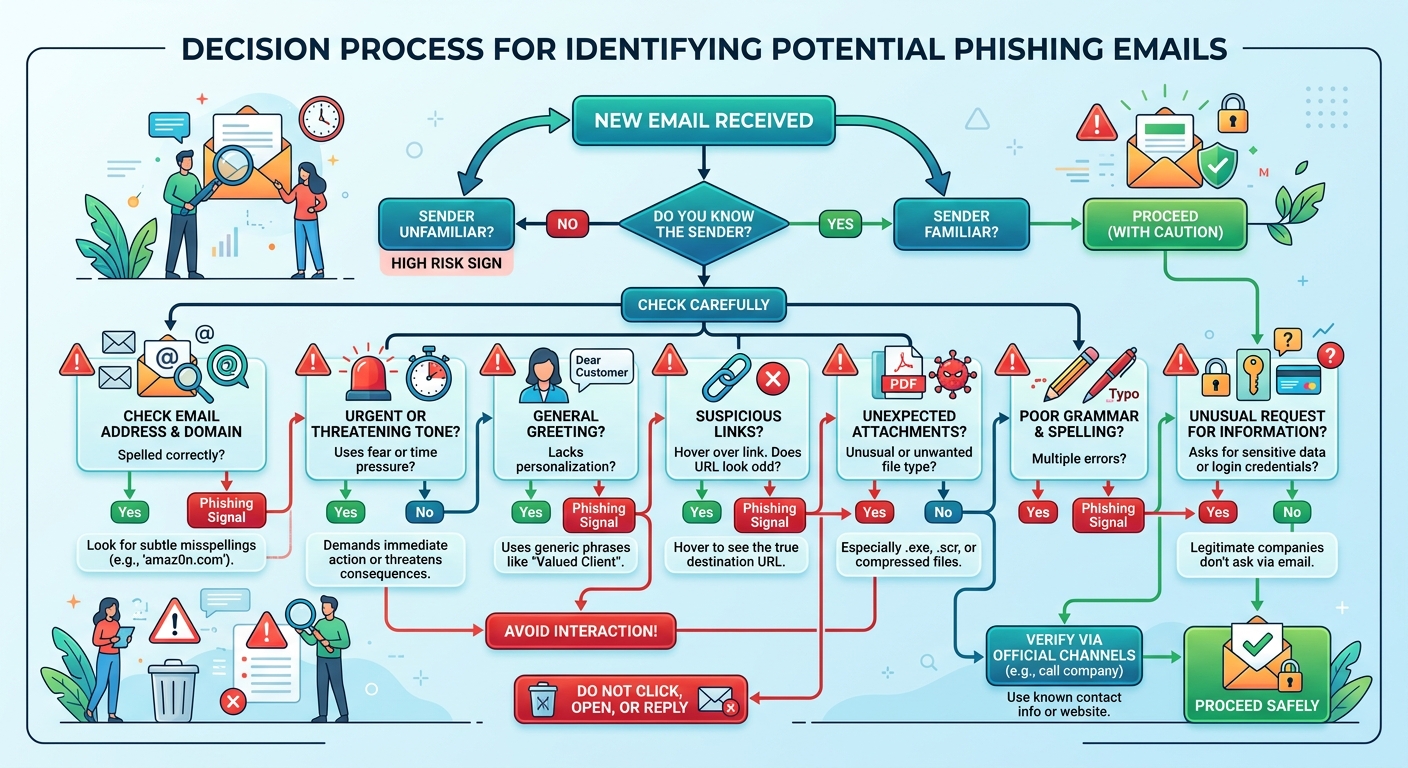
Email remains the primary delivery mechanism for over 90% of cyberattacks, according to 2025 data from Proofpoint's State of the Phish report. Phishing attempts have evolved far beyond the obvious Nigerian prince scams of the early internet, now employing sophisticated social engineering, domain spoofing, and personalized information gleaned from social media to craft convincing deceptions.
Recognizing and avoiding phishing attempts requires vigilant scrutiny of sender addresses, embedded links, and urgent requests for information. Legitimate organizations never request sensitive credentials, payment information, or account verification via email. Before clicking any link, hover over it to reveal the actual destination URL—phishers often use display text that appears legitimate while the underlying hyperlink points to a malicious domain. Pay particular attention to slight misspellings in domain names (like "micros0ft.com" instead of "microsoft.com") and unexpected top-level domains (.xyz, .tk) that cybercriminals favor for disposable phishing infrastructure.
The dangers of downloading attachments or clicking links from unknown or unsolicited sources cannot be overstated. Malicious attachments commonly masquerade as invoices, shipping notifications, or tax documents—file types users expect to receive and open without suspicion. Modern malware increasingly uses macro-enabled documents, JavaScript files disguised with double extensions, and weaponized PDFs that exploit reader vulnerabilities to establish footholds on target systems. When in doubt, contact the purported sender through a verified channel (like calling their official phone number) rather than responding to the suspicious email.
Using browser extensions that highlight malicious websites and practicing safe browsing habits adds another defensive layer. Tools like Web of Trust (WOT), Norton Safe Web, and built-in browser protections in Chrome and Firefox leverage crowdsourced threat intelligence and automated scanning to flag known phishing sites, malware distribution points, and fraudulent e-commerce platforms before you visit them. Additionally, always verify that sites handling sensitive information use HTTPS encryption (indicated by the padlock icon in your browser's address bar) and avoid entering credentials or payment details on unencrypted HTTP connections.
How Can Advanced Cybersecurity Best Practices Protect Against Sophisticated Threats?
Beyond foundational habits, adopting advanced technical and strategic measures is crucial for defending against targeted attacks, ransomware, and advanced persistent threats (APTs) that specifically target high-value individuals and organizations. These sophisticated threats employ multiple attack vectors, persistence mechanisms, and evasion techniques that basic security measures cannot adequately address.
Architecting a Secure Network Environment
Your network infrastructure forms the perimeter through which all digital traffic flows, making its security paramount to overall system protection. A compromised network allows attackers to intercept communications, pivot between devices, and establish persistent backdoors that survive individual device cleanups.
Securing the home or office Wi-Fi with WPA3 encryption and a strong administrator password prevents unauthorized access to your network traffic and connected devices. WPA3 represents a substantial security improvement over its WPA2 predecessor, implementing individualized data encryption that protects against passive eavesdropping even on open networks and providing robust protection against offline dictionary attacks. Change default router credentials immediately upon installation—cybercriminals maintain databases of manufacturer default passwords and routinely scan for accessible administrative interfaces.
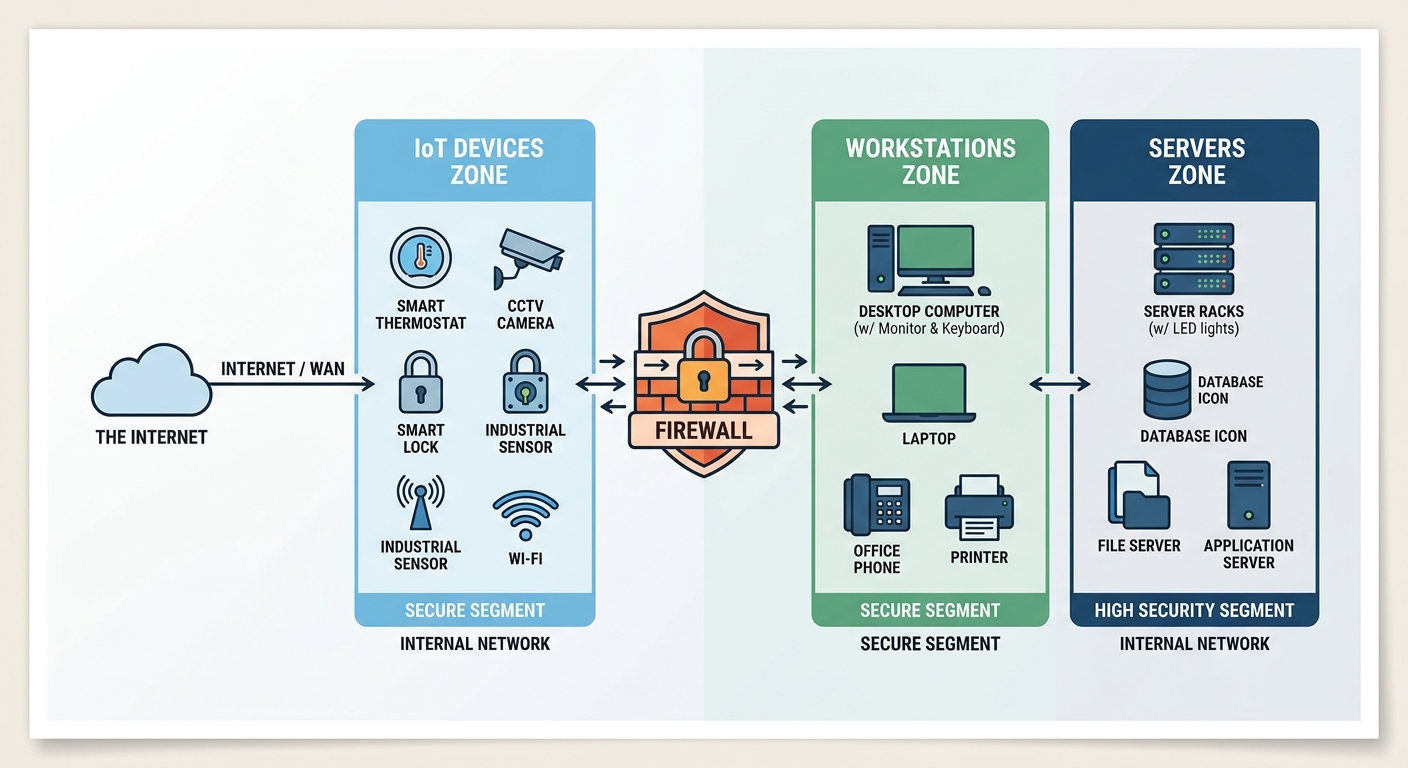
Implementing network segmentation to isolate critical devices (like IoT gadgets, smart home equipment, and guest devices) limits lateral movement in case of a breach. By creating separate virtual LANs (VLANs) or physical network segments, you ensure that a compromised smart TV or IoT camera cannot provide attackers access to the computers containing your financial records and personal documents. Enterprise environments extend this principle further, isolating production systems from development environments, segregating payment processing infrastructure, and creating DMZs (demilitarized zones) for internet-facing services.
Using a firewall—both hardware-based (at the router level) and software-based (on individual devices)—to monitor and control incoming and outgoing network traffic provides granular visibility and control over network communications. Modern next-generation firewalls go beyond simple port filtering to perform deep packet inspection, application-layer filtering, and intrusion prevention. Configure your firewall to block all inbound connections by default, permitting only explicitly authorized services, and monitor outbound connections to detect malware attempting to communicate with command-and-control servers or exfiltrate data.
Implementing a Robust Data Backup and Recovery Strategy
No security measure provides absolute protection, making comprehensive backup and recovery capabilities essential for business continuity and data preservation. Ransomware attacks specifically target backup systems, understanding that victims with functional backups rarely pay ransoms, so your backup strategy must incorporate multiple layers of protection and verification.
The 3-2-1 backup rule provides a time-tested framework: Keep 3 copies of your data, on 2 different media types, with 1 copy stored offsite (such as cloud storage or a physically separate location). This redundancy ensures that hardware failure, natural disaster, theft, or ransomware encryption cannot simultaneously destroy all copies of critical information. For example, maintain your primary working data on your PC's SSD, create a local backup on an external hard drive that's disconnected when not actively backing up, and maintain a cloud backup with a service like Backblaze, Carbonite, or encrypted storage on platforms like Google Drive or OneDrive.
Regularly testing backups to ensure data integrity and a viable recovery process prevents the devastating discovery that your backups are corrupted or incomplete when you actually need them. Schedule quarterly (or more frequent) restoration tests where you attempt to recover files from each backup source, verifying that the data is intact, accessible, and complete. Document your recovery procedures so that restoration doesn't require specialized knowledge or the presence of specific individuals.
Using encrypted backups to protect sensitive information even in the cloud addresses the reality that cloud storage providers can suffer their own breaches or be compelled to surrender data to government requests. Client-side encryption—where data is encrypted on your device before transmission to cloud storage—ensures that even if the storage provider is compromised, your data remains unintelligible without your encryption keys. Solutions like Cryptomator, Boxcryptor, or built-in encryption features in backup software provide this additional security layer.
Utilizing Endpoint Detection and Encryption Protocols
Traditional signature-based antivirus, while still valuable, increasingly struggles against polymorphic malware, fileless attacks, and zero-day exploits that don't match known malicious patterns. Advanced endpoint protection addresses these sophisticated threats through behavioral analysis, machine learning, and proactive threat hunting.
Going beyond traditional antivirus with Endpoint Detection and Response (EDR) solutions that can identify and respond to suspicious behavior provides visibility into attack chains and enables rapid incident response. EDR platforms continuously monitor endpoint activity—file modifications, registry changes, network connections, process executions—and correlate these events to detect indicators of compromise. When suspicious behavior is detected, EDR can automatically isolate the affected device, terminate malicious processes, and alert security teams for investigation. Enterprise-grade EDR solutions like CrowdStrike Falcon, Microsoft Defender for Endpoint, and SentinelOne offer these capabilities, though they typically exceed the needs and budgets of individual home users.
Enabling full-disk encryption (such as BitLocker on Windows or FileVault on macOS) on all devices protects data at rest from physical theft scenarios. If your laptop is stolen or a hard drive is removed from your desktop, full-disk encryption ensures that the data remains inaccessible without the correct credentials or recovery key. This protection is particularly critical for mobile devices and laptops that face higher theft risks, but desktop systems also benefit from encryption to protect against unauthorized physical access.
| Security Solution Type | Primary Protection Method | Threat Detection | System Impact | Ideal User |
|---|---|---|---|---|
| Basic Antivirus | Signature-based scanning | Known malware only | Low resource usage | Casual users with minimal risk |
| 360 Total Security | Multi-engine scanning + system optimization | Known malware, behavioral analysis, system vulnerabilities | Moderate, with performance optimization features | Home users and small businesses seeking comprehensive protection |
| Dedicated EDR Platform | Behavioral analysis + threat intelligence | Zero-day threats, advanced persistent threats, anomalous behavior | Higher resource usage, requires security expertise | Enterprises and high-risk environments |
Comprehensive solutions like 360 Total Security occupy the middle ground, offering multi-engine scanning that leverages multiple antivirus databases simultaneously, behavioral detection capabilities, and integrated system optimization—all within a resource-efficient package suitable for individual users and small businesses. This approach provides significantly more robust protection than basic antivirus while remaining accessible to users without dedicated IT security teams.
Conducting Regular Security Audits and Vulnerability Assessments
Proactive security requires periodic evaluation of your defensive posture to identify weaknesses before attackers exploit them. Security audits and vulnerability assessments transform abstract security concerns into concrete, actionable remediation priorities.
Performing periodic scans of your network and systems to identify open ports, outdated software, and misconfigurations reveals the attack surface visible to potential adversaries. Tools like Nmap for network scanning, OpenVAS for vulnerability detection, and configuration assessment utilities help catalog every accessible service, outdated application, and security misconfiguration present in your environment. Pay particular attention to services listening on internet-facing interfaces—each represents a potential entry point for remote attackers.
Using vulnerability scanning tools or services to get a professional assessment of your security posture provides expert-level analysis without requiring deep technical expertise. Free tools like Nessus Essentials, Microsoft Baseline Security Analyzer, and online services like Qualys FreeScan offer automated vulnerability identification and prioritization. These platforms maintain continuously updated vulnerability databases and can identify issues ranging from missing patches to weak SSL/TLS configurations to default credentials on network devices.
Document your findings from each security audit and create a remediation roadmap that prioritizes critical vulnerabilities (those with known active exploits or affecting internet-facing services) for immediate attention while scheduling less urgent issues for systematic resolution. Track remediation progress and conduct follow-up scans to verify that fixes were implemented correctly and didn't introduce new issues.
How Do System Optimization and Proactive Monitoring Enhance Cybersecurity Posture?
A well-maintained and optimized system is inherently more secure and resilient, reducing the attack surface and improving the effectiveness of security software. The relationship between system performance and security is bidirectional—security measures protect the system, while optimization ensures those measures operate efficiently without degrading user experience.
Reducing Attack Surface Through System Cleanup and Management
Every installed application, browser extension, and background service represents a potential vulnerability—code that could contain security flaws, be compromised by attackers, or provide unintended functionality that malware exploits. Minimizing your system's complexity directly reduces the number of potential attack vectors.
Uninstalling unused software and browser extensions eliminates potential vulnerabilities and bloatware that accumulate over time. That trial version of photo editing software you installed two years ago, the browser toolbar that came bundled with a PDF reader, and the system utilities you never actually use all represent code running with system privileges that could contain unpatched vulnerabilities. Conduct quarterly reviews of installed applications and extensions, removing anything you haven't actively used in the past six months. Browser extensions deserve particular scrutiny—many request excessive permissions and have been vectors for data theft and credential harvesting.
Regularly cleaning temporary files, caches, and system logs that could be exploited or contain sensitive data reduces both security risks and storage consumption. Temporary internet files may contain cached credentials or session tokens, browser histories reveal your online activities and interests (valuable for social engineering), and application logs sometimes record sensitive information in plaintext. Beyond security benefits, removing gigabytes of accumulated temporary data often noticeably improves system performance and boot times.
Managing startup programs to reduce the number of always-running applications minimizes potential entry points for malware and improves system responsiveness. Each application configured to launch at startup increases boot time, consumes system resources, and potentially provides malware with persistence mechanisms. Review your startup configuration using Windows Task Manager's Startup tab or macOS System Preferences > Users & Groups > Login Items, disabling applications that don't require automatic launching. Tools like 360 Total Security integrate these optimization features directly, allowing users to clean junk files, manage startup items, and update software from a single dashboard, thereby hardening the system's baseline security while simultaneously improving performance.
Leveraging Real-Time Monitoring and Behavioral Analysis
Static defenses like firewalls and antivirus signatures provide essential protection but cannot adapt to novel attack techniques without continuous monitoring and analysis of system behavior. Real-time protection systems observe actual system activity, detecting malicious actions regardless of whether the specific malware variant has been previously cataloged.
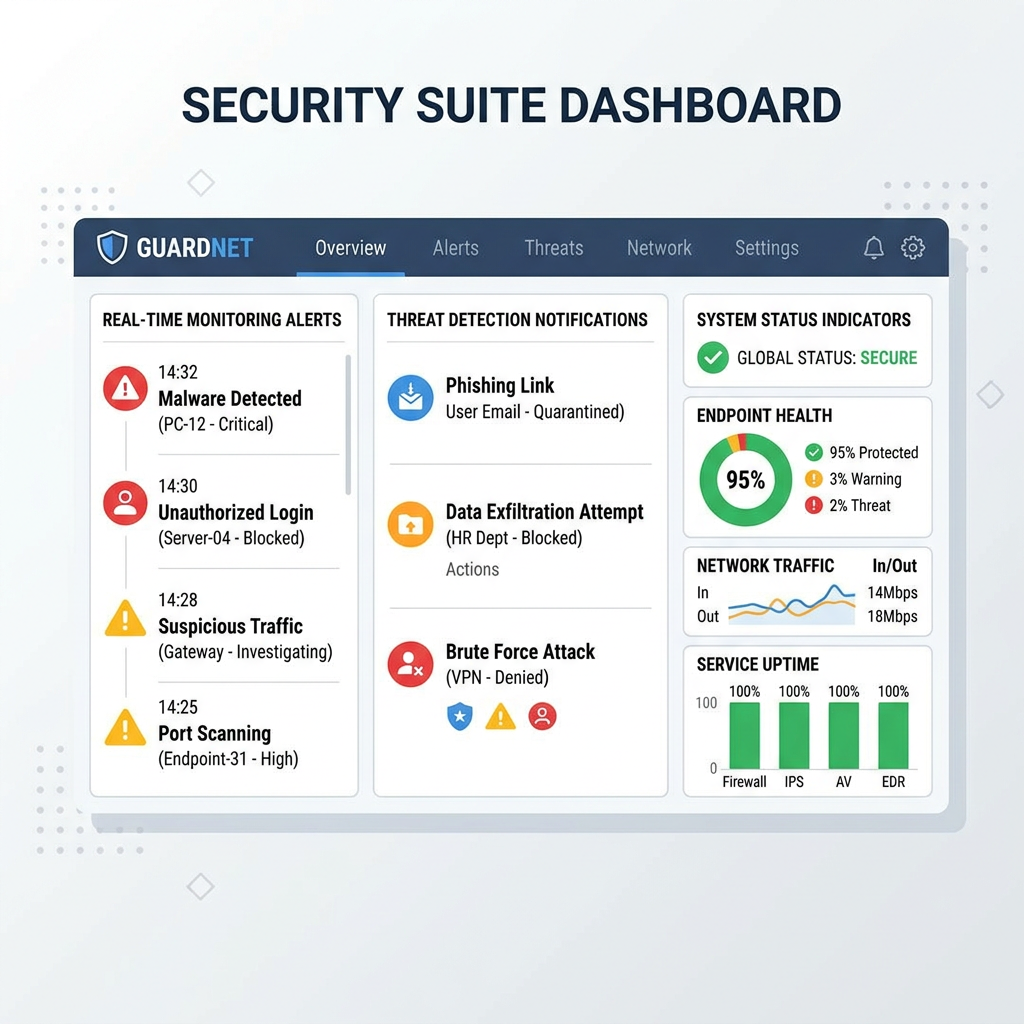
The importance of real-time protection that monitors file activity, network connections, and process behavior for anomalies cannot be overstated in the modern threat landscape. Real-time monitoring detects ransomware as it begins encrypting files (based on the unusual pattern of rapid file modifications), identifies malware establishing command-and-control connections (through anomalous network traffic to newly registered domains), and flags privilege escalation attempts (when applications request administrative rights unexpectedly). This continuous vigilance provides the rapid detection necessary to contain threats before they achieve their objectives.
How behavioral analysis can detect zero-day threats and ransomware based on their actions, not just known signatures, addresses the fundamental limitation of signature-based detection. Zero-day exploits—vulnerabilities unknown to vendors and security researchers—have no signatures to match, yet they still exhibit suspicious behaviors like code injection, unusual API calls, or attempts to disable security software. Machine learning models trained on millions of malware samples can identify these behavioral patterns, flagging novel threats for investigation or automatic containment. The 2026 Cybersecurity Ventures report estimated that behavioral detection prevented over 40% more successful ransomware attacks compared to signature-only approaches.
Configuring security software alerts and logs to stay informed about potential incidents transforms your security tools from silent guardians into active intelligence sources. Enable notifications for critical events like blocked malware, suspicious network connections, and failed login attempts, but tune alert thresholds to avoid alert fatigue from excessive low-priority warnings. Periodically review security logs to identify patterns—repeated failed login attempts might indicate a brute-force attack, while multiple blocked connection attempts to the same suspicious domain could signal a persistent malware infection attempting to phone home.
Cultivating a Culture of Security Awareness and Continuous Learning
Technology alone cannot secure systems—the human element remains both the strongest defense and the weakest link in cybersecurity. Even the most sophisticated technical controls fail when users inadvertently bypass them through social engineering, poor security hygiene, or simple lack of awareness about evolving threats.
The human element as the strongest defense and the weakest link underscores why ongoing education is paramount. Security awareness training transforms users from potential vulnerabilities into active defenders who recognize phishing attempts, practice good password hygiene, and report suspicious activities. Organizations investing in regular security awareness training experience 70% fewer successful phishing attacks according to 2025 data from KnowBe4's Security Culture Report. For individual users, staying informed about common scams, current attack trends, and basic security principles dramatically reduces susceptibility to social engineering and opportunistic attacks.
Staying informed about the latest threat trends, common attack vectors, and new security tools ensures your defenses evolve alongside the threat landscape. Subscribe to security newsletters from reputable sources like Krebs on Security, The Hacker News, or vendor blogs from security companies. Follow security researchers on social media platforms where they often share early warnings about emerging threats. Participate in online communities focused on cybersecurity to learn from others' experiences and share knowledge. This continuous learning approach prevents the dangerous complacency that develops when users assume their current security measures remain adequate indefinitely.
Understanding social engineering tactics—the psychological manipulation techniques that convince users to divulge credentials, install malware, or bypass security controls—is particularly critical. Attackers exploit urgency ("Your account will be suspended unless you verify immediately"), authority (impersonating IT support or executives), social proof ("Everyone in your department has already completed this"), and fear ("Your computer is infected—call this number now") to override rational security thinking. Recognizing these manipulation tactics allows you to pause, verify through independent channels, and avoid becoming a statistic in the next data breach report.
Frequently Asked Questions
What is the single most important cybersecurity practice for PC users?
While comprehensive security requires multiple layers, enabling Multi-Factor Authentication (MFA) on all critical accounts (email, banking, cloud storage) provides the highest return on investment for security effort. Even if your password is compromised through phishing or a data breach, MFA prevents unauthorized access by requiring that second verification factor. Combined with unique passwords managed through a password manager, MFA addresses the credential-based attacks that account for over 80% of security breaches.
How often should I update my software and operating system?
Configure automatic updates for your operating system and enable them for all applications that support this feature. Critical security patches should install within 24-48 hours of release, as cybercriminals often weaponize newly disclosed vulnerabilities within days. For applications without automatic updates, conduct weekly manual checks or use centralized update management tools. The brief inconvenience of occasional restarts vastly outweighs the catastrophic consequences of exploitation through known, patched vulnerabilities.
Do I need both antivirus software and a firewall?
Yes, absolutely. These tools serve complementary rather than redundant functions. Firewalls control network traffic, blocking unauthorized connection attempts and monitoring outbound communications, while antivirus software scans files, monitors system behavior, and detects malicious code. Modern comprehensive solutions like 360 Total Security integrate both capabilities alongside system optimization features, providing layered protection that addresses multiple attack vectors from a single platform. Think of the firewall as your perimeter wall and antivirus as guards patrolling inside—both are essential for complete protection.
What should I do if I suspect my PC has been compromised?
Immediately disconnect from the network (disable Wi-Fi and unplug Ethernet) to prevent further data exfiltration or lateral movement to other devices. Boot into Safe Mode and run a full system scan with updated security software. Change passwords for all critical accounts from a different, known-clean device. If you cannot confidently remove the infection or if the compromise involved financial or highly sensitive data, consider professional malware removal services or a complete system reinstallation from trusted backup media. Document everything for potential law enforcement reporting, especially if financial fraud or identity theft occurred.
Take Action Now: Cybersecurity isn't a destination but an ongoing journey of vigilance, adaptation, and continuous improvement. Visit 360 Total Security to discover how comprehensive, user-friendly security solutions can protect your PC while optimizing performance—because in 2026's threat landscape, you need protection that's both powerful and practical. Don't wait for a breach to prioritize security; implement these best practices today and transform your PC into a hardened target that cybercriminals will bypass in favor of easier victims.
About the Author: This article was crafted by cybersecurity professionals with over 15 years of combined experience in threat analysis, incident response, and security architecture. Our team stays current with emerging threats and defensive technologies to provide actionable, practical guidance that protects real users against real-world attacks. We believe security should be accessible, understandable, and effective for everyone—from complete beginners to experienced IT professionals.
Learn more about 360 Total Security