Preguntas frecuentes
Método 1: Inicia sesión con una cuenta Premium para completar la vinculación del dispositivo
- Abre 360 Total Security en el PC o la tableta que quieras vincular.
- Inicia sesión con tu cuenta 360 Premium.

- Cuando aparezca "¿Quieres añadir este dispositivo?", haz clic en Aceptar.
- Si no aparece el aviso, haz clic en Añadir para vincular el dispositivo manualmente.
- Si compraste una clave para 3 o 5 dispositivos, vincula los demás de la misma forma desde tu centro personal.
Método 2: Introduce la clave de licencia para completar la vinculación
- Haz clic en Registrar clave de licencia en Ajustes.
- Introduce la clave para terminar de vincular el dispositivo.
Motivos habituales de fallo
- Una clave solo puede vincularse a una cuenta. Confirma que has iniciado sesión en la cuenta correcta.
- La clave introducida no es válida. Comprueba que la has escrito correctamente.
- La clave ha caducado. Comprueba su periodo de validez y renúevala.
- Existe un límite máximo de dispositivos vinculables. Elimina dispositivos sin usar en tu centro personal o compra una nueva clave.
Si tienes problemas, contacta con support@360safe.com.
Elimina los dispositivos añadidos y vincula dispositivos nuevos
Nota: Las operaciones de eliminación y vinculación de dispositivos nuevos solo pueden realizarse desde la página del centro personal.
- Inicia sesión en la página del centro de seguridad de 360.
- Selecciona la pestaña Licencias.
- Abre la lista desplegable de la sección Dispositivos.
- Haz clic en el botón Eliminar situado a la derecha del dispositivo que quieras quitar.
- Después de eliminarlo, aparecerá en la parte superior de la página el aviso "¿Quieres añadir el dispositivo a tu cuenta actual?". Haz clic en Añadir para vincular el nuevo dispositivo.
Consulta o elimina dispositivos registrados desde la página web
- Abre la 360 Account page e inicia sesión con tu cuenta Premium.
- Ve a Administrar.
- En la sección de licencias activas, haz clic en Eliminar a la derecha del dispositivo que quieras quitar.
Puedes ir al centro personal para consultar los beneficios de tu cuenta, donde se muestran claramente los beneficios adquiridos y la fecha de caducidad.
Comprueba si aparece el logotipo Premium en la página principal: indica que Premium está activo y que todas las funciones y herramientas con una corona están disponibles.

Si el producto no muestra el logotipo Premium, las funciones Premium no estarán disponibles. Inicia sesión con tu cuenta Premium de 360 y añade el dispositivo. Consulta Cómo eliminar dispositivos registrados y vincular dispositivos nuevos.
¿Dónde puedo consultar la clave, el periodo de validez y la información de renovación?
Puedes consultar todos los datos relacionados en el antiguo centro personal, incluidos la clave de licencia, el periodo de validez y la información de renovación.
- Haz clic en el icono del avatar de la cuenta para entrar en la página del antiguo centro personal.
- Cambia a la pestaña Licencia para consultar la clave, el periodo de validez y la información de renovación.
- Restaura la copia de seguridad y comprueba el problema como se muestra a continuación:
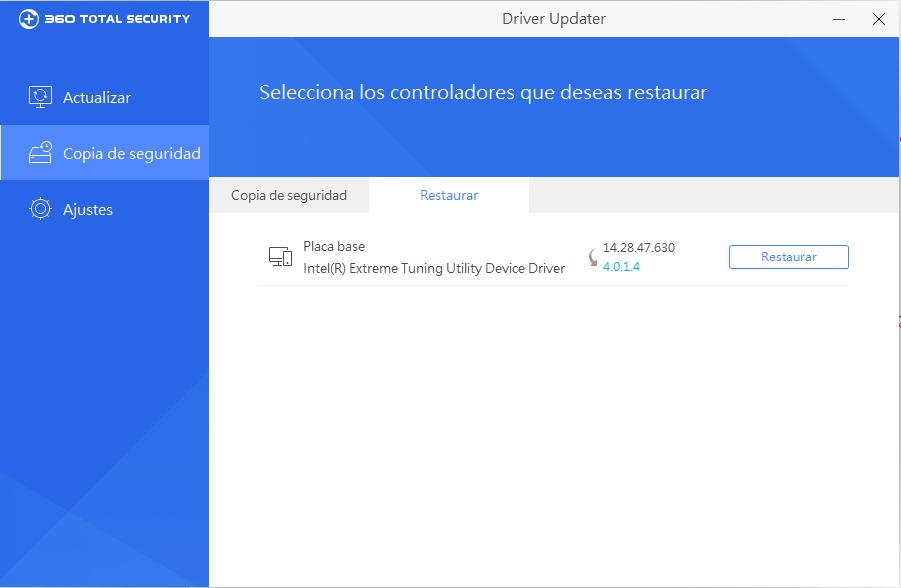
- Envíanos por correo electrónico support@360Safe.com el registro de actualización del controlador para analizarlo. Está en C:\Users\username\AppData\Roaming\360DrvMgr
¿Qué productos y sistemas operativos son compatibles con el servicio Premium?
Productos compatibles: 360 Total Security (versión de Windows) 360 Total Security Essential (versión de Windows)
Recomendaciones de compra para distintos dispositivos
Para usuarios de Windows XP / Windows 7 / Windows 8 o dispositivos incompatibles con Windows 10/11 x86: Ofrecemos un canal de pago antiguo para estos dispositivos.
Tienda de la región rusa: https://www.360totalsecurity.com/ru/store
Tienda de la región inglesa: https://www.360totalsecurity.com/en/storePara los demás dispositivos fuera de los escenarios anteriores: Puedes comprar Premium normalmente en nuestro sitio oficial o desde el cliente del producto.
Premium is a built-in value-added service of 360 Total Security. Free and Premium users share the same installation package, no extra app download needed.
Activation Steps:
- Download and install 360 Total Security.
- Click "Upgrade Now" or Premium promotion entry to purchase.
- Purchase inside the client: After payment, your 360 account will pop up automatically, membership binds directly to your login email with no license key required.
- Purchase from legacy stores (https://www.360totalsecurity.com/ru/store/ https://www.360totalsecurity.com/en/store/): We will send a license key to your email. Open the drop-down menu, click Register License Key, enter the key and complete activation.
 Register License Key
- Log in your 360 account, your membership will be bound to this account.
- A success prompt means activation is done.
Troubleshooting (Ads remain / Premium features unavailable after purchase)
- Verify you have logged into your 360 account. Reference: How to log in to 360 account in 360 Total Security.
- Verify your membership/license is activated. Reference: How to add my license key.
- Verify your device is bound to the account. Reference: How to add devices.
- Confirm you have the latest software version installed.
- Check that your membership/license has not expired. Reference: How to extend the expiration date.
La clave contiene 25 caracteres:
XXXXX-XXXXX-XXXXX-XXXXX-XXXXX
Consulta la información de la clave en tu correo:
Si compraste Premium en nuestra tienda en línea, "360" envió la clave a la dirección de correo que indicaste al comprar. Para encontrar el mensaje:
- Si tienes varias direcciones, revisa el buzón que usaste para comprar Premium.
- Busca "360" en tu correo.
- Revisa la carpeta de spam.
Manually register on web:
- Go to Register.
- Enter your 25-character key into the field. Refer to "Where can I find my license key after purchase?".
- Click Register button.
If you see key error message when you enter the key, try the following ways to solve it:
- Check if you have entered the correct 25 characters. Try to copy or type it again.
- If you have multiple 360 accounts, check if you have added this key to another 360 account.
Servicio de atención al cliente
Asociarse
Address:2/F YAU TAK BUILDING 167 LOCKHART ROAD WANCHAI,HONGKONG, 999077.